
UniData Communication Systems SQ-3000 Manuel utilisateur


User Manual
This manual includes product specifications and instructions for SQ-3000 phone operation. This manual must be read before operating the product.
The SQ-3000 phone access point is required to use this product. Usage of the SQ-3000 access point provided in the full package is recommended.

Safety Precautions
Do not put the SQ-3000 in heating appliances such as heaters and microwave ovens to dry it if the device is wet.
This can cause explosions, deformation, or other problems. If this occurs, free services shall not be provided.
Do not use the SQ-3000 in places that are too hot or too wet (keep it indoors between 0 ℃and + 50 ℃).
If the device gets wet with rain, or through spilled beverages, or is used in extremely hot/wet places such as public saunas, it can cause battery
explosions.
Be careful that conductors such as necklaces, keys, and coins not to contact battery terminals (the metal section).
Since short circuits can cause explosions, be careful to prevent this.
Keep the SQ-3000 and chargers out of the reach of children or pets.
Batteries in the mouth, or using broken batteries, can hurt or cause electric shocks.
Be sure to only use the designated batteries and accessories for the SQ-3000 provided by our company.
If you use unauthorized batteries or accessories, it can reduce the life of the SQ-3000, cause explosions, or damage. If this occurs free servicing is
avoid .
Correctly install the SQ-3000 in compliance with instructions.
Otherwise, abnormal operation of the SQ-3000, or a reduction in its life span may occur.
Record and keep the information contained in the SQ-3000 separately.
Since important information stored in the SQ-3000 can be removed due to unavoidable circumstances such as user carelessness, maintenance,
and product upgrades, please keep a record of important information. Take note that the manufacturer will not take responsibility for any damage
from the loss of information.
Never push the power button when the SQ-3000 is wet, and do not touch the SQ-3000, charger, or power cords with wet
hands. This can cause fires or electric shocks. The SQ-3000 is not water-resistant. Keep it dry
Do not use chemical detergents such as benzene, thinners, and alcohol to clean the SQ-3000.
This can cause fires.
1

Safety Precautions
Do not hold the SQ-3000 to your ears to turn on the power. This can cause hearing impairments or physical injuries.
Do not look at the infrared window in a direct way when using the remote control. this can cause visual impairment.
Refrain from the use of SQ-3000, and leave the power cord for the charger unplugged when it is thundering and flashed lightning.
Thunderbolts can cause severe physical injuries or fires.
Do not disassemble the SQ-3000 temporarily, or apply shocks to device.
If the device is damaged when you disassemble it, or inflict shocks on the device, it causes electric shocks, electric leakage or fires.
2

Index
Safety Precautions………………………………………………………………………………...............................................1
Basic Components...…………………………………………………………………………………………….….…...…………4
Battery Replacement….…………………………………………………………………………………….......….……………...5
Time Taking to Charge / Battery Life………………………………………………………………………….………………….6
Inserting / Removing a micro SD card…..…………………………………………………………………….…………………8
Power On/Off………………………………………………………………………………………..............................................10
Names & Function of Device Parts………………………………………………………………………………………………11
Display Indicators…………………………………………………………………………………………………………………..12
Calling Method………………………………………………………………………………………………………………………13
Phone Book………………………………………………………………………………………………………………………….20
Messaging……………………………………………………………………………………………………………………………27
Display………………………………………………………………………………………………………………………………..28
Sound…………………………………………………………………………………………………………………………………29
Tools…………………………………………………………………………………………………………………………………..30
Logs……………………………………………………….………………………………………………………..………………...31
System Settings…………………………….……………………………………………………………………..………………..32
3

Basic Components
Phone Cradle Battery Manual Adapter
The Basic Components as shown below may be different from the original.
For safety in use, please purchase authentic products. If you want to purchase additional batteries or chargers, contact your
dealer.
4
CAUTION
RISK OF EXPLOSION IF A BATTERY IS REPLACED WITH AN INCORRECT TYPE. DISPOSE OF USED BATTERIES ACCORDING TO THE
INSTRUCTIONS.
Battery Replacement
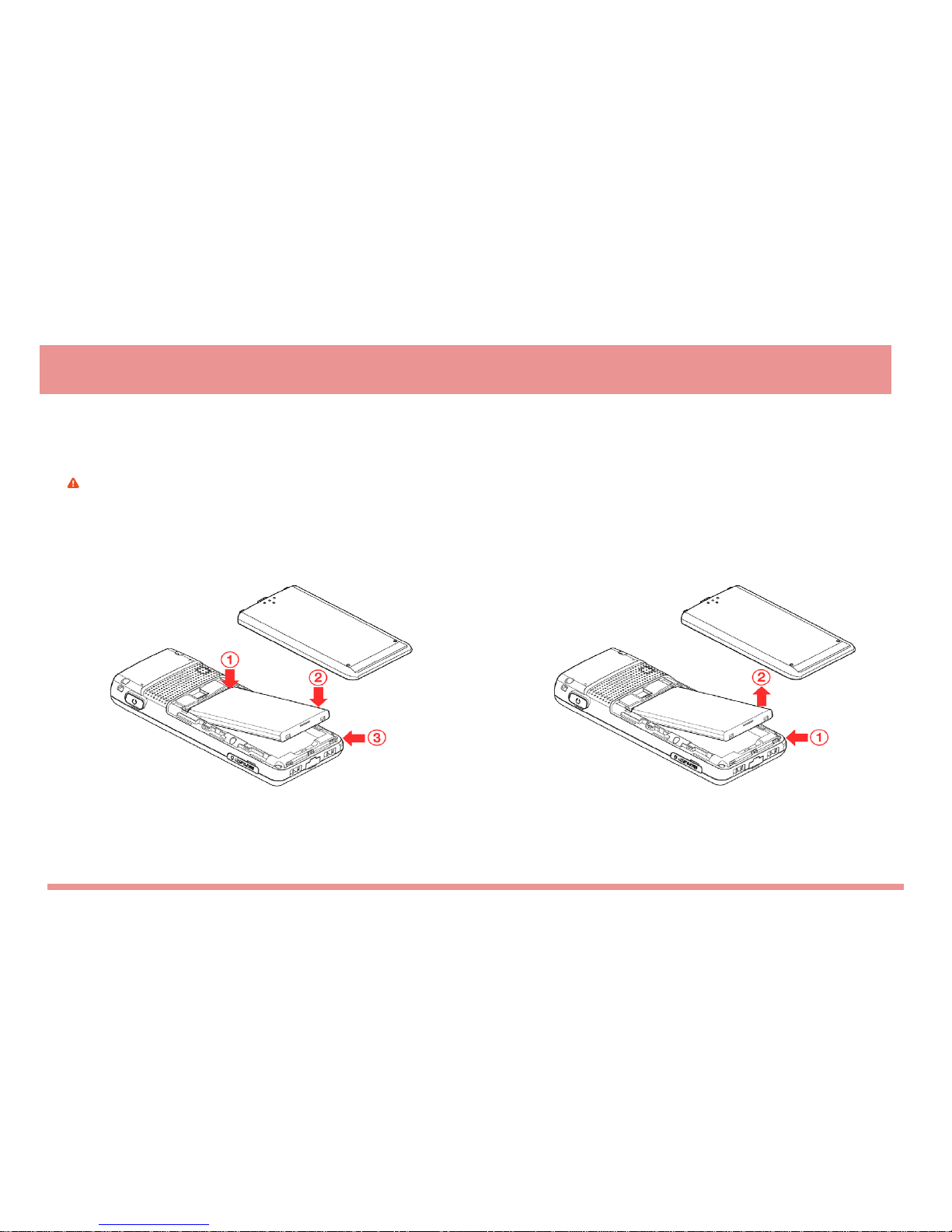
Use only batteries authorized by the company when you replace batteries, following the diagram below.
Battery installation method Battery removal
If the battery is inserted upside down, the SQ-3000 phone will not work. Please turn off the power before removing the battery from the SQ-3000 phone.
(a sudden power off can cause problems)
Battery Replacement
5

Charge the battery
Charge the battery after purchasing the product as it is not fully charged.
Charging with the desktop charger
※Lamp on the charger flickers? Separate the battery from the charger,
and then re-fits into the charger. It is still flickering? Then, cleans the
charging terminal and charge the battery. (When the lamp doesn‟t stop
flickering, apply to the dealer.)
Features Charging Charging
Complete
Charging Lamp RED GREEN
Time Taking to Charge / Battery Life
6

Time Taking to Charge / Battery Life
※Battery life varies with the environment temperature,
battery age and movement of the user.
-Battery life is not permanent
Model Standard Model
Charging time 3 hours 30 minutes
Battery life
(continuous
calling)
Voice 6 hours
Video 3 hours
Time Taking to Charge / Battery Life
The successive use time and standby time of batteries are the
estimates of the company‟s laboratory, which can vary from
the figures in the manual depending on the patterns used
7

Inserting the micro SD card
Inserting / Removing the Micro SD card
Use Only compatible micro SD cards approved by UniData for use with this device. UniData uses approved industry standards
for memory cards, but some brands may not be fully compatible with this device. Incompatible cards may damage the card, the
device and corrupt data stored on the card.
The phone supports micro SD cards up to 8GB.
1. Open the side cover of the micro SD slot.
2. Insert the card into the micro SD card slot with the contact surface facing down, and press it until it locks into place.
3. Close the side cover.
Remove the micro SD card
1. Make sure that no application is currently accessing the micro SD memory card.
2. Open the side cover of the micro SD slot.
3. Press the micro SD card slightly in to release lock, and pull the card out.
Important: Do not remove the memory card in the middle of an operation when the card is being accessed.
Removing the card in the middle of an operation may damage the memory card as well as the device, and data stored on the
card may be corrupted.
You can remove or replace the micro SD card during phone operation without switching the device off.
8
Table des matières
Autres manuels UniData Communication Systems Téléphone portable


