
UMIDIGI G5 Tab Manuel utilisateur

G5 Tab
User Manual • Uživatelský manuál •
Užívateľský manuál • Használati utasítás •
Benutzerhandbuch

2
English
3 –9
Čeština
10 –16
Slovenčina
17 –23
Magyar
24 –30
Deutsch
31 –37
3
Dear customer,
Thank you for purchasing our product. Please read the following instructions carefully
before first use and keep this user manual for future reference. Pay particular attention
to the safety instructions. If you have any questions or comments about the device,
please contact the customer line.
www.alza.co.uk/kontakt
✆+44 (0)203 514 4411
Importer Alza.cz a.s., Jankovcova 1522/53, Holešovice, 170 00 Praha 7, www.alza.cz
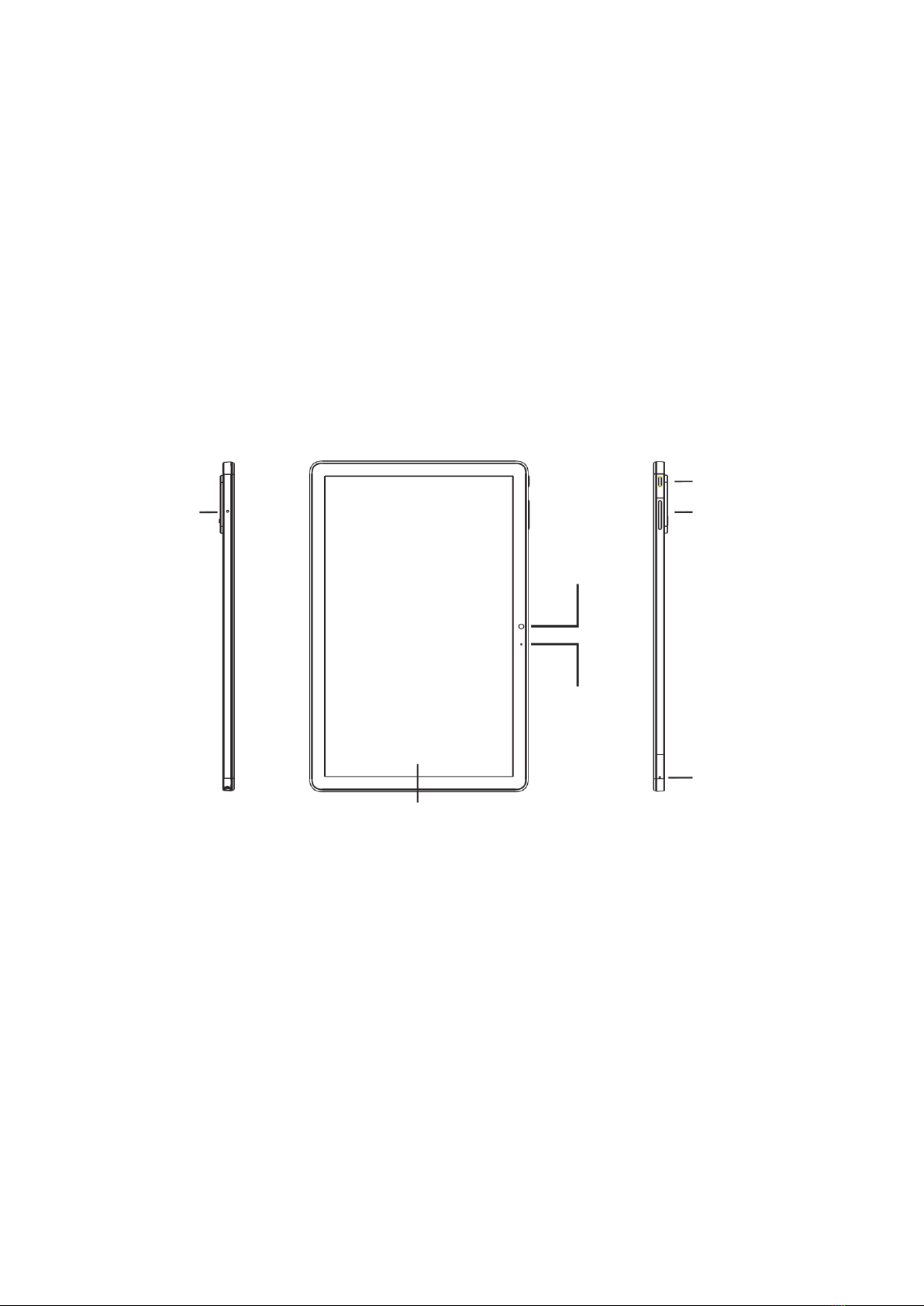
Power button
Light sensor
Screen
Volume button
Microphone 1
Microphone 2
8MPx Front
camera

4
Power button: Long press the power button to turn on the device. When the device is
on, short press the power button to turn the screen on and off.
Volume button: Short press the volume button to adjust the volume.
Memory Card Management
Nano-SIM card installation: Please face the chip side of the Nano-SIM card down when
inserting the card into the slot. Be aware of the direction of the cut edge when placing
the Nano-SIM card into the slot.
Reminder: Please use standard Nano-SIM card. Please don’t use a nonstandard card
that is hand-cut, in order to prevent the SIM slot and card tray from being damaged and
card-rejecting situation that may cause damage to the tablet.
Memory card installation: Please place the metal contact of the memory card down
and be aware of the direction of the cut edge. Place the card onto the tray and insert it
into the device.
Reminder: Please turn off the tablet before changing or replacing the memory card.
Memory card does not come with the tablet, so please purchase it separately.
USB Type C
Speaker
3.5mm audio jack
SIM / Memory card slot
Speaker
2MPx Depth-of-field
camera
13MPx main camera
LED flashlight

5
Dual SIM Management
Please choose which SIM card slot is to be the main one for 4G network via Settings >
SIM card. Choose your preferred network type via Settings > Network & Internet >
Mobile Network > Preferred network type.
Network Connection
WLAN Connection
Enter the WLAN settings via Settings > Network & Internet > Wi-Fi. When WLAN is on, a
list of available Wi-Fi connections will appear. Click on the one you want to connect to,
enter the password if the network is encrypted, then click on Connect. When it’s a public
network, simply click on Connect and when it shows “connected” next to the network, it
means you can access the local network and/or the internet.
Bluetooth Connection
Enter the Bluetooth settings via Settings > Connected Devices > Bluetooth. Enable the
Bluetooth function by clicking the menu button and selecting “refresh”, then the tablet
will search for available Bluetooth devices for pairing and list them on the screen. Click
on the one you want to pair with, then click on “Pair” on the dialog pop-up. Documents
are available for transmission after Bluetooth pairing.
Reminder: Slide down the status bar twice to open the shortcut switches for Bluetooth
and other functions.
WLAN Hotspot Setting
Click on Settings > Network & Internet > Wi-Fi Hotspot to turn on the Portable WLAN
Hotspot function. When setting up a WLAN hotspot, enter your username in “Network
Name” and a password, then click on Save. Another device may connect to your hotspot
upon entering the set password.
Reminder: Please enable the Data Connection before enabling the network sharing
function. Note that you cannot use Wi-Fi connection while the hotspot is active, so you
will be sharing your mobile data with other devices that connect to your hotspot.

6
Camera
Aim the camera at the object you want to take a photo of, the tablet will start to focus it
automatically. Alternatively, you can click on the screen to choose an object you wish to
focus on. Then click the capture icon to take the photo. You can also choose other
modes, such as video recording, beautifying, or panorama.
Security Information
Security information (including BS, ES, battery security information) of third-party
software installation and function may vary in different regions or by different hardware
specifications. Umidigi holds disclaimer for the performance problem or incompatibility
caused by third-party applications, registry editing, OS software modifying. Customizing
the OS may cause the device or some applications to fail to work properly.
Please prevent using the device in extremely cold/hot conditions. The extreme
temperature will lead to deformation of the tablet and reduce the charging capacity and
battery life.
Please only use the custom designed and approved battery and recharger by Umidigi.
Incompatible battery and recharger may cause damage to the tablet. Please abide by
local regulation when disposing of the used batteries and tablets.
Please do not place the battery or the tablet onto or inside heating devices such as
microwave, oven, or radiator. The battery may explode if it gets too hot.
Please do not crush or pierce the battery. Prevent the battery from getting high pressure
from outside. It may cause internal short-circuit and overheating.

7
Specifications
Basic Information
Model
MT16
Operating System
Android™13
CPU
T606 2× A75 @ 1.6GHz + 6× A55 @ 1.6GHz
GPU
Mali-G57-3EE-1core @ 650MHz ES3.2
RAM
4GB
ROM
128GB
Battery
6000mAh
Display
Screen Size
10.1 inch (25.65 cm)
Resolution
1280×800 pixels
Touch
Capacitive multi-touch
Cameras
Rear Camera
13Mpx + 2Mpx
Front Camera
8Mpx
Connection (I/O)
SIM/Memory Card
2× Nano-SIM card /
1× Nano-SIM card + 1× Memory card
Wi-Fi
IEEE802.11 a/b/g/n/ac
Bluetooth
Bluetooth 5.0
GNSS
GpS / Gloass / Galileo
FM
Yes
Earphone Port
3.5mm
USB Port
Type-C
Other Features
Video File Format
3GP, MPEG4, etc.
Audio File Format
WAV, MP3, AAC, AMR, MIDI, APE, WMA, etc.
Memory Card Support
Up to 1TB
Language
Multi-language
Sensor
G-sensor, compass

8
Warranty Conditions
A new product purchased in the Alza.cz sales network is guaranteed for 2 years. If you
need repair or other services during the warranty period, contact the product seller
directly, you must provide the original proof of purchase with the date of purchase.
The following are considered to be a conflict with the warranty conditions, for
which the claimed claim may not be recognized:
•Using the product for any purpose other than that for which the product is intended
or failing to follow the instructions for maintenance, operation, and service of the
product.
•Damage to the product by a natural disaster, the intervention of an unauthorized
person or mechanically through the fault of the buyer (e.g., during transport,
cleaning by inappropriate means, etc.).
•Natural wear and aging of consumables or components during use (such as
batteries, etc.).
•Exposure to adverse external influences, such as sunlight and other radiation or
electromagnetic fields, fluid intrusion, object intrusion, mains overvoltage,
electrostatic discharge voltage (including lightning), faulty supply or input voltage and
inappropriate polarity of this voltage, chemical processes such as used power
supplies, etc.
•If anyone has made modifications, modifications, alterations to the design or
adaptation to change or extend the functions of the product compared to the
purchased design or use of non-original components.

9
EU Declaration of Conformity
This equipment is in compliance with the essential requirements and other relevant
provisions of EU directives.
WEEE
This product must not be disposed of as normal household waste in accordance with
the EU Directive on Waste Electrical and Electronic Equipment (WEEE - 2012/19 / EU).
Instead, it shall be returned to the place of purchase or handed over to a public
collection point for the recyclable waste. By ensuring this product is disposed of
correctly, you will help prevent potential negative consequences for the environment
and human health, which could otherwise be caused by inappropriate waste handling of
this product. Contact your local authority or the nearest collection point for further
details. Improper disposal of this type of waste may result in fines in accordance with
national regulations.

10
Vážený zákazníku,
Děkujeme vám za zakoupení našeho produktu. Před prvním použitím si prosím pečlivě
přečtěte následující pokyny a uschovejte si tento návod k použití pro budoucí použití.
Zvláštní pozornost věnujte bezpečnostním pokynům. Pokud máte k přístroji jakékoli
dotazy nebo připomínky, obraťte se na zákaznickou linku.
www.alza.cz/kontakt
✆+420 225 340 111
Dovozce Alza.cz a.s., Jankovcova 1522/53, Holešovice, 170 00 Praha 7, www.alza.cz
Tlačítko napájení
Světelný senzor
Obrazovka
Tlačítko hlasitosti
Mikrofon 1
Mikrofon 2
8MPx přední
fotoaparát
Table des matières
Langues :
Autres manuels UMIDIGI Comprimé


