
Ultenic T10 PRO Manuel utilisateur
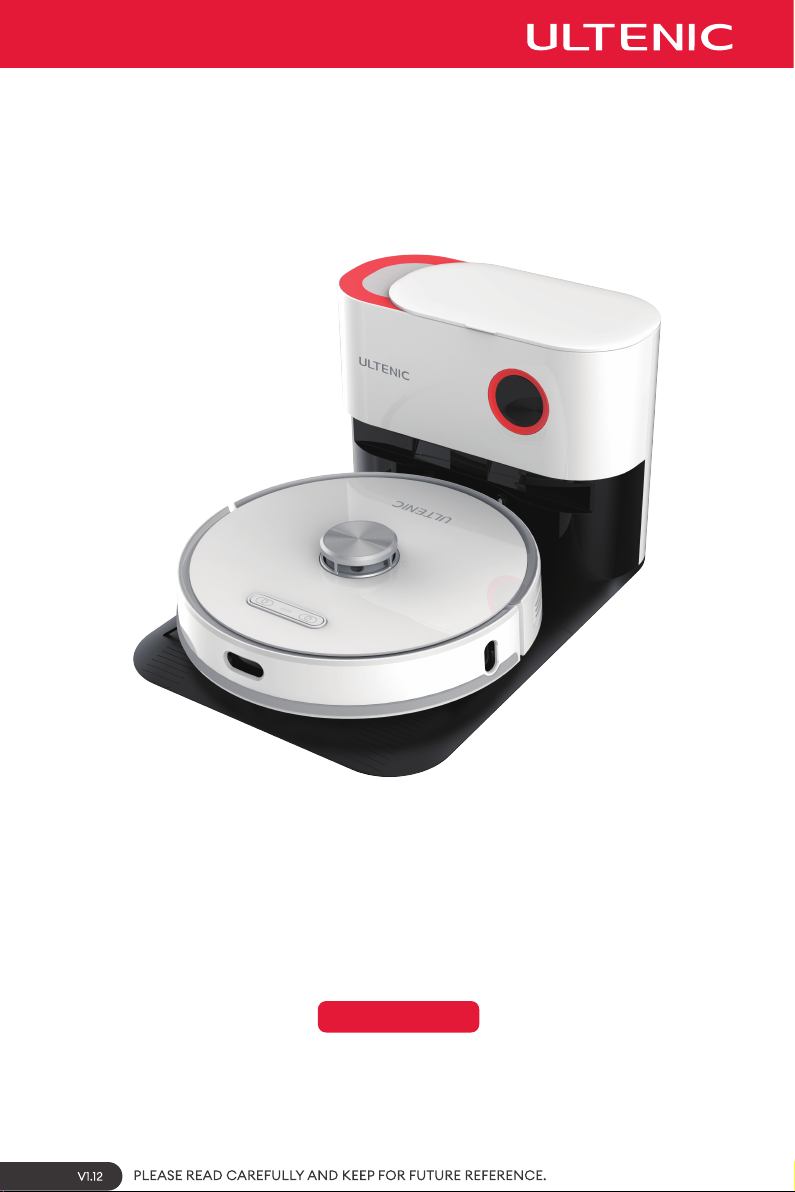
Model: T10 PRO
USER MANUAL


TABLE OF CONTENTS
Safety Warning ·································································································· 02
Inside the Box ···································································································· 04
Product Description ··························································································· 05
Product Operation ···························································································· 08
Product Maintenance ························································································ 13
Product Specications ······················································································· 16
Troubleshooting ·································································································· 17
SAFETY WARNING
IMPORTANT SAFETY INSTRUCTIONS FOR
HOME USE ONLY
Basic precautions should always be observed
when using any electrical equipment, including
the following:
WARNING: READ ALL SAFETY INSTRUCTIONS
AND THE ENTIRE MANUAL. Failure to heed the
warnings and instructions may result in electric
shock, re, or serious injuries. Please read all
instructions before using this robot.
WARNING:
·This robot is intended for children 8 years of
age and older. People with reduced physical,
sensory, or intellectual abilities, or those who
lack experience and knowledge, should be
supervised or instructed in safely using the
robot; they must also be aware of possible
hazards. Children should not play with this
robot. Cleaning and user maintenance should
not be performed by children without
supervision.
·The robot must be used in accordance with
the instructions in this manual. The company
is not responsible for any damage or injury
caused by improper use.
To reduce the risk of injury or damage, please
observe the following safety precautions when
installing, using and maintaining the robot:
·Please read all instructions regarding safety
and operation before using the robot.
·Keep the safety and user manual for future
reference. If you accidentally lose the manual,
you may visit the official website to download
the electronic version.
(https://www.ultenic.com).
·Heed all warnings on the robot, battery,
charging station, and user manual.
RESTRICTIONS
·This robot is for indoor use only. Do not use it
outside, or in commercial and industrial
environments.
·Before using the robot, remove fragile items
such as clothing, loose-leaf paper, rope or
curtains, and power cords from the floor. The
robot may snag onto an object, table, or shelf
if it gets stuck on a cable.
·This robot is not a toy. Do not sit or stand on
this robot. Children and pets should be
supervised while the robot is operating.
·Store and operate the robot at room
temperature.
·Do not use this robot to clean anything that is
burning or smoking.
·Do not use the robot to clean bleach, paint, or
other chemicals, or anything wet.
·If the cleaning area involves a balcony, a
physical barrier should be set up to prevent
the robot from accessing the balcony and
ensure it operates safely.
·People (including children) with reduced
physical, sensory, or intellectual abilities, or
those who lack experience and knowledge,
should be supervised or instructed in safely
using the robot.
Follow all operating and usage instructions.
The product's labels or packaging indicate that:
Do not dispose of the electrical appliances as
unsorted waste or, use a separate waste
collector.
Contact your local authority for information on
the appropriate disposal method. If electrical
appliances are discarded in landfills, hazardous
substances can leach into groundwater, enter
the food chain, and damage people's health.
Contact your local or regional waste
management agency for more information on
their recycling and reuse programs.
·Children should be supervised to ensure they
do not play with the robot. Further, cleaning
and maintenance must not be performed
without adult supervision.
·Do not place anything on the robot.
·Please note the robot will move on its own. Try
to be careful when walking in the operating
area to avoid stepping on it.
·Do not operate the robot in an area where a
ground power outlet is exposed.

RESTRICTIONS
·This robot is for indoor use only. Do not use it
outside, or in commercial and industrial
environments.
·Before using the robot, remove fragile items
such as clothing, loose-leaf paper, rope or
curtains, and power cords from the floor. The
robot may snag onto an object, table, or shelf
if it gets stuck on a cable.
·This robot is not a toy. Do not sit or stand on
this robot. Children and pets should be
supervised while the robot is operating.
·Store and operate the robot at room
temperature.
·Do not use this robot to clean anything that is
burning or smoking.
·Do not use the robot to clean bleach, paint, or
other chemicals, or anything wet.
·If the cleaning area involves a balcony, a
physical barrier should be set up to prevent
the robot from accessing the balcony and
ensure it operates safely.
·People (including children) with reduced
physical, sensory, or intellectual abilities, or
those who lack experience and knowledge,
should be supervised or instructed in safely
using the robot.
BATTERY AND CHARGING
·Only use rechargeable battery packs with
specifications approved by our company.
·Use the standard complimentary charging
station for charging. This product must not be
used with any type of power adapter; the use
of other power adapters will immediately void
the warranty.
·Do not use a charging station with a damaged
power cord or plug. If the power cord or plug is
damaged, it must be repaired by the
manufacturer or a similarly qualified party.
·Ensure to charge and remove the batteries in
the robot and accessories before long-term
storage or transportation.
·The remote control battery type is AAA
alkaline battery.
·To replace the remote control�s batteries,
slide the battery cover on the back of the
remote control open, remove the battery
cover, and replace the batteries.
·Charge the robot indoors only.
·Your robot's charging station may be
protected by a surge protector to prevent
power surges.
·Do not operate the charging station with wet
hands.
·Children should be supervised to ensure they
do not play with the robot. Further, cleaning
and maintenance must not be performed
without adult supervision.
·Do not place anything on the robot.
·Please note the robot will move on its own. Try
to be careful when walking in the operating
area to avoid stepping on it.
·Do not operate the robot in an area where a
ground power outlet is exposed.
·Before cleaning or maintaining the robot, the
plug must be removed from the socket.
·Ensure the voltage rating of the enclosed
charging station matches the voltage of the
standard outlet.
·Used battery packs should be placed in a
sealed plastic bag and disposed of safely in
accordance with local environmental
regulations.
·Before each use, inspect the battery pack for
signs of damage or leakage. Do not charge
damaged or leaking battery packs.
·If the battery pack leaks, please contact
Customer Service.
·The battery pack must be removed from the
robot before disposal.
·Do not crush or disassemble the battery pack.
Do not apply heat to the battery pack or
place it near any heat source.
·Do not incinerate the battery pack. Do not
short-circuit the battery pack.
·Do not immerse the battery pack in any liquid.
·Do not crush or disassemble the robot.
USER MANUAL
Model: T10 PRO
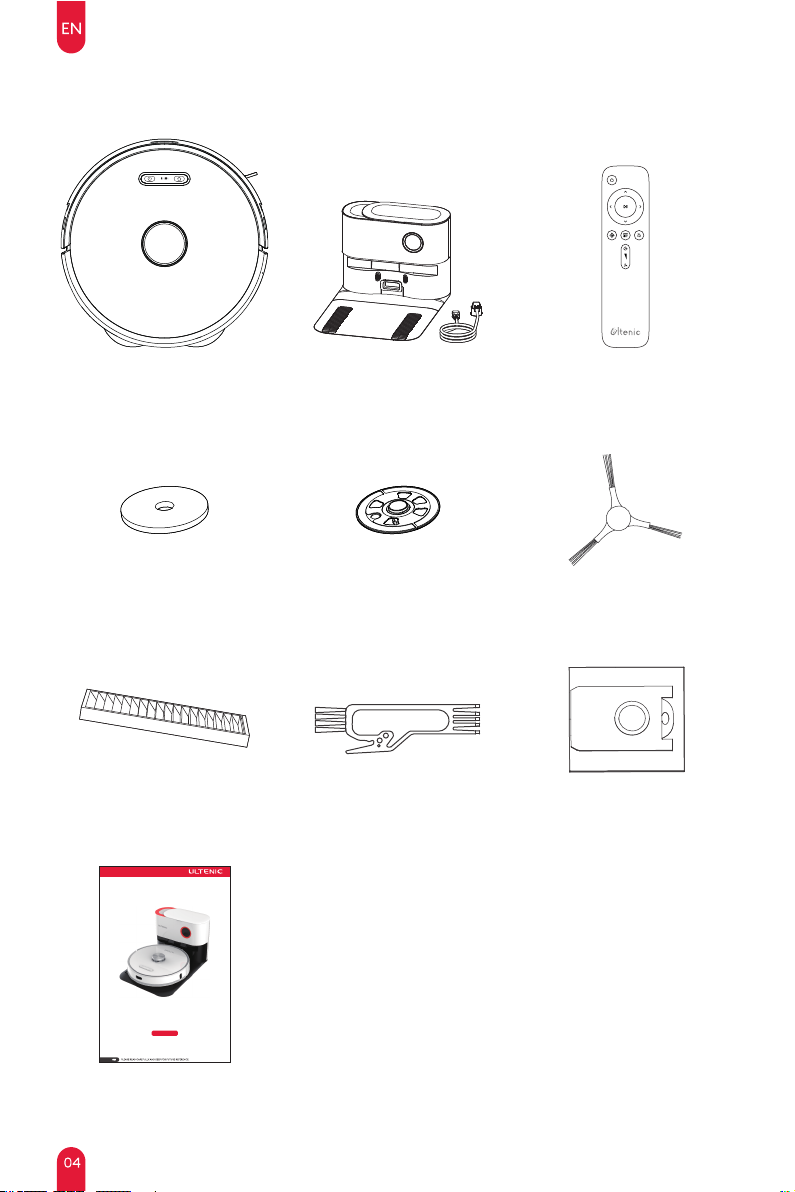
INSIDE THE BOX
User Manual
Cleaning BrushHEPA Filter
Side BrushRag Bracket*2Mop*4
Remote ControlCharging StationRobot
Dust Bag
PRODUCT DESCRIPTION
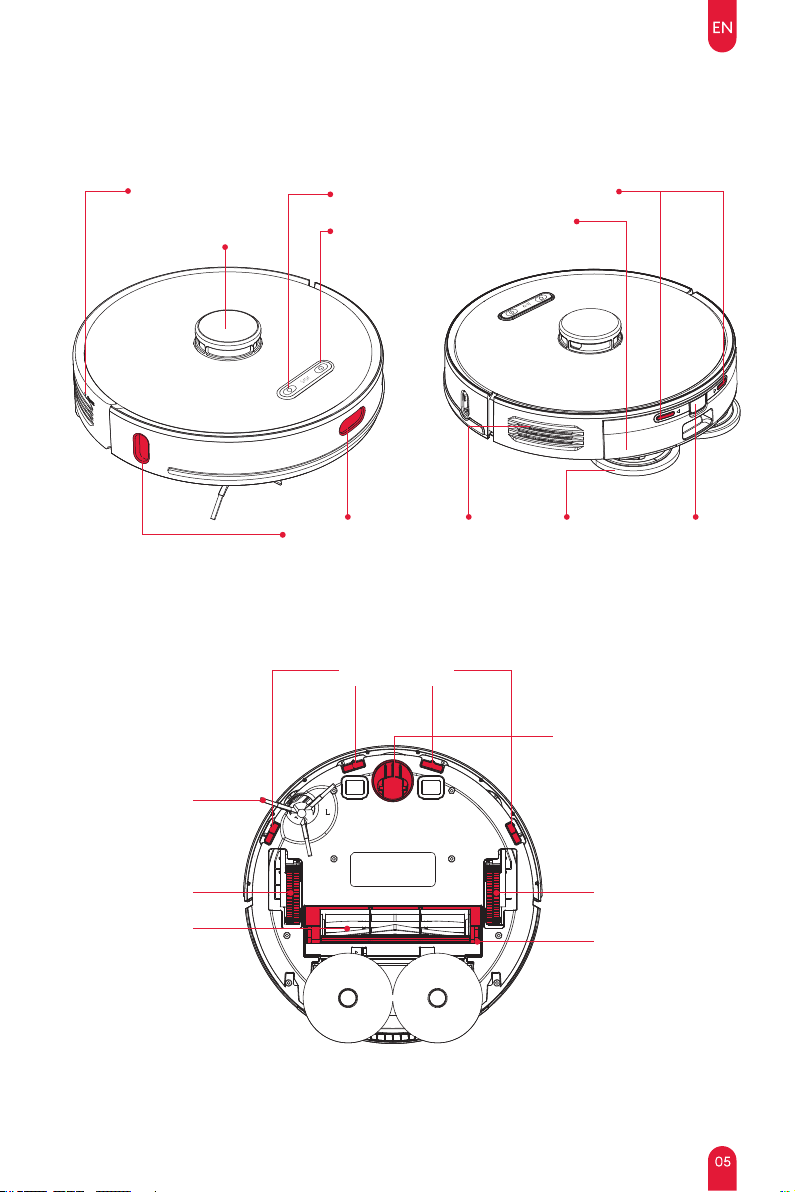
Recharge Buon
Reset Buon
360°LIDAR Module Dustbin and
Water Tank
Charging Contacts
Power Buon/
Clean Buon
Speaker Mopping
Modules
Dustbin
Release Buon
Infrared Sensors
The Robot
Reset
Cli Sensors
Omnidirectional Wheel
Side Brush
Right Driving
Wheel
Main Brush
Le Driving
Wheel
Main Brush
Cover
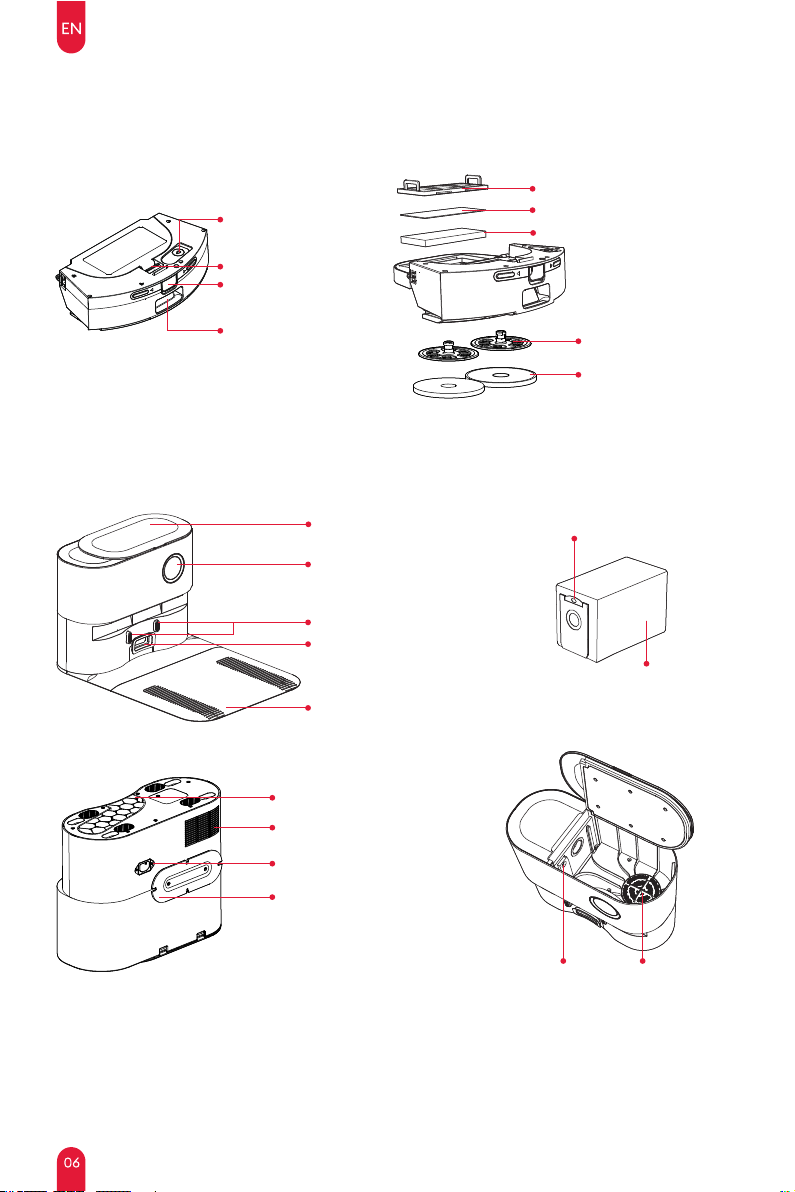
Hepa Filter
Mop
Rag Bracket
Secondary Filter Sponge
Primary lter holder
Charging Station
2-in-1 Dual Rotating Dustbin and Water Tank
Dustbin Release
Buon
Dust Outlet
LED Display Panel
Charging Contacts Point
Dustbin Latch
Water Inlet
Cover
Dust Collector Port
Pads
PRODUCT DESCRIPTION
NOTE :
1: One dust bag already pre-installed in Charging Station.
2: It is normal for the dust bag may appear"deflated".
3: Dust bag handle must be fully lowered as shown in order for debris to enter properly.
Dust Bag
Fan Filter
Dust Bag Handle
Dust Collector Cover
Air Outlet
Power Cable Winding Board
Power Interface
UVC lamp
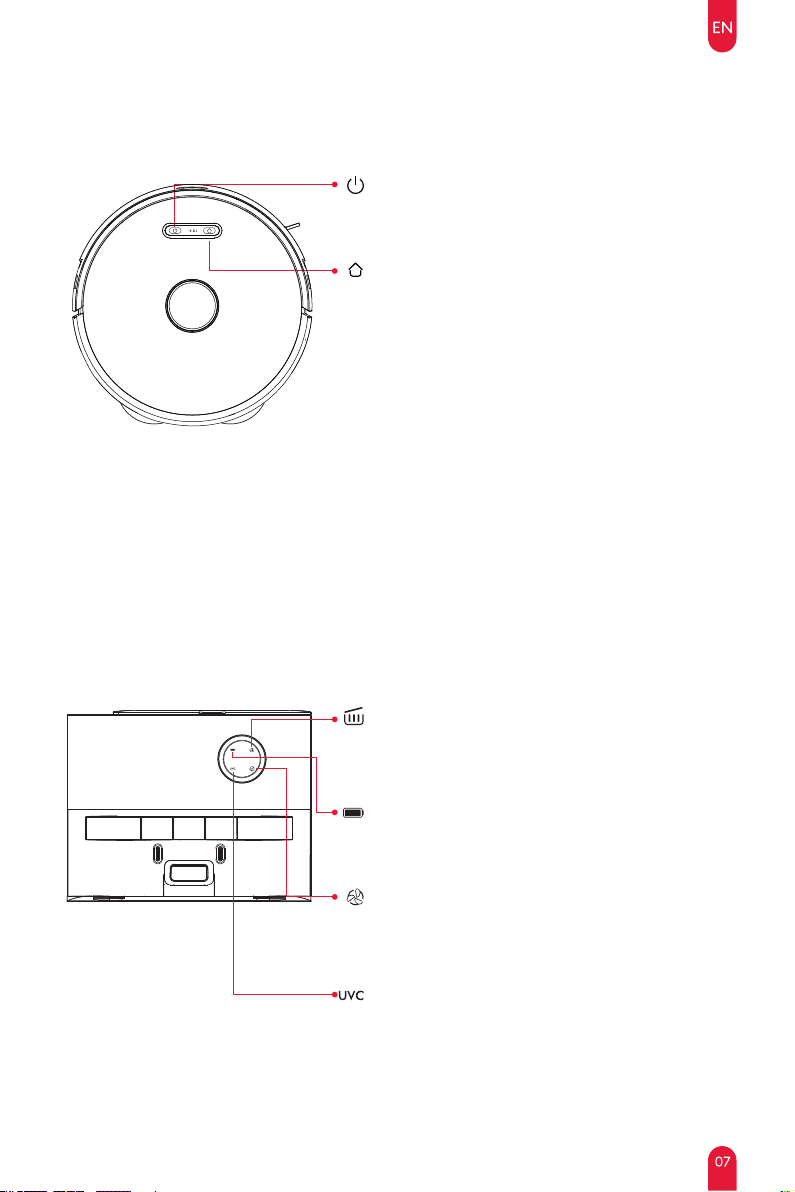
Robot Indicator Lights
Power Button
·Long press 3S to turn on/off.
·Short press to start/pause cleaning.
Status Indicator
·Solid white light: Collecting dust.
·Flashing red light: Fan overheating/fan error/cover
not closed.
Recharge Button / Recharge & Power Indicator
Press the button to return the robot to the charging
station.
Press and hold the recharge and start/stop buttons at
the same time for 5s to enter network configuration
mode.
Blue breathing light: power on/upgrading firmware
Steady blue light: standby/normal working state
Blinking yellow light: low battery
Green breathing light: charging
Steady green light: fully charged
Flashing red light: error
Charging Station Indicator Light
PRODUCT DESCRIPTION
Power Indicator
·Flashing green light: Charging.
·Solid green light: Standby.
Sterilization Indicator
·Solid white light: Sterilizing on
·Light off: Sterilizing off
Dust Bag Indicator
·Solid white light: Dust bag is full/dust duct is blocked
·Flashing red light: Dust bag is not installed/dust bag
is not installed correctly
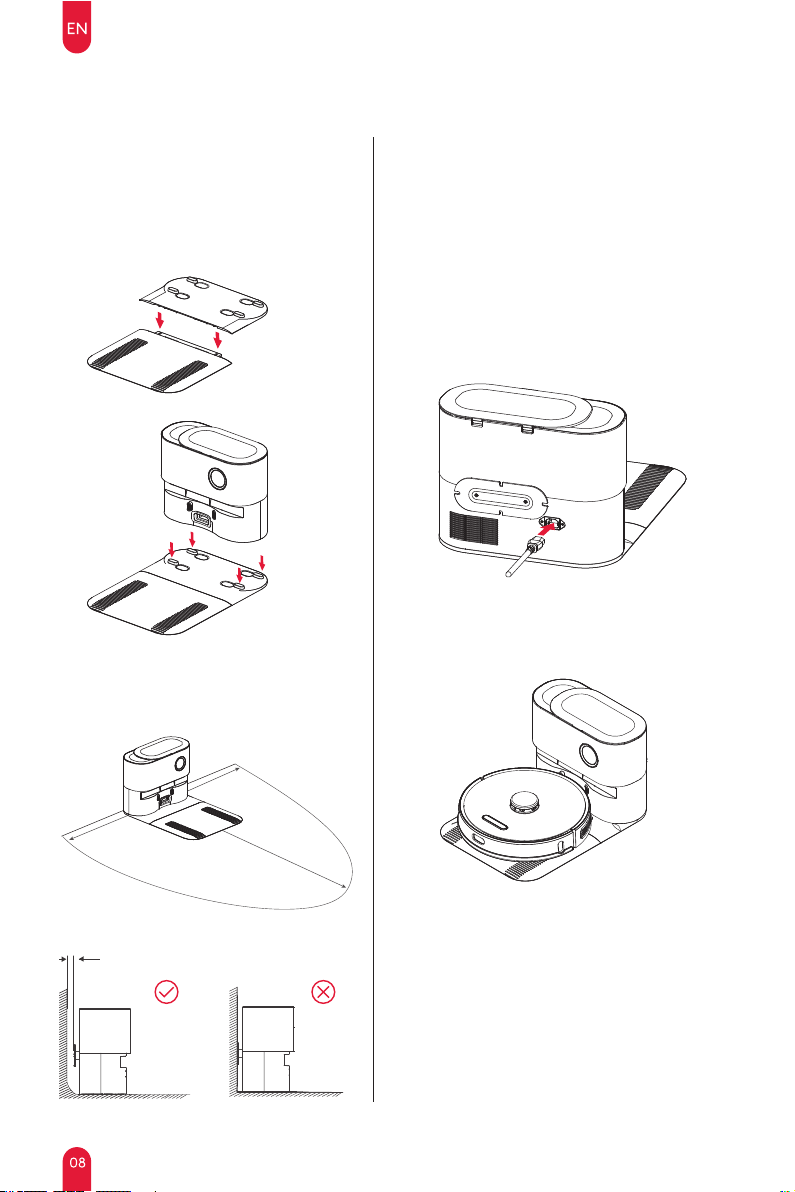
Before use, remove all protective parts from
the robot and charging station.
1. Assemble the pads.
3. Assemble power cord for charging station.
4. Charge Robot.
2. Set up the charging station.
The Charging Station is designed to
automatically empty and charge the Robot.
Place on a at, hard surface at least 0.2 feet
(6cm) away from the wall. Ensure that there is
a clear space in front and on both sides so
that your Robot can return to Station to
recharge and empty.
Note: The charging station must always be
connected to the power supply. Avoid using
power supplies that may be accidentally
turned o (e.g. power strips, outlets
controlled by light switches, GFCI).
PRODUCT OPERATION
Before Using
0.2 feet(6cm) away from the wall
2 feet(0.6m) 2 feet(0.6m)
5/1.5m
Table des matières
Autres manuels Ultenic Aspirateur

Ultenic
Ultenic D5 Series Manuel utilisateur

Ultenic
Ultenic U10 PRO Manuel utilisateur

Ultenic
Ultenic U10 PRO Manuel utilisateur

Ultenic
Ultenic U11 PRO Manuel utilisateur

Ultenic
Ultenic D5 Series Manuel utilisateur

Ultenic
Ultenic T10 Manuel utilisateur

Ultenic
Ultenic T10 Manuel utilisateur

Ultenic
Ultenic U10 Manuel utilisateur

Ultenic
Ultenic U10 PRO Manuel utilisateur

Ultenic
Ultenic T10 Manuel utilisateur


