
TypeS BLIZZARD BOX Series Manuel utilisateur

WP ITM. AC57245
AC57245-1
INSTRUCTION MANUAL
PLEASE READ THIS USER MANUAL CAREFULLY BEFORE CONNECTING AND OPERATING APPLIANCE.
SAVE FOR FUTURE REFERENCE.
PORTABLE FRIDGE / FREEZER

2
PACKAGE CONTENTS:
Blizzard Box Blizzard Box Lid
Instruction
Manual
12V DC Power Cord - 9 1/2’ 110V Power Adaptor - 6’
Small
Storage Basket
Large
Storage Basket

3
TECHNICAL SPECIFICATIONS:
Blizzard
Box Lid
Storage
Baskets
Operating
Panel
Handle
Capacity: 41 Quart (38.80L)
Dimension: 29.6” × 16.1” × 16.1”
(Including Handles) (752mm × 410mm x 410mm)
USB charging port output: 5 V / 1.5A rating
Climate class: 50ºF ~ 109ºF (10ºC ~ 43ºC)
(SN/N/ST/T)
Compressor: SECOP/Danfoss PBC-2.0
Cooling Performance: 0ºF ~ 50ºF (-18ºC ~10ºC)
Refrigerant: R134a (60g)
Insulation: CFC-free PU foam
Power consumption: 55W (as needed)
Ventilation

4
OPERATION:
1. Connecting power
BEFORE YOU START
The red slide switch on the Operating Panel should be to the left
during “normal use.”
Insert DC plug into vehicle’s power port. You may also use the
included 110V AC to 12V DC Power Converter for household
power.
CAUTION!
• To reduce the chances of overheating, keep your Blizzard Box
in an open area, not to obstruct the heat dissipation side
ventilation openings. Ensure these side vents are not blocked
while in use, or shortly after use.
• Use in dry conditions.
• Do not use near heat sources such as gas ovens, heaters, or
direct sunlight.
• Do not immerse in water.
• Do not ll with liquid.
• Do not use in direct sunlight or near ames / re.
• Ensure Blizzard Box, cables, and charging inputs / outputs are
not exposed to direct moisture or heat.
DC SOCKET
Nomal Use

5
2. Operating panel
After connecting power to your Blizzard Box, the Power Light
Indicator on the Operating Panel will be Orange. The Digital
Display will be blank.
Press and hold the On / Off Button for three seconds. The Digital
Display will then show the current interior temperature. Once the
Power Light turns Green, your Blizzard Box is operating.
Temp. / Setting DownDigital DisplaySetting Button
Temp. / Setting Up
On / Off Button Power / Status Light
Orange: Stand-by
Green: Running
Error Light
Red (Flashing): Low voltage or damage,
contact Customer Care.
OPERATION CONT.:
3. Turning on Blizzard Box
4. Setting the temperature
- Press button once, start setting temperature status.
- Use / to set temperature from 0°F to 50°F or
-18°C to 10°C.
- The cooling temperature will be displayed for a few seconds.
The Digital Display will ash several times before the interior
temperature is displayed.
- Press button once again, start exchange status for
Fahrenheit degree (°F) and centigrade degree (°C).

6
The Blizzard Box is equipped with multi-level vehicle battery
protection that guards against excessive discharging when
connected to a 12V / 24V power source.
If the Blizzard Box is operating when the vehicle ignition is
switched off, it will switch off automatically once the supply voltage
falls below the cut-off level. The Blizzard Box will switch back on
once the vehicle battery has been recharged to the restart voltage
level (See table in Section 9).
NOTICE! Avoid Damaging Vehicle Battery
If the Vehicle Battery Protection Setting becomes activated and
switches off the Blizzard Box, the vehicle battery will NOT be fully
charged. Avoid restarting the vehicle repeatedly, or operating the
radio before the vehicle battery has fully recharged via running
engine.
Ensure that the battery is recharged.
-Press the button three times.
-Use the / buttons to select the Vehicle Battery
Protection Setting.
5. Vehicle Battery Protection Setting
NOTE
If the ambient temperature is above +90°F (+32°C), the minimum
setting temperature cannot be attained.
When Blizzard Box interior temperature reaches the desired
temperature setting, the compressor will stop. The Power Light
will turn to Orange.
- Use / to switch between Fahrenheit and Centigrade.
The cooling temperature appears on the display for a few
seconds. The display ashes several times and then the interior
temperature is displayed again.
OPERATION CONT.:

7
Digital Display will be as follows:
(LOW), (MED), (HIGH)
The selected mode then appears on the display for a few seconds.
The display ashes several times before it returns to the current
temperature. (Reference Section 9 for more information)
In working status, press and hold button for three seconds
to turn off the Blizzard Box. Pull out power plug.
Emergency Override Mode is for temporary use only.
Emergency Override Mode will restart the Blizzard Box to run at
a voltage below the preset of the battery protection. During the
voltage override, the Blizzard Box will run with the Orange Stand-
by Light and Red (ashing) Error Light. Digital Display will not be
available.
Emergency Override Mode can be used to keep the Blizzard Box
running if the Operation Panel malfunctions.
To conrm if the Blizzard Box is running, feel for the air ow, or
listen for sound from ventilation openings on either side of the
appliance. (See image on pg.3 )
NOTE
When using Emergency Override Mode, the vehicle battery
can drain rapidly.
6. Turning off the Blizzard Box
7. Emergency Override Mode
Emergency Switch
Nomal Use Emergency Mode 1.5A USB Port
OPERATION CONT.:

8
8. USB port for power supply
1.5A USB Port allows you to charge most mobile devices.
OPERATION CONT.:
When the vehicle battery’s voltage drops to the below setting, the
Blizzard Box compressor will turn off. This will protect the vehicle
battery from over discharge. The Error Light will ash Red to alert
you to charge the battery by running the engine. The Orange
Stand-by Light will remain on.
When the Blizzard Box is powered by an auto starter battery,
High Mode Setting is recommended to warrant the vehicle’s
battery power is high enough to ensure starting.
If you use an additional battery (RV, campers) as a power
supply, Low Mode Setting is recommended.
If you use an AC 110V Power Converter (included), set the
Battery Protection Setting to Low Mode.
Voltage Range: Vehicle Battery Protection:
(Reference Section 5 Vehicle Battery Protection Setting)
Power
Supply
Status Battery
Protector
Low Mode Medium
Mode
High
Mode
DC 12V Cut-off Voltage 10.1±0.3V 11.4±0.3V 11.8±0.3V
Restart Voltage 11.1±0.3V 12.2±0.3V 12.6±0.3V
DC 24V Cut-off Voltage 21.5±0.3V 24.1±0.3V 24.6±0.3V
Restart Voltage 23.0±0.3V 25.3±0.3V 26.2±0.3V
9. Setting Vehicle Battery Protection / Low Voltage Battery Protection
9
Suggested beverage & food storage
temperatures
Temperature
Beer (Light), Sparkling Wines, Champagne 41°F / 5°C
Beer (Craft), White Wine 46°F / 8°C
Beer (Rich avor), Red Wine 53°F / 12°C
Soda / Pop 40°F / 4°C
Fruit & Veggies (Cool Season) 32-35°F / 0-1.6°C
Fruit & Veggies (Warm Season) 45-55°F / 7-12°C
Meat & Fish 41°F / 5°C
Dairy 35°F / 1.6°C
Eggs 45°F / 5°C
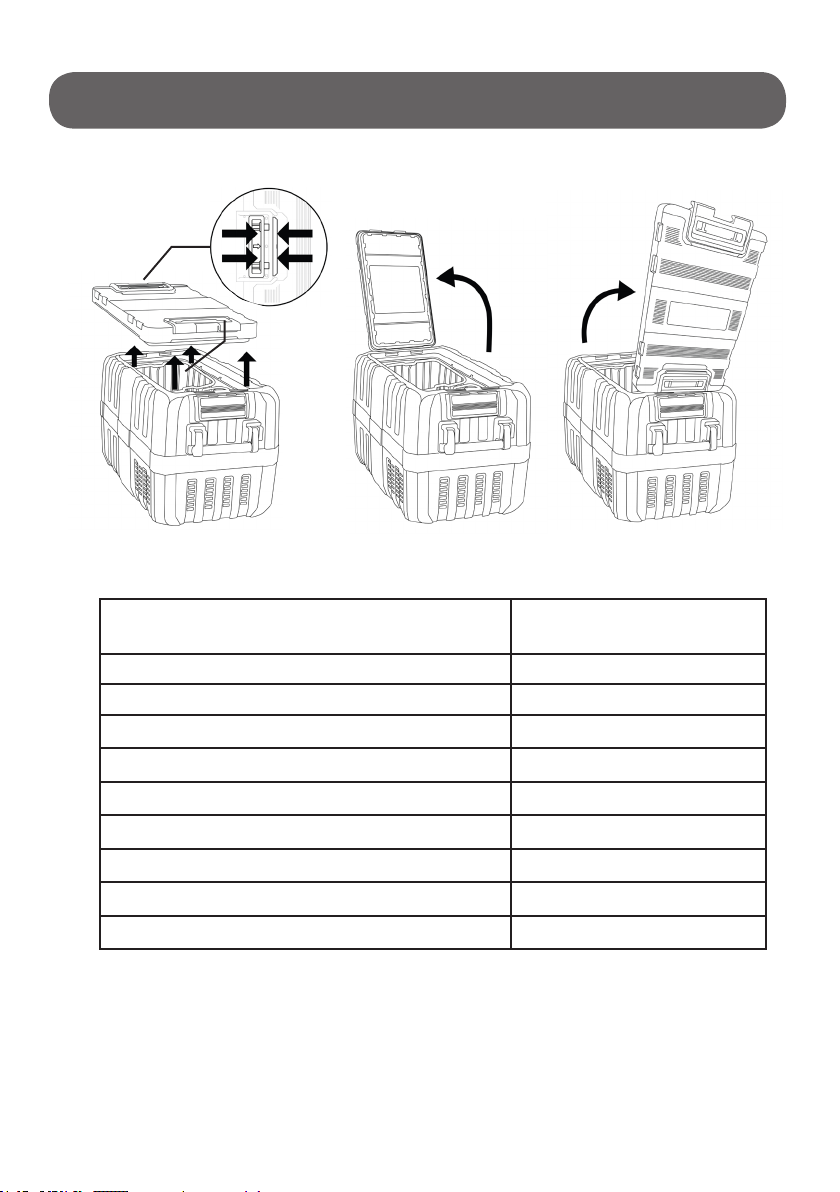
10. 3-Position Lid
11. Tips
OPERATION CONT.:
• Blizzard Box is designed to maintain chilled temperatures
of food and beverages.
• Pre-cool Blizzard Box before storing food or beverages.
• Pre-cool food or beverages before storing in Blizzard Box.

10
OPERATION CONT.:
Defrosting steps are as below:
• Remove the contents from the Blizzard Box and store them in
another cooler if necessary.
• Disconnect the power of the Blizzard Box. Open the lid, and
keep it open until the ice and frost melt away.
• Use clean cloth to wipe up the defrosted water.
Never use hard or pointed tools to remove ice or to loosen objects
which have frozen in place.
Replacing a defective fuse:
• Unplug the DC power plug;
• Turn the cap counter-clockwise to open it, and
remove the defective fuse from the plug;
• Insert a new fuse that has the same rating
(15A 250V);
• Close and tighten the cap.
WARNING: Always disconnect Blizzard Box from power before
cleaning or servicing.
• Occasionally clean the device interior and exterior with a damp cloth.
• Clean heat dissipation window frequently to ensure good heat
dissipation.
• Do not turn Blizzard Box on its side or upside down. Keep upright.
Defrosting: Humidity can form frost in the interior of the cooling
device or on the evaporator. This reduces the cooling capacity.
WARNING: Do not use abrasive cleaning agents or hard objects
during cleaning as these can damage the Blizzard Box.
Cleaning and Maintenance
Table des matières


