
TypeS LC 360 Manuel utilisateur
1
WP ITM. LM533425
Important, retain for future reference:
Read carefully
LC 360 LED VIDEO LIGHT
& POWER BANK

23
PRODUCT IMAGE PACKAGE CONTENTS
Cold Shoe
Mount Adapter
LED Video Light
USB-C/USB-A
Charging Cable
Carry Pouch
User Guide Warranty Card
www.typesauto.com/register
Register this product within 30 days of purchase to receive 1 FREE YEAR of additional warranty coverage
(beyond the standard one year warranty), along with special product offers and announcements.
Registre este producto dentro de los 30 días siguientes a la compra para recibir 1 AÑO GRATUITO de
cobertura de garantía adicional (más allá de la garantía estándar de un año), junto con ofertas de productos
y anuncios especiales.
Enregistrez ce produit dans les 30 jours suivant l'achat pour recevoir une couverture supplémentaire
GRATUITE DE 1 AN (au-delà de la garantie standard d'un an), ainsi que des offres et des annonces spéciales.
STOP
ARRÊT
DETÉNGASE
Mon-Fri, 8am-5pm PST / Lundi au vendredi, 8h à 17h HNP /
Lun-vie, 8 a. m. a 5 p. m. Hora del Pacífico
Please contact our customer service before returning this product to
the store. Our friendly representatives are happy to help with any
questions or concerns you have.
Póngase en contacto con nuestro servicio a clientes antes de regresar
este producto a la tienda. A nuestros amables representantes les dará
mucho gusto ayudarle con cualquier pregunta o inquietud que tenga.
Veuillez communiquer avec notre service à la clientèle avant de
retourner le produit au magasin. Nos représentants se feront un plaisir
de vous assister pour toute question ou préoccupation.
Product code / Code de produit / Código del producto : LM533425
@TypeSAuto
ML-533425DNR_V1

45
SPECS
Battery Capacity
USB Type C Input/Output
Storage Temperature
Operating Temperature
Charging Temperature
CRI
RGB Color Gamut
Color Temperature
Color Saturation Adjustment
Brightness Adjustment
Lumen
High Temp. Protection
27.72Wh 7200mAh 3.85V
5V/2.4A
-4°F ~ 113°F / -20°C ~ 45°C
-4°F ~ 95°F / -20°C ~ 35°C
14°F ~ 113°F / -10°C ~ 45°C
95
0~360° Full Gamut
2600~9000K
0~100
0~100%
750lm
When the temperature is high, the display ashes [ ] high temperature
warning. When the ambient temperature is too high or after long, continuous
use, a high temperature warning sign will appear. If the user continues use, the
lights and power output (USB-C charging) will turn off automatically. Once the
heat reduces to a safe temperature, the video light can be restarted.
PRODUCT OVERVIEW
1. High Denition Display Screen
2. SET Menu Adjust Dial Wheel
3. Power Switch
4. FN Adjustment Dial Wheel
5. Cold Shoe Socket
6. 1/4 Screw Hole
7. 1/4 Screw Hole
8. LED Lamp Bead
9. Cold Shoe Socket
10. Cold Shoe Base
11. Universal Foot Screw Hole
12. Type-C Charging Port
12
10
9
2
3
4
11
6 7
5
1
8
67
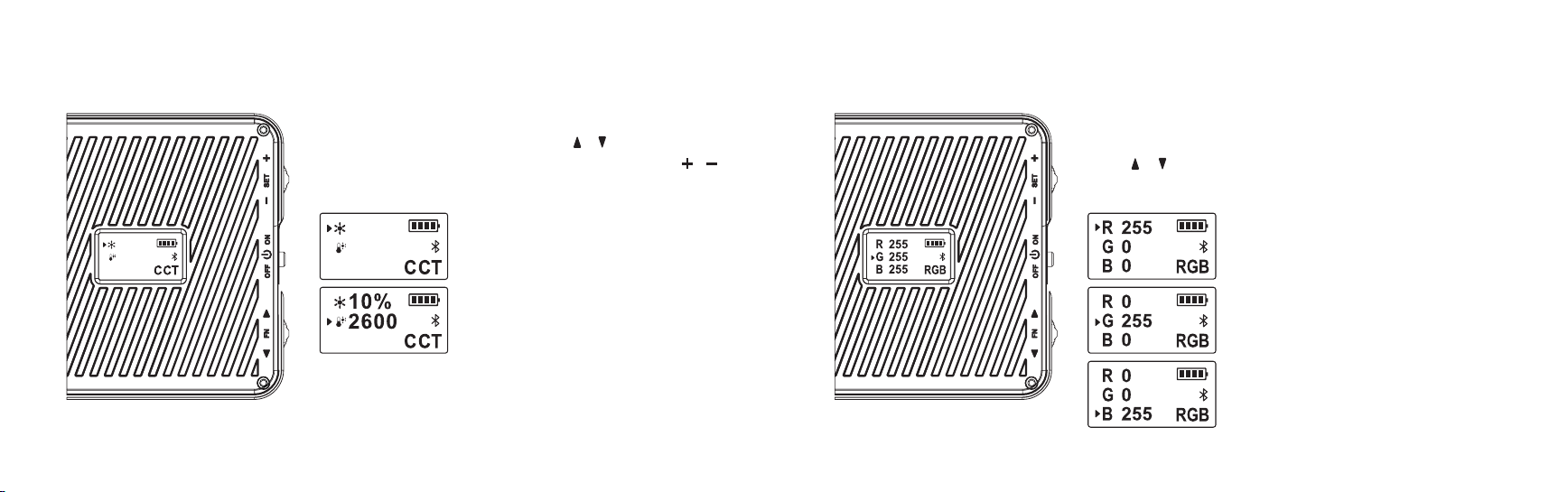
MODE SETTINGS RGB MODE
Press the [ SET ] wheel, when the lower right corner of the screen shows
[ RGB ], press the [ FN ] wheel to switch the selection, rotate the [ FN ]
wheel [ ] [ ] to adjust the R-red light, G-green light, B-blue light param-
eter values from 0 to 255.
G-Green Light
B-Blue Light
R-Red Light
MODE SETTINGS CCT MODE
Press the [ SET ] dial wheel until the lower right corner of the screen
displays [ CCT ], rotate the [ FN ] dial wheel [ ] [ ] to adjust the color
temperature from 2600K to 9000K; rotate the [ SET ] dial wheel [ ] [ ]
to adjust the brightness from 0 to 100%.
Color Temperature Adjustment
Brightness Adjustment
100%
9000K
100%
9000K

89
MODE SETTINGS SCN MODE
Press the [ SET ] dial and when [ SCN ] is displayed in the lower right cor-
ner of the screen, rotate the [ FN ] dial [ ] [ ] to select 1~21 effects and
rotate the [ SET ] dial [ ] [ ] to adjust the brightness from 0 to 100%.
Scene Adjustment
Brightness Adjustment
100%
1
RGB Slow
100%
1
RGB Slow
10%
2
RGB Fast
MODE SETTINGS HSI MODE
Press the [ SET ] dial wheel until the lower right corner of the screen displays
[ HSI ], press the [ FN ] dial to toggle the selection and rotate the [ FN ] dial wheel
[ ] [ ] to adjust the color gamut from 0 to 360° and saturation from 0 to 100;
rotate the [ SET ] dial wheel [ ] [ ] to adjust the brightness from 0 to 100%.
Full Color Gamut Adjustment
Brightness Adjustment
Color Saturation Adjustment

10 11
APPLICATION - ADDING DEVICE
Install the TYPE S LED APP on your smart
device. Scan below QR code or search for
the TYPE S LED APP in the APP Store or
Google Play.
Compatible with phones with
Android™ 4.3 or higher.
Note: not all Android™ phones are
equipped with Bluetooth® v5.3 required
for this application.
Compatible with iPhone 4s & higher,
iPad3, iPad Mini, iPad Air & higher,
and iPod touch 5th Generation &
higher. Requires iOS 9.0 or higher.
Type S LED
1. Chose the LC video Light 2. Press Add Device
MODE SETTINGS SCN MODE ( 21 EFFECTS )
#1 RGB Slow
#2 RGB Fast
#3 Laser Show
#4 Fireworks
#5 EMT 1
#6 EMT 2
#7 EMT 3
#8 Police 1
#9 Police 2
#10 Police 3
#11 FireTruck 1
#12 FireTruck 2
#13 FireTruck 3
#14 Fire
#15 Candle
#16 Lightning 1
#17 Lightning 2
#18 Paparazzi
#19 SOS
#20 Bulb Flicker
#21 TV Screen

12 13
INSTALLATION
This product does not include microphone, light stand or camera.NOTE:
Use of the Multifunctional Bracket
Connect Hot Shoe Base Connect Cold Shoe Base Connect Light Stand Desktop Stand
APPLICATION - ADDING DEVICE
3. Select the Device you wanted. 4. When paired, then it will show
successful.
5. After Paired, it will go to main
page directly.

14 15
WARNINGS
INSTRUCTIONS PERTAINING TO RISK OF FIRE, ELECTRIC SHOCK OR INJURY TO PERSONS
• Do not allow this product to become wet. Exposure to excessive moisture will damage the unit.
• Do not immerse the product in water.
• Do not operate the product in explosive atmospheres, such as in the presence of ammable liquid, gas or dust.
• Do not modify or disassemble this product.
• Do not store in locations where the temperature may exceed 104ºF (40ºC).
• Under extreme heat conditions, battery leakage may occur. Avoid contact with your skin. In case of skin or
eye contact, rinse immediately with clean water and seek medical attention.
• If battery leakage occurs, take it to your local battery recycling center for disposal. Do not attempt to use.
Bracket Rotation Adjustment
360º
Install When Shooting
Vertically
360º RotationInstall When Shooting
Horizontally
This product does not include microphone, light stand or camera.NOTE:
360º Rotation
INSTALLATION
Cold Shoe Bracket Installation
360º

16 17
WARNINGS
IMPORTANT SAFETY INSTRUCTIONS
WARNING - When using this product, basic precautions should always be followed, including the following:
• Read all the instructions before using the product.
• To reduce the risk of injury, close supervision is necessary when the product is used near children. Children
should not operate this device unless under strict supervision by a person responsible for their safety.
• Do not put ngers or hands into the product.
• Do not use any attachment that is not sold by device manufacturer which may result in a risk of re, electric
shock, or injury to persons.
• To reduce risk of damage to the electric plug and cord, pull the plug rather than the cord when disconnecting the
device.
• Do not use an appliance that is damaged or modied. Damaged or modied appliance may exhibit unpredictable
behavior resulting in re, explosion or risk of injury.
• Do not operate the device with a damaged cord or plug, or a damaged output cable.
• Do not disassemble the device; take it to a qualied service person when service or repair is required. Incorrect
reassembly may result in a risk of re or electric shock.
• To reduce the risk of electric shock, unplug the device from the outlet before attempting any instructed servicing.
WARNINGS
BATTERY DISPOSAL
The battery is self-contained and not consumer replaceable. The battery must be disposed of properly when it no
longer holds a charge. Proper charging practices will increase the life of the product. For information on battery
recycling, call toll-free 800-822-8837.
For information regarding air travel safety with batteries please check the U.S. Department of Transportation prior to
travel at: http://phmsa.dot.gov/safetravel/batteries or contact your airline if traveling from a country outside the U.S.
Note: The Power Bank gives 27.72 watt hours of power.

18 19
FCC COMPLIANCE STATEMENT
This device complies with Part 15 of the FCC rules. Operation is subject to the following two conditions:
1. This device may not cause harmful interference, and
2. This device must accept any interference received, including interference that may cause undesired operation.
Warning: Changes or modications to this unit not expressly approved by the party responsible for compliance
could void the user’s authority to operate the equipment.
The manufacturer is not responsible for any radio or TV interference caused by unauthorized modications or
change to this equipment. Such modications or change could void the user’s authority to operate the equipment.
Note: This equipment has been tested and found to comply with the limits for a Class B digital device, pursuant to
part 15 of the FCC Rules. These limits are designed to provide reasonable protection against harmful interference
in a residential installation. This equipment generates, uses and can radiate radio frequency energy and, if not
installed and used in accordance with the instructions, may cause harmful interference to radio communications.
However, there is no guarantee that interference will not occur in a particular installation. If this equipment does
cause harmful interference to radio or television reception, which can be determined by turning the equipment off
and on, the user is encouraged to try to correct the interference by one or more of the following measures:
• Reorient or relocate the receiving antenna.
• Increase the separation between the equipment and receiver.
WARNING - RISK OF EXPLOSIVE GASES.
• The device shall be stored indoors and protected from the elements;
• The unit shall not be charged outdoors;
• When in use, steps should be taken to reduce the exposure to rain, sleet, snow, and the like.
• Do not overcharge the internal battery.
• This product is suitable for use in home, ofce, household workshop or garage. Do not operate in rough environment
such as repair facility.
WARNING - To reduce the risk of injury, do not stare directly into the ashlight when it is on. Serious eye injury could occur.
• Do not touch or hold the ashlight by the lens or the top of the ashlight. To reduce the risk of injury, only handle the
ashlight by the handle and casing.
WARNINGS
Ce manuel convient aux modèles suivants
1
Table des matières
Autres manuels TypeS Équipement d'éclairage

Manuels Équipement d'éclairage populaires d'autres marques


Qazqa
Qazqa Suplux SL 3 Black 103062 Manuel utilisateur

Commercial Electric
Commercial Electric 54568141 Manuel utilisateur

CREE LIGHTING
CREE LIGHTING 304 Series Manuel utilisateur

Goobay
Goobay 49867 Manuel utilisateur

ECOMAN ITALIA
ECOMAN ITALIA LED T8 Manuel utilisateur

Alkalite
Alkalite Krypton KT-81 Manuel utilisateur


