
Tyco ZETTLER Manuel utilisateur

VLVL
VLVL
VL
TT
TT
Telephone/elephone/
elephone/elephone/
elephone/
VLVL
VLVL
VL
TT
TT
Telephone pluselephone plus
elephone pluselephone plus
elephone plus
Doc. version 1.2
2. february 2009
ZETTLER
955.80955.80
955.80955.80
955.8000
00
01E1E
1E1E
1E
User guideUser guide
User guideUser guide
User guide
®

©Tyco Safety Products 2008, 2009
Contents subject to change without notice.
All rights to this documentation, including the contents of
the online help, are reserved, in particular but not limited to
the rights of copying, distribution and translation.
No portion of this documentation, including the online help,
may be reproduced, edited, copied or distributed in any
form without prior written authorization fromTyco Safety
Products. Use of the data medium provided with this
product is restricted to copying the software for the purpose
of data backup only.
FILNET®, Medicall®, medifon®, ZETADRESS®, ZETFAS®,
ZETTLER® are registered trademarks of
TOTAL WALTHER GmbH.
Echelon®, LON®und LonTalk®are registered trademarks of
Echelon Corporation.
All other trade names are trademarks or registered
trademarks of the respective producers.

3
User guide Doc. version 1.2
Content
VLTelephone/VLTelephone plus
1Guide to this manual ........................... 6
1.1 Signal words and symbols ............................. 6
2 Safety information .............................. 7
2.1 Intended use .................................................. 7
2.2 Installing the telephone ................................. 7
2.3 Emergency call function ................................ 8
3 Operation elements ........................... 10
3.1 Overview ...................................................... 10
3.2 Keys and their functions .............................. 11
3.3 Slide switches for volume adjustments ....... 12
3.4 Symbols in the display ................................. 12
3.5 Special characters in the display ................. 13
3.6 Illumination of key pad and display ............. 13
4 Emergency call .................................. 14
4.1 Sending an emergency call .......................... 14
4.2 Manual interruption of an emergency call ... 15
4.3 Taking of the emergency call by the staff. ... 15
4.4 Vital sign function (confirmation of
presence) ...................................................... 15
5 Making telephone calls ..................... 17
5.1 Manual dialling ............................................ 17
Content

4User guide Doc. version 1.2
VLTelephone/VLTelephone plusContent
5.2 Dialling with off-line call preparation .......... 18
5.3 Dialling via speed dialling keys.................... 18
5.4 On-Hook-Dialling .......................................... 19
5.5 Redialling ..................................................... 19
5.6 Abbreviated dialling ..................................... 20
5.7 Call number chaining (call-by-call function). 21
5.8 Dialling the telephone number transmitted
by the last incoming call .............................. 21
5.9 Ringing signal volume .................................. 22
5.10 Handset volume ........................................... 22
5.11 Loudspeaker volume .................................... 23
5.12 Listening-in .................................................. 23
5.13 Hands-free operation ................................... 24
5.14 Switching between handset and hands-free
operation...................................................... 25
6 Set functions ..................................... 26
6.1 Store speed dialling numbers ...................... 26
6.2 Store abbreviated numbers .......................... 27
6.3 Indication of incoming call by flashlight
ON/OFF ......................................................... 28
7 Extended telephone functions .......... 29
7.1 Dialling via direct call .................................. 29
7.2 Do-not-disturb function ............................... 30
7.3 List of released numbers for ringing signals 30
7.4 List of restricted numbers for ringing
signals .......................................................... 30

5
User guide Doc. version 1.2
Content
VLTelephone/VLTelephone plus
7.5 Ringing melody ............................................ 31
7.6 Display contrast adjustment ........................ 31
7.7 Call restriction ............................................. 31
7.8 Support for hearing aid users ...................... 32
7.9 Operation with headset ............................... 32
7.10 Display language .......................................... 32
7.11 Room monitoring ......................................... 33
8 Error messages .................................. 35
9 Cleaning the device ........................... 37
Index ........................................................... 38
6
User guide Doc. version 1.2
1 Guide to this manual VLTelephone/VLTelephone plus
1 Guide to this manual
1.1 Signal words and symbols
Signal words and symbols in this guide refer you to warning
advice, information and instructions (see table 1).
Signal word Symbol Explanation
DANGER Warning advice. Direct and
immediate danger. Failure to
comply will result in death or
serious injury.
WARNING Warning advice. Possibly
dangerous situation. Failure
to comply could result in
death or serious injury.
CAUTION Warning advice. Possibly
dangerous situation. Failure
to comply could result in
slight or minor injury or
damage to equipment.
Helpful information.
Table 1: Signal words and symbols in this guide
7
User guide Doc. version 1.2
2 Safety information
VLTelephone/VLTelephone plus
2 Safety information
Read this manual carefully. It contains important information
for safe use of your telephone.
2.1 Intended use
This telephone is suited to be connected to analogue line
interfaces of public switched telephone networks.
DANGER
Never try to unscrew the screws and open
the device.You could get in contact with
current-carrying parts.
Never touch the connector contacts with
pointed or metallic objects.
2.2 Installing the telephone
WARNING
The telephone was produced for standard use
conditions. Please do not install the device
close to heat sources (air-conditioning,
heater, exposure to direct sunlight),
in humid rooms (no exposure to splashing
water or chemicals),
nearby devices emitting strong magnetic
fields (electrical appliances, fluorescent
tubes, computers,TV sets),
8User guide Doc. version 1.2
VLTelephone/VLTelephone plus
2 Safety information
in dusty rooms,
in rooms where the device is exposed to
vibrations or extreme variations in
temperature.
CAUTION
Never carry the telephone at the handset or
the connection cables.
Some furniture lacquers or furniture cleaning
products may attack the rubber at the feet of
the telephone and thus cause patches. In
such cases, please use a non-slip pad under
the device.
2.3 Emergency call function
DANGER
In rare cases, the function of sending out an
emergency call to the call system or to a freely-
programmable destination cannot be guaranteed.
This might be the case if e. g. the telephone
network fails or if the radio transmission from
the wireless transmitter to the telephone is
subject to interference. If the device is used for
people who are in a critical or life-threatening
health condition, you should not refrain from
additional safety means.

9
User guide Doc. version 1.2
2 Safety information
VLTelephone/VLTelephone plus
Wireless pendantWireless pendant
Wireless pendantWireless pendant
Wireless pendant
(variant VLTelephone plus only.)
If the wireless pendant is worn around the neck
by means of the cord, please consider the
following:
The wireless pendant should only be worn in
front of the upper part of the body and above
the clothing. It then can easily be accessed
at any time.
The cord has been developed and designed
to break when exposed to extra ordinary
high mechanical load. Despite of this, a risk
of injury cannot be completely excluded. It is
recommended to wear the wireless pendant
around the wrist when helping laid up
persons.
Only use an original cord to replace a faulty
one. Do not try to repair the cord on your
own (e. g. by making a knot).
Wireless pendant and cord should be kept
out of reach of small children.
Be aware, that a call will be transmitted only
within a certain range to the receiver. Please
ask the installer of your telephone - he will
inform you about the coverage of the
wireless transmitter.
10User guide Doc. version 1.2
VLTelephone/VLTelephone plus3 Operation elements
3 Operation elements
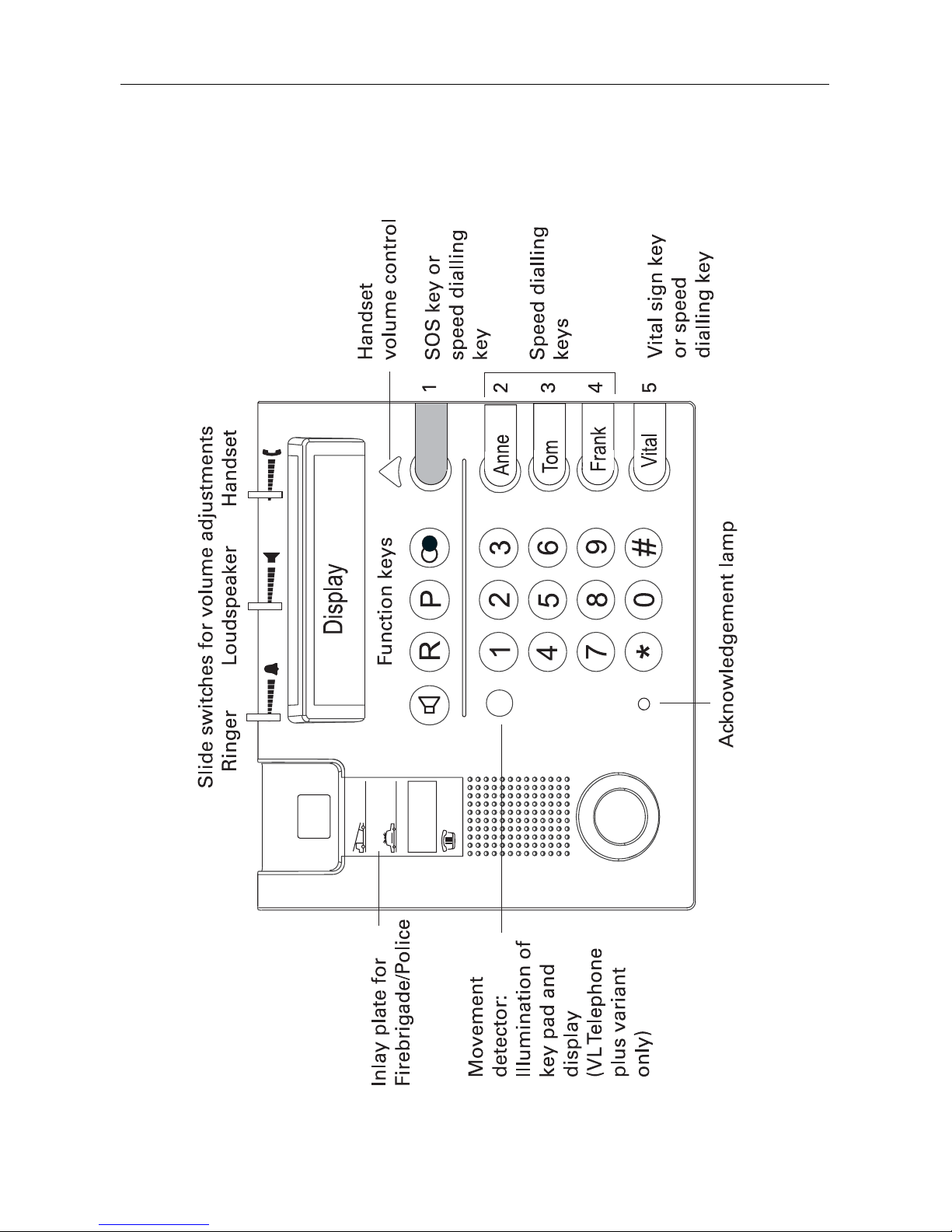
3.1 Overview
Fig. 1: Overview
Ce manuel convient aux modèles suivants
2
Table des matières


