
Triplex MP4 SDVR Manuel utilisateur

Triplex MP4 SDVR
Stand Alone Type
DVR SYSTEM
MANUAL
Firmware 2.0 Version
Revision Date : 2005. 01. 31.
050131041130

• MODIFICATION CONTENTS
Firmware ver 2.0
Modification Date: 2005.01.31
Please refer the below message to confirm the modify contents.
1. PTZ CONTROL
* ADD PRESET FUNCTION : FOR PELCO-D PROTOCOL
* ADD SWING FUNCTION : FOR DONGYANG CAMERA (D-MAX)
2. CD-RW ( CD Read&Write Burner )
* ADD CD-RW FUNCTION FOR DATA BACK-UP
3. IE BROWSER
•ADD IE BROWSER ( ALLOW FOUR USERS MONITORING AT THE
SAME TIME )

•INDEX
■ CHAPTER 1 . ( Specification & System Organization )
1.1 Specification ------------------------------------------------------ 7
1.2 Product Contents List ------------------------------------------------ 8
1.3 System Organization ------------------------------------------------ 9
■ CHAPTER 2 . ( Description )
2.1 Front Panel ------------------------------------------------------- 10
2.2 Rear Panel ---------------------------------------------------- 11
2.3 Remote Controller ----------------------------------------- 12
■ CHAPTER 3 . ( Installation )
3.1 Hard Disk Installation ------------------------------------------------ 13
3.2 Camera Connection ------------------------------------------------ 15
3.3 Monitor Connection ------------------------------------------------- 15
3.4 Computer Connection --------------------------------------------- 15
3.5 Network Connection ------------------------------------------------ 15
3.6 Alarm/Relay/PTZ Connection ------------------------------------------- 16
3.7 Power Connection -------------------------------------------------- 16
3.8 Finishing Installation ------------------------------------------------- 16
※ Hard Disk Format ------------------------------------------------- 17
■ CHAPTER 4 . ( Monitoring )
4.1 System Power ON --------------------------------------------------- 18
4.2 Select Screen Mode ------------------------------------------------- 18
4.3 Convert Screen Mode ------------------------------------------------ 19
4.4 Control PTZ/Focus -------------------------------------------------- 19
4.5 System Power OFF -------------------------------------------------- 20
■ CHAPTER 5 . ( Search )
◎ Go to Search ----------------------------------------------- 21
5.1 Search by Date/Time ------------------------------------------------ 21
5.2 Search by Event -------------------------------------------------- 22

•INDEX
■ CHAPTER 6 . ( Menu )
◎ Go to Menu ----------------------------------------------------- 24
◎ Menu Initial ------------------------------------------------------- 24
6.1 Display ---------------------------------------------------------- 25
6.2 Record ---------------------------------------------------------- 25
6.2.1 Size/Rec. Rate/Quality ---------------------------------------- 25
6.2.2 Timer Recording Setup -------------------------------------26
6.2.3 Motion Detection Setup -------------------------------------- 27
6.2.4 Alarm Recording Setup ----------------------------------------- 27
◎ Time Recording Weekly Setup -------------------------------------- 28
◎ Partial Motion Region Setup ----------------------------------------- 29
6.3 Camera ---------------------------------------------------------- 30
6.3.1 Status/Title Setup ----------------------------------------------- 30
6.3.2 Covert/PTZ Setup --------------------------------------------- 30
6.3.3 Color Setup -------------------------------------------------- 31
6.4 AUDIO -------------------------------------------------------- 31
6.4.1 Audio Recording Setup ------------------------------------------- 31
6.4.2 Live Audio Setup ------------------------------------------------ 32
6.5 ALARM --------------------------------------------------------- 32
6.5.1 Alarm Input Setup ----------------------------------------------- 32
6.5.2 Relay Output Setup ---------------------------------------------- 33
6.6 SYSTEM -------------------------------------------------------- 33
6.6.1 Date/Time --------------------------------------------------- 33
6.6.2 Network ------------------------------------------------------- 34
6.6.3 Buzzer Setup --------------------------------------------------- 34
6.6.4 Password ---------------------------------------------------- 34
6.6.4.1 Administrator Password --------------------------------------- 34
6.6.4.2 Manager Password ------------------------------------------ 35
6.6.4.3 Operator Password ---------------------------------------- 35
6.6.4.4 Network Password --------------------------------------- 35
6.6.5 Disk Write Mode ----------------------------------------------- 36
6.6.6 System Information --------------------------------------------- 36
6.6.7 Factory Default ------------------------------------------------ 36

•INDEX
6.7 CD-RW Back-up ----------------------------------------------------- 37
■ CHAPTER 7 . ( Remote Agent )
◎ System Requirement --------------------------------------------38
◎ DVR Remote Agent 1.0 Installation ------------------------------- 39
7.1 Monitoring
7.1.1 Function Introduction ------------------------------------------ 41
7.1.2 Screen Division Selection ----------------------------------------- 42
7.1.3 PTZ Control --------------------------------------------------- 42
7.1.4 Selection Network ID -------------------------------------------- 42
7.1.5 AVI File Conversion -------------------------------------------- 43
7.1.6 Color Adjustment ------------------------------------------- 43
7.2. Search
7.2.1 Function Introduction ------------------------------------------- 44
7.2.2 Search Method ------------------------------------------------- 45
7.2.3 Search Option --------------------------------------------- 46
7.3. Setting
7.3.1 Connection ID Setup ----------------------------------- 51
7.3.2 Option Setting ----------------------------------------------- 52
■ CHAPTER 8
Time Table ------------------------------------------------------ 53
PTZ Protocol --------------------------------------------------- 54
PTZ Control ----------------------------------------------- 55
8.1 PTZ Reset --------------------------------------------------56
8.2 Swing ------------------------------------------------ 56
Cross cable making tip ------------------------------------------- 57

• SUPPLEMENT LIST
1. PTZ Control
1.1 PTZ Control -------------------------------------------------- 77
1.2 FOCUS/IRIS Control ------------------------------------------- 77
1.3 PRESET Control ----------------------------------------------- 78
11.4 SWING Control ----------------------------------------------- 78
2. Cross Cable Making Tip ----------------------------------------- 79

1.1 Specification
7
• Specification & Organization
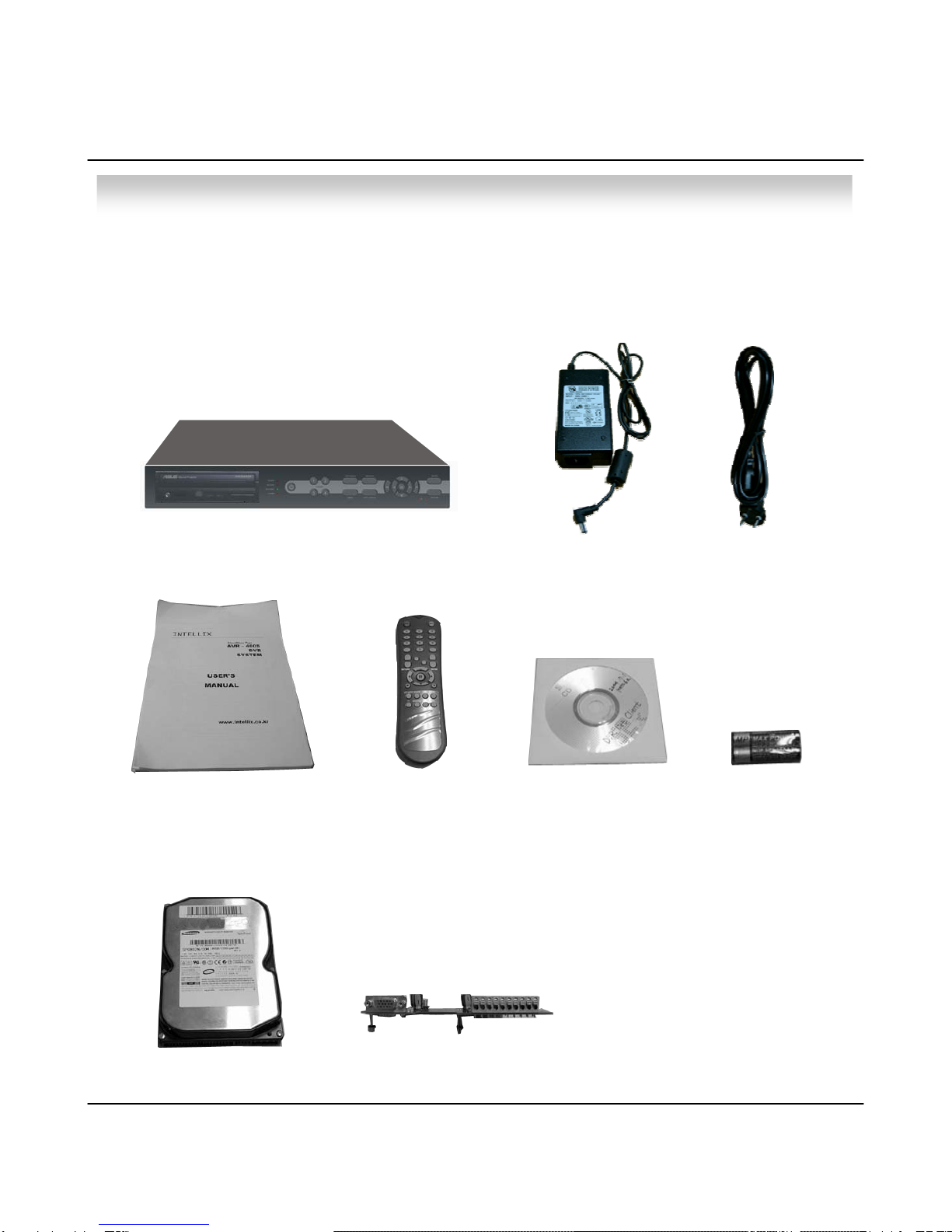
1.2 Product Contents List
① Basic Contents
② Option Contents
DVR Machine
Remote Controller
User’s Manual Remote Client Program
Install CD
AAA Battery X 2
80GB HDD VGA OUT Install Kit
12V Adaptor Power Cable
• Specification & Organization
8
Please confirm the contents when you open packing.

• Specification & Organization
1.3 System Organization
Remote Client PC
Image Printer
NETWORK
Camera #1-4
Alarm Sensor #1-4 Relay Out
VCR VGA
Monitor AV Monitor
Remote
Controller
AVR 400s
Video In
Video Out
TCP/IP
Alarm Input/Out
9
10
• Description
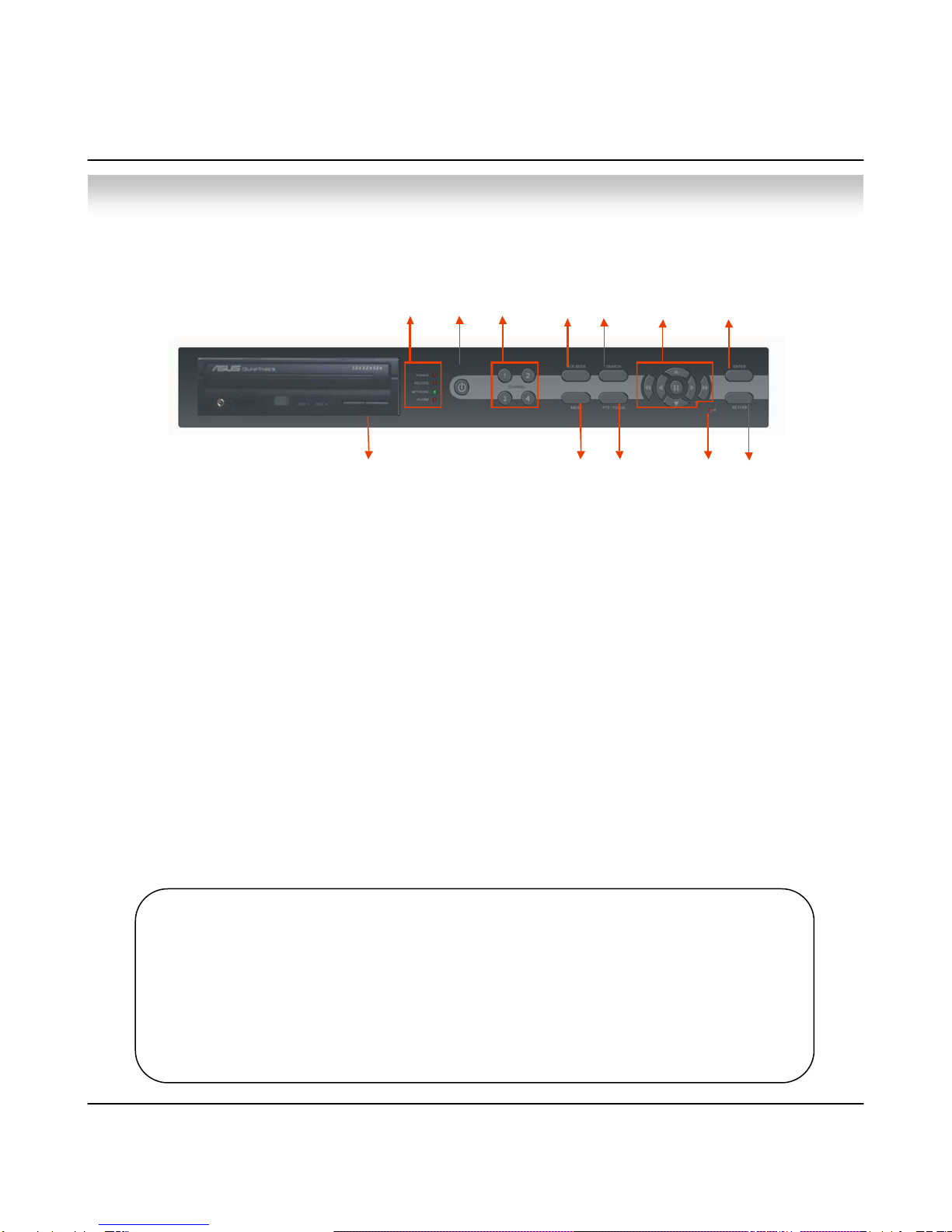
1. Power : System Power On/Off.
2. LED Indicator : Indicate Present System Situation
( POWER: System On/Off , RECORD: Record On/Off , 1
NETWORK: Client Network Connect On/Off , ALARM: Alarm Sensor On/Off )
3. Channel Select Button : When Select Channel or Input Password
4. SCR Mode : When Select Screen Division Mode or Rotation Mode
5. Menu : Go to System Menu
6. Search : Go to Search Mode for Searching Recorded Video
7. PTZ/Focus : Go to Camera PTZ/Focus Control
8. Remote Controller Sensor Input
9. Search Controller : Searching Recorded Video or Control Menu & PTZ/Focus
10. Enter : Press Enter to Apply Changing Setup
11. Return : Cancel Setup or Return Previous Mode
12. CD-RW Burner
2.1 Front Panel
Tip • Power Button is soft style to Prevent System Failure by wrong operation.
• Channel Selection Button is prior to SCR mode.
• When Remote Controller Sensor Input is blocked by something, it cause 1
remote controller do not work properly.
• When press any button, it operate with Beep Sound.
112 346
811
10
9
75
12
Autres manuels pour MP4 SDVR
1
Table des matières
Autres manuels Triplex DVR

Triplex
Triplex HS-400STB Manuel utilisateur

Triplex
Triplex Removable HDDCD-RW Manuel utilisateur

Triplex
Triplex T3200-DVR Manuel utilisateur

Triplex
Triplex Nextwork DVR Manuel utilisateur

Triplex
Triplex MP4 SDVR Manuel utilisateur

Triplex
Triplex H.264 Network DVR Manuel utilisateur

Triplex
Triplex H.264 Network DVR Manuel utilisateur

Triplex
Triplex MPEG-4 Manuel utilisateur


