Trio MC508 P848 Manuel utilisateur

QUICK START GUIDE
TECHNOLOGY
MC508
P848 | P849
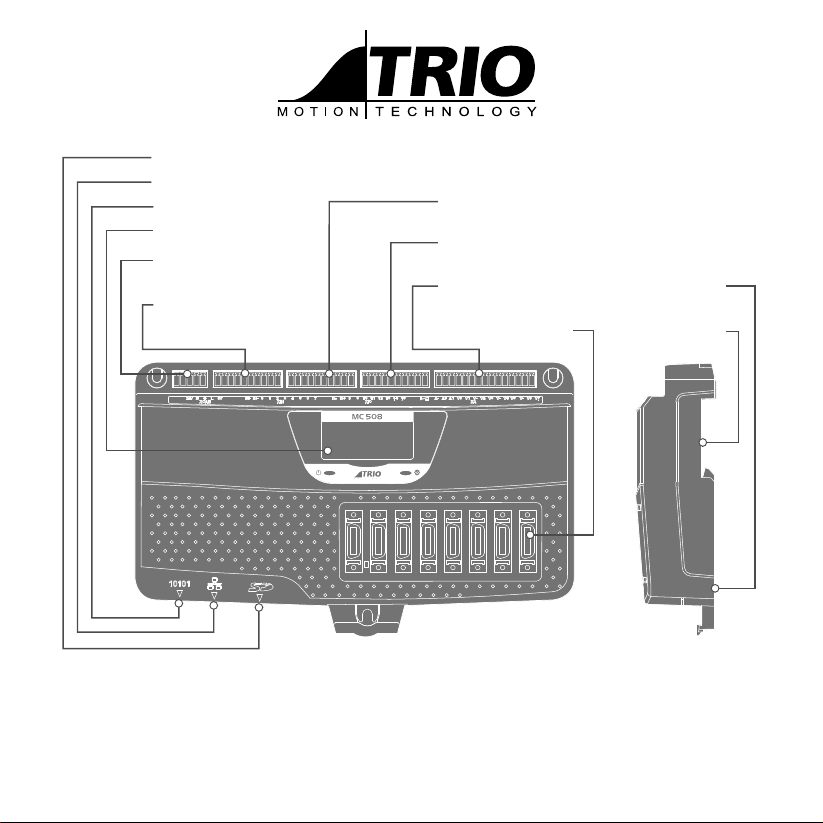
16 PNP OR NPN INPUTS
INC 8 REGISTRATION
(I-O CONNECTOR 1)
CAN / DEVICENET SLAVE /
USER PROGRAMMABLE
(5 WAY CONNECTOR) ALALOGUE IN
DIGITALOUT / WDOG
(I-O CONNECTOR 4)
8 DIGITAL OUTPUTS
(I-O CONNECTOR 3)
SERIAL PORT
ETHERNET PORT
MICRO SD CARD
BACKLIT DISPLAY
8 DIGITAL OUTPUTS
(I-O CONNECTOR 2)
8 MDR FLEXIBLE AXIS PANEL OR
DIN MOUNT
CHASSIS
EARTH SCREW

2
SAFETY WARNING
During the installation or use of control systems, users of Trio products must ensure that there is no possibility of injury to any
person or damage to machinery.
Control systems, especially during installation, can malfunction or behave unexpectedly. Bearing this in mind, users must
ensure that even in the event of a malfunction or unexpected behaviour, the safety of an operator or programmer is never
compromised.
5-WAY CONNECTOR
This is a 5 way 3.5mm pitch connector. The connector is used both to provide the 24 Volt power to
the MC508 and provide connections for I/O expansion via Trio’s CAN I/O expanders. A 24V dc, Class 2
transformer or power source must be provided as this powers the unit.
This 24 Volt input is fully isolated.
THE 24V (V+) AND 0V (V-) MUST BE CONNECTED AS THEY POWER THE MC508. THE MC508 IS
GROUNDED VIA THE METAL CHASSIS. FIT A SHORT SHIELD CONNECTION BETWEEN THE CHASSIS
EARTH SCREW AND THE EARTHED METAL MOUNTING PANEL / PLATE. THE CAN CONNECTIONS
ARE OPTIONAL.
See the Technical Reference Manual for important power connection EMC information.
ETHERNET CONNECTOR (RJ45)
A standard Ethernet connector is provided for use as the primary programming interface.
The Trio programming software, Motion Perfect, must be installed on a Windows based PC that is tted with
an Ethernet connection. The IP address is displayed on the MC508 display for a few seconds after power-up or
when an Ethernet cable is plugged in.
Ethernet cable must be CAT 5 or better.
SERIAL CONNECTIONS
Pin Function Note
1 RS485 Data In A Rx+ Serial Port #2
2 RS485 Data In B Rx-
3 RS232 Transmit Serial Port #1
4 0V Serial
5RS232 Receive Serial Port #1
65V Output 150mA max*
7 RS485 Data Out Z Tx- Serial Port #2
8 RS485 Data Out Y Tx+
*400mA total shared with encoders
V+
CAN_H
SHIELD
CAN_L
V-
Input Common A
N/C
Input 0
Input 1
Input 2
Input 3
Input 4
Input 5
Input 6
Input 7
Input Common B
N/C
Input 8
Input 9
Input 10
Input 11
Input 12
Input 13
Input 14
Input 15
OP 0V B
OP 24V B
output 16
output 17
output 18
output 19
output 20
output 21
output 22
output 23
WDOG +
WDOG -
analogue 0V
Ain 0
analogue 0V
Ain 1
OP 0V A
OP 24V A
output 8
output 9
output 10
output 11
output 12
output 13
output 14
output 15
8
7
6
5
4
3
1
2

3
I/O CONNECTOR 1
PNP (current sink) operation: Connect common to 0V.
NPN (current source) operation: Connect common to 24V.
Any input, 0 - 7, may be mapped to any axis as a registration input.
I/O CONNECTOR 2
PNP operation: Connect common to 0V.
NPN operation: Connect common to 24V.
I/O CONNECTOR 3
24V Power / Outputs 8 - 15
V+
CAN_H
SHIELD
CAN_L
V-
Input Common A
N/C
Input 0
Input 1
Input 2
Input 3
Input 4
Input 5
Input 6
Input 7
Input Common B
N/C
Input 8
Input 9
Input 10
Input 11
Input 12
Input 13
Input 14
Input 15
OP 0V B
OP 24V B
output 16
output 17
output 18
output 19
output 20
output 21
output 22
output 23
WDOG +
WDOG -
analogue 0V
Ain 0
analogue 0V
Ain 1
OP 0V A
OP 24V A
output 8
output 9
output 10
output 11
output 12
output 13
output 14
output 15
Optical
Input
Signal
Common
Input
6k8
V+
CAN_H
SHIELD
CAN_L
V-
Input Common A
N/C
Input 0
Input 1
Input 2
Input 3
Input 4
Input 5
Input 6
Input 7
Input Common B
N/C
Input 8
Input 9
Input 10
Input 11
Input 12
Input 13
Input 14
Input 15
OP 0V B
OP 24V B
output 16
output 17
output 18
output 19
output 20
output 21
output 22
output 23
WDOG +
WDOG -
analogue 0V
Ain 0
analogue 0V
Ain 1
OP 0V A
OP 24V A
output 8
output 9
output 10
output 11
output 12
output 13
output 14
output 15
V+
CAN_H
SHIELD
CAN_L
V-
Input Common A
N/C
Input 0
Input 1
Input 2
Input 3
Input 4
Input 5
Input 6
Input 7
Input Common B
N/C
Input 8
Input 9
Input 10
Input 11
Input 12
Input 13
Input 14
Input 15
OP 0V B
OP 24V B
output 16
output 17
output 18
output 19
output 20
output 21
output 22
output 23
WDOG +
WDOG -
analogue 0V
Ain 0
analogue 0V
Ain 1
OP 0V A
OP 24V A
output 8
output 9
output 10
output 11
output 12
output 13
output 14
output 15
Optical
Output
Control
Signal
OP 24V A
Protected
Switch

4
I/O CONNECTOR 4 (WDOG / OUTPUTS / ANALOGUE INTPUTS)
24V must be applied to power the outputs, analogue inputs and
DAC outputs on the axis connector.
AMPLIFIER ENABLE (WATCHDOG) RELAY OUTPUT
An internal solid-state relay is used to enable external ampliers
when the controller has powered up correctly and the system and
application software are ready. The enable relay contact will be open
circuit if there is no power on the controller OR the user program
sets it open with the WDOG=OFF command. Each axis also has an
independent enable relay which operates in tandem with the main
relay as determined by the application program. See MC4 range
technical manuals for details.
ALL STEPPER AND SERVO AMPLIFIERS MUST BE INHIBITED
WHEN THE AMPLIFIER ENABLE OUTPUT IS OPEN CIRCUIT.
ANALOGUE INPUTS
Ain0: 0 to 10V
AIN1: 0 TO 10V
ANALOGUE OUTPUTS
Vout0 to Vout7
Output: +/-10V at 5mA
Output impedance: 100 Ohms.
Common 0V return.
Via Flexible Axis connectors.
V+
CAN_H
SHIELD
CAN_L
V-
Input Common A
N/C
Input 0
Input 1
Input 2
Input 3
Input 4
Input 5
Input 6
Input 7
Input Common B
N/C
Input 8
Input 9
Input 10
Input 11
Input 12
Input 13
Input 14
Input 15
OP 0V B
OP 24V B
output 16
output 17
output 18
output 19
output 20
output 21
output 22
output 23
WDOG +
WDOG -
analogue 0V
Ain 0
analogue 0V
Ain 1
OP 0V A
OP 24V A
output 8
output 9
output 10
output 11
output 12
output 13
output 14
output 15
Ain
0V
22k
22k 30pF
A to D
CONVERTER
0V
Vout
0V
100R
100nF
0V
D to A
CONVERTER
Amplier
Enable 1
Amplier
Enable 2
Trio Controller Servo Amplier En-
able or Safety Relay
24V 0V 0V
Enable

5
FLEXIBLE AXIS CONNECTOR
Pin Incremental
Encoder Function
Pulse & Direction
Function
Pulse &
Direction
Function
(P8 49 ONLY)
Absolute
Encoder
Function
1 Enc A(n) Pulse(n) Pulse(n) Clock(n)
2 Enc /A(n) /Pulse(n) /Pulse(n) /Clock(n)
3Enc B(n) Dir(n) Dir(n) NC
4 Enco /B(n) /Dir(n) /Dir(n) NC
5 +5V Enc (100mA max.)
6 Do not connect
7WDOG(n)+
8WDOG(n)-
9 Input A+ (16 + n*2)
10 Input A/B Common
11 Enc Z(n) Enable(n) Pulse(n+8) Data(n)
12 Enc /Z(n) /Enable(n) /Pulse(n+8) /Data(n)
13 NC NC Dir(n+8) NC
14 NC NC /Dir(n+8) NC
15 0V Enc
16 Do not connect
17 VOUT + (n)
18 VOUT - (n)
19 Do not connect
20 Input B + (17 + n*2)
Shell Screen
1. n=axis number
2. WDOG(n)+/- = normally open solid state relay, rated 24V@100mA (one per axis)
3. Input A/B Common, 0V_Enc & VOUT- are all isolated so must be connected with the correct signals.
4. +5V Output 400mA maximum current output is shared between all 8 axis connectors and the serial connector. 100mA
maximum per axis connector.
1
10
11
20

6
LCD DISPLAY
The IP address and subnet mask of the MC508 is shown on the LCD display for a few seconds after power-up. The factory default
IP address is 192.168.0.250. This can be changed using the ETHERNET or the IP _ ADDRESS command via Motion Perfect.
0
1
2
3
4
5
6
7
8
9
10
11
12
13
14
15
ENABLE
0
1
2
3
4
5
6
7
8
9
10
11
12
13
14
15
Display at start-up Display with WDOG on
Good quality screened cables should be used for the serial ports. The serial ports and CANbus port are not
galvanically isolated, therefore the 0V return MUSTbe connected to all peripheral devices. In addition, bond
together the 0V (24V return) terminals of all system components so as to minimise current owing in the serial
cables.

7
CHASSIS MOUNTING DIMENSIONS (LOOKING FROM FRONT)
M4 screws should be used in 3 places to mount the MC508 to an unpainted metal panel.
The best EMC performance is obtained when the MC508 is attached from the shield screw (marked) using a at braided
conductor with a cross section of 4mm x 1mm. Do NOT use a circular section wire or run the braid to a central star point.
116mm
210mm
105mm
Shield Screw

UK | USA | CHINA | INDIA
WWW.TRIOMOTION.COM
THE MOTION SPECIALIST
CAD data Drawings to aid packaging and mounting are available in various formats from the Trio web site. Products should be
wired by qualied persons.
Specications may change without notice. E & OE
Quick Start v2 March 2017
154mm
184mm
56mm
186mm
122mm
35mm
226mm
132mm
35mm
135mm
122mm
35mm
270.97mm
212.97mm
40mm
200.35mm
146.35mm
34.0mm
120mm
157mm
107mm
40mm
147mm
15mm15mm15mm
17mm17mm
120mm
157mm
40mm 120mm
157mm
40mm
170mm
129mm
25mm
130mm
26mm 85mm
120mm
157mm
40mm
Ce manuel convient aux modèles suivants
1
Table des matières
Autres manuels Trio Contrôleurs

Trio
Trio Flex-6 Nano P601 Manuel utilisateur

Trio
Trio MC664 Manuel utilisateur

Trio
Trio MC664 Mode d’emploi

Trio
Trio MC302X Manuel du produit

Trio
Trio Motion Coordinator MC216 Manuel du produit

Trio
Trio MC405 Mode d’emploi

Trio
Trio MC403-X Manuel utilisateur

Trio
Trio MC206X Mode d’emploi

Trio
Trio MC302X Mode d’emploi

Trio
Trio MC508 Mode d’emploi