
Tribit BTS60 Manuel utilisateur

Soundbar Speaker
English User Manual
Benutzerhandbuch | Guide Utilisateur | Manual de Usuario
Manuale Utente | 取扱説明書
2.1 Channel Soundbar
BTS60
Find more about Declaration of Conrmity, please click the
below link to download:
http://les.tribit.com/bts60-uk-doc.pdf
Um mehr über die Konformitätserklärung zu erfahren,
klicken Sie bitte auf den folgenden Link:
http://les.tribit.com/bts60-uk-doc.pdf

English User Manual
Benutzerhandbuch
Guide Utilisateur
Manuale Utente
Manual de Usuario
取扱説明書
01
10
18
26
34
42

EN EN
- 1 - - 2 -
Soundbar Control Button
Tribit Home Soundbar
Optical Cable
HDMI Cable
Mounting Kit
Remote Control
Power Cable
Power
Source
VOL-
EQ Mode
VOL+
Bluetooth
Packing List

EN EN
- 3 - - 4 -
Input Functions
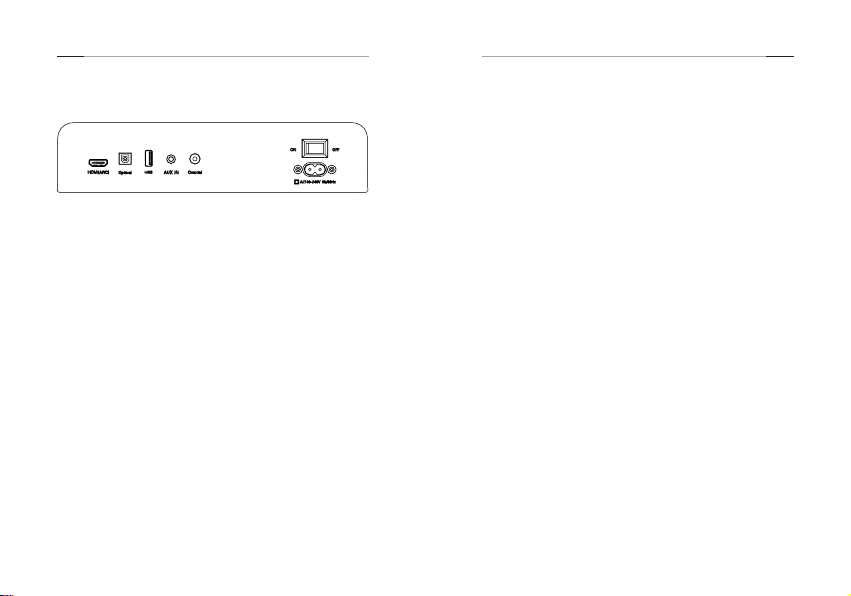
1. AC Power Input:
Use included AC power cable to connect AC 100V-240V
2. HDMI (ARC) Mode:
(1) Using the HDMI cable connect the HDMI(ARC)
connector on the soundbar to the HDMI ARC connector
on the TV.(HDMI ARC port on TV may be labelled
differently,For details,see the TV user manual.)
(2) Go to setting in your TV menu to select source as
HDMI(ARC) mode. For details, see the TV manual.(may
vary due to different brand)
1) Setting>Sound>select speaker to: extemal
speaker(ARC mode)/turn off TV speaker
2) Setting>Sound(audio)>advanced Audio>digital audio
output>PCM Setting> Sound(audio)>audio output
format>PCM/Dolby off
3. Optical Mode:
(1) Using the provided optical cable connected to the TV.
(2) Select optical mode using the remote by pressing the
Source button, and the soundbar indicator will show
OPTIC.
(3) Go to Setting in your TV menu
4. AUX Mode:
(1) Turn on the soundbar, Select AUX mode using the
remote by pressing the Source button or press the
source button on the right side of soundbar, and the
soundbar indicator will show AUX.
(2) Plug in the 3.5mm AUX cable(not included) to the aux in
connector on the soundbar and start playing from the
music device.
5. Coaxial Mode:
(1) Using the Coaxial cable (not included) connected to the
TV.
(2) Select Coaxial mode using the remote by pressing the
Source button, and the soundbar indicator will show
COAXI
(3) Go to Setting in your TV menu.
6. Bluetooth Connect:
(1) Press the Source button to choose Bluetooth mode until
BT is shown on the LED display.
(2) Press the bluetooth button onthe remote control or on
the right side of soundbar
(3) Search for new device on your Bluetooth player.
(smartphone, tablet, computer.) Choose the device
named Tribit Soundbar in the list of new devices
detected and select it.

EN EN
- 5 - - 6 -
Remote Control Battery
replacement
Remote Control
Button Function
Power on/off
MUTE Mute the sound
SOURCE Shifting Input mode between
HDMI(ARC)/Optical/Coaxial/
BT/AUX/USB
Vol+ Increase volume
VoL- Decrease volume
Previous track
Play/Pause
Next track
MOVIE Entering to MOVIE EQ mode
GAME Entering to GAME EQ mode
MUSIC Entering to MUSIC EQ mode
NEWS Entering to NEWS EQ mode
Entering bluetooth pairing
①Remove the battery
compartment cover.
②Inseert 2AAA
batteries (Not
included) according
to the marking inside
compartment .
③Close the
compartment.
Equalizer Modes:
The soundbar has 4 equalizer presets, tailored to complement
various styles of music. Press the EQ modes button on the
remote or the right side of soundbar to choose between
Music, Movie, News, Game.

EN EN
- 7 - - 8 -
Specifications
Output Power 25W*2+50W
Frequency Response 50Hz-20KHz
Bluetooth Version 5.0
Power Input 100-240V 50/60Hz
Function HDMI(ARC) , Optical, Coaxial,
Bluetooth, USB
EQ Mode Music, Movie, News, Game
Size
Changes or modications not expressly approved by the party
responsible for compliance could void the user’s authority to
operate the equipment.
This equipment has been tested and found to comply with
the limits for a Class B digital device, pursuant to Part 15
of the FCC Rules. These limits are designed to provide
reasonable protection against harmful interference in a
residential installation. This equipment generates uses and
can radiate radio frequency energy and, if not installed and
used in accordance with the instructions, may cause harmful
interference to radio communications. However, there is
no guarantee that interference will not occur in a particular
installation. If this equipment does cause harmful interference
to radio or television reception, which can be determined by
turning the equipment off and on, the user is encouraged to
try to correct the interference by one or more of the following
measures:
-- Reorient or relocate the receiving antenna.
-- Increase the separation between the equipment and
receiver.
-- Connect the equipment into an outlet on a circuit different
from that to which the receiver is connected.
-- Consult the dealer or an experienced radio/TV technician for
help
This device complies with part 15 of the FCC rules. Operation
is subject to the following two conditions (1)this device may
not cause harmful interference, and (2) this device must accept
any interference received, including interference that may
cause undesired operation.
FCC Statement
Wall mounting
1. Measure ?mm and drill 2 parallel hole(1/4 in each) in the
wall.
2. Firmly apply a dowel into each hole in the wall.(dowel
only required for solid wall)
3. Install the bracket to the wall using screw
4. Attach the soundbar to the bracket , and press and push
the soundbar to the right location.

EN EN
- 9 - - PB -
English:
This device complies with Industry Canada licence-exempt
RSS standard(s).
Operation is subject to the following two conditions: (1)
This device may not cause interference, and (2) This device
must accept any interference, including interference that
may cause undesired operation of the device.
French:
Le présentappareilestconforme aux CNR d'Industrie
Canada applicables aux appareils radio exempts de licence.
L'exploitationestautorisée aux deux conditions suivantes:
(1) l'appareil ne doit pas produire de brouillage, et
(2) l'utilisateur de l'appareildoit accepter tout
brouillageradioélectriquesubi, mêmesi le brouillageest
susceptible d'encompromettre le fonctionnement.
IC Caution

DE DE
- 10 - - 11 -
Lautsprecher Betätigungsknopf
Tribit Home Lautsprecher
Optisches Kabel
HDMI Kabel
Montagesatz
Fernbedienung
Stromkabel
Leistung
Quelle
VOL-
EQ Modus
VOL+
Bluetooth
Paketliste
DE DE
- 12 - - 13 -
Eingabefunktion
1. AC Leistungseingang:
Schließen Sie den AC 100V-240V über das mitgelieferte
Netzkabel an.
2. HDMI(ARC) Modus:
(1) Verwenden Sie das HDMI-Kabel, um den HDMI(ARC)
Anschluss am Lautsprecher an den HDMI ARC-
Anschluss am Fernseher anzuschließen. (HDMI ARC
Anschluss auf dem Fernseher können unterschiedlich
gekennzeichnet werden. Weitere Informationen finden
Sie im Benutzerhandbuch für den Fernsehmodus. )
(2) Gehen Sie zur Einstellung in Ihrem TV Menü, um die
Quelle als HDMI (ARC) Modus auszuwählen. Weitere
Informationen nden Sie im Benutzerhandbuch für den
Fernsehmodus.(kann aufgrund der unterschiedlichen
Marke variieren)
1) >Klang>Lautsprecher wählen: Externe Lautsprecher
(ARC Modus)/TV-Lautsprecher ausschalten
2) Einstellung>Klang(Audio)>Erweitertes Audio>Digitaler
Audioausgang>PCM Auftellen> Klang(Audio)>Audioaus
gabeformat>PCM/Dolby aus
3. Optischer Modus:
(1) Schließen Sie den Fernseher über das mitgelieferte
optische Kabel an.
(2)Drücken Sie die Quellknopf, um den optischen
Modus mit der Fernbedienung auszuwählen, und die
Lautsprecheranzeige zeigt OPTISCH.
(3) Wechseln zu den Einstellungen im TV-Menü.
4. AUX Modus:
(1) Schalten Sie den Lautsprecher ein und drücken Sie
den Quellknopf der Fernbedienung oder den Quellknopf
auf der rechten Seite des Lautsprechers, um den AUX
Modus auszuwählen. Und die Lautsprecheranzeige zeigt
AUX.
(2)Schließen Sie das 3,5-mm-AUX-Kabel (nicht im
Lieferumfang enthalten) an den Aux-Anschluss an dem
Lausprecher an, und das Musikgerät beginnt zu spielen.
5. Koaxialer Modus:
(1) Schließen Sie den Fernseher über das koaxiale Kabel
(nicht im Lieferumfang enthalten) an.
(2) Drücken Sie den Quellknopf der Fernbedienung,
um den koaxialen Modus auszuwählen. Und die
Lautsprecheranzeige zeigt COAXI.
(3) Wechseln zu den Einstellungen im TV-Menü.

DE DE
- 14 - - 15 -
Fernbedienung
Knopf Funktion
Power ein/aus
MUTE Stummschaltung
SOURCE
Wechseln des Eingabemodus
zwischen HDMI(ARC)/Optisch/
Koaxial/BT/AUX/USB
Vol+ Lautstärke erhöhen
VoL- Lautstärke verringern
Vorheriger Schritt
Spielen/Pause
Nächster Schritt
MOVIE in den FILM EQ Modus wechseln
GAME in den SPIEL EQ Modus wechseln
MUSIC in den MUSIK EQ Modus wechseln
NEWS in den NACHRICHTEN EQ Modus
wechseln
Eingabe der Bluetooth Kopplung
6. Bluetooth Verbindung:
(1) Drücken Sie die Quelltaste, um den Bluetooth-Modus
auszuwählen, bis BT auf der LED-Anzeige angezeigt wird.
(2) Drücken Sie die Bluetooth-Taste der Fernbedienung
oder die Bluetooth-Taste auf der rechten Seite des
Lautsprechers
(3) Suchen Sie auf Ihrem Bluetooth-Player nach einem
neuen Gerät. (Smartphone, Tablet, Compter.) Wählen Sie
das Gerät mit dem Namen Tribit Soundbar in der Liste
der erkannten neuen Geräte aus, und wählen Sie es
dann aus.
Equalizer-Modus:
Die Soundbar verfügt über 4 Equalizer-Presets, die auf eine
Vielzahl von Musikstilen zugeschnitten werden können.
Drücken Sie den EQ-Modus der Fernbedienung oder den
EQ-Modus auf der rechten Seite des Lautsprechers, um
zwischen Musik, Film, Nachrichten, Spiel auszuwählen.
Table des matières
Langues :


