1.9BluetoothDisconnect:WhentheBluetoothisinthemodeofdisconnected,thenotification
willbe“notconnection”IfyoudisconnectyourBluetoothdevicewiththespeaker,theLEDlight
willstarttwinklingquickly,itmeansthespeakerisinthepairingmode.Ifthereisnodevicetobe
pairedwiththespeaker;Ifyoudisconnectyourphoneandspeaker,butforgettocloseour
Bluetoothspeaker,itwillturnoffautomaticly5minuteslater.Ifyourphoneisconnectedwiththe
speaker,whileyouhaveacallcomesin,andyouansweringthecall,youleaveawayfromthe
speaker,sincethedistancewillcausethespeakerandyourphonedisconnected,youwillhearthe
notification”notconnection”fromourspeaker,Sowesuggestyouneedtoanswerthecallclosed
totheBluetoothspeaker.Anothersituation,ifyouraudiodeviceistakenawayfromourbluetooth
speakerwhileitisconnected,itwillbedisconnectedsincethedistancebetweenthem,youalso
canhear”notconnection”.onceyouclosetothespeakeritwillconnectwiththespeaker
automaticallyandvoiceout”paired”.Thenyoucanplayyourmusicagain.
2.0NFCoperations:PleasechecktheNFCmarkonthesiliconecover,nearFieldcommunication,
isassetofstandardforsmartphoneandthisspeakertoestablishBluetoothradiocommunication
witheachotherbytouchingthemtogetherorbringingthemintocloseproximity,usuallynomore
thanafewcentimeters.Youshouldalwayspayattentiontoyourphone’sscreentofocusonthe
stepstofinishtheconnectingwithourbluetoothspeaker.
‐YoucanpairupthedevicebyNFCtriggering.
‐MakesureyourmusicdeviceormobilephonedohavetheNFCfunction.Pleaserefertoyour
musicdeviceormobilephoneinstructionmanualfordetail.
‐MakesuretheNFCfunctionandSBeamfunctionarebothenabledatyourmusicdeviceormobile
phone.Pleaserefertoyourmusicdeviceormobilephoneinstructionalmanualfordetail.
‐SwitchonourBluetoothspeaker.
‐PlacethemusicdeviceormobilephoneonourbluetoothspeakerwheretheNFClocated.The
musicdeviceormobilephonewillpromptanewBluetoothdeviceisfoundandwouldyouliketo
pairitup.Pickupthemusicdeviceorthemobilephone(Youarestronglysuggestedtopickupthe
musicdevicebeforeacceptingtopairingupinordertoreducethesignalinterference).Nowyou
canpressonthemusicdeviceormobilephonetoacceptpairingupwiththefoundedbluetooth
device.Oncethedeviceisconnectedwithourbluetoothspeaker,itwillvoiceout“paired”Repeat
theaboveprocessagaintounpairourbluetoothspeaker.
Important:Forsomesmartphones,pleaseactivetheNFCfunction(subjectstophone’sown
setting)andBluetoothfunctionofyoursmartphoneatthesametime.
(NFCOnlyreceiverfunction)
2.1Buttonfunction:Thespeakerwiththefunctionlikesvolumecontrol,songstracking,
play/pauseect,handsfree,allthefunctionswillbecometurebyoperatingthebuttonsonthe
siliconecover.
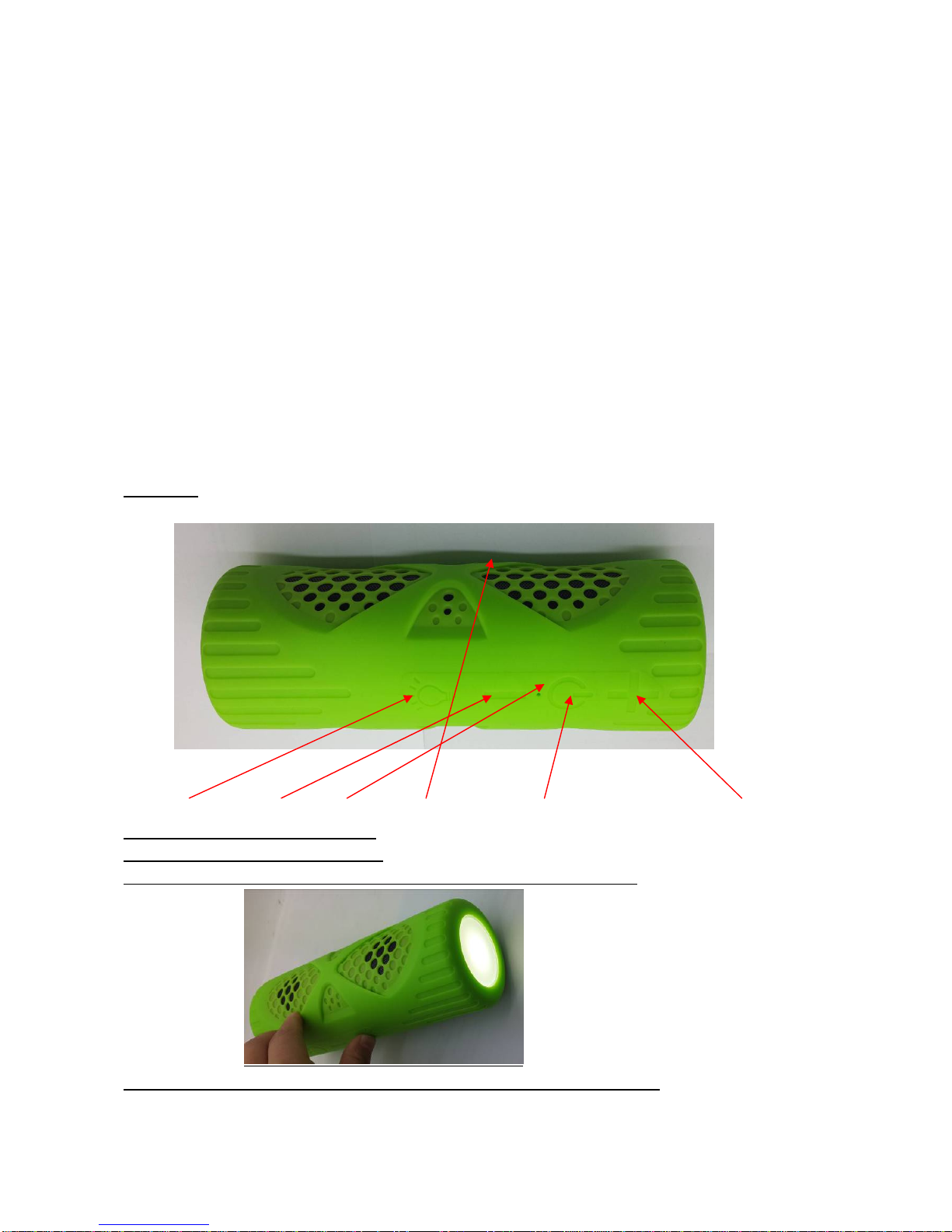
2.1.1ON/OFFbuttononthespeaker,(seeDiagram1below).
2.1.2VOL‐/BWDbuttonfunction(seeDiagram1below):Longpressthebuttoniscontrolthe
volume“‐“(VOL‐/FWD),shortpressthebuttonisforthesongsbackwardandforward.
2.1.3VOL+/FWDbuttonfunction(seeDiagram1below):Toincreasevolumepress“+”
(VOL+/FWD)buttonandhold,togotonextsongpressthebuttonshortly.
2.1.4PLAY/PAUSEbuttonfunction(seeDiagram1below):Whenplayingmusic,thePlay/Pause
cancontrolplayingtheaudiosource,shortpressPlay/Pausebuttontopauseorplaymusic.
2.2MicroUSBCharging/Aux‐inport:Theseportsareonthetopoftheunit,Youcanchargethe
built‐inLi‐IonbatteryviathemicroUSBport,youcanseeRedLEDlightwillbelightenup.Ifyou
connectyourdeviceandthespeakerviatheaudiocable,thespeakercanplaymusicdirectly.