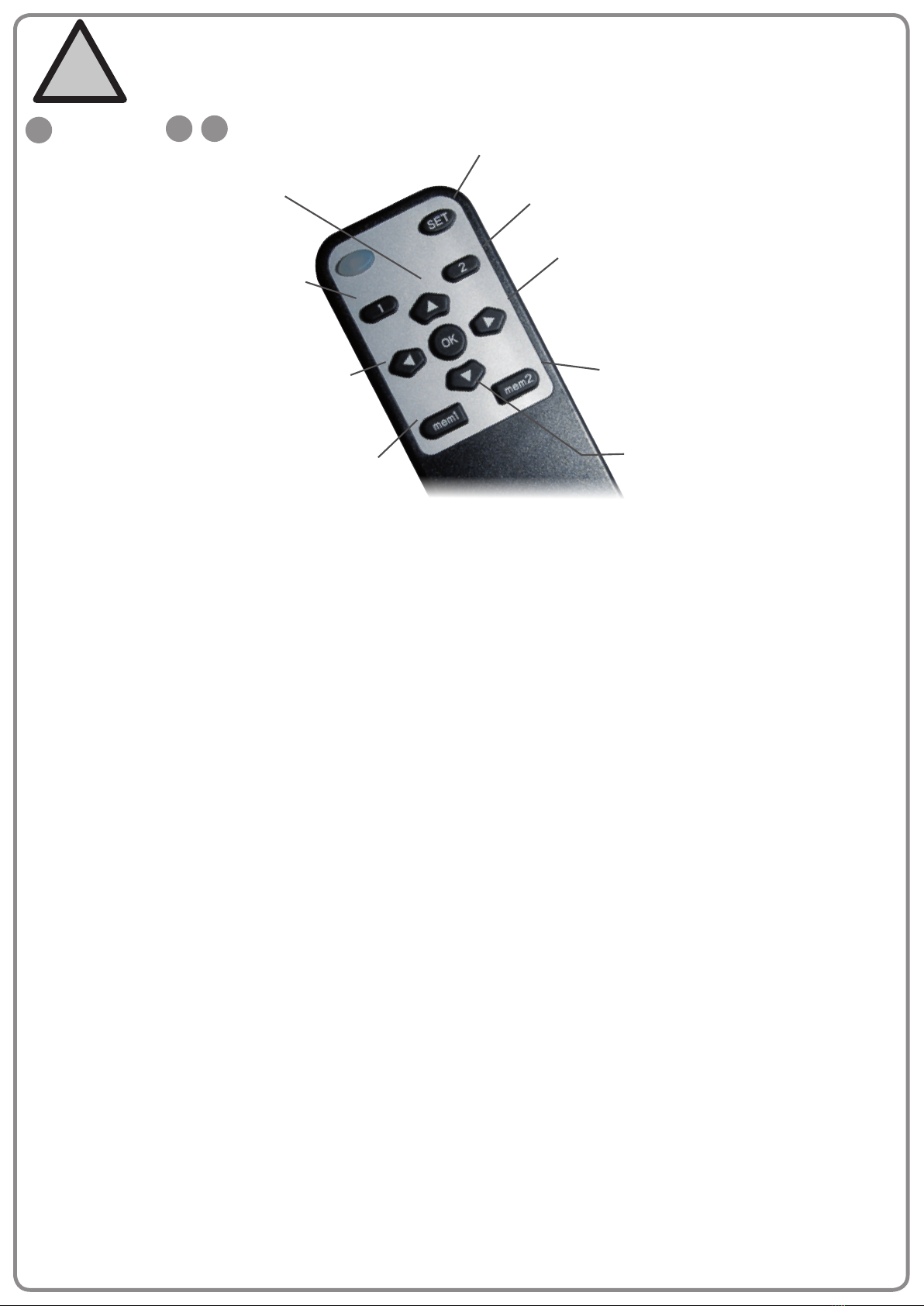
learn mode
: Stop Button
OK +
OK
SET
: Learning Button
Before power connection, be sure that bracket and the TV installed correctly.
Keep the children away from power.
!
IN
Press and release.
(The TV wall mount will automatically
return to rest against the wall)
left swivel
Press and release.
(The TV wall mount will swivel to the left until OK is
pressed or the TV wall mount swing to -30° to stop)
NOTE: Using this button is valid only when the
wall mount fully unfolds.
right swivel
Press and release.
(The TV wall mount will swivel to the right until OK is
pressed or the TV wall mount swing to 30° to stop)
NOTE: Using this button is valid only when the wall
mount fully unfolds.
memory 1
Press and hold for 5 seconds.
(The buzzer will sound twice, LED light turn on for 1
second, The memory is saved as location 1)
memory 2
Press and hold for 5 seconds.
(The buzzer will sound twice, LED light turn on for 1
second, The memory is saved as location 2)
location 1
Press and release, than press OK.
(The TV wall mount will automatically swivel
to the location 1 after buzzer sounds once)
location 2
Press and release, than press OK.
(The TV wall mount will automatically swivel to the
location 2 after buzzer sounds once)
learn mode
OUT
Press and release.
(The TV wall mount will fully unfold)
Remote control operation instruction
1. When powered, the buzzer sounds once beep. TV wall mount will be in standby state.
2. Press OK to return the TV wall mount at against the wall and hear one beep from the buzzer, the system will then enter a
working condition.
3. Follow the key function instructions above to operate.
NOTE:
• If TV wall mount encounters an obstacle or has some damage of machinery part in the process. TV wall mount will stop automati
cally and sound three times.
• When the wall mount meets with an obstacle in the process. Please remove the obstacle and push the wall mount by hand until
returns it at against the wall. The wall mount can normal use after press IN.
LEARN MODE operation instructions
The loss of matched remote control would result in TV wall mount being unusable. The learn mode is used to learn how to use TV
remote (Only suitable for the TV remote of popular brands.) to control TV wall mount.
NOTE:
• TV remote can`t replace the all functions of matched remote control. Only learning the 5 buttons functions.
LEFT SWIVEL, RIGHT SWIVEL, OK, IN and OUT
• The user must follow the rules below when using the TV remote to control TV wall mount.
• Select the alternate buttons from the TV remote, and the button that can`t direct control the TV.
LEARN MODE instructions as shown below
1. Press and hold SET for 5 seconds until LED light on the matched remote control stays on, than press OK. The buzzer will sound
once, the red LED light on the IR receiver will stay on, then the learn mode will be entered.
2. If learn LEFT SWIVEL, please press LEFT SWIVEL on the matched remote control until the buzzer sounds twice. The red LED
light on the IR receiver will change from being steady to a slow ash.
3. Aim the TV remote at the IR receiver, and press the button on the TV remote that you need to set as the function of
LEFT SWIVEL until the buzzer sounds three times. The red LED light on the IR receiver will change from slow ash to a fast
ash
4. Press OK on the matched remote control until the buzzer sounds four times. The red LED light on the IR receiver will turn o.
LEFT SWIVEL button will be learned successfully. If the buzzer only sounds once, then a learn failure. (The TV remote won`t
support the learning function).
(Please follow step 1 through step 4 in turn if the user need to LEARN more buttons)
Learn „Power“ button on the TV remote:
Press and hold SET for 5 seconds until LED light on the matched remote control stays on, and then press OK. The buzzer will
sound once, the red LED light on the IR receiver will stay on, then press and hold LOCATION 1 button on the matched remote
control until the buzzer sounds twice, then release the LOCATION 1 button. The red LED light on the IR receiver will change from
being steady to a slow ash. Aim the TV remote at the IR receiver, and press Power button. The buzzer will sound three times. The
red LED light on the IR receiver will change from slow ash to a fast ash. Press OK Button on the matched remote control until
the buzzer sounds four times. The red LED light on the IR receiver will turn o. Power button will be Learned successfully. If press
power button, the TV wall mount will automatically reset.
NOTE: When there is no activity for over 20 seconds in any step, TV remote will automatically exit from the learn mode.