
TP-Link Tapo T315 Manuel utilisateur

User Guide
Tapo Smart Temperature & Humidity Monitor
© 2023 TP-Link 1910013360 REV1.0.0

Contents
About This Guide ···················································· 1
Introduction ······························································· 2
Appearance ······························································· 3
Tapo Smart Ecosystem······································· 4
Automate Your Home··········································· 5
Set Up Your Smart Monitor ······························· 6
Use Your Smart Monitor······································ 9
How to Reset Your Smart Monitor···············11
Authentication························································12

1
About This Guide
This guide provides a brief introduction to the Smart Temperature & Humidity Monitor and the Tapo app, as well as regulatory information.
Please note that features available in Tapo may vary by model and software version. Tapo availability may also vary by region. All images, steps, and
descriptions in this guide are only examples and may not reect your actual Tapo experience.
Conventions
In this guide, the following convention is used:
Convention Description
Blue Key information appears in blue, including management page text such as menus, items, buttons and so on.
Underline Hyperlinks are in blue and underlined. You can click to redirect to a website.
Note: Ignoring this type of note might result in a malfunction or damage to the device.
More Info
• Specications can be found on the product page at https://www.tapo.com.
• Our Technical Support and troubleshooting information can be found at https://www.tapo.com/support/.
• The setup videos can be found at https://www.tp-link.com/support/ setup-video/#smart-sensors.

2
Introduction
The Smart Temperature and Humidity Monitor with a 2.7" E-ink display detects real-time temperature and humidity with great accuracy. Receive instant
app notications when temperature or humidity levels fall outside your customized ranges. React promptly to sudden air condition changes whenever
the need arises.
• Real-Time & Accurate Monitoring - Detects real-time temperature and humidity with great accuracy. (Measurement Accuracy: ±0.54 ºF, ±3% RH).
• 2.7" E-ink Display - Indicates temperature & humidity, comfort level with facial expressions, battery condition, and signal.
• Home Automation - Automatically turn on/o home electronics (e.g. heater, fan, humidier and more) to maximize conform and save energy.
• Instant App Notication - Receive app alert notication when conditions fall outside preset range.
• Free Data Storage & Visual Graphs - Record temperature and humidity data and generate periodic data summary.
• Flexible Installation - Just place it on the desk or mount it on the wall.
• Hub Required - The Tapo Hub is requried to support smart features, like remote monitoring, home automation, data export and more.

3
Appearance
1
Humidity
5
Display/Reset
Button
4
3Temperature
Vent Hole
2Indicator Icons
You can press the button to switch display position.
Battery Level
Connection
• Blinking: Connecting to hub
• Solid On: Connected to hub
• O: No connection
Battery level 20%
Battery level 5%
Inside Comfort Level
Outside Comfort Level
The default comfort level is temperatures between 20℃(68℉)
- 26℃(78.8℉) while humidity is between 30% - 60%.
You can customi!e the comfort level on the Tapo app.
Indicator Icons
• Single Press
Switch the temperature unit ℃/℉.
• Double Press
Switch the display position of temperature and
humidity.
• Press and hold for 5s
Reset your monitor to enter pairing mode.
Display/Reset Button

4
Tapo Smart Ecosystem
Tapo is the easy way to turn your home into a smart home. With the Tapo Hub as a bridge, Tapo Smart Sensor works with a wide range of Tapo
accessories. So you can easily control and monitor your home from anywhere.
Smart
Button
Motion
Sensor Te
Smart
Switch
Temperature &
Humidity
Monitor

5
Automate Your Home
Create a Smart Action to automate your smart devices and activate them all with motion. Customize your own Smart Actions to group your Tapo
products together any way you want.
Automate Your Appliances
Monitor and adjust your home’s comfort level along
with other Tapo devices.
For example, turn on a heater connected to Tapo smart plug
automatically when the temperature in your home drops too low.
Then switch it o when it’s warm enough to save energy. Also
works on appliances like fans, humidiers and dehumidiers.
Get Instant Alerts
Send you instant app notications when the temperature
or humidity levels fall outside your preset ranges.
Perfect for monitoring your green house, cigar humidors,
wine cellars, instrument cases and more.
Tapo T315
Tapo T315
Tapo Plug
Tapo Hub

6
1. Set Up Your Monitor
Tap the button in the Tapo app, tap
Sensors, and select your model.
2. Power Up Your Monitor
Remove the back panel and insert the
batteries. The screen will light up.
Set Up Your Smart Monitor
Watch setup videos at https://www.tp-link.com/support/download/tapo-t315/
Before You Start
A Tapo Hub is required. Make sure your Tapo
Hub is successfully added via the Tapo app.
OR

7
4. Complete Setup
Follow the app instructions to set up your
monitor.
3. Enter Pairing Mode
Press and hold the button for at least 5
seconds until the Connection icon starts to
blink.
5. Test Your Sensor
Take the monitor to your preferred location.
Make sure the Connection icon on the screen
is solid on. If there is no connection icon,
move it closer to your hub.
8
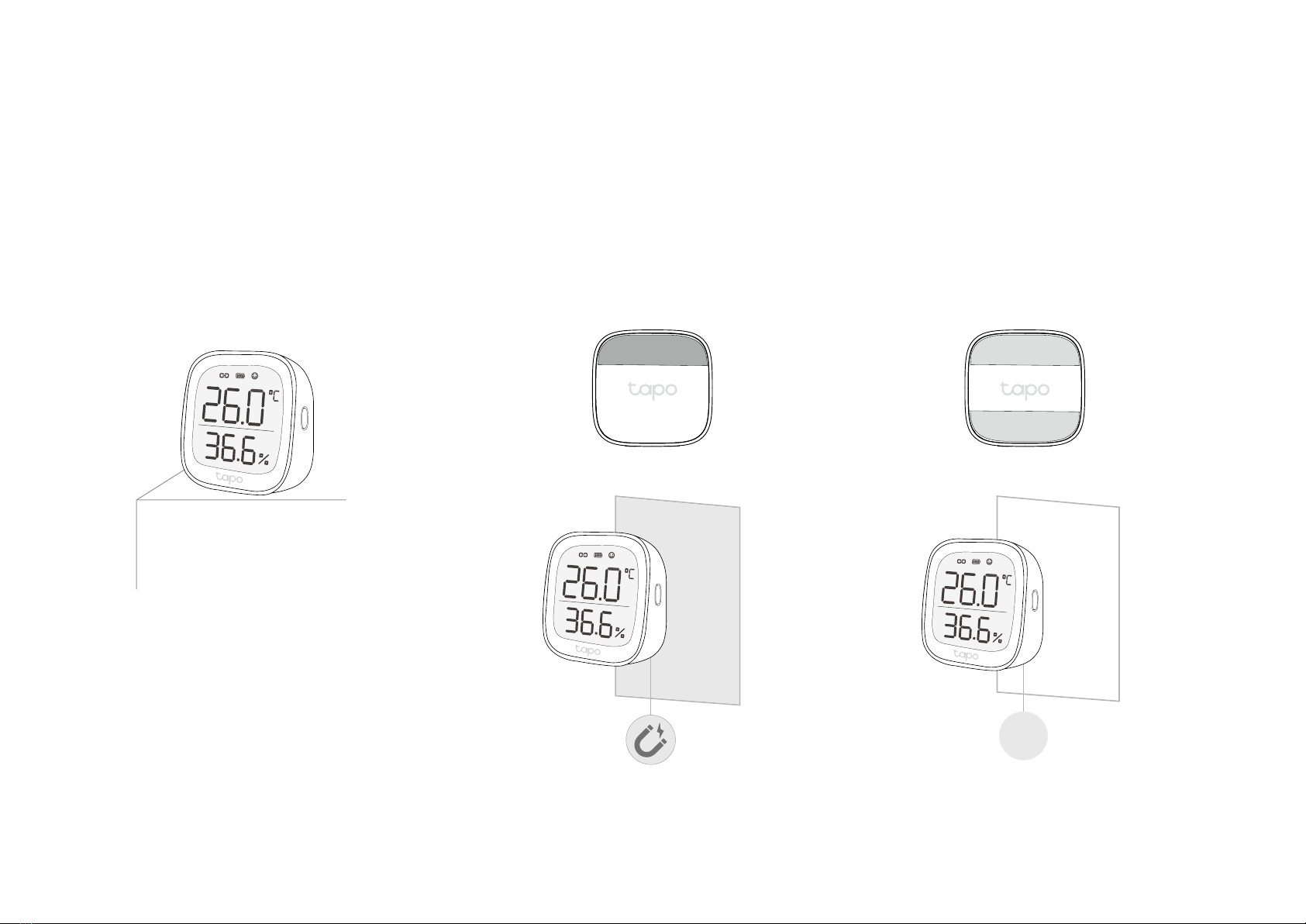
6. Place Your Monitor
Option 1: Place it on a table or a shelf Option 2: Attach the non-slip pad to the back
and magnetically attach to metallic surfaces
Option 3: Stick to a clean wall with the
included adhesive
3M
Autres manuels pour Tapo T315
1
Table des matières


