
TOZED M60 Manuel utilisateur

M60
Gettingconnectedwithyourdevice


Knowingtheappearanceandkeyfunctionsofyourdevice
1.LeftKey 7.CallHistory 13.Mute
2.DirectionKey 8.Configuration 14.Delete
3.SelectKey 9.VolumeUp 15.NumberKey
4.Screen 10.ExternalANT 16.QuickKey
5.RightKey 11.VolumeDown 17.Microphone
6.Contact 12.PowerOn/Off 18.HandfreeKey
19.DialKey

Connectingyourdevice
Tostartusingyourdevice,connectyourdeviceasthefollowing
schematicdiagram.

Note:

ConfiguringyourPC
ThefollowingstepsshowshowtoconfiguretheInternetprotocolinWindows10
systemforWIFIconnection.
1. Goto ControlPanel andfind NetworkandInternet, andthengointo
NetworkandSharingCentre. Select Changeadaptersettings.
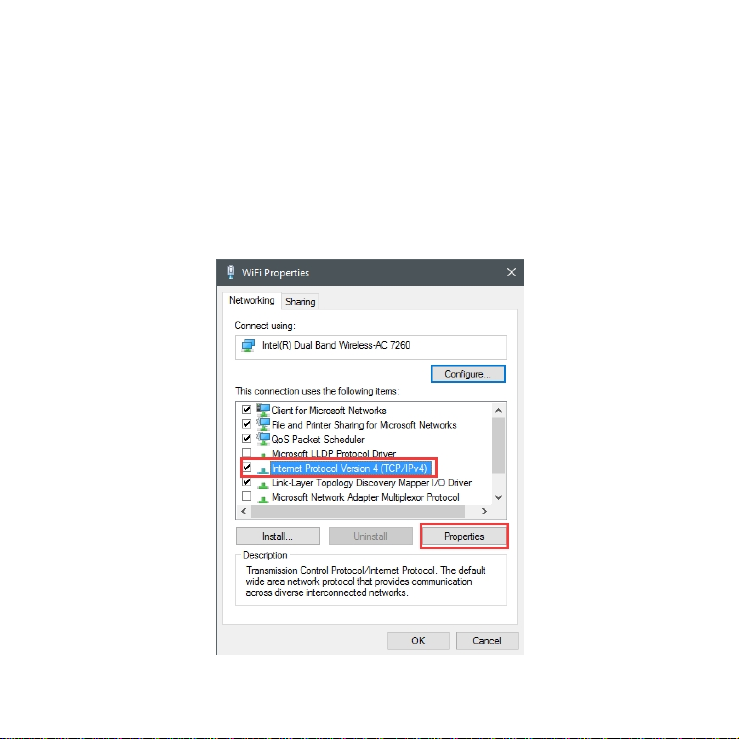
2. Find WirelessNetworkConnection andrightclickit,andthenclick
Properties.In WiFiProperties,double-click InternetProtocolVersion
4(TCP/IPv4),orselect InternetProtocolVersion4(TCP/IPv4) andthen
click Properties.

3. Select ObtainanIPaddressautomatically,and ObtainDNSserver
addressautomatically.Click OK toconfirm.

Wirelessconnection
SelecttheSSIDoncomputerormobilephoneandclick Connect. After
inputtingpassword,theWiFicanbeused(defaultSSIDandpasswordcanbeseen
onM60sticker).

Method2:WPSConnect
PC:SelecttheSSIDoncomputerandclick Connect asabove.Press WPS
Connect inM60 WPSSetting menu,andthenyourcomputerwillconnecttothe
SSIDautomaticallywithoutinputtingpassword.
MobilePhone:Press WPSConnect inM60 WPSSetting menu,andthen
operatephone WLANàMenuàAdvancedSettingsàWPSconnection.The
phonewillconnectwiththeSSIDautomaticallywithoutinputtingpassword.
Note:WPSisenabledbydefault,pleaseloginWebUIandenter Device
Settings àWirelessSettings àWPS toswitchiton/offifneed.
RouterFunctionmenuonM60device
Top
level
Secondary
Remark
Router
Function
WiFiStatus ShowWiFistatus
WiFiSwitch Activate/DeactivateWiFi
WiFiSetting SSID,WPSSettingmenu,etc.
DHCPSettings DHCP switch, local IP, Advanced
Setting
Table des matières


