
Tormach SmartCool Manuel technique

TECHNICAL DOCUMENT
TORMACH.COM
Page 1
©Tormach® 2017. All rights reserved.
Specicaons subject to change without noce.
TD10422_SmartCool_Install_0417A
SmartCool™Install
Product Idencaon: SmartCool Starter Kit (PN 37167)
Purpose: This document details installaon and use of the SmartCool programmable coolant system on a
PCNC 1100™, PCNC 770™, or PCNC 440™ mill with PathPilot®.
This document has 10 secons:
1. Install SmartCool Head Unit 6. Make Control Module Connecons
2. Route Cables on a PCNC 1100 or PCNC 770 7. Calibrate with PathPilot
3. Route Cables on a PCNC 440 8. SmartCool MulCoolant Module (PN 37168)
4. Relocate Flood Coolant Mounng Bracket 9. Programming
5. Make Coolant Connecons 10. Troubleshoong
Qty.SmartCool Starter Kit PN
1 SmartCool Head Unit —
1 Control Module —
1 USB Cable —
1 Tube —
1AC/DC Power Adapter —
1 Mounting Bracket —
2 M6 x 16 mm Socket Head Cap Screw —
2 M6 x 10 mm Button Head Cap Screw —
2 M6 Small Flat Washer —
2 M6 Large Flat Washer —
4Zip Tie Mount 31460
4Zip Tie 32791
1 M5 x 12 mm Socket Head Cap Screw 31353
1 Sheet Metal Screw 31718
NOTE: If any of these items are missing, contact Tormach
Customer Service at (608) 849-8381 for a replacement.
Required Tools:
• Phillips screwdriver • Metric hex wrench set • Adjustable wrench • Wire cutter • M6 x 1 tap1
1PCNC 440 mills serial number 80075 and below require holes to be drilled and tapped to complete assembly.

Tormach, Inc.
P: 608.849.8381 / F: 209.885.4534
tormach.com
TECHNICAL DOCUMENT
Page 2
©Tormach® 2017. All rights reserved.
Specicaons subject to change without noce.
TD10422_SmartCool_Install_0417A
NOTE: If mill is not equipped with an automac tool changer (ATC), an addional mounng bracket is required
for SmartCool install. Refer to the table below for more details.
PN Description
37258 PCNC Coolant 1100 Relocation Bracket
37259 PCNC Coolant 770 Relocation Bracket
37260 PCNC Coolant 440 Relocation Bracket
IMPORTANT! Download and install the latest version of PathPilot before proceeding. PathPilot v1.9.7 or later is
required to use these instrucons. For more informaon, refer to www.tormach.com/updates.
Install SmartCool Head Unit
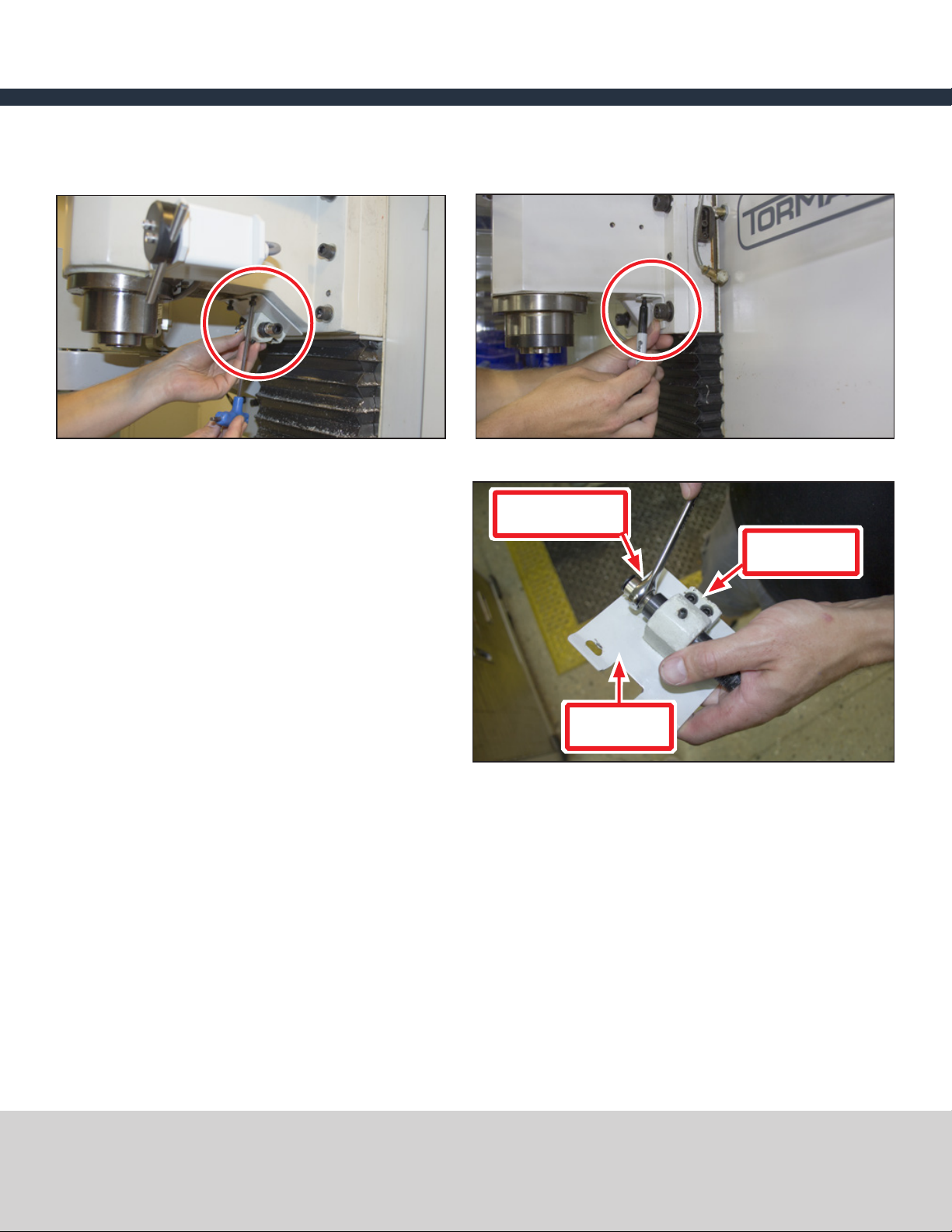
1. Idenfy two pre-exisng mounng holes behind spindle on head casng (see Figure 1).
NOTE: Holes may need to be cleaned of paint prior to use.
PCNC 440 mills serial number 80075 and below require two mounng holes to be drilled and tapped:
• Temporarily place Mounng Bracket behind spindle on head casng
• Mark hole locaons (see Figure 2)
• Drill and tap marks for a M6 x 1 mm screw
Figure 1 Figure 2
Mounting
Bracket
PCNC 440

Tormach, Inc.
P: 608.849.8381 / F: 209.885.4534
tormach.com
TECHNICAL DOCUMENT
Page 3
©Tormach® 2017. All rights reserved.
Specicaons subject to change without noce.
TD10422_SmartCool_Install_0417A
2. Using two M6 x 1 mm Buon Head Cap Screws
and two M6 Small Flat Washers, loosely aach
SmartCool Head Unit to Mounng Bracket as
shown in Figure 3.
3. Posion SmartCool Head Unit roughly in
center of slots on Mounng Bracket (see
Figure 4). Final adjustments will be made
aer installaon is complete to ensure coolant
stream is correctly posioned.
4. Using two M6 x 1 mm Socket Head Cap Screws
and two M6 Large Flat Washers, loosely aach
Mounng Bracket to two mounng holes (see
Figure 5).
5. Weave control cable from SmartCool Head Unit
through Mounng Bracket and underneath
head casng (see Figure 6).
NOTE: Cable roung for PCNC 1100/PCNC 770 and
PCNC 440 varies; see related secon.
Figure 6
Figure 4Figure 3
Figure 5

Tormach, Inc.
P: 608.849.8381 / F: 209.885.4534
tormach.com
TECHNICAL DOCUMENT
Page 4
©Tormach® 2017. All rights reserved.
Specicaons subject to change without noce.
TD10422_SmartCool_Install_0417A
Route Cables on a PCNC 1100 or PCNC 770
NOTE: This secon shows SmartCool install on a PCNC
1100 mill; installaon on a PCNC 770 mill is similar.
1. Open spindle motor cabinet door.
2. Route control cable from SmartCool Head
Unit up spindle column and through inside of
spindle motor cabinet (see Figure 7).
3. Using two zip es and two zip e mounts,
secure control cable from SmartCool Head
Unit to mill in locaons A and B as shown in
Figure 8.
4. Route control cable from SmartCool Head
Unit to back of mill based your specic mill
conguraon:
• If power drawbar (oponal) is installed:
Route through power drawbar’s cable
carrier and out to back of mill (see Figure 9).
• If no power drawbar is installed: Holding control cable from SmartCool Head Unit in locaon Cas
shown in Figure 10, slowly run spindle head up and down to ensure clearance through full range of
moon in Z direcon. Loosen center screw on Z-axis motor mount plate; using one zip e and one zip
e mount, aach control cable from SmartCool Head Unit (see Figure 10).
5. Slowly run spindle head up and down to ensure control cable cannot get caught in any part of mill.
Figure 7
Figure 9
Power Drawbar Installed
Figure 8
B
A
Figure 10
No Power Drawbar Installed
C

Tormach, Inc.
P: 608.849.8381 / F: 209.885.4534
tormach.com
TECHNICAL DOCUMENT
Page 5
©Tormach® 2017. All rights reserved.
Specicaons subject to change without noce.
TD10422_SmartCool_Install_0417A
Route Cables on a PCNC 440
1. Route control cable from SmartCool Head Unit up spindle column; secure using two cable mounts and two
zip es as shown in Figure 11 and Figure 12.
2. Slowly run spindle head up and down to ensure control cable cannot get caught in any part of mill.
Relocate Flood Coolant Mounting Bracket
If your mill is equipped with an oponal ATC, Coolant
Hose Mount Bracket is already relocated. Skip to Step
5 later in this secon.
1. If mill is equipped with ood coolant kit,
remove 1/4” Coolant Hose and Coolant Hose
Mount Bracket (see Figure 13); set aside.
Figure 11 Figure 12
Figure 13
1/4” Coolant
Hose
Coolant Hose
Adapter
Coolant Hose
Mount Bracket
Tormach, Inc.
P: 608.849.8381 / F: 209.885.4534
tormach.com
TECHNICAL DOCUMENT
Page 6
©Tormach® 2017. All rights reserved.
Specicaons subject to change without noce.
TD10422_SmartCool_Install_0417A
2. Idenfy mill-specic locaon for mounng
bracket (see Figure 14 and Figure 15).
NOTE: PCNC 440 mills serial number 80075 and
below require one hole to be drilled and tapped
behind SmartCool’s Mounng Bracket. Temporarily
place Relocaon Bracket on spindle column ush
with right edge of spindle head casng as shown in
Figure 15; mark hole locaons. Drill and tap these
marks for a 6 mm screw.
3. Using two screws from Coolant Hose Mount
Bracket, aach Coolant Hose Mount Bracket
and Coolant Hose Adapter to Relocaon
Bracket (see Figure 16). Figure 16
Relocation
Bracket
Push-to-connect
Fitting
Coolant Hose
Adapter
Figure 15
PCNC 440
Figure 14
PCNC 1100 / PCNC 770

Tormach, Inc.
P: 608.849.8381 / F: 209.885.4534
tormach.com
TECHNICAL DOCUMENT
Page 7
©Tormach® 2017. All rights reserved.
Specicaons subject to change without noce.
TD10422_SmartCool_Install_0417A
4. Aach Relocaon Bracket to head casng in
locaon idened in step 2.
5. Remove Push-to-connect Fing from Tube
(see Figure 17); install on Coolant Hose Adapter
using adjustable wrench (see Figure 16).
Make Coolant Connections
SmartCool units are pre-congured for use with ood
coolant, but can be congured to use mist coolant as
the primary coolant source.
NOTE: An oponal MulCoolant Module (PN 37168)
allows the SmartCool to use ood coolant and mist
coolant simultaneously – along with several other
conguraons. For more informaon, refer to
SmartCool MulCoolant Module secon later in this
document.
Flood Coolant
Connect Tube to Push-to-connect Fing on
Relocaon Bracket and route to SmartCool Head Unit
(see Figure 18).
Mist Coolant
1. Idenfy Hub on SmartCool Head Unit (see
Figure 19).
Figure 18
Push-to-connect
Fitting
Figure 17
Push-to-connect
Fitting
Figure 19
Hub

Tormach, Inc.
P: 608.849.8381 / F: 209.885.4534
tormach.com
TECHNICAL DOCUMENT
Page 8
©Tormach® 2017. All rights reserved.
Specicaons subject to change without noce.
TD10422_SmartCool_Install_0417A
2. Remove cap from Hub; idenfy two slots for
ood and mist coolant (see Figure 20) and set
aside.
3. Remove Hub’s mounng plate from front of
SmartCool Head Unit (see Figure 21); idenfy
two slots for ood and mist coolant. Hub
mounng plate follows same paern as hub
cap.
4. Re-install hub mounng plate with mist slot on
boom; ghten screws nger-ght.
5. Re-install hub cap set aside earlier with mist
slot on boom. Insert two hoses into slots as
shown in Figure 22; ghten screws nger-ght.
Figure 20
Flood
Mist
Figure 21
Figure 22

Tormach, Inc.
P: 608.849.8381 / F: 209.885.4534
tormach.com
TECHNICAL DOCUMENT
Page 9
©Tormach® 2017. All rights reserved.
Specicaons subject to change without noce.
TD10422_SmartCool_Install_0417A
Make Control Module Connections
1. Connect the Control Module as follows:
• Connect AC/DC Power Adapter to Power
port (see Figure 23)
• Connect USB Cable to USB port
(see Figure 23)
• Connect Control Cable from SmartCool
Head Unit (see Figure 23)
NOTE: If equipped with oponal MulCoolant Module
(PN 37168), wait to make M07 Auxiliary Solenoid
connecon unl SmartCool MulCoolant Module
secon later in this document.
2. Control Module is magnec; aach to back of
mill as shown in Figure 24.
3. Route USB Cable to controller; connect to any
available USB connector.
4. Route AC/DC Power Adapter to power outlet.
NOTE: SmartCool can be plugged in and used at any
me; mill does not need to power cycle for PathPilot
to recognize SmartCool.
Figure 24
Figure 23
Power USB
Control
Cable
M07 Auxiliary Solenoid (for use
with MultiCoolant Module)
Control Module

Tormach, Inc.
P: 608.849.8381 / F: 209.885.4534
tormach.com
TECHNICAL DOCUMENT
Page 10
©Tormach® 2017. All rights reserved.
Specicaons subject to change without noce.
TD10422_SmartCool_Install_0417A
Calibrate with PathPilot
Using a tool of a known length, calibrate the height of the coolant ow from SmartCool by issuing a M08 or M07
command in PathPilot and mechanically adjusng assembly installaon on spindle head casng.
1. To calibrate SmartCool, insert a measured tool
into spindle and acvate length oset. For more
informaon, refer to mill Operator Manual.
2. In MDI line, type M8 P0 to turn on ood
coolant and aim stream at p of tool (for more
informaon, refer to Programming Guide
secon later in this document).
3. Observe coolant stream; if necessary, adjust
SmartCool Head Unit within Mounng Bracket
(see Figure 25) to visually correct for uneven
mounng. Adjust unl coolant stream is in line
with tool p.
4. Tighten down screws securing SmartCool Head
Unit to Mounng Bracket.
5. If necessary, coolant stream can be further
adjusted in PathPilot to posion on tool p as
shown in Figure 26. Type ADMIN SMARTCOOL_
OFFSET to raise or lower the coolant stream;
posive values move the coolant stream up,
negave values move the coolant stream down
(for more informaon, refer to Programming
Guide secon later in this document).
Figure 25
Figure 26
Table des matières
Autres manuels Tormach Contrôleurs


