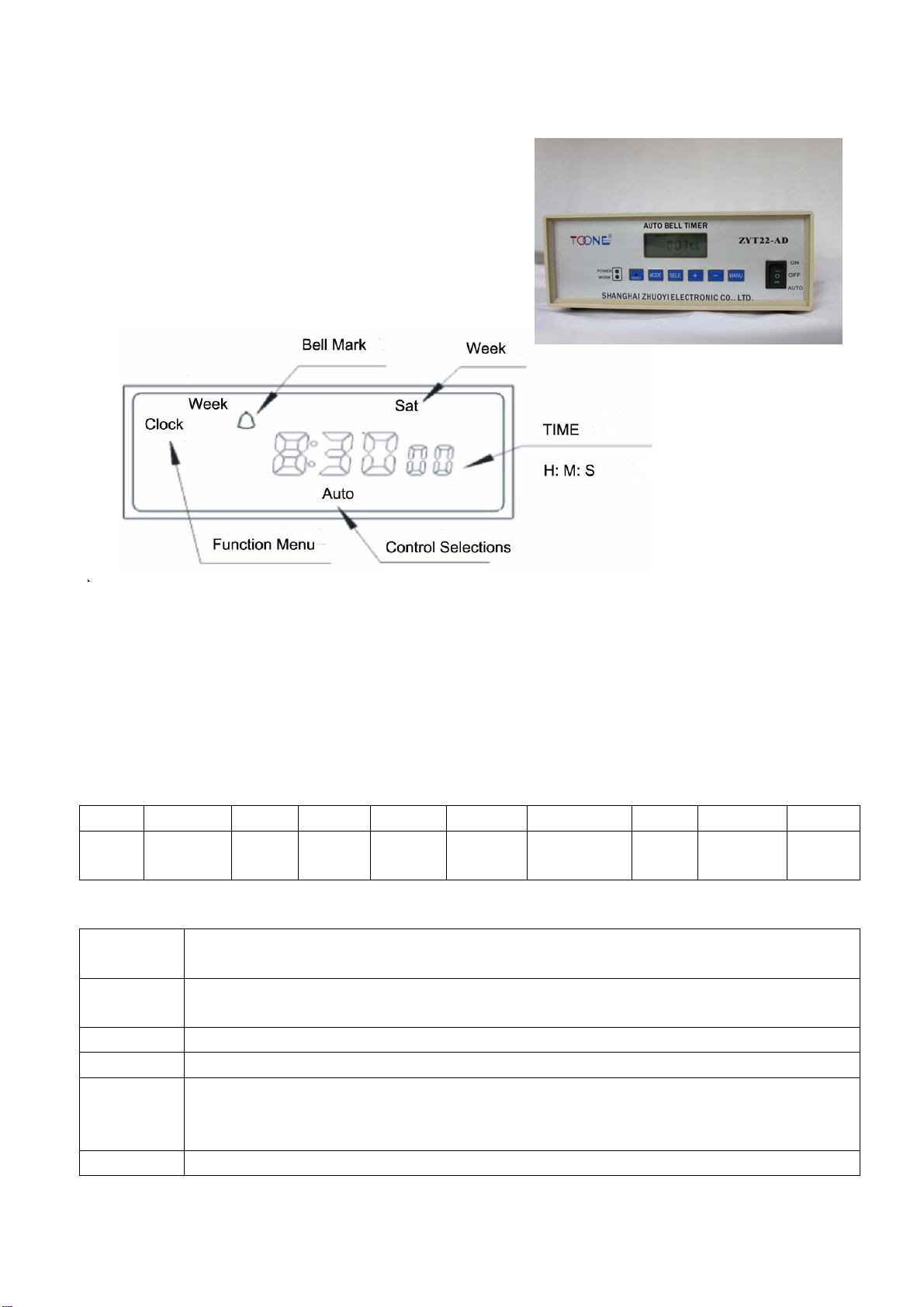
Notice:
a. It will return clock without any operation under any setting state for 30s.
b. Without external power and under clock state, meanwhile press “+” and “-“for 2s, it will turn off the LCD
display, and enter the power saving mode. Under clock state, without any operation for 5 minutes, it also
can enter the power saving mode. Press any key to awake it.
c. Under the program setting, choose the program setting and press “AUTO/MAN” and “-“ key for 3s, it can
cancel the setting.
d. Under the program setting, choose the program setting and press “AUTO/MAN” and “+” key for 3s, it can
cancel the setting.
Ⅲ. Adjust Clock:
1. Before use this product, please check the clock display to follow the current time, and calibrate it.
2. Pls “MODE” key, enter the sate of “TC”, press “SELE” key to choose “HOUR”, “MINUTE”
“SECOND”, WEEK” and adjust them respectively by “-“ and”+” keys.
Ⅳ. Program setting
step key Setting content
①Press the key "MODE" enter the state of ” PROG”
②Press ”SELE” key “HOUR” is flashing
③Press “+” or “-“ key Setting the time on “HOUR”
④Press ”SELE” key again “MINUTE” is flashing
⑤Press “+” or “-“ key again Setting the time on “MUNITE”
⑥Press ”SELE” key again “WEEK” is flashing
⑦Press “-“ key Make sure the “ON” or “OFF” state
⑧Press ”SELE” key again “01” is flashing
⑨Press “+” key To select the event number:01, 02, 03, 04….
⑩ Repeat step ② to ⑨ Set other 2ON,3ON until 80ON
Notice: When make an error or cancel the settings, press "SELE " and”+” or “-“ select this setting, and then
press “AUTO/MAN” key to make it display “— — :— —” ( it means no timing program, not "00:00").
ⅣSetting error:
Base on the actual clock error, count the day error, and put into system. Positive error means adjust the
clock quick, negative error means adjust the clock slow.
1. Press “MODE” key and enter the sate of “ER“ and the “error” is flashing.
2. Press “SELE” key, and press “+” or “-” to adjust the preset value.
3. Setting confirm: Press “MODE”to shift to “TL” state, or continuously press it to return clock state.
ⅤTime length setting
It is used to set its run time, the setting range is 0-(23h+59m+59s), and the default is 10s.
1. Press “MODE” key and enter the state of “TL” and the “TIME LENGTH” is flashing.
2. Press “SELE” key to select “HOUR”, “MINUTE”, “SECOND”, it is flashing when they are chosen.
3. Press “+” or “-” key to adjust “HOUR”, “MINUTE”, “SECOND”
4. Setting confirmation: Press “MODE”key to return back the clock state.
ⅥON, AUTO, OFF operation
There are 2 modes to select the ON, AUTO, OFF state.
1. Press “ AUTO/MAN” key to make sure the ON,AUTO or OFF state.
2. Press” AUTO, OFF, ON” key on side face of this product, it is necessary in emergency.
ⅦFor example
There is a factory has the working schedule as follows:
On duty: 8:00-12:00 am, 14:00-18:00pm, From Monday to Friday.