
TMT TCB Series Guide de démarrage rapide

- 1 -
TCB(L) SERIES
VER 101
CRANE SCALE
OPERATIONAL MANUAL

- 2 -
NOTE
(1) The unauthorized copying of some or all of this manual is prohibited.
(2)
The information contained herein is subject to change without notice.
(3)
If there are any questions such as wrong or missing parts of the
contents listed in this manual, please contact us.
(4) To improve the product performance, functions can be changed with no
notice.
(5) Please understand that TMT does not have responsibility for a
demand related to loss, lost profit etc. caused by operating the product,
regardless of the third clause.

- 3 -
INDEX
1. Precautions .....................................................................................................4
2. Main Features ..............................................................................................4
3. Specifications ...............................................................................................5
4. Description of Panels and Symbols ..........................................7
5. Rechargeable Battery .............................................................................8
6. General Functions for Weighing Mode .................................9
7. Setting Mode .............................................................................................10
8. Test Mode ....................................................................................................15
9. IR Remote Controller ..........................................................................17
10. ZigBee Wireless (Option 1) ........................................................18
11. Bluetooth Wireless (Option 2) .................................................18
12. Real Time Clock (Option 1) .......................................................19
13. Check Message .....................................................................................20

- 4 -
1. Precautions
◆Do not put too much pressure to keys. Light touching is enough to operate
products.
◆Do not use inflammable substances for cleaning.
◆Do not use the product in the rain. Keep it dry.
◆Avoid sudden changes of temperature if possible
◆Do not use the product in a place with a high-voltage current or severe
electronic noise.
◆Keep the product in a dry place.
◆Do not use the product in a place with strong direct sunlight and dust.
◆Do not use the product in a place with severe vibration.
◆Check the supply voltage.
◆Please check if the safety hook is connected well before you install our
TCB(L), so that the SHACKLE is not separated.
2. Main Features
◆Swivel hook
◆Big size display
◆Easy to exchange battery pack (Li-Po battery)
◆Standard IR remote controller
◆LAN communication is possible using the ZigBee
◆ZigBee wireless application and real time clock (OPTION 1)
◆Bluetooth application (OPTION 2)
- 5 -
3. Specifications
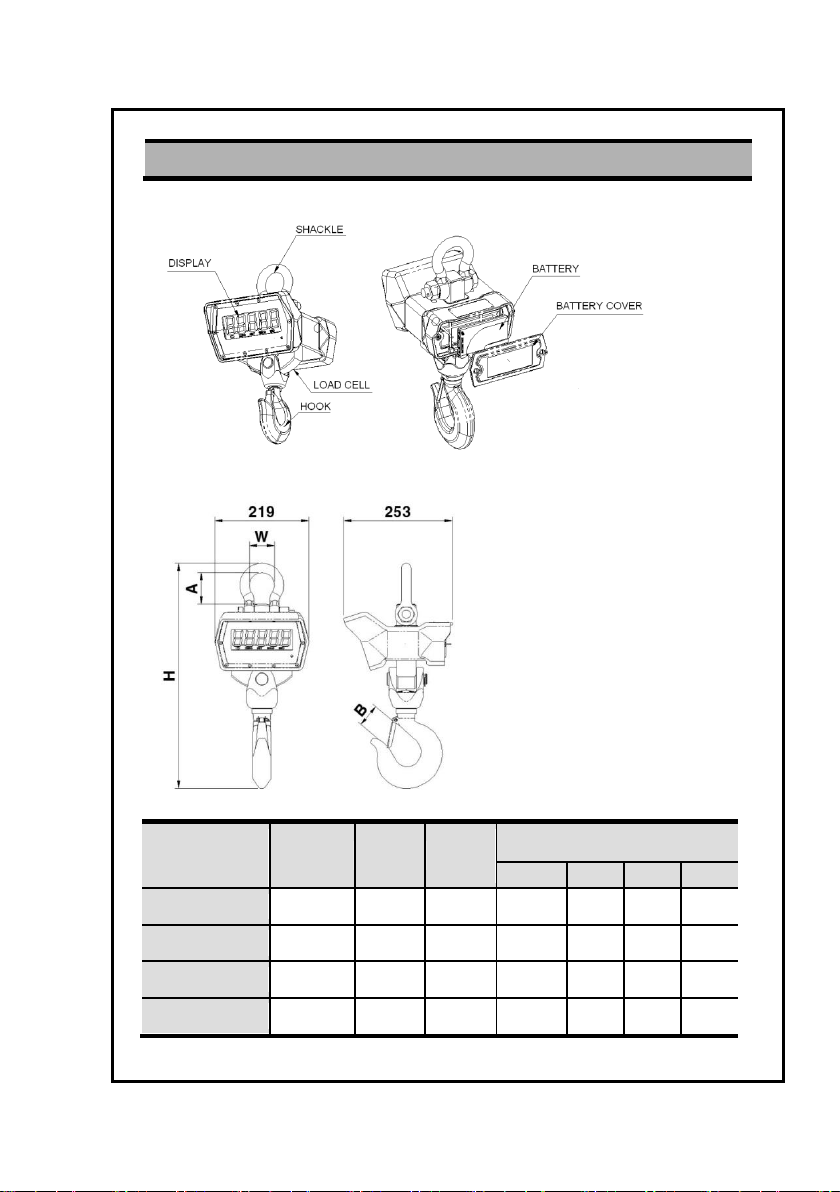
◆Overall view
◆Dimensions
MODEL
Max
(kg)
e=d=
(kg)
Weight
(kg)
DIMMENSION (UNIT: mm)
H
A
W
B
TCB-1T(L)
1,000
0.5
8.9
407
62
50
25
TCB-3T(L)
3,000
1
15.2
525
73
57
34
TCB-5T(L)
5,000
2
16.7
525
73
57
40
TCB-10T(L)
10,000
5
26.9
697
101
83
55

- 6 -
◆Specifications
MODEL
TCB (FND TYPE)
TCB-L (LCD TYPE)
Display
5 digit FND 30.4mm
6 digit FSTN LCD 30mm
Operating time
Approx. 150hr
Approx. 300hr
Battery
7.4V
3.7V
Power adaptor
12V 1A
5V 1A
Display lamp
Low battery, Zero, Tare, Hold, Stable
Function
ON/OFF, Zero, Tare, HOLD, *
Temperature
-20℃~60℃
Max. tare weight
Full Tare
Safety overload
150% of capacity
Zero point
Within 2% of Maximum Weight
Initial zero band
Within 10% of Maximum Weight
Parts
Infrared controller, Power adaptor, Manual
◆Parts
[Rechargeable adaptor]
[Crane scale] [Infrared remote controller]

- 7 -
4. Description of Panels and Symbols
LCD Type
FND Type
◆Display
888888
Display the weight data & message
w
Indicates when the weight is stable
a
Indicates when the weight is zero
e
Indicates when the tare is included
b
Indicates when the hold function is set
r
Indicates when a battery has to be recharged (B type)
q
Indicates when the ZigBee communicates data (L type)
◆Keypad
Key
Description
ON/OFF
Power ON/OFF of indicator
ZERO
The key to make weight value as zero
TARE
The key to perform tare weight
HOLD
The key to measure the unstable weight.
ENTER
The key to store/confirm setting value

- 8 -
5. Rechargeable Battery
(1) Method of recharge battery
■ Check the power supply voltage.
■ If adaptor is still being charged, the RED lamp is on as below picture.
■ If a charging is completed, the RED lamp is off.
The battery charging time takes about 6 hr.
(The battery charging time is subject to be changed according to battery
condition.)
Clamp
(2) Method of exchange battery pack
■ Turn clamps that exit on both sides of charger to the right in a quarter
■ Pull out a battery pack
■ Inserting is in reverse
(3) Battery pack specifications
Nominal capacity
4000mAH
Nominal voltage
FND Type: 7.4V / LCD Type: 3.7V
(4) Low battery lamp
In order to prevent the electric discharge, after LOW BATTERY LAMP is on,
the power will be turned off automatically after about 1~5 hours.
(It’s subjected to be changed according to using conditions.)

- 9 -
6. General Functions
(1) Zero function
Use to correct drifted zero value when the scale is unloaded, and motion is
not detected. This function works when ZERO KEY is pressed, and the
ZERO LAMP is on.
(2) Setting tare weight function.
Press the TARE KEY. Then, the scale will memorize the weight of the tare
and will display zero value ‘0’kg. The TARE LAMP will be on.
To escape this function, remove everything from the scale, and press the
TARE or ZERO KEY.
Then, the TARE LAMP will be off and this function is terminated.
(3) Hold function
Automatic hold function
■ Press HOLD KEY when the scale is empty (Initial zero state).
■ The weight display will indicate AH ON. HOLD LAMP is on.
■ After loading a thing, if the weight turns stable then, a display shows -----
and average weight will appear.
■ The weight of a loaded thing is displayed.
■ To escape the automatic hold mode, when zero point is on, press HOLD
KEY.
Then, the message of AHOFF is displayed and HOLD LAMP is off and
normal weighing mode is reverted.
Manual hold function
■ Press HOLD KEY loading a thing.
■ This message of HOLD is displayed and sequentially the message of -----
is shown with appearing the average weight.
■ The weight of a loaded thing is displayed.
■ To escape the manual hold mode, remove everything from a hook, or
press the HOLD KEY. Then, HOLD LAMP will be off and the scale
changes from a hold mode to a normal mode.

- 10 -
7. Setting Mode
(1) How to enter this mode
Press the ON/OFF KEY while pressing the TARE KEY.
Changed values are saved after run to the final menu.
(2) Keyboard
: Used to set up an initial zero value (0).
: Used to move the input value to the left or right by one place.
: Used to increase the setting constant one by one.
: Used to save the value and to move next menu.
(3) Menu
■ F01 : Adjustment the speed of weight change (1~9)
Setting Menu
Description
F01-1
Very fast
F01-5
Normal
F01-9
Very slow
■ F02 : Weight backup (0,1)
Setting Menu
Description
F02-0
Not used
F02-1
Used
■ F03 : Stable condition set of weight (1~9)
Setting Menu
Description
F03-1
Sensitive
F03-5
Normal
F03-9
Insensitive
Ce manuel convient aux modèles suivants
9
Table des matières
Autres manuels TMT Échelle


