
TL Electronic SlimLine ES Series Manuel utilisateur
PPC SL ES Series Operating Instructions
Last Revised: 01/2019 1
Operating instructions for panel PC
SlimLine ES Series
This docu entation is applicable to all the versions of the product
which are supplied.
The panel PC is designed solely for fixed installation in echanical
and plant engineering syste s for nor al achine applications
and industrial use. The panel PC can be fitted with different front
panels and housings.
The product designation also includes the following odels:
•WM xx(W)-IB32-ES-y (Celeron Bay Trail)
•WM xx(W)-ID32-ES-y (Ato D)
•WM xx(W)-IH32-ES-y (Core i 5th Generation)
The following applies:
xx: Diagonal display easure ent in inches
(W): Aspect ratio widescreen or widescreen for at (optional)
y: Codes for further options
Please note the safety information in the general operating in-
structions supplied with the product!
Also available with the product designation (see type plate) under
https://www.tl-electronic.de/download/driver:
•Quick Start Guide (English)
•User Manual (English)
Product labelling
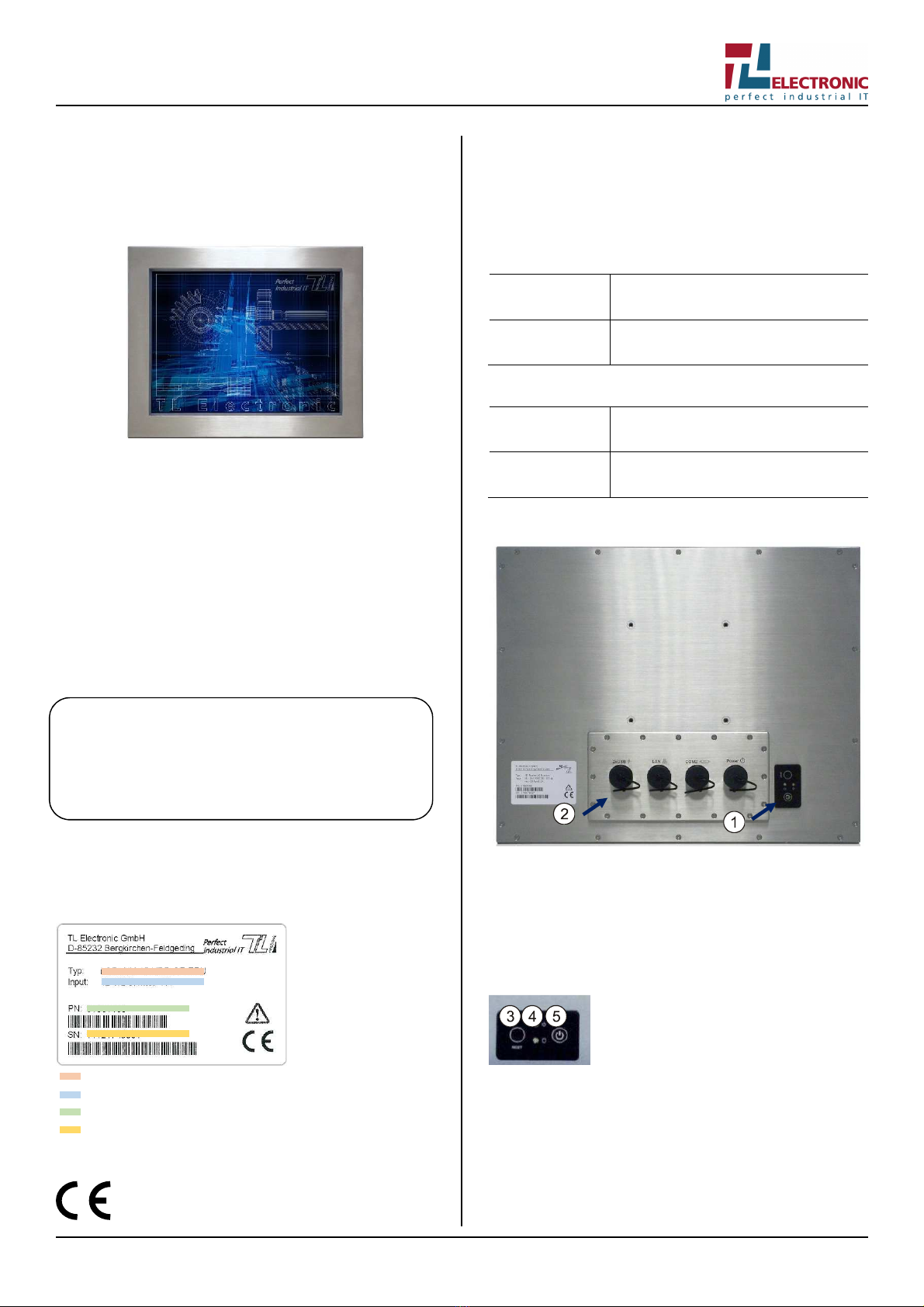
Type plate
The type plate is located on the rear of the product.
Product designation
Mains supply
Product nu ber
Serial nu ber
CE marking
The product eets the require ents set out in the
EMC Directive 2014/30/EU.
Ambient conditions
Protect the product fro dust, oisture, heat and echanical
stress, such as strong vibrations and i pact. Keep the product out
of direct sunlight. Install the product in such a way that it does not
constitute a hazard (e.g. so that it cannot tip over or fall down).
Operation
Operating te per
a-
ture
0 °C to 45 °C
At ospheric h
u-
idity
30 % to 90 % non
-
condensing
Transport and storage
Storage te per
a-
ture
-
20 °C to 65 °C
At ospheric h
u-
idity
10 % to 90 %
non
-
condensing
Overview
Rear (exa ple product picture)
1. Controls
2. Connections and interfaces
Controls
The controls are located on the back of the product at the botto .
Botto rear (exa ple product picture)
3. Reset button: restarts the syste
4. LE s: status indicators
green power supply switched on
yellow or red access to hard disk
5. On/off switch: switches the product on or off

PPC SL ES Series Operating Instructions
Last Revised: 01/2019 2
Connections and interfaces
Underside
6. 2× USB interface
7. Ethernet port
8. Serial interfaces (COM2)
9. Power supply connection
PIN assignment
USB
Ethernet
Serial port
Power supply
Power supply
Risk of damage to the product! Check the infor ation on the
input voltage range on the type plate before connecting.
Use the ains adapter supplied with the product!
Risk of damage to the product! When installing the product in
a housing, ake sure that the ter inals on the ter inal block can-
not be short-circuited by etal parts or tools!
The power supply socket is located on the rear of the product at
the botto and depends on the configuration (see PIN assign ent
above).
Operation
Plug the power supply cable into the power supply socket on the
product and then connect it to the ains supply.
Switching on
The product is fitted with an on/off switch on the rear. Press the
on/off switch to start up the product.
The function of the on/off button can be deactivated by a BIOS op-
tion or a hardware odification. The product can then be switched
on together with other achines via a central circuit.
Switching off
First shut down then switch off! The operating syste ust be shut
down first and then the product ay be switched off. Otherwise the
syste ay be da aged in such a way as to prevent the product
fro starting up again.
The product is not co pletely disconnected fro the power
supply when the on/off button or ains switch is switched off!
Rights should be assigned in the control software in such a way
that users who are not allowed to close the software are also de-
nied per ission to switch off the product. If the product is switched
off during a write operation, this file will be destroyed. Control soft-
ware usually executes write operations auto atically every few
seconds, so da age can very easily be caused by switching off
while the software is running.
Technical data
Di ensions (W ×
D ×
H)
WM 15
…
WM 17
…
WM 19
…
WM 22W
…
384 × 311 × 61
416 × 350 × 61
460 × 385 × 63
550 × 340 × 65
Weight
WM 15
…
WM 17
…
WM 19
…
WM 22W
…
6.6 kg
8.6 kg
10.2 kg
12 kg
Protection class
IP65
Wireless capabilities
–
Supply voltage
External ains a
dapter
Power input
12 V DC
Service
Contact details
Tel.: +49 (0)8131 33204-130
Fax: +49 (0)8131 33204-150
If you contact the service staff, please have the serial nu ber
ready which can be found on the type plate on the product.
Company headquarters
TL Electronic G bH
Bg .-Gradl-Str. 1
85232 Bergkirchen-Feldgeding
Ger any

PPC SL ES Series Operating Instructions
Last Revised: 01/2019 3
Tel.: +49 (0)8131 33204-0
Fax: +49 (0)8131 33204-150
You can also visit our website at www.tl-electronic.de
Table des matières
Autres manuels TL Electronic Écran tactile

Manuels Écran tactile populaires d'autres marques


IBASE Technology
IBASE Technology ASTUT-152-RE1S Manuel utilisateur

YASKAWA
YASKAWA TP 610C Manuel utilisateur

B&R
B&R Power Panel C Series Manuel utilisateur

Beijer Electronics
Beijer Electronics X2 control Manuel utilisateur

AXIOMTEK
AXIOMTEK GOT321W-521 Manuel utilisateur

TRIDONIC.ATCO
TRIDONIC.ATCO x-touchBOX Manuel utilisateur


