
TizzBird F30 Manuel utilisateur

User’s Manual
Smart Media Player
TIZZBIRD™F30
Rev 1.2x

2
Table of Contents
1. Safety Notice ............................................................................. 4
2. Features .................................................................................... 5
3. Specifications ............................................................................ 6
4. Description of Each Part ............................................................. 7
5. Package Contents ...................................................................... 8
6. Installation and Connection........................................................ 9
7. Using Remote Controller............................................................14
8. Initial Screen ............................................................................15
8.1 Turning On Power ..........................................................................................................15
8.2 Setting TV Output...........................................................................................................15
8.3 Setting Menu Language.................................................................................................16
8.4Screen Alignment ...........................................................................................................17
8.5 Audio & Visual Settings..................................................................................................18
8.6 Network Settings............................................................................................................20
8.6.1 Configure Wi-Fi Connection ..........................................................................................20
8.6.2 Configure Ethernet Connection.....................................................................................22
8.6.3 Configure Manual-IP Ethernet ......................................................................................22
8.7 Turning Power Off, Completely Power Off...................................................................23
9. Start-Up and Terminate.............................................................25
9.1Home Screen...................................................................................................................25
9.2 Status Bar and Weather Widget ...................................................................................26
9.3 Change Cover-View Style ..............................................................................................27
9.4 Movie Browser ................................................................................................................28
9.5 Terminate........................................................................................................................28
10. Watching Movie.......................................................................29
10.1 Movie Browser ................................................................................................................29
10.2 Selecting Device and View ............................................................................................30
10.3 Movie Browser Menu......................................................................................................31
10.4 To Add Movie Poster ......................................................................................................32
10.5 Resume and Bookmark..................................................................................................34
10.6 Movie Playback Menu ....................................................................................................35
10.7 Playback Speed Control .................................................................................................36
10.8 Searching Menu (Time, Chapter, Bookmark) ..............................................................36
10.9 Playback Information Menu ..........................................................................................37
10.10 Subtitle Menu..................................................................................................................37
10.11 Audio Menu .....................................................................................................................37
10.12 Video Parameter Menu ..................................................................................................38
10.13 Playback 3D Format Movies ..........................................................................................38
10.14 Skip Playback Position...................................................................................................38
11. Listening Music .........................................................................39
11.1 Music Browser ................................................................................................................39
11.2 Sorting Music ..................................................................................................................40
11.3 Music Playback Screen...................................................................................................40
11.4 Music Playback Menu.....................................................................................................40
12. Watching Photo .......................................................................41
12.1 Photo Browser ................................................................................................................41
12.2 Photo Browsing Menu....................................................................................................41
12.3 Photo Wall & Photo Stack..............................................................................................41
12.4 Photo Playback Screen ..................................................................................................42
12.5 Slideshow Control ..........................................................................................................42
13. Using File Browser ...................................................................43

3
13.1 File Browser Screen .......................................................................................................43
13.2 Selecting Device at File Browser ..................................................................................44
13.3 Register Subtitle Font File.............................................................................................44
13.4 Using File Operation.......................................................................................................45
14.Connecting Internet ................................................................47
14.1 Execute Internet Browser .............................................................................................47
14.2 Control Internet Browser ..............................................................................................47
15. Install & Execute Applications..................................................48
15.1 Move Applications at Android Phone to TizzBird.........................................................48
15.2 Execute Application........................................................................................................49
16. Settings ....................................................................................50
16.1 System.............................................................................................................................50
16.2 Audio and Visual.............................................................................................................53
16.3 Movie ...............................................................................................................................55
16.4 Music................................................................................................................................56
16.5 Photo ...............................................................................................................................57
16.6 Network...........................................................................................................................57
16.7 Cover-View......................................................................................................................58
17. Connecting Network Server or NAS............................................59
17.1 Network connection using NFS.....................................................................................59
17.1.1 Downloading TizzNFS Server ........................................................................................59
17.1.2 Executing TizzNFS Server & Configuration..................................................................59
17.1.3 Downloading other NFS Server.....................................................................................60
17.1.4 Executing freeNFS Server & Configuration..................................................................60
17.1.5 Connecting NFS Server at Device .................................................................................61
17.2 Network Connection using Samba ...............................................................................63
17.2.1 Activating PC Share........................................................................................................63
17.2.2 Connecting Samba Server at Device ............................................................................63
17.3 Accessing Network Drive at File/ Media Browser.......................................................65
18. Firmware Upgrade ....................................................................66
18.1 Online Upgrade (O.T.A –Over The Air Upgrade).........................................................66
18.2 Local Upgrade .................................................................................................................66
18.2.1 Upgrade at Settings Screen...........................................................................................66
18.2.2 Upgrade at File Browser ................................................................................................67

4
1. Safety Notice
Do not try to disassemble the unit. It may cause
malfunction or fire.
Keep away the unit from magnetized devices. It
may erase the data stored in the HDD drive
inside.
Do not place the unit in places that are exposed
to oil, water, dust, humidity, rain or wind.
Keep away the unit from overheated areas, such
as heaters. Place it well ventilated location.
Ensure that a free airflow is maintained around
the unit.
Do not touch the power plug with wet hands or
use defective power cables and electric outlets.
It may cause electric shocks or fire.
Do not drop or shock the unit from heights.
Doing so may cause serious damage to the HDD
inside.
Please install the unit nearby the socket-outlet and easily accessible place. Unplug the
power cable when the device is not used for a long time.

5
2. Features
Tizzbird playbacks various full HD movie contents including HDMV and DVD backup
formats as well as AVI, MKV, XVID and TS formats on TV. It supports most recent
video formats such as H264 and VC-1.
TizzBird provides a full web-browsing capability very similar like PC. Mouse and
keyboard can be attached to support various inputs, which enable slick Internet
surfing even on the big screen TV.
TizzBird playbacks high resolution photo images on TV. It can slideshow the photos
while playing back the music in background. Transition effects such as fade-in-out
or zooming can be applied during transition of each photo.
TizzBird playbacks high quality lossless music such as FLAC, WAV up to 24bit/
96Khz. It also supports compressed MP3, OGG, AAC and CUE format thru high
fidelity Wolfson DAC.
TizzBird runs applications on TV exact same APPs installed on the Android
Smartphone without any conversion. This also includes 3D games or 3D APPs that
utilize the superb OPEN-GL 3D accelerator. Some APPs that fixed screen-aspect
ratio cannot be applicable in some cases.
It also supports gigabit Ethernet which enables fastest networking ever before.
TizzBird supports NFS, SAMBA, uPnP network protocols to connect various servers.
It also has multiple mounting drive options and automatic browsing capability
which maximize the network connection experience.
TizzBird can be used as an external USB 3.0 storage thru connecting PC. TizzBird
also supports playback the contents at USB flash drive or external HDD thru
connecting USB host ports.
6
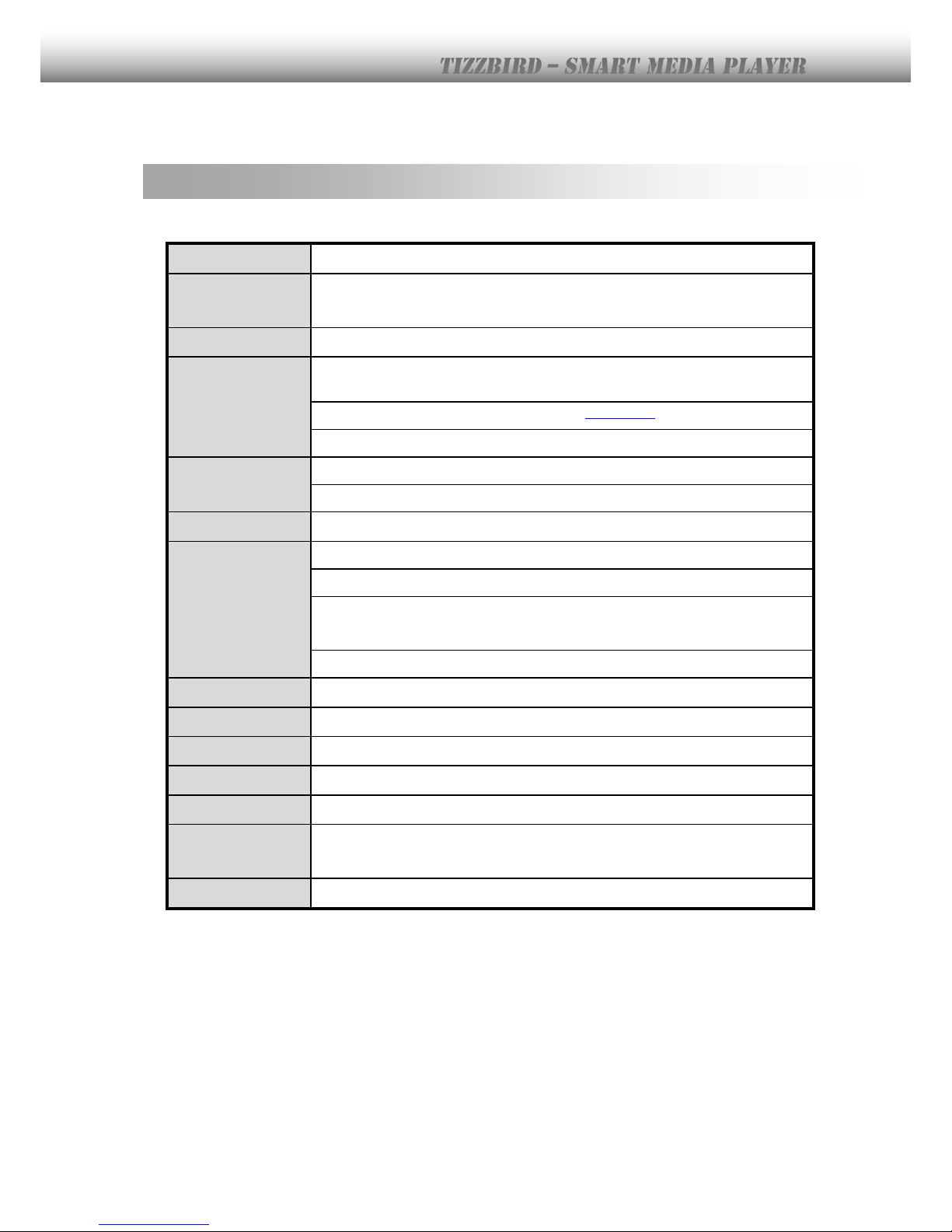
3. Specifications
Model
TizzBird F30
System
TCC9302 1Ghz CPU/ 512M Memory/ 2GB NAND flash
Booting time from stand-by is less than two seconds.
OS
Android Rev 2.3 Gingerbread
Video
Format: AVI/ MKV/ MPG/ WMV/ VOB/ TP/ TRP/ M2TS/ MOV/ FLV/ IFO/
ISO/ HDMV
Resolution: Max 1080p 60Hz
Audio
MP3/ OGG/ WAV/ AAC/ FLAC/ APE/ WMA
Dolby Digital / DTS Down Mixing and Pass-thru
Image
JPG, JPEG, BMP, PNG, GIF, TIF
Connection
USB 2.0 Host Port 3 EA (Current Max 500mA / Port)
USB 3.0 Device Port 1EA (Max Transfer Rate 5Gbps)
Gigabit Ethernet,
Wireless Wi-Fi 802.11n (Optional)
Network Protocol : Samba (CIFS)/ NFS/ uPnP
Video Output
HDMI 1.3a / Component(YPbPr)/ Composite
Audio Output
Digital: Coaxial and Optical Output / Analogue: Stereo RCA Output
File System
NTFS, FAT32
Subtitle
smi, smil, sub, sub/idx, srt, ssa, ass
Power
DC 12V / 3A Adapter, Standby power consumption < 0.4w
Languages
English, French, German, Spanish, Italian, Portuguese, Vietnamese,
Swedish, Czech,Norwegian, Danish, Japanese, Korean, Traditonal Chinese
Dimension
215 x 215 x 59 mm

7
4. Description of Each Part
Power Button
Turn ON/OFF power of the unit.
Smart HDD Rack
Install/ uninstall the HDD easily
with this RACK
Connectors
Please connect the unit to AV port of the TV or AV receiver. Please connect
Ethernet cable or install the Wi-Fi USB dongle for connecting the network.
* There’s another USB host port at the side.*

8
5. Package Contents
The TizzBird package contains the following items. The shape of items described below may
slightly different from the actual contents.
Main Unit
Remote Controller
USB 3.0 Cable
A/V Cable
Quick Guide
Power Adapter
Power Cable
HDMI Cable

9
6. Installation and Connection
Pedestal Assembly
This is a guide for assembly of pedestal into the main unit. No screw needed.
Find out six bumps of the pedestal and
assembly them with six holes of the
bottom side of the main unit.
Push the pedestal to the front side
until the “CLICK” sound.

10
HDD Installation
This is a guide for installation of HDD into the rack. No screw needed
Before install the HDD into the rack, please check the
four bumps on the rack. There are two A bumps on the
side, and two B bumps on the bottom.
Find out the side holes of HDD, and assembly them with
two A bumps. Insert the HDD first on the side. Then
assembly the bottom holes of HDD with two B
bumps.
Insert the rack smoothly into the main unit. Please make
sure that handle of rack is open status, before insertion.
Push the rack until it reaches internal end of the unit.
Close the handle of the rack after insertion.
Autres manuels pour F30
2
Ce manuel convient aux modèles suivants
1
Table des matières
Autres manuels TizzBird Lecteur multimédia


