
TIS EPC300A Instructions de montage
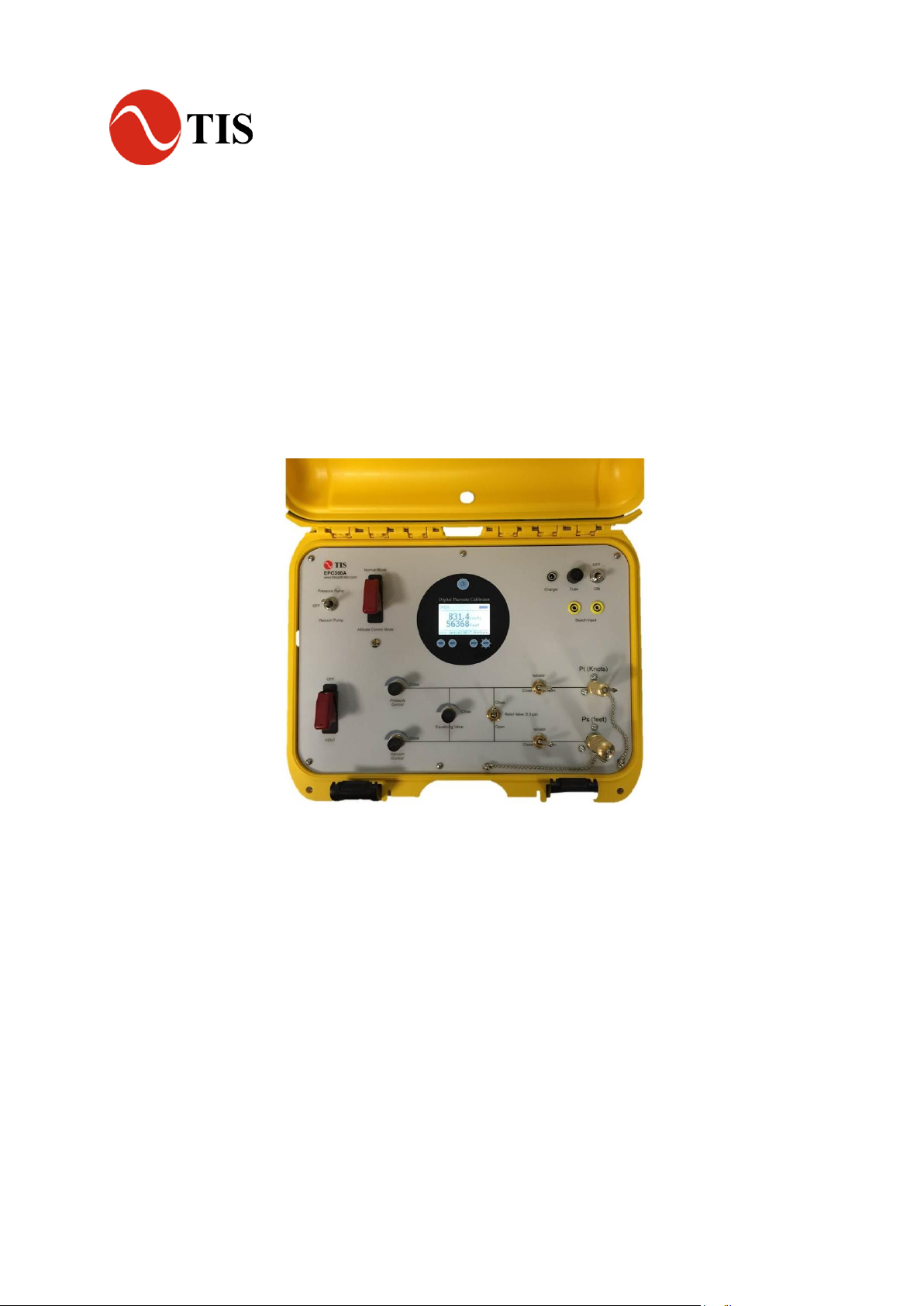
Electric Pressure / Vacuum Tester
Model: EPC300A
User Reference Manual

2
Introduction
The TIS Electric Pump Pressure Calibrator EPC300A combines the high accuracy of digital electronics with
the convenience and ease of use of an analog test gauge. Accurate to ±0.025% FS is standard, optional to
0.01% F.S. With high resolution of 5 full digits, this Calibrator can be used as a calibration reference or in
any application where high accuracy pressure measurement is required.
.
1.1 Customer Service
Corporate Office:
www.tiscalibrator.com
e-mail: sales@tisinstruments.com
Tel: (65) 6779-9272 Fax: (65) 6873-8262
TIS Instruments (s) Pte Ltd
8 @ Tradehub 21, #06-16 Boon Lay Way
Singapore 609964
1.2 Standard Equipment
Check to see that your TIS Leak Pressure Tester EPC300A has arrived intact. Save the packing materials at
least until you have verified that there is no concealed damage.

3
Misuse
Should the TIS Pressure Calibrator be exposed to overpressure or sudden physical shock (i.e. being
dropped) it should be examined for any damage that may cause a safety concern. If in doubt please return
the unit for evaluation to TIS Instruments. Please refer to the Customer Service Section for contact
information.
Caution
To avoid possible damage to calibrator or to equipment under test:
•Do not over pressure the EPC300A or unit under test
•Keep/ store the unit in cool dry place.
4
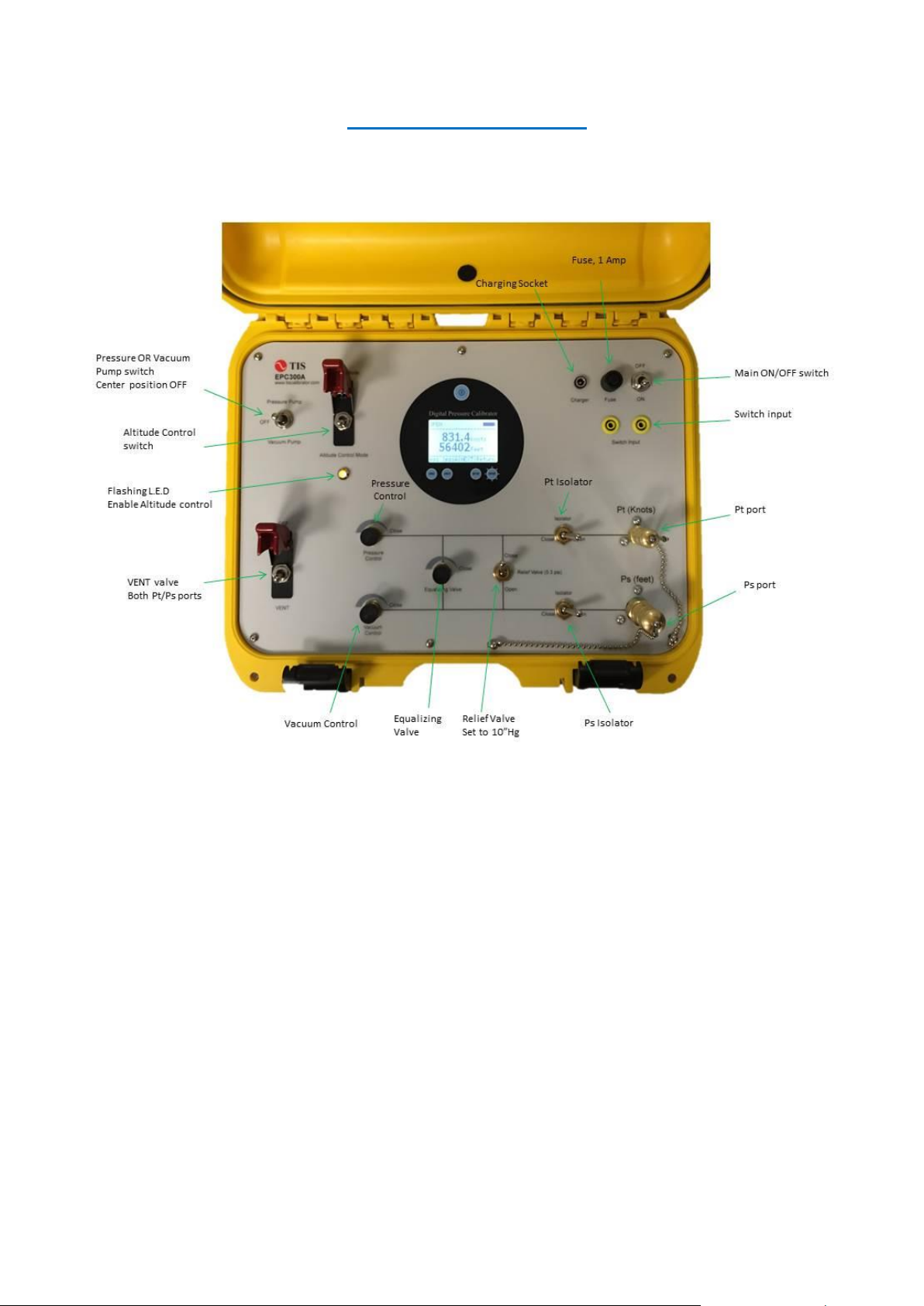
EPC300A Front Panel Layout

5
Startup
Power: TIS Electric Pump Pressure Calibrator is supplied with 14.8Vdc@4000mAH re-chargeable Li-ion
batteries installed.
Display battery voltage. Bar-graph indicates actual battery voltage condition. Re-charge when it reaches
25%.
To switch ON the unit, flip the ON/OFF switch to DOWN position. To switch OFF the unit, flip the ON/OFF
switch to UP position.
Upon power on, display shown the main menu, refer to Fig 1.0.
Main menu, Fig 1.0
1. Engineering Units Selection:
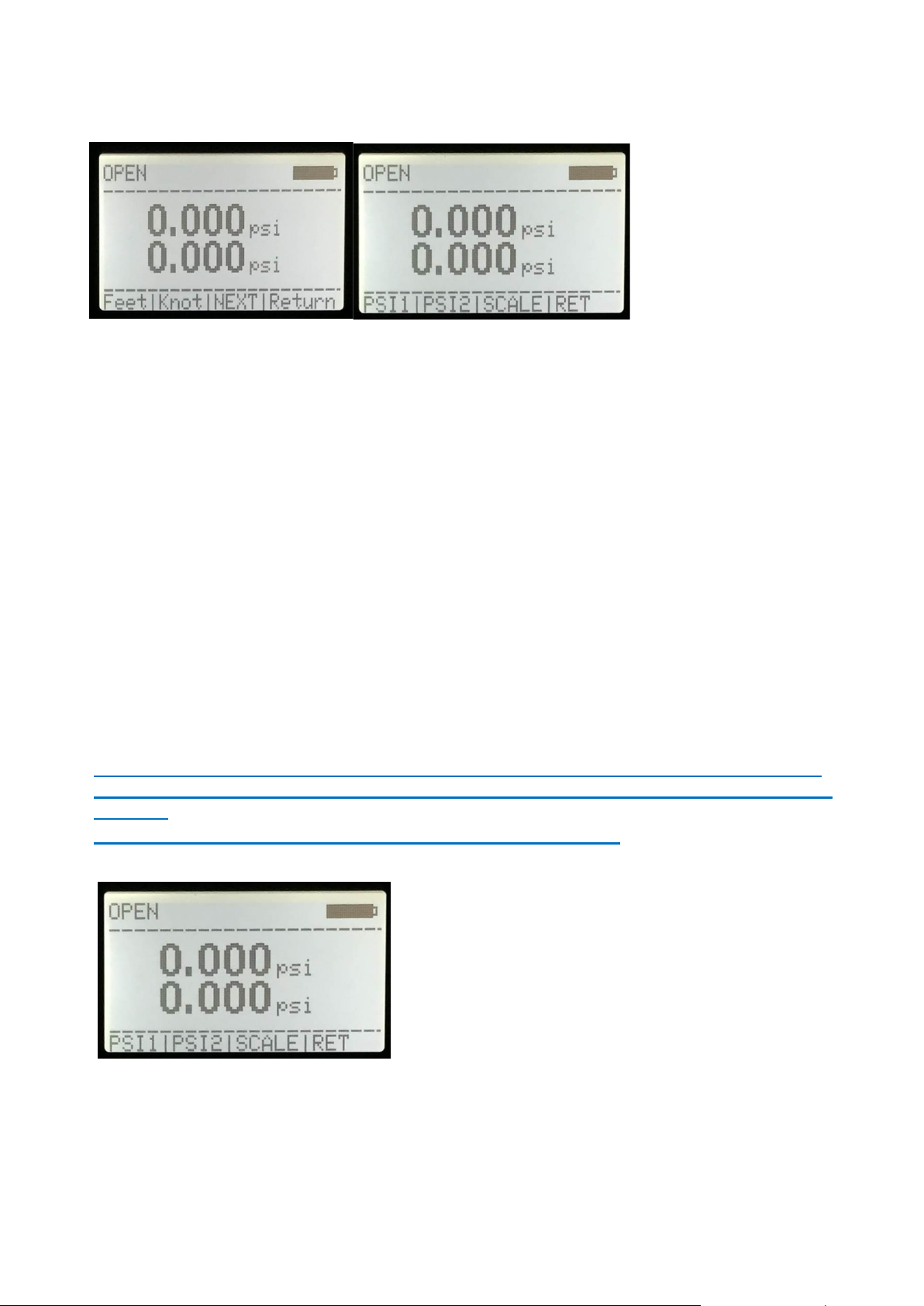
By pressing the Unit key (Fig 1.0), and Next (Fig 1.1) key, User can scroll forward through the 10 standard
engineering units. When the desired unit is displayed, press the key corresponds to Unit display. Pressure will
now be displayed in the chosen engineering units
Note: Line 2 (Ps, feet): do not have knots unit.
6
Unit Selection, Fig 1.1
2. Set ZERO/TARE reading in GAUGE mode only (Line 1, Pt knots).
a) Vent the system by switching the x2 isolator valves to OPEN position, anti-clockwise about 3-5 turns
both the Pressure and Vacuum control knob, switch on the VENT valve
b) Select Line 1 psi (gauge mode).
c) Wait for few seconds to stabilize the pressure, press PSI 1 + RET keys concurrently (Fig 2.0)
d) Line 1 should now read 0.000 psi ±0.001.
3. Set ZERO/TARE reading in GAUGE mode only (Line 2, Ps feet).
a) Vent the system by switching the x2 isolator valves to OPEN position, anti-clockwise about 3-5 turns
both the Pressure and Vacuum control knob, switch on the VENT valve
b) Select Line 2 psi (gauge mode).
c) Wait for few seconds to stabilize the pressure, press PSI 2 + RET keys concurrently (Fig 2.0)
d) Line 2 should now read 0.000 psi ±0.001.
Note: To increase accuracy of the measurement. When the reading is >=0.005 psig in VENT
mode, user need to re-zero reading of Line 1 and Line 2 when selected either psi, mbar, inHg,
hPa unit;
Zero key is disable when user selected Absolute, knots or feet unit.
Line 1 or Line 2 zero selection, Fig 2.0

7
Normal Mode (Fig 3.0): Positive pressure at Pt (knots) (Ps port open to atmosphere)
1. Switch to Normal Mode
2. Connect the Pt port via pressure hose to the U.U.T/D.U.T
3. Set both Isolator valve to OPEN position
4. Set Relief valve to CLOSE position
5. Close the Equalizing valve by turning knob fully clock-wise, do not over torque, hand tight is good
enough.
6. Close both Pressure and Vacuum Control metering valve by turning knob fully clock-wise, do not
over torque, hand tight is good enough.
7. Switch OFF VENT valve
8. Switch on the internal Pressure Pump
9. Open the Pressure Control metering valve slowly anti-clock-wise to increase pressure.
10. CLOSE the Pressure Control metering valve Switch OFF the internal pump when pressure reaches
set point.
11. If require, CLOSE both the isolator valves.
12. To VENT the system, switch the x2 isolator valves to OPEN position, switch on the VENT valve
and open the Pressure Control metering valve slowly anti-clock-wise to vent pressure.
Fig 3.0

8
Normal Mode (Fig 4.0): Negative pressure at Ps (feet) (Pt port open to atmosphere)
1. Switch to Normal Mode
2. Connect the Ps via pressure hose to the U.U.T/D.U.T
3. Set both Isolator valve to OPEN position
4. Set Relief valve to CLOSE position
5. Close the Equalizing valve by turning knob fully clock-wise, do not over torque, hand tight is good
enough.
6. Close both Pressure and Vacuum Control metering valve by turning knob fully clock-wise, do not
over torque, hand tight is good enough.
7. Switch OFF VENT valve
8. Switch on the internal Vacuum Pump
9. Open the Vacuum Control metering valve slowly anti-clock-wise to increase vacuum level.
10. CLOSE the Vacuum Control metering valve and Switch OFF the internal pump when vacuum
reaches set point.
11. If require, CLOSE both the isolator valves.
12 To VENT the system, switch the x2 isolator valves to OPEN position, switch on the VENT valve
and open the Vacuum Control metering valve slowly anti-clock-wise to vent vacuum pressure.
Fig 4.0

9
Normal Mode (Fig 5.0): Negative pressure at Ps and Pt
1. Switch to Normal Mode
2. Connect the Pt and Ps via pressure hose to the U.U.T/D.U.T
3. Set both Isolator valve to OPEN position
4. Set Relief valve to OPEN position (10 inHg differential pressure protection)
5. Close the Equalizing valve by turning knob fully clock-wise, do not over torque, hand tight is good
enough.
6. Close both Pressure and Vacuum Control metering valve by turning knob fully clock-wise, do not
over torque, hand tight is good enough.
7. Switch OFF VENT valve
8. Switch on the internal Vacuum Pump
9. Open the Vacuum Control metering valve slowly anti-clock-wise to increase vacuum level. Control
Equalizing valve for Pt pressure as required.
10. Switch OFF the internal vacuum pump and CLOSE the Vacuum Control metering valve when
vacuum reaches set point.
11. If require, CLOSE both the isolator valves.
12 To VENT the system, switch the x2 isolator valves to OPEN position, switch ON the VENT valve,
open Equalizing valve slowly to equalize the pressure between Pt and Ps. When both Pt and Ps
pressure equalize, open the Pressure Control metering valve slowly anti-clock-wise to vent vacuum
pressure.
Fig 5.0

10
Altitude Control Mode (Fig 6.0): Negative pressure at Ps (Pt open to atmosphere)
Air Speed Indicator / Altimeter
1. Switch to Altitude Control position (Line 1, Pt display knot)
2. Select Line 2 unit to Feet
3. Connect the Ps (Pt open to atmosphere) via pressure hose to the U.U.T/D.U.T
4. Set both Isolator valve to OPEN position
5. Set Relief valve to OPEN position (10 inHg differential pressure protection)
6. Close the Equalizing valve by turning knob fully clock-wise, do not over torque, hand tight is good
enough.
7. Close both Pressure and Vacuum Control metering valve by turning knob fully clock-wise, do not
over torque, hand tight is good enough.
8. Switch OFF VENT valve
9. Switch on the internal Vacuum Pump
10. Open the Vacuum Control metering valve slowly anti-clock-wise to increase both knots and feet
reading.
11. Switch OFF the internal vacuum pump and CLOSE Vacuum Control metering valve when readings
reaches set point.
12. If require, CLOSE both the isolator valves.
13. To VENT the system, switch the x2 isolator valves to OPEN position, switch ON the VENT valve
and open the Vacuum Control metering valve slowly anti-clock-wise to vent vacuum pressure.
Note: Knots automatically display on Line 1(only knot in this mode). Select Line 2 unit to feet
Fig 6.0
Table des matières
Autres manuels TIS Équipement de test


Manuels Équipement de test populaires d'autres marques

SMART
SMART KANAAD SBT XTREME 3G Series Manuel utilisateur

Agilent Technologies
Agilent Technologies BERT Serial Manuel utilisateur

Agilent Technologies
Agilent Technologies N3280A Manuel utilisateur

Vernier
Vernier Go Direct Voltage Manuel utilisateur

Lifeloc
Lifeloc R.A.D.A.R. Manuel utilisateur

Fluke
Fluke T5-600 Instructions d'utilisation et d'installation


