
ThL T200 Manuel utilisateur

Quick Start Guide
SIM Card and Memory Card. Before Bootup
. About SIM Card
lmportant t{otes: WCDMA cards can be identif ied
in both SlMl and SlM2 card slots and connected to
3G network, However, only one WCDMA card can
be connected to 3G network and the other
connected to 2G network in a smart phone. To better
protect the SIM cards, please follow the instructions
below. Enter [Settings/Wireless and Network
(More)/ Mobile Network/3G Servicel to set which
card to be connected to 3G network.
The 3G card inserted into the SIM 1 card slot will be
connected to 3G network in default.
. About Memory Card
lmportant Notes: Please take out the memory card
after safe uninstalling or power off to prevent
possible system faults.
. Battery lnserting & Removing
Align the metal contacts of the battery with the
contactors in the phone, gently press the battery
down until it snaps into place.
Screen Unlocking and Locking
After power on, press the Power key to light up the
screen and click the unlocking icon. sliding touch
screen into right menu. Press the Power key in any
interface to enter Standby mode.
This photo is for your reterence only- Please see the product for details

Desktop Setting
After unlocking and entering the desktop, users can
click an icon to open corresponding program, and
drag an icon to rearrange it after pressing and
holding it. To remove an icon, press and hold it until
"Delete" pops up on the screen, drag it to the
location of "Delete" and release it. ln this way, the
shortcut icon will be removed but not uninstalled.
G)
Amimi G/-
I O q7 'i!ie iexl messaoe .
Coniacts Managing
Please select the mode to add contacts in first
use.supports multiple modes to add contacts. Users
can import contacts from SIM card and SD card, set
a sync account, or directly add new contacts.
SMS Sending
ioe tame oi number
Before sending a SMS, users can add one or
several receivers at a time. The smart phone
supports sending texts, photos, expressions,
contact information, audio or video. lmportant SMS
can be locked orforwarded by pressing and holding
the SMS.
Set up my profile
Denny
!t Gr
HOPE
LE/

Calls Making
T9 keyboard can be used to make calls or search
contacts. Contacts can be searched by the letter,
partial spelling, fullspelling of their names and
contact numbers. The search results will be
displayed in the order of degree of match and
frequency of contact. Missed calls will be
highlighted in red in Call Logs. Swipe to the right to
switch to Recent Calls. Swipe to the right again to
switch to Contacts.
Open the Camera to take photos. Support quick
adjust focus, continuous capture, special effect and
other more professional photo modes. Switch to
Video Mode in the menu. CIick "Photo Key" while
making a video to take photos. Support sync multi-
task operation.
Photo Browsing
Enter the Gallery program, double click or pinch to
zoom out a single photo, swipe to the left or right to
switch to the previous or next photo. Click the photo
to pop up or conceal the Menu. Select MMS,
Bluetooth, Microblog, E-mail or other applications
to share the photos.
Photos or Videos
Flash ll g ht
Switch
Front & Bear
Camera
Sw tchover
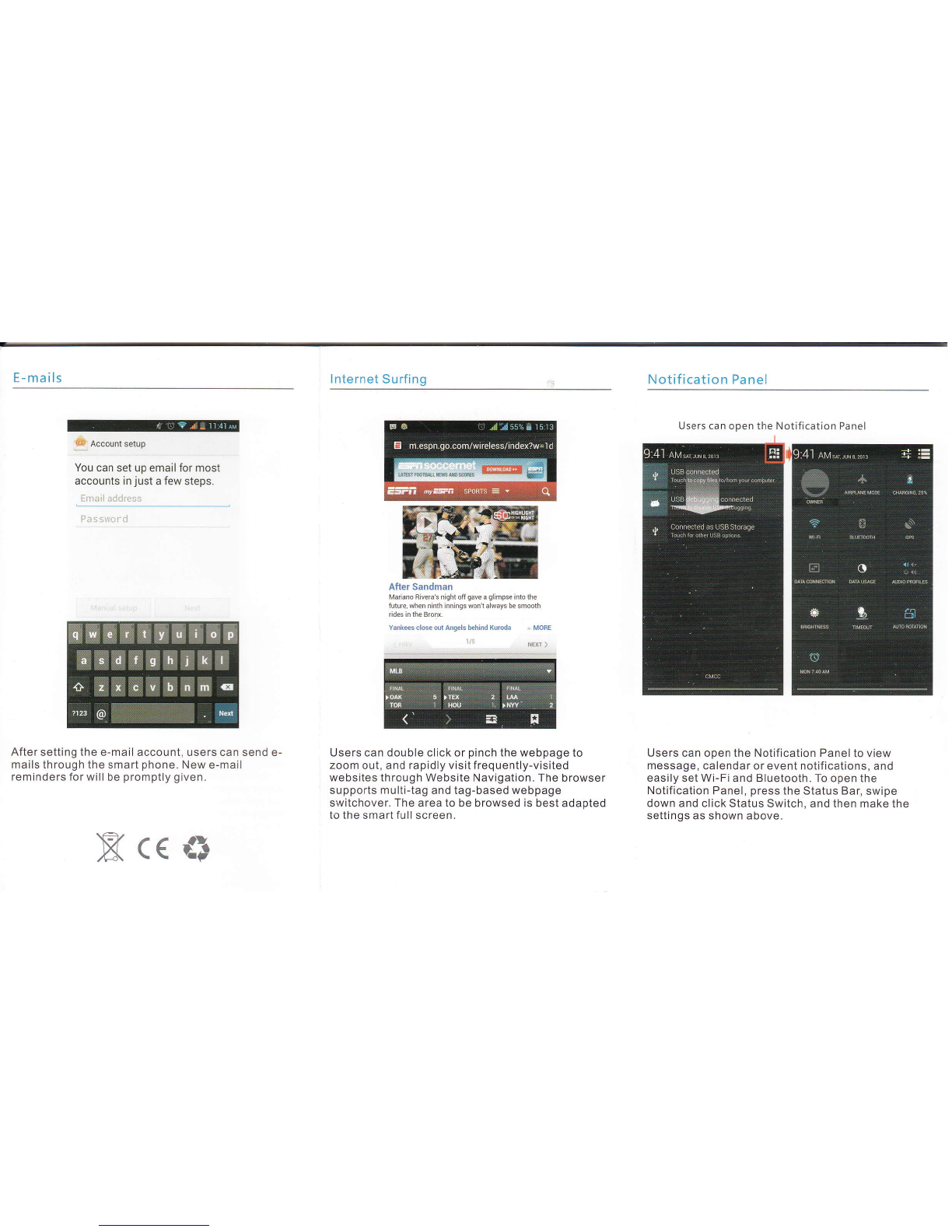
E- ma ils
& Account setup
You can set up email for most
accounts in just a few steps.
i:mail address
Pass$crii
After setting the e-mail account, users can send e-
mails through the smart phone. New e-mail
reminders for will be promptly given.
lnternet Surfing
After Sandman
Mariano Bivera's nishl otrqave a glimpse intothe
fulure.when ninth inninqs won1always be smoolh
Yanksscloseodansls khind Kuroda .. MoBE
1ta NEE i
Users can double click or pinch the webpage to
zoom out, and rapidly visit frequently-visited
websites through Website Navigation. The browser
supports multi-tag and tag-based webpage
switchover. The area to be browsed is best adapted
to the smart fullscreen.
Notification Panel
Users can open the Notification Panel to view
message, calendar or event notifications, and
easily set Wi-Fi and Bluetooth. To open the
Notification Panel, press the Status Bar, swipe
down and click Status Switch, and then make the
settings as shown above.
-ffiru
ffiffi
Users can open the Notification Panel
Xc<&

Desktop Setting
After unlocking and entering the desktop, users can
click an icon to open corresponding program, and
drag an icon to rearrange it after pressing and
holding it. To remove an icon, press and hold it until
"Delete" pops up on the screen, drag it to the
location of "Delete" and release it. ln this way, the
shortcut icon will be removed but not uninstalled.
l!l! -.-.. ..-.-.-.-. --l .-:.-
Set up my profile
Contacts Managing
Please select the mode to add contacts in first
use.supports multiple modes to add contacts. Users
can import contacts from SIM card and SD card, set
a sync account, or directly add new contacts.
SMS Sending
T'rpe name or nunber
Before sending a SMS, users can add one or
several receivers at a time. The smart phone
supports sending texts, photos, expressions,
contact information, audio or video. lmportant SMS
can be locked or forwarded by pressing and holding
the SMS.
Aaron
Amimi
0
Denny
fi
lE/
lE/
G/
HOPE
IlE/

Calls Making
T9 keyboard can be used to make calls or search
contacts. Contacts can be searched by the letter,
partial spelling, full spelling of their names and
contact numbers. The search results will be
displayed in the order of degree of match and
frequency of contact. Missed calls will be
highlighted in red in Call Logs. Swipe to the right to
switch to Recent Calls. Swipe to the right again to
switch to Contacts.
Open the Camera to take photos. Support quick
adiust focus, continuous capture, special effect and
other more professional photo modes. Switch to
Video Mode in the menu. Click "Photo Key" while
making a video to take photos. Support sync multi-
task operation-
Photo Browsing
Enter the Gallery program, double click or pinch to
zoom out a single photo, swipe to the Ieft or right to
switch to the previous or next photo. Click the photo
to pop up or concealthe lvlenu. Select MMS,
Bluetooth, Microblog, E-mail or other applications
to share the photos.
Photos or Vrdeos
Flashlight
Swltc h
Front & Bear
Camera
Switchover
Table des matières
Autres manuels ThL Téléphone portable


