
ThinkGizmos TG644 Manuel utilisateur

English p 1
Deutsch p 9
Francais p 17
Italiano p 25
Español p 33
TG644 PROJECTION CLOCK
CONGRATULATIONS ON PURCHASING THE THINK GIZMOS PROJECTION CLOCK,
PLEASE FOLLOW THESE INSTRUCTIONS CAREFULLY AND KEEP THIS INSTRUCTION BOOKLET
FOR FUTURE REFERENCE.
User Manual

If you have any issues with your product or have any questions, please contact us via email:
This is the quickest way to resolve any problems. You will be surprised how fast we will get
back to you on email with a resolution.
All our products are covered by our manufacturer’s warranty, details can be found on page
8.
For more of our brilliant products, search Amazon for “ThinkGizmos”.
“Small enough to care. Big enough to deliver”.
ENGLISH MANUAL - CONTENTS
1.
2.
3.
4.
1.1 Projection Clock Features ...................................................................................3
2.1 Important Information ....................................................................................... 3
2.2 Battery Safety ...................................................................................................... 4
2.2 Power Cable and Battery Installation ............................................................... 4
2.3 Reset Function .................................................................................................... 4
3.1 Manual Time/Date Setting.................................................................................. 5
PROJECTION CLOCK FEATURES
TIME AND CALENDAR SETTINGS
IMPORTANT INFORMATION
5.
4.1 Setting the Alarm ................................................................................................ 6
4.2 Activating and Deactivating the Alarm ............................................................. 6
4.3 Snooze Function ................................................................................................. 6
4.4 Stopping the Alarm ............................................................................................. 6
ALARM SETTING
6.
7.
5.1 Projection Function ............................................................................................ 7
5.2 Backlight .............................................................................................................. 7
PROJECTION AND BACKLIGHT
6.1 °C/°F Temperature Display ................................................................................7
6.2 Charging Function ............................................................................................. 7
TEMPERATURE AND CHARGING
Warranty Information ............................................................................................. 8
WARRANTY
2

1. PROJECTION CLOCK FEATURES
1.1 Projection Clock Features
●Date and day of week display.
●Perpetual calendar: 2001-2099.
●Snooze Alarm Clock.
●Temperature display in °C/°F.
●Thermometer: Indoor measurement ranges -9°C to +50 °C.
●LED back light display with projection (auto o after 5 seconds when using batteries).
●Projection On/O Switch.
●Battery: 2 x AAA 1.5V (Not included).
●Mains powered using USB Cable (included) - A 5V/2A QC2.0 or Above Power Adaptor (not
Included) is required for powering using the USB Cable.
●USB Charging Slot.
2. IMPORTANT INFORMATION
2.1 Important Information
Thank you for purchasing the TG644 Projection Clock. Please read through this instruction
manual before use as it contains all the information you need about how to correctly enjoy
this product.
CAUTION
ELECTRONIC PRODUCT
Do not leave children aged 6 or below unattended with this product. This product should be
used in accordance with this user manual in a safe way to avoid electric shock.
ADULT SUPERVISION REQUIRED
WARNING! Do not try to modify this product in any way as this may invalidate your
warranty.
WARNING! Contains small parts, child supervision is required at all times.
3

1) Use only brand new batteries of the correct size and power.
2) Do not mix old and new batteries, dierent types of batteries (zinc, alkaline or
rechargeable).
3) If using rechargeable batteries, ensure they are all the same capacity.
4) Do not try and charge non-rechargeable batteries.
5) Rechargeable batteries should be charged by an Adult or under Adult supervision. Stop
charging immediately if you notice any abnormal behaviour.
6) Do not throw batteries in the re.
7) Replace all batteries of the same type/brand at the same time.
8) The supply terminals are not to be short circuited.
9) Remove empty batteries from the product.
10) Batteries should be changed by an Adult.
11) If the Weather Station is going to be inactive for a long period of time, please remove all
batteries.
12) For your safety, please operate according to these instructions.
2.2 Battery Safety
2.3 Power Cable and Battery Installation
In order to get the full screen brightness and easy visibility of all numbers and symbols, we
recommend you use the USB Cable (included) with a USB Power Plug (not Included) rather
than batteries for the main unit.
Mains Power:
●Plug the charging cable USB-A male into a 5V/2A QC2.0 or above power adaptor.
●Connect the power adaptor to the mains socket.
●Plug the alternate end of the USB Cable into the port on the back of the clock.
●If connected correctly, the lights on the clock should light up.
IMPORTANT:
A 5V/2A QC2.0 or Above Power Adaptor is required for the clock to work correctly on
mains power.
Battery Power:
●Gently open the battery compartment located on the rear side of the unit.
●Insert 2 X 1.5V AAA batteries observing the correct polarity, as marked inside the
compartment.
●Replace the battery compartment door.
2.4 Reset Function
●If the clock is not working properly or does not respond to your input remove all
batteries and power for 30 seconds.
●This will reset the clock to factory defaults.
4
3. TIME AND CALENDAR SETTINGS
3.1 Manual Time/Date Setting
Note: After 20 seconds without pressing any button, the clock switches automatically from
Set Mode to Normal Time Mode.
●Press and hold down the TIME button for 2 seconds, the 12/24 hour mode display starts
to ash. Now use +and -buttons to set the correct 12/24 hour mode.
●Press TIME to conrm your setting, the Hour display starts to ash. Now use +and -
buttons to set the correct hour.
●Press TIME to conrm your setting, the Minute display starts to ash. Now use +and -
buttons to set the correct minute.
●Press TIME to conrm your setting, the date format display starts to ash. Now use +
and -buttons to set the correct date format.
●Press TIME to conrm your setting, the Year display starts to ash. Now use +and -
buttons to set the correct year.
●Press TIME to conrm your setting, the Month display starts to ash. Now use +and -
buttons to set the correct month.
●Press TIME to conrm your setting, the Date display starts to ash. Now use +and -
buttons to set the correct date.
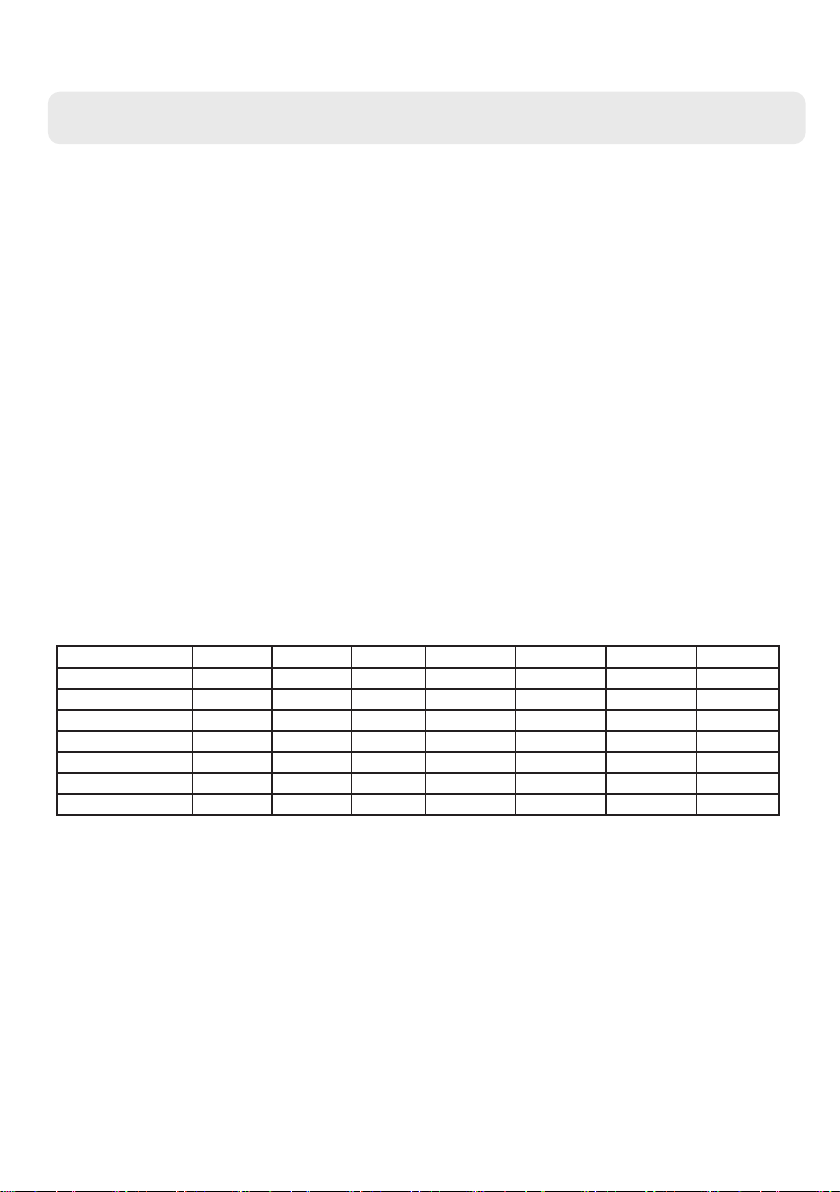
●Press TIME to conrm your setting, the Language for the day of the week will start to
ash. Now use +and -buttons to set the correct Language
Langue Dimanche Lundi Mardi Mercredi Jeudi Vendredi Samedi
English, ENG SUN MON TUE WED THU FRI SAT
German, GER SON MON DIE MIT DON FRE SAM
French ,FR DIM LUN MAR MER JEU VEN SAM
Spanish, SPA DOM LUN MAR MIE JUE VIE SAB
Italian, ITA DOM LUN MAR MER GIO VEN SAM
Dutch, DUT ZON MAA DIN WOE DON VRI ZAT
Danish, DAN SON MAN TIR ONS TOR FRE LOR
●Press TIME to conrm your settings and nish the Time / Date setup.
5

4. ALARM SETTING
4.1 Setting the Alarm
This Clock possesses 2 daily alarms. To view the set alarm times toggle the switch or
switch to ON and the LCD display will show the alarm time.
Note: After 20 seconds without pressing any button, the clock switches automatically from
Set Mode to Normal Time Mode.
●Press and hold down the ALARM button for 2 seconds until Alarm Time starts ashing
on the display.
●The Hour display of the Alarm will start to ash. Use the +and -buttons to set the
required hour. Press the ALARM button to conrm your settings.
●The Minute display of the Alarm will start to ash. Use the +and -buttons to set the
required minute. Press the ALARM button to conrm your settings.
●The Hour display of the Alarm will start to ash. Use the +and -buttons to set the
required hour. Press the ALARM button to conrm your settings.
●The Minute display of the Alarm will start to ash. Use the +and -buttons to set the
required minute. Press the ALARM button to conrm your settings and to end the alarm
setting procedure.
4.2 Activating and Deactivating the Alarm
●To activate or deactivate the daily alarms, briey toggle switch or switch .
4.3 Snooze Function
●While the alarm is sounding, touch the button to activate snooze function.
When the snooze fuction is active the alarm icons or will ash on the display.
●The snooze function moves the alarm back by 5 minutes and after this time it will sound
again.
●To turn o the snooze function press and button on the projection clock.
●If a snooze alarm is in process and another alarm is scheduled this will automatically
stop the snooze function and the set alarm will sound.
4.4 Stopping the Alarm
●When the alarm is sounding press any button on the back, apart from the “SNZ” button,
to stop the alarm.
●The alarm will stop sounding automatically after 2 minutes and will repear 24 hours later
at the set time.
●The alarm is a rising alarm which changes volume 4 times whilst the alarm sounds.
6

5. PROJECTION AND BACKLIGHT
5.1 Projection Function
●The projection lamp on the right side of the product can project the current time of the
clock on the wall or ceiling in order to see the time at night, if the projection direction is
not correct, press the button to switch the display direction.
●When the clock uses the USB power adapter, the projection can be switched on and o
using the On/O Switch on the back of the clock. When using battery power the On/O
switch will select whether the projection lights up when the backlight button is pressed.
5.2 Backlight
●On batteries at any time, touch the button and the backlight will light for 8
seconds.
●When using the USB power adapter, the projection clocks backlight will have 4
brightness settings, high - medium - low - out, each time the button is pressed
it will change the brightness setting.
6. TEMPERATURE AND CHARGING
6.1 °C/°F Temperature Display
●The temperature is displayed either in °C or °F. Pressing the -button allows you to switch
between the individual models.
6.2 Charging Function
●When using the USB power adapter, the USB plug on the left side of the projection clock
can be used for charging mobile phones etc.
●Charging a device using the USB Charging function does not use Fast Charge and devices
will be charged at a standard charging speed.
7

WARRANTY
Warranty Information
Think Gizmos, Unit 19, Lawson Hunt Industrial Park,
Broadbridge Heath, West Sussex, RH12 3JR
Tel.: +44/(0)203 384 8304
What is Covered:
This warranty covers any defects in materials or workmanship, with the exceptions stated
below.
How Long Coverage Lasts:
This warranty runs for 2 Years from the date your Projection Clock is delivered.
What is not covered:
Any problem that is caused by abuse, misuse, or an act of God (such as a ood) are not
covered.
Warranty does not reset with replacement items, it runs from the date the original item
was delivered.
What We Will Do:
If the Product proves defective during the warranty period, we will provide you with the
instructions for the return, and we will take one of the following actions: (i) replace the
Product with a product that is the same or equivalent to the Product you purchased; (ii)
repair the Product; or (iii) refund to you the whole of or part of the purchase price of the
Product.
How To Get Service:
To obtain instructions on how to obtain service under this warranty, contact our customer
service by phone or email. You will nd the contact details of our customer service below.
Customer service may ask you questions to determine your eligibility under this warranty,
and if you are eligible you’ll be given instructions for returning the defective Product. If
we send you a replacement or repair your Product, we will pay the cost of delivering the
replacement or repaired Product to you.
Do not return the item to the original place of purchase, please contact Think
Gizmos direct.

English p 1
Deutsch p 9
Francais p 17
Italiano p 25
Español p 33
TG644 PROJEKTIONSUHR
Bedienungsanleitung
BITTE FOLGEN SIE DIESE BEDIENUNGSANLEITUNG SORGFÄLTIG DURCHFÜHREN UND DIESES
BETRIEBSBUCH FÜR KÜNFTIGE REFERENZ BEHALTEN.
WEGEN DER KONTINUIERLICHEN VERBESSERUNGEN KANN DAS TATSÄCHLICHE PRODUKT DEN
ABBILDUNGEN UNTERSCHIEDLICH SEIN.

DEUTSCHE ANLEITUNG - INHALT
1.
2.
3.
4.
1.1 Funktionen der Projektionsuhr ........................................................................11
2.1 Wichtige Sicherheitshinweise .......................................................................... 11
2.2 Wichtige Informationen zu den Batterien ..................................................... 12
2.3 Installation des Netzkabels und der Batterie ................................................ 12
2.4 Rückstellfunktion .............................................................................................. 12
3.1 Manuelle Zeit-/Datumseinstellung.................................................................. 13
FUNKTIONEN DER PROJEKTIONSUHR
EINSTELLUNGEN VON ZEIT UND KALENDER
WICHTIGE INFORMATIONEN
10
5.
4.1 Einstellen des Weckers .................................................................................... 14
4.2 Den Wecker aktivieren und deaktivieren ...................................................... 14
4.3 Schlummerfunktion .......................................................................................... 14
4.4 Den Wecker ausschalten ................................................................................. 14
EINSTELLEN DES WECKES
6.
7.
5.1 Projektionsfunktion .......................................................................................... 15
5.2 Hintergrundbeleuchtung ................................................................................. 15
PROJEKTION UND HINTERGRUNDBELEUCHTUNG
6.1 °C/°F Temperaturanzeige ................................................................................15
6.2 Ladefunktion .................................................................................................... 15
TEMPERATUR UND LADEN
Garantieinformationen ......................................................................................... 16
GARANTIE
Wenn Sie Probleme mit Ihrem Produkt oder Fragen haben, senden Sie uns bitte eine E-Mail an:
Dies ist der schnellste Weg, Probleme zu lösen. Die schnelle Antwort mit der Lösung Ihres Problems
per E-Mail wird Sie überraschen.
All unsere Produkte fallen unter unsere Herstellergarantie, weitere Informationen nden Sie auf
Seite 16.
Für weitere fantastische Produkte suchen Sie auf Amazon nach “ThinkGizmos”.
“Klein genug für einen persönlichen Service, groß genug, diesen auch zu liefern”
Autres manuels pour TG644
1
Table des matières
Langues :
Autres manuels ThinkGizmos Horloge


Manuels Horloge populaires d'autres marques

Silicon Laboratories
Silicon Laboratories SI5324 Manuel utilisateur

Heathkit
Heathkit GC-1005 Manuel utilisateur

Oregon Scientific
Oregon Scientific PRYSMA RMR221P Manuel utilisateur

Andrew O'Malley
Andrew O'Malley DOTKLOK Manuel utilisateur

ALGE-Timing
ALGE-Timing ASC3 Manuel utilisateur

Bodet
Bodet Profil 960 Manuel utilisateur


