
Tevion 44217 Manuel utilisateur

DIGITAL FREEVIEW RECEIVER
User Guide
Now you have purchased a Tevion® product
you can rest assured in the knowledge that as
well as your 3 year parts and labour warranty
you have the added peace of mind of dedicated
helplines and web support
AFTER SALES SUPPORT
UK/N.IRELAND HELPLINE NO 01270 508538
REP. IRELAND HELPLINE NO 1800 995 036
WEB SUPPORT www.quesh.co.uk
MODEL NUMBER: 44217

02. Welcome Section
03. General Information and Safety Instructions
04. Battery Handling and Usage
05. Accessories
06. Features
07. Front and Rear Panel Information
08. Remote Control Operation
09. Connecting To Your TV
10. Operating Instructions
11. Troubleshooting
12. Technical Specification
13. Warranty Card
14. Fault Report Card
Helpline No. UK/Northern Ireland 01270 508538 Rep.Ireland 1800 995 036
Web Support www.quesh.co.uk
Model No: 44217
Contents 1
2
Chapter

Helpline No. UK/Northern Ireland 01270 508538 Rep.Ireland 1800 995 036
Web Support www.quesh.co.uk
Model No: 44217
Congratulations on choosing to buy a Tevion® product. By doing so
you now have the assurance and peace of mind that comes with
purchasing a product made by one of Europe’s leading manufacturers.
All products brought to you by Tevion® are manufactured to the
highest standards of performance and safety, and, as part of our
philosophy of customer service and satisfaction, are backed by our
comprehensive 3 year warranty.
We hope you enjoy using your purchase for many years to come.
Welcome Section 2
3
Helpline No. UK/Northern Ireland 01270 508538 Rep.Ireland 1800 995 036
Web Support www.quesh.co.uk
Model No: 44217
General Information and Safety Instructions
Please read through the following safety information before use
3
•To avoid risk of electric shock do not attempt to open this
appliance.
•Keep away from fire.
•Do not expose the appliance to water, rain or dampness.
•Keep this appliance away from direct sunlight and other heat
sources.
•Keep this appliance away from strong magnets.
•Never cover the ventilation slots on the underside or back of the
appliance.
•Avoid placing heavy objects on top of the appliance.
•Always disconnect the appliance from mains power before
cleaning.
•Clean the exterior of the appliance with a soft cloth only.
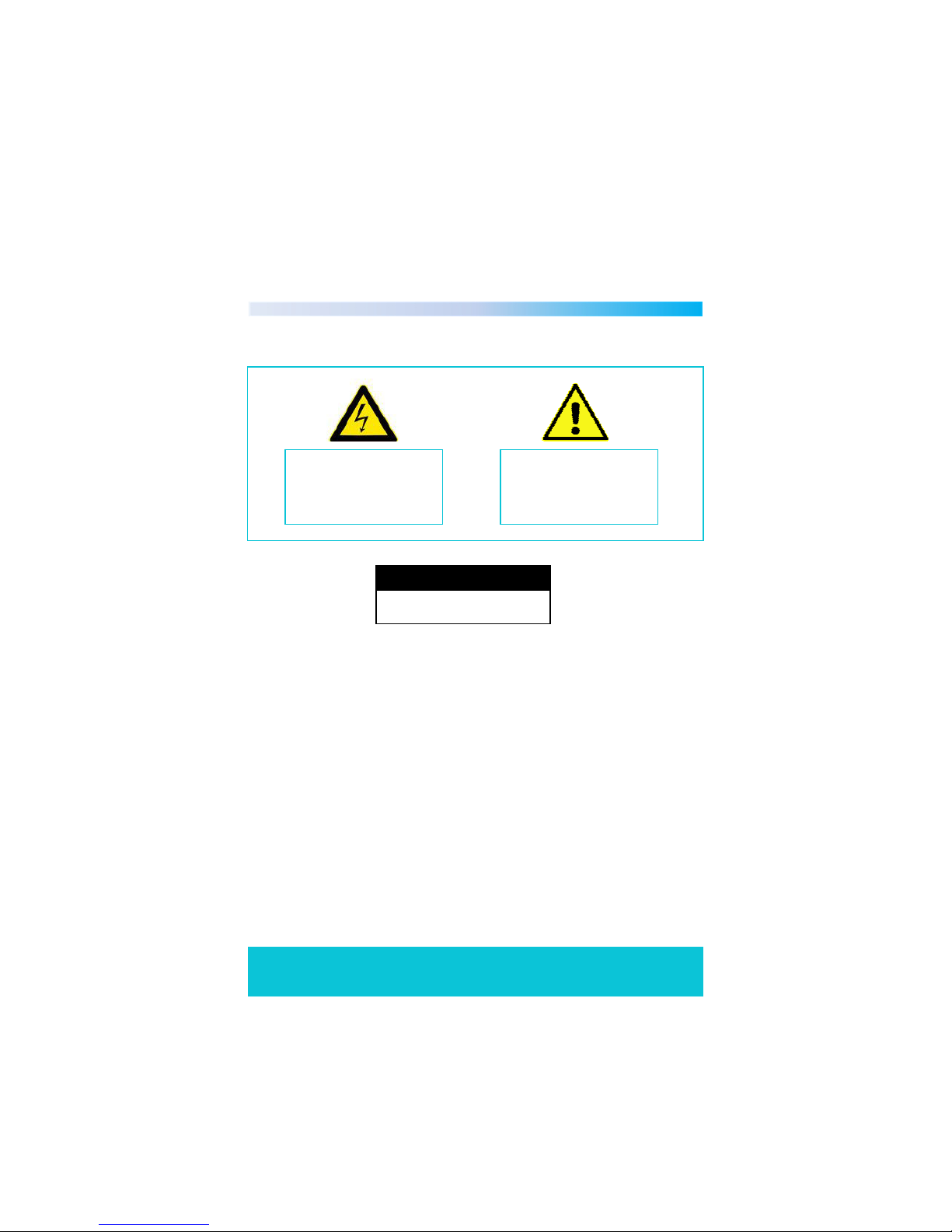
The lightening flash and
arrowhead within the triangle
is a warning sign alerting you of
dangerous voltage inside the
product
The exclamation mark within
the triangle is a warning sign
alerting you of important safety
instructions concerning the
product
C A U T I O N
RISK OF ELECTRIC SHOCK
DO NOT OPEN
4

Battery Handling and Usage 4
Helpline No. UK/Northern Ireland 01270 508538 Rep.Ireland 1800 995 036
Web Support www.quesh.co.uk
Model No: 44217 5
Remote Control
The remote control uses 2 x AAA batteries.
When inserting batteries always ensure the correct +/- polarity.
Electric and electronic equipment (EEE) contains materials, parts and
substances which can be dangerous to the environment and harmful
to human health. Once this appliance has reached the end of its life
span, the unit in its entirety should be taken to a recycling centre.
Please contact your local authority for details of recycling schemes in
your area.
Disposal of Your Old Product
Do not dispose of batteries in your household waste. Please
contact your local authority for details on safe disposal.
Do not dispose of this product in your household waste.
Please contact your local authority for details of recycling
schemes in your area.
Battery Safety
Never throw batteries into fire or expose to excessive heat sources.
If batteries are swallowed, please seek immediate medical attention
Ensure correct polarity when installing batteries
Do not recharge non-rechargeable batteries

Accessories 5
The following accessories are included with your Digital Set Top Box.
Should any of these be missing, please contact the customer support
team on the number below.
Helpline No. UK/Northern Ireland 01270 508538 Rep.Ireland 1800 995 036
Web Support www.quesh.co.uk
Model No: 44217 6
1 X Remote control (Including batteries)
1 X Scart Cable

Features 6
Helpline No. UK/Northern Ireland 01270 508538 Rep.Ireland 1800 995 036
Web Support www.quesh.co.uk
Model No: 44217 7
•Easy Installation
•Auto Setup
•USB Input
•Twin Scart Sockets
•Interactive Red Button
•Automatic Channel Scan
•Now and Next Programme Display
•7 Day Electronic Programme Guide

Front and Read Panel Information 7
Helpline No. UK/Northern Ireland 01270 508538 Rep.Ireland 1800 995 036
Web Support www.quesh.co.uk
Model No: 44217 8
1. Standby Indicator: Used to show the power state of the set top box,
the green LED will show when turned on, when the set top box is
turned off the LED will show red.
2. Remote Control Sensor: Used to receive the signal from the
remote control.
3. USB Input: Used for music, video, photo playback and software
upgrade.
Front Panel
Rear Panel
1. RF IN : This connects to your aerial.
2. RF Loop Through : This socket passes the RF signal to either your
TV or another video system.
3. VCR Scart : This socket connects to either a DVD or other video
system.
4. TV Scart : This socket connects to your TV
5. COAXIAL : This socket connects to your surround sound system
6. Mains Cable : This is used to connect to your mains power supply.

Helpline No. UK/Northern Ireland 01270 508538 Rep.Ireland 1800 995 036
Web Support www.quesh.co.uk
Model No: 44217 9
Remote Control Operation 8
1. MUTE
2. NUMBER KEYS 0-9
3. TV/RADIO KEY
4. INFO
5. SUBTITLE
6. EXIT
7. CH+
8. VOL+
9. OK
10. COLOUR KEYS
11. PAGE+
12. DTV/VCR
13. STANDBY
14. FAV
15. AUDIO
16. MENU
17. EPG
18. VOL-
19. CH-
20. TEXT
21. PAUSE
22. PAGE -
Note : To use the remote control point it towards the front of the
digital set top box. The remote control has a range of up to 7
metres from the set top box at an angle of up to 60 degrees.
The remote control will not operate if its path is blocked.
Connecting To your TV
Helpline No. UK/Northern Ireland 01270 508538 Rep.Ireland 1800 995 036
Web Support www.quesh.co.uk
Model No: 44217 10
9
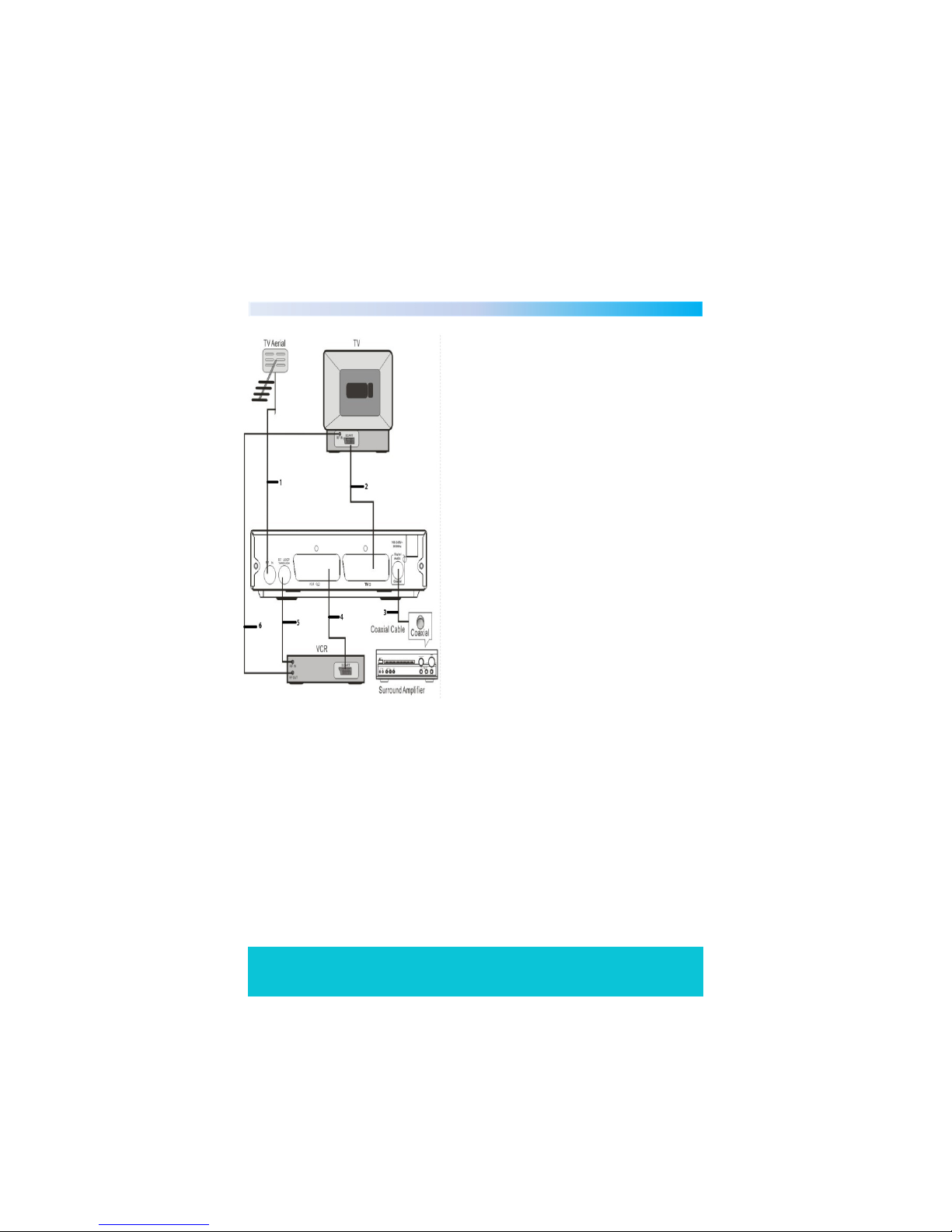
1. Connect the set top box to your
existing aerial point.
2. Insert one end of the scart cable
into the TV scart socket on the set
top box, then connect the other
end to a scart socket on the back of
your TV.
3. (Optional) Insert one end of a
COAXIAL cable into the COAXIAL
socket on the back of the set top
box, connect the other end to the
COAXIAL socket on our surround
sound system.
4. (Optional) Insert one end of a scart
socket in to the VCR socket, then
connect the other end into your
VCR/DVD player.
5. (Optional) Insert one end of your RF
loop through cable into the RF
LOOP THROUGH socket on the set
top box, then connect the other
end into your VCR’s RF IN socket.
6. (Optional) Insert one end of your RF
cable into the RF out socket on
your VCR, then connect the other
end into the RF in socket on the
back of your TV.
Note : When connecting your digital set top box to other
equipment, e.g, TV,VCR and amplifier, make sure to refer to the
relevant user manual for instructions. Also make sure you
disconnect all the equipment from the mains power supply.
Table des matières
Autres manuels Tevion Récepteur


