2
INSTALLATION INSTRUCTIONS
Read the safety instruction rst.
Installation of system according standard IEC60728-11 ensures safety of personnel and prevents apparatus against
damaging due to lightning or other sources of overvoltage surges.
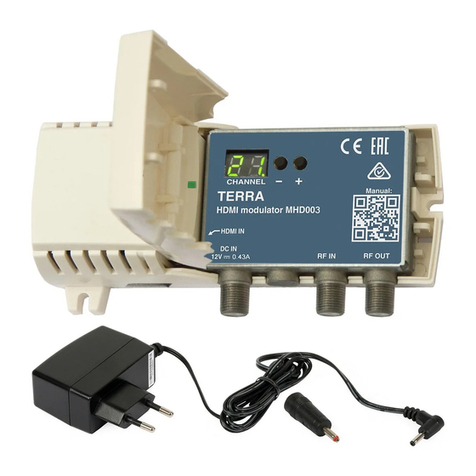
To change the modulator settings, open the plastic cover.
If RF IN connector on the modulator is not used, connect the 75 Ω load supplied.
To wall mount the modulator - screw the modulator to the wall (see Figure 1).
Do not connect TV antennas to modulator RF IN connector directly. If you intend to combine TV signals of antennas
and the modulator, plug in booster with output-to-input isolation ≥20 dB between antenna output and RF IN connector.
DEFAULT SETTINGS
1. Output channel 21;
2. Protection from unauthorized access OFF (Preset oF);
3. Service name MHD001 CH_21 (Preset 00);
4. Output signal attenuator 15 dB (Preset I5);
5. Output signal ON (Preset on);
6. Region Europe (Preset EU).
OPERATING
CHANGING OF SETTINGS
The modulator has two modes of operating:
1. normal: sets after plug in;
Output channel can be selected in normal mode by pressing buttons “-“ or “+” (see tables 2-6).
2. setting: to enter the setting mode press “-“ and “+” buttons simultaneously, to exit setting mode press “-“ and “+” buttons
simultaneously for 1 second. The setting mode is indicated by point after rst digit.
Select of necessary to change parameter by pressing button “-“ and set necessary parameter value by pressing “+” button.
1. Protection from unauthorized access setting (displayed L.C):
a) after switching settings mode, indicator displays protection from unauthorized access parameter name L.C;
b) select protection from unauthorized access parameter value by pressing “-“ button (displayed o.nor o.F) ;
c) change protection from unauthorized access parameter value by pressing “+“ button.
In the normal operation mode the symbol "LO" appears, if you try to change output channel in locked mode and output
channel remains unchanged.
2. service number:
a) press “-“ button (displayed n.O);
b) press “-“ button again (displayed number from 00 to 99);
c) change service name by pressing “+“ button.
When the service number is set to number greater that 00, the logical channel number will be added and service name is
set to MHD001 CH_service number. For New Zeland region service name is set according Table 7. When the service number
is set to 00, the logical channel numbering is o and service name is set to MHD001 CH_channel number.
Note: set dierent service numbers for cascaded modulators.
3. output attenuator:
a) press “-“ button (displayed A.t);
b) press “-“ button again (displayed number from 00 to 30);
c) change attenuator value by pressing “+“ button.
4. output signal switching:
a) press “-“ button (displayed r.F);
b) press “-“ button again (displayed o.nor o.F);
c) switching between RF ON and RF OFF by pressing button “+”, “on”- RF ON, “oF”- RF OFF.
5. region switching:
a) press “-“ button (displayed r.9);
b) press “-“ button again (displayed region name (see Table 1);
b) switching between regions by pressing button “+”.
REGION SETTING
Table 1.
Region Displayed Channel tables
Europe EU Table 2, Table 4
New Zealand n2 Table 2, Table 4
Australia AU Table 3, Table 5
United Kingdom Table 2, Table 4
Russia rU Table 2, Table 6