
Tenmars TM-380 Manuel utilisateur
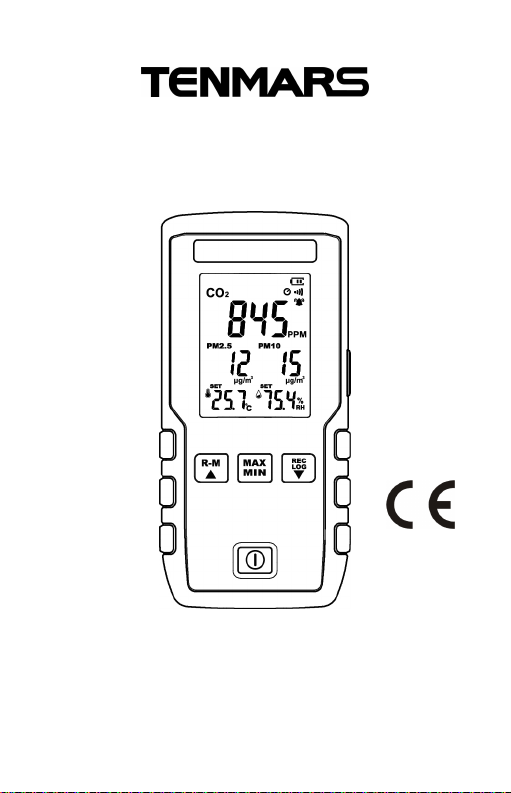
Multi IAQ Monitor
TM-380
User’s Manual
HB2TM3800000


Contents:
1 Application.................................................................. 1
2 Accessories................................................................. 1
3 Safety Precaution........................................................ 1
4 Instrument Description............................................... 2
4.1 Feature and function...................................... 2
4.2 Indication on the LCD display....................... 3
5 Operation..................................................................... 4
5.1 Power on/off................................................... 5
5.2 Auto Power Off............................................... 5
5.3 Backlight mode.............................................. 5
5.4 MAX/MIN,AVG and MAN MIN ................. 5
5.5 REC Manual record................................ 5
5.6 LOG starts the auto-recording function 6
5.7 Read the data recorded in the memory. 6
5.8 °C or °F units.................................................. 6
5.9 Clear memory................................................. 6
5.10 Turn on / off the key sound .................... 7
5.11 Resume the factory settings.......................... 7
5.12 Function settings........................................... 7
6 General Specifications.............................................. 12
7 General Specifications.............................................. 14
7.1 PM2.5............................................................ 14
7.2 PM10............................................................. 14
7.3 CO2................................................................ 14
7.4 Temperature................................................. 15
7.5 Humidity....................................................... 15
8 Maintenance or Repair.............................................. 16
9 Product disposal....................................................... 16

TM-380
1
1 Application
This air quality meter can measure and display CO2,
PM2.5, Humidity and Temperature measurements and is
ideal for monitoring indoor air quality in a variety of
environments.
2 Accessories
1 Meter (with a 3.7V Rechargeable
lithium
b
attery
)
1
User
’s
Manu
al
1
Micro USB cable
3 Safety Precaution
Caution! Please refer to this manual.
Improper use may damage the meter
and its components.
Complies with European Directive.
Do not operate in environments with flammable gas or humid
environments.
Operating altitude: up to 2000M.
Operating environment: Indoor use; Pollution degree 2.
Clean with soft cloth when dirty, such as glasses cloth. Do not
clean with chemicals and other solvents.
EMC: EN61326-1:CISPR 11:Group 1, Class B
Class B – Equipment for use in all establishments other than
domestic.
Group 1 – RF energy generated is needed for internal
functioning.

TM-380
2
4 Instrument Description
4.1 Feature and function
1.
LCD
2.
R
ight
-
side
button
3. Memory reading / Up button
4.
M
AX / MIN /
AVG
button
5.
Power button
6. Single log and auto-record button/Down
button
7.
Temperature and humidity
sens
ing
port
8.
A
ir outlet
for sensor
9.
A
ir inlet
for sensor
10.
Micro USB
jack
TM-380
3
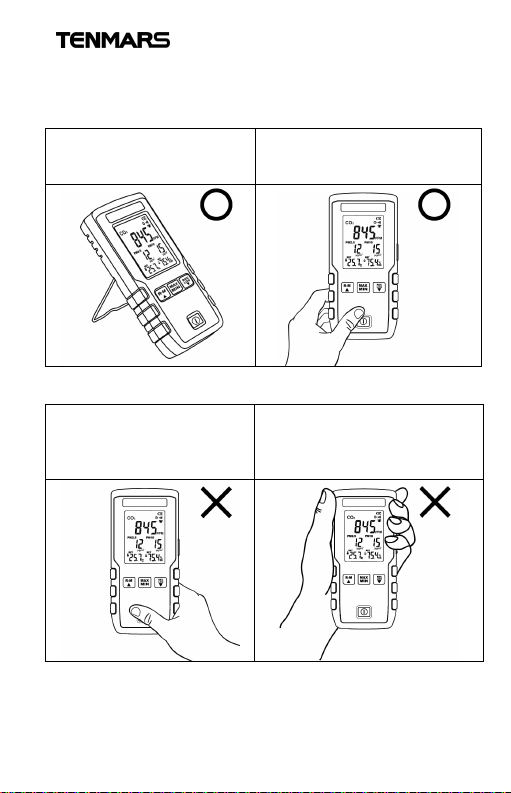
4.2 Indication on the LCD display
1.MAX / MIN /AVG
/MAN MIN
2.Manual recording
3.Auto-recording
4.Read record
5.Battery indicator
6.Auto-power off
7.Buzzer
8.Alarm
9.CO2
10.PM2.5
11.Temperature
12.MM minute,
SS second
13.PM10
14.Humidity
TM-380
4
5 Operation
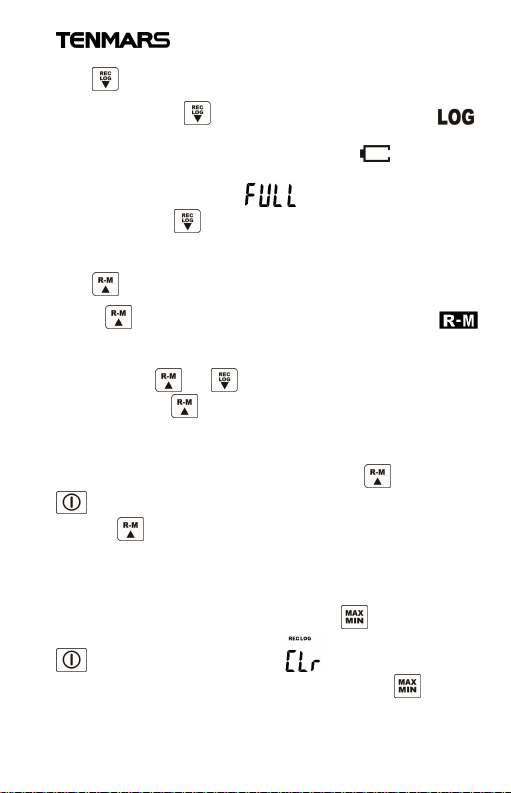
Please hold the meter in the following way for the correct
measured value:
The placement follows the
electrical specifications
described in Section 7.
This is a suitable way to hold
the meter, holding for a long
time may affect the accuracy.
This is not a proper way to
hold the meter, it will block
the temperature and
humidity sensors.
This is not a proper way to
hold the meter, it will block
the PM2.5, PM10 and CO2
se
nsors.

TM-380
5
5.1 Power on/off
Press to turn the power on or off.
5.2 Auto Power Off
At the power-on status, press and hold for more than 2
seconds to disable or resume auto power off function. When
auto power off is activated, the indicator appearing, and
it will automatically turn off after 30 minutes.
5.3 Backlight mode
Press “right-side button” to turn on or off the backlight.
(When the red backlight for alarm is on, this button is invalid)
The backlight mode is turned off automatically after 15
seconds.
5.4 MAX/MIN AVG and MAN MIN
Press to enter this function, the MAX is shown on the
screen and it displays the maximum value.
Press repeatedly to select the function of
MIN/AVG/MAX MIN/MAX and update the displayed value.
When select MAX MIN function, it displays the current
measured value.
5.5 REC Manual record
Press to save one data log, the “REC” and the log
number appear on the LCD for one second. For an example
of the log number 10, it will increase by 1 when pressing
every time. When reaching the maximum log number
20, appears.
TM-380
6
5.6 LOG starts the auto-recording function
Press and hold for more than 2 seconds, “ ”
appears on the LCD, and auto-recording starts. If the power
is insufficient during auto-recording, appearing,
auto-recording will be forcibly stopped. When reaching the
maximum log number 20, appears.
Press and hold again for more than 2 seconds to exit
the auto-recording function.
5.7 Read the data recorded in the memory
Press to enter the memory-reading mode, while
and the log number appear on the LCD for one second, the
record is then displayed. Read the data recorded in the
memory with or .
Press and hold to exit this mode.
5.8 °C or °F units
At the shutdown status, press and hold , then press
to turn on the meter, after the software version appears,
release .
Repeat the above steps to switch the unit.
5.9 Clear memory
At the shutdown status, press and hold and then press
to turn on the meter, the and software version
appears successively on the LCD, release the to clear
the memory.

TM-380
7
5.10 Turn on / off the key sound
The sound is defaulted as on and the is displayed.
At the shutdown status, press and hold and then press
to turn on the meter, after the software version appears,
release and the disappears, the key sound is off.
Repeat the above step to tun on the key sound.
5.11 Resume the factory settings
At the shutdown status, press and hold “right-side button”
and then press , the and software version
appears successively on the LCD, release the “right-side
button” to complete the process of resuming to the factory
settings and clearing the memory.
Auto-shutdown: OFF
Key sound: On
The calibration value resumed to 0
CO2Abc OFF
Memory cleared
5.12 Function settings
Press “right-side button” for more than 2 seconds to enter
the setting mode.
Press the “right-side button” repeatedly to enter the setting
function 1 ~ 8 in sequence:
Table des matières
Autres manuels Tenmars Moniteur


