
Tenderfoot Quad Quantizer Manuel utilisateur

Quad Quantizer Manual
Quad Quantizer
4 – Channel CV Quantizer
Manual revision 28/01/2020
1
TENDERFOOT ELECTRONICS

Quad Quantizer Manual
Overview
The Quad Quantizer is a 4-channel CV quantizer with custom note selection, preset
scales, and selectable keys. For each channel, there is a CV input, trigger input, CV
output, and trigger output.
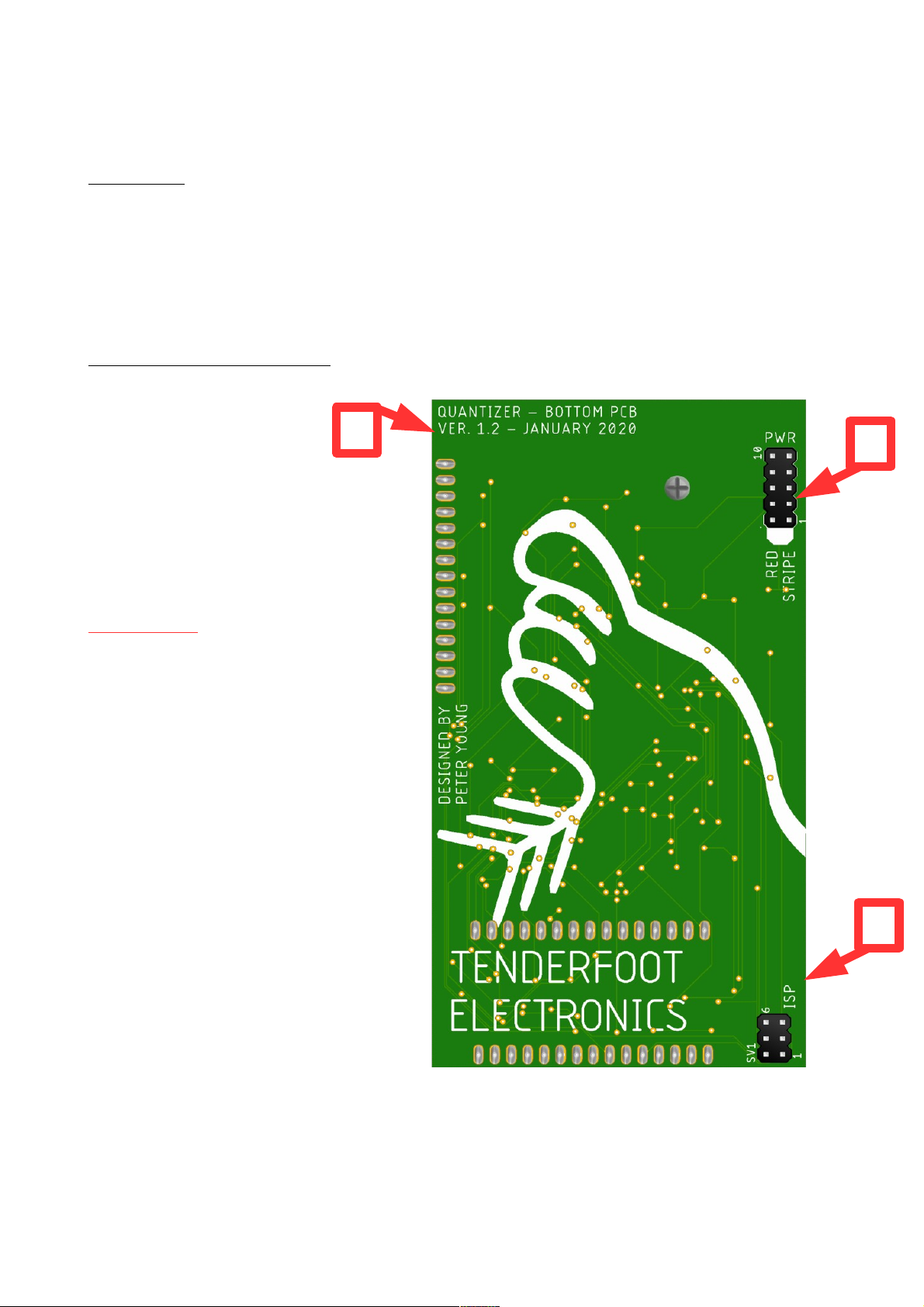
The back of the module
The rear of the module reveals:
(1) the PCB version
(2) the power header
(3) the ISP programming header
IM ORTANT
PCB revisions prior to VER 1.2 may
also have a label on the back of the
board saying “calibrate”. This label
points to a small tactile switch on the top
side of the lower PCB. This button is for
factory use to calibrate the module
before shipping. Do not press this
button as calibration requires an
accurate volt meter and voltage source.
If you have pressed this button, get in
touch with us and we can either talk you
through the recalibration process, or
arrange to recalibrate your module for
you.
3
2
1
3
TENDERFOOT ELECTRONICS

Quad Quantizer Manual
Installation
Tenderfoot Electronics modules are designed to be used with a Eurorack-compatible case
and power supply. Before installing a new module into your case, please ensure that your
power supply and case have sufficient space and available capacity to power the module.
The Quad Quantizer draws current from the +12V and -12V rails, and has an onboard V
regulator for any circuitry which requires it, so can be used in cases without a V rail.
Failure to adequately power your modules may result in damage to your modules or power
supply. If you are unsure, please contact us before proceeding.
Before installing or removing a module from your rack, ensure that you turn off the power
supply for the case. If a module is removed or installed while the rack power supply is
switched on, it could cause serious damage to either the module, or power supply, or both.
Connecting the power cable to the module:
When connecting the ribbon cable to the back of the module, make sure you attach it to
the 10-pin header that is labelled “PWR” towards the upper-right side of the PCB.
Connecting the power cable to the ISP header will irreparably damage the module
The power header is labelled at one end with a
bold stripe, and the words “red stripe”. Align the red
stripe on the ribbon cable with the “red stripe” label
on the PCB.
Once the cable is attached to the module, connect
the 16-pin end of the cable to your case's power
supply, again ensuring the red stripe lines up with
that of the power supply PCB.
Using the included screws, screw the module on to
your rails, power up, and enjoy! If at any time you
notice irregularities in the operation of the module,
turn off the case and inspect all connections and
cables.
4
TENDERFOOT ELECTRONICS

Quad Quantizer Manual
Panel Layout
CV IN
Insert the control voltages that
you wish to quantize into the
CV IN. The first jack for each
channel is the CV IN.
RIG IN
Leaving this unpatched will
allow continuous quantizing
of the CV input. ending a
trigger to this input will
sample and hold the current
CV IN. Once unpatched, the
continuous sampling mode
will resume after 5 seconds.
CV OU
The quantized CV from the
module will emerge from the
third jack of each channel.
This will typically be patched
to a 1V/oct input on a VCO.
RIG OU
The trigger output will produce
a trigger signal each time the
CV output changes value.
Each time a trigger is
generated, the associated
LED indicator will illuminate.
This output will typically be
patched to the trigger / gate
input of your envelope
generator.
Note Display
The LED display is laid out in
the shape of a piano and
shows which notes the CV
inputs are currently being
quantized to. The cursor
position for custom note
selection is marked by a
blinking of the LED of the
currently selected note.
Key Dial
The current scale and notes
selected on the quantizer can
be transposed to a different
key using this dial. When
using the TRAN PO E CV
input jack, this dial becomes
an attenuator, and therefore
needs to be turned clockwise
to allow any CV to pass
through it.
Scale Dial
There are 12 pre-programmed
scales in the Quad Quantizer.
This dial selects which of
those scales is activated.
When using the CALE CV
input jack, this dial becomes
an attenuator, and therefore
needs to be turned clockwise
to allow any CV to pass
through it.
Button 2
Button 2 has three
main functions. For a
full explanation, read
on to the next page.
Button 1
Button 1 adds and
removes notes to the
current quantization
scale.
Encoder
Turning the encoder moves
the cursor up or down the
LED note display. The
currently selected note is
shown by a blinking of the
associated LED.
SCALE CV IN
This CV input allows the
automation of changes to the
scale that each channel is
being quantized to.
Remember to turn the scale
dial clockwise to allow CV
through.
RANSPOSE CV IN
This CV input allows the
automation of changes to the
key that each channel is being
quantized to. Remember to
turn the key dial clockwise to
allow CV through.
TENDERFOOT ELECTRONICS

Quad Quantizer Manual
Scale dial
The Quad Quantizer has 12 preset scales that are selectable via the scale dial.
Note, that when using the SCALE CV input jack, the dial will become an attenuator. In
order to allow CV from the SCALE CV nput jack to enter the module, you must turn the
scale dial clockwise. We recommend turning it all the way to “locr” and then rolling it back
if the CV needs attenuating.
The 12 preset scales are indicated as follows:
1. “chrm” - Chromatic Scale
2. “maj” - Major Scale
3. “n min” - Natual Minor Scale
4. “h min” - Harmonic Minor Scale
. “mmin” - Melodic Minor Scale
6. “Mpnt” - Major Pentatonic Scale
7. “mpnt” - Minor Pentatonic Scale
8. “dor” - Dorian Mode
9. “phry” - Phrygian Mode
10. “lyd” - Lydian Mode
11. “mixo” - Mixolydian Mode
12. “locr” - Locrian Mode
6
TENDERFOOT ELECTRONICS

Quad Quantizer Manual
Functions of BUTTON 2
Button 2 has three main features:
Quick Press <0.5 seconds
A momentary press of the button toggles between the panel settings and the scale saved
in the quick memory. All of the note LED will blink once per second while in the quick
memory mode as an indicator of which mode you are in. Whilst in quick memory mode,
any changes to the scale or key dials or associated CV inputs will not be registered. This
can be useful if you wish to manually change to another key or scale without scrolling
though all of the intermediary scales and keys.
Medium press 0.5 to 3 seconds
Pressing the button for between 0.5 and 3 seconds saves the currently selected notes to
the quick memory. Confirmation that you have saved the current settings to quick memory
is shown in the form of a single blink of all of the display LED .
Long press > 3 seconds
Holding the button for over 3 seconds clears the current note selection and stops all
quantization. This is shown by a double blink of the LED .
IMPOR AN HINGS O NO E AND REMEMBER
1. When using either the CALE or TRAN PO E CV inputs, remember to turn the
associated dial clockwise, as it will be acting as an attenuator.
2. Do not press the hidden tactile button on the top side of the lower PCB (labelled
“calibrate” on PCB revisions before VER1.2) as this is the calibration button intended for
our own factory use only. If you have pressed this and have access to an accurate volt
meter, get in touch and we can walk you through the calibration procedure. If you do not
have access to a volt meter, we will happily recalibrate your module for you at our factory,
but are unable to cover postage fees for returning the module back to Taiwan to do so.
3. As always, make sure you plug the power cable on to the correct header pins, and line
up the red stripe with the white marking on the PCB silkscreen.
4. Have fun with the module, and if you have any questions or issues regarding it, don't
hesitate to get in touch with us at [email protected] !
7
TENDERFOOT ELECTRONICS
Table des matières


