6 to g inches away from your mouth. If the recording
is distortedr decrease the volume setting during re-
cording. trf the recording is weak, increase the vol-
ume setting.
To Rewind the Tape
To rewind the tape, move the Function selector
to the Rewind position. To stop the tape, return the
Function selector to the Off position.
To Play a Recording
l. Followinstructions under "Threadingthe Tape".
2. Move the Function selector to the Play position.
3. Adjust theVolume control to the desired listen-
ing level.
4. To stop the tape transport, move the Function
selector to the Off Position.
Erasing Recorded Material
Any recording on atape is automatically erased
before anew recording isput on thetape when the unit
is in Record position. To erase a tape without putting
a new recording on it, follow the normal recording
procedurebut leavethe Volume control setting at min-
imum.
To Remove the Recorder from the Case
D ISASSEMBLY
3.
l. Remove the Function control knob (l) and the
Volume eontrol knob.
2. Remove the rear escutcheon by pressing in on 5.
the front and lifting upward.
Dual Track Recording
These recorders are designed to record and
play back on one-half the tape width at a time. After
the recording is completed, and all the tape is wound
on the take-up reel, remove the reels from the re-
eorder. Turn the reels over and place full reel onthe
eupply spindle. Properly thread the tape and proceed
with recording. After the second track has been re-
corded, the first track canbe played back in the same
manner.
To Edit and Splice Tape
N0TE: Since one track cannot be edited and
spliced without affecting the other traek,
recordings to be edited should be limited
to one track only.
l. Tape may be edited by cutting out unwanted
portions ofthe tape or by joining selections into
another sequence. Announcements may be in-
serted between selections, etc. Unused sections
can be spliced for re-use.
2. For best results, cut tape at a slight diagonal,
join ends with splicing tape on the glossy side.
Trim off any excess width.
Remove 3 screws and lift the front escutcheon
up off the recorder.
Lift the recorder from the case.
To reassemble, reverse the above procedure.
3
O-t
str
trh
'6
3;
_Go
4.
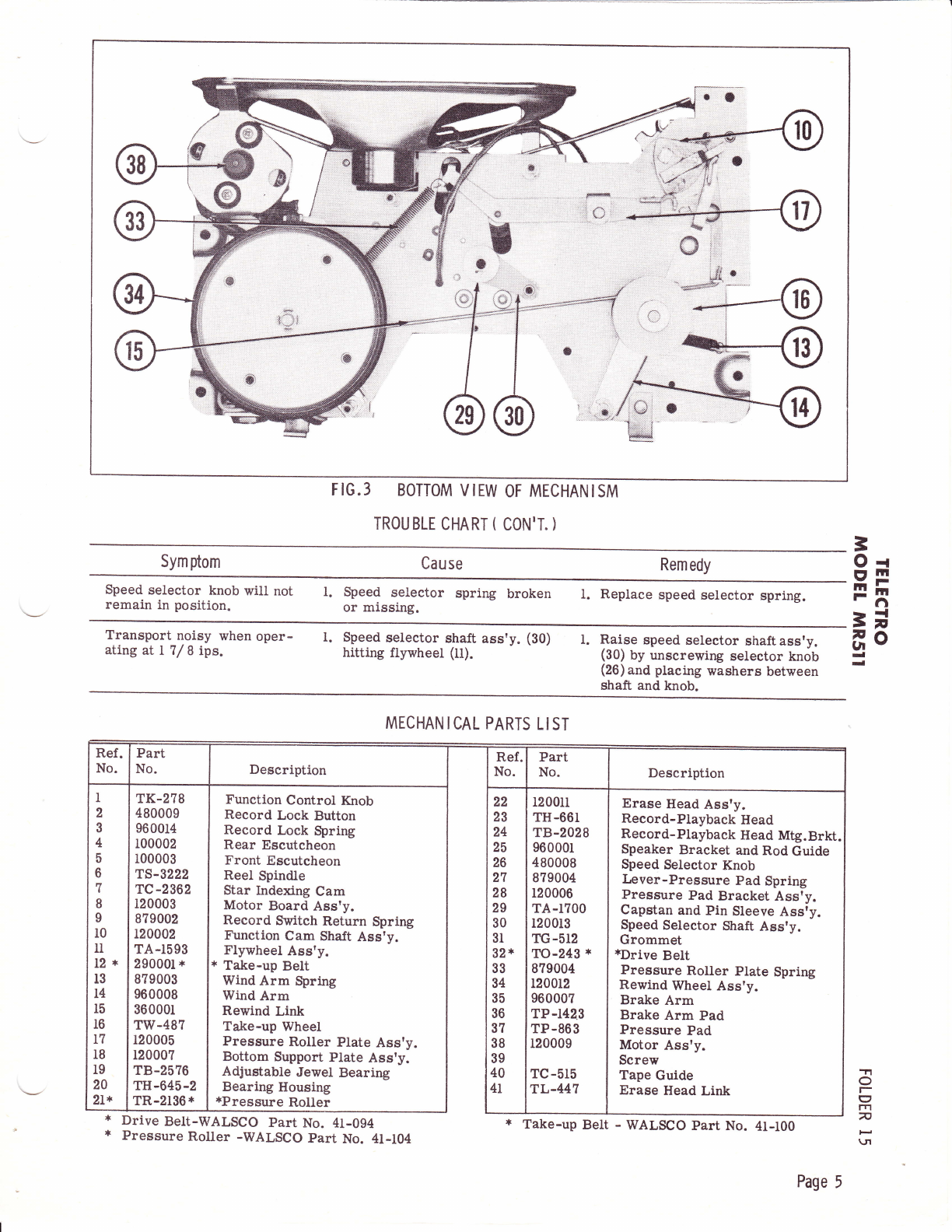
Pressure roller (21), Capstan shaft (ll), Tape
guide (41), and Record-Playback head (23)may accum-
ulatetape oxide coating, worn offthe tape asit passes
these parts. This accumulation will cause poor per-
formance and should be removed with a soft lint-free
cloth dipped in alcohol.
CLEAN I NG
LU BRI CATION
ADJUSTMENT
Under normal use, this recorder needs no lub-
rlcation. When unit is disassembled, clean and lubri-
cate all bearing surfaces with a good grade of oil.
Lubricate the cams and levers with a non-hardening
grease. Make sureno oilor grease gets onthe rubber
surface of the drive wheels"
Record-Playback Head
The Record-Playback head (23) has been prop-
erly aligned at the factory, and should not need ad-
justment unless it is replaced. The top edge of the
Record-Playback head(23) must be set evenly withthe
topedge of thetape. Loosen nuts andadjuet theheight.
Using an alignmenttape, adjust head adjustment serew
(40) until highest frequency response is obtained.
Flywheel Bearing Adjustment
To adjust flywheel, loosen nut and adjust adjust-
ment screw (19) until a stight resistance is feltl back
off screw L/ 4 ilrtrn and tighten nut.
N0TE: Care must be taken when turning fly-
wheel adiusting acrew (19) to prevent
damage to flywheel bearing.
Brake Adjustment
To adjust brake (35) loosen screws and adjust
brake arm until proper brake action is obtained.
Braking should be smooth and immediate.
o
I
rn
n
\JI
Page 3