
TeleAdapt ChargeTime Plus Manuel utilisateur

USER GUIDE
MODEL: TA-7850

ATTENTION: POUR ÉVITER LES CHOC ÉLECTRIQUES, INTRODUIRE LA LAME LA PLUS LARGE DE LA FICHE DANS
LA BORNE CORRESPONDANTE DE LA PRISES ET POUSSER JUSQU'AU FOND.
DANGEROUS VOLTAGE: The lightning flash with arrowhead symbol, within an equilateral triangle is
intended to alert the user to the presence of uninsulated dangerous voltage within the product's
enclosure that may be of sufficient magnitude to constitute a risk of electric shock to persons.
ATTENTION: The exclamation point within an equilateral triangle is intended to alert the user to the
presence of important operating and maintenance (servicing) instructions in the literature accompanying
the appliance.
FCC WARNING: This equipment may generate or use radio frequency energy. Changes or modifications to this
equipment may cause harmful interference unless the modifications are expressly approved in the instruction manual.
The user could lose the authority to operate this equipment if an unauthorized change or modification is made.
CAUTION: TO REDUCE THE RISK OF ELECTRIC SHOCK, DO NOT REMOVE COVER (OR BACK).
NO USER-SERVICEABLE PARTS INSIDE. REFER SERVICING TO QUALIFIED SERVICE PERSONNEL.
CAUTION
RISK OF ELECTRIC SHOCK
DO NOT OPEN
NOTE: This equipment has been tested and found to comply with the limits for a Class B digital device, pursuant to part
15 of the FCC Rules. These limits are designed to provide reasonable protection against harmful interference in a
residential installation. This equipment generates, uses and can radiate radio frequency energy and, if not installed and
used in accordance with the instructions, may cause harmful interference to radio communications. However, there is no
guarantee that interference will not occur in a particular installation. If this equipment does cause harmful interference

to radio or television reception, which can be determined by turning the equipment off and on, the user is encouraged to
try to correct the interference by one or more of the following measures:
. Reorient or relocate the receiving antenna.
. Increase the separation between the equipment and receiver.
. Connect the equipment into an outlet on a circuit different from that to which the receiver is connected
. Consult the dealer or an experienced radio/TV technician for help.
Compliance information: This device complies with Part 15 0f the FCC Rules. Operation is subject to the following two
conditions: (1) this device may not cause harmful interference, and (2) this device must accept any interference received,
including interference that may cause undesired operation.
SURGE PROTECTORS: It is recommended to use a surge protector for AC connection. Lightning and power surges ARE
NOT covered under warranty for this product.
WARNING: TO PREVENT FIRE OR SHOCK HAZARD, DO NOT EXPOSE THIS UNIT TO RAIN OR MOISTURE.
CAUTION:
Danger of explosion if battery is incorrectly replaced. Replace only with the same or equivalent type.
The batteries shall not be exposed to excessive heat such as sunshine, fire or the like.
Dispose of batteries properly according to environmental regulations.
Packaging
The product has been packaged to protect it from damage in transit. Packaging materials are raw materials
and can therefore be reused or recycled.
FCC RF Radiation Exposure Statement
This equipment complies with FCC RF radiation exposure limits set forth for an uncontrolled environment. This
equipment should be installed and operated with a minimum distance of 20 centimeters between the radiator
and your body.

This symbol on a product means that the product is covered by European Directive 2012/19/EU. Inform yourself
about the local separate collection system for electrical and electronic products. Follow local rules and never
dispose of the product with normal household waste. Correct disposal of old products helps prevent negative
consequences for the environment and human health.
Batteries
Do not dispose of used batteries in the household rubbish. Every consumer is obliged by law to take old batteries
to a collection point for used batteries in a recycling centre or retailer that sells batteries.
Unplug this apparatus during lightning storms or when unused for long periods of time.
Do not block any ventilation openings. The minimum distance around the product for sufficient ventilation is 10 cm.
The product shall not be exposed to dripping or splashing.
The product can be used in both moderate and tropical climate.
Do not place any sources of danger on the product (e.g. liquid filled objects, lighted candles).
Where the plug of the Direct Plug-in Adapter is used as the disconnect device, the disconnect device shall remain readily
operable.
EMC Directive 2004/108/EC
Low Voltage Directive 2014/35/EU
Ecodesign Directive 2009/125/EC
RoHS Directive 2011/65/EU
Declaration of conformity :

1. Read these Instructions.
2. Keep these Instructions.
3. Heed all Warnings.
4. Follow all instructions.
5. Do not use this apparatus near water.
6. Clean only with a dry cloth.
7. Do not block any ventilation openings. Install in accordance with the manufacturer’s instructions.
8. Do not install near any heat sources such as radiators, heat registers, stoves, or other apparatus (including ampliers)
that produce heat.
9. Do not defeat the safety purpose of the polarized or grounding - type plug. A polarized plug has two blades with one
wider than the other. A grounding type plug has two blades and a third grounding prong. The wide blade or the third
prong are provided for your safety. When the provided plug does not fit into your outlet, consult an electrician for
replacement of the obsolete outlet.
10. Protect the power cord from being walked on or pinched particularly at plugs, convenience receptacles, and the point
where they exit from the apparatus.
11. Only use attachments/accessories specied by the manufacturer.
12. Use only with a cart, stand, tripod, bracket, or table specied by the manufacturer, or sold with the apparatus.
When a cart is used, use caution when moving the cart/apparatus combination to avoid injury from tip-over.
13. Unplug this apparatus during lightning storms or when unused for long periods of time.
14. Refer all servicing to qualied service personnel. Servicing is required when the apparatus has been damaged in any way,
such as power-supply cord or plug is damaged, liquid has been spilled or objects have fallen into the apparatus, the
apparatus has been exposed to rain or moisture, does not operate normally, or has been dropped.
15. Power Sources - This product should be connected to a power supply only of the type described in these operating
instructions, or as marked on the unit.
IMPORTANT SAFETY INSTRUCTIONS

16. Water and Moisture - This product should be kept away from direct contact with liquids. The apparatus shall not be
exposed to dripping or splashing and that no objects filled with liquids, such as vases, shall be placed on the apparatus.
17. CAUTION – Danger of explosion if battery is incorrectly replaced. Replace only with the same or equivalent type.
Batteries (a battery pack or an installed battery) shall not be exposes to excessive heat such as sunshine, re, etc.
18. Where the mains plug or an appliance coupler is used as the disconnect device, the disconnect device shall remain
readily operable.
19. Do not install this equipment in a conned or "boxed-in" space such as a bookcase or similar unit, and maintain good
ventilation conditions. The ventilation should not be impeded by covering the ventilation openings with items such as
newspaper, tablecloths, curtains, etc.
20. This apparatus is for professional use only.
21. When moving or not using the appliance, secure the power cord (e.g., wrap it with a cable tie). Be careful not to damage
the power cord. Before using it again, make sure the power cord has not been damaged. If the power cord has been
damaged at all, bring the unit and cord to a qualied service technician for repair or replacement as specified by the
manufacturer.
22. WARNING: Please refer to any important information (e.g., electrical, safety, etc.) printed on the exterior bottom
enclosure or rear panel before installing or operating the product.
23. WARNING: Do not ingest the battery, Chemical Burn Hazard. This product contains a coin/button cell battery. If the
coin/button cell battery is swallowed, it can cause severe internal burns in just 2 hours and can lead to death.
Keep new and used batteries away from children. If the battery compartment does not close securely, stop using the
product and keep it away from children. If you think batteries might have been swallowed or placed inside any part of
the body, seek immediate medical attention.

AC POWER SOURCE
Insert the small end of the AC adaptor into the DC In
Jack(located on the rear of the unit). Connect the other
end to a wall outlet providing 100-240V AC, 50/60 Hz.
The output of the provided AC/DC Adaptor is DC 5V 5A.
note: Disconnect both ends of the power cord when not
in use. Use only the supplied AC adaptor with the
following specs: AC In - 100-240V AC, 50/60Hz/DC
Out - 5V 5A
Press the VOL + or VOL - button repeatedly to increase
or decrease the volume to a safe listening level.
ADJUSTING THE VOLUME
AC outlet
AC/DC
adapter plug
TA-7850 Alarm Clock, AC power adaptor, plastic wall plug.
tapping screws(4 pcs), steel rope, DC head plastic holder,
rubber plug.
INSIDE THE BOX
1
14
89
2
10
3
11
4
12
5
13
6 7
1
14
9
2
10
3
11
4
12
5
13
6
7
8
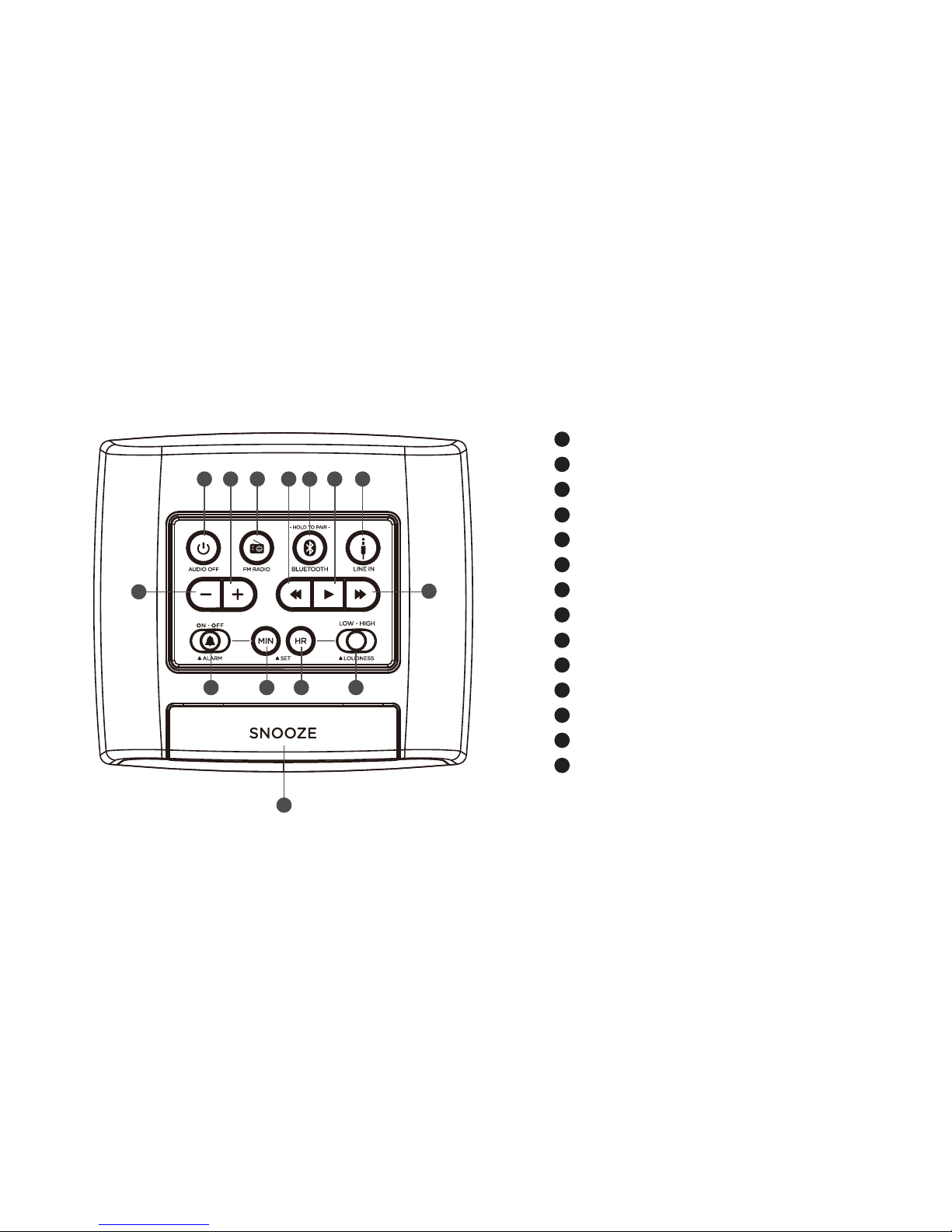
LOCATION OF CONTROLS
AUDIO OFF button
Volume + button
FM RADIO button
TUNE/SKIP - button
BLUETOOTH button
PLAY button
LINE IN button
Volume - button
TUNE/SKIP + button
ALARM ON-OFF switch
ALARM SET MINUTE button
ALARM SET HOUR button
ALARM LOUDNESS switch
SNOOZE button

9
10
11
12
13
8
23
22
21
20
19
18
17
16
15 USB Charging port
Dimmer button
USB Charging port
Screw jack
DC In jack
Line-In jack
Backup battery compartment
HOUR ADJUST button
TIME SET button
LCD Display indicators
DST
DIMMER ON/OFF
Day of the week
AM/PM (ALARM )
ALARM Set Time
ALARM
9
10
11
12
13
8
15 16 17 18 19 20 21 22 23
Time display
Line-In/AUX
Bluetooth
FM Radio
Radio PRESET
Day/Night
AM/PM Time
1
2
3
4
5
6
7
123
4
5
6
7

Charge Time Plus with a built-in backup battery, which is for prevention from data lost due to power disconnection
and saves the date and time to make setup simpler. The date and time are saved for PST(Pacific Standard Time)
There's also an internal capacitor that is used for backup to save time and alarm settings during a power failure
or if the AC adapter is unplugged. Since this is built-in there is no need to replace any batteries to maintain the
power backup feature.
Simply press "Hour Adjust" on the back of ChargeTime plus to adjust the hour. The date and time is initially set
to PST (Pacific Standard Time).
QUICK TIME SETUP
BACKUP BATTERY
Ce manuel convient aux modèles suivants
1
Table des matières
Autres manuels TeleAdapt Réveil


