Tekmar tekmarNet 4 Setpoint Control 161 Manuel utilisateur

Rough In
Wiring
Rough-in
wiring
instructions
3
Information
Brochure
Choose controls
to match
application
1
Application
Brochure
Design your
mechanical
applications
2
Wiring
Brochure
Wiring and
installation of
specific control
Job
Record
Record settings &
wiring details for
future reference
6
Data
Brochure
Control settings
and sequence of
operation
5
W161
12/08
tekmarNet®4 Setpoint Control 161
- Wiring Brochure
1 of 12 © 2008 W 161 - 12/08
4
Overview
The following brochure describes how to wire the
tekmarNet®4 (tN4) Setpoint Control 161. The 161 has a
single output for heat. The 161 has one sensor input.
Table of Contents
Definitions.......................................................................2
Rough-In Wiring .............................................................2
Remove the Wiring Cover...............................................3
Mounting the Setpoint Control........................................3
Wiring Symbols...............................................................4
Electrical Drawings .........................................................4
Wiring the Setpoint Control.............................................7
Troubleshooting the Wiring.............................................9
Testing the Wiring......................................................... 10
Technical Data.............................................................. 12
24 V ±10% 50/60 Hz 1.7 VA
24 V (ac) 2 A
Power:
Relays:
tN4 Setpoint Control 161
One Stage Heat
Feb 2006
Lot 1948
Meets Class B:
Canadian ICES
FCC Part 15
Cut jumper to
isolate relay
For product instructions see brochure
Use at least 194°F (90°C) conductors
/
161
Relay
Contact
tN4 Network
24 V (ac) Power
Sensor Input
DIP
Switches
Jumper

© 2008 W 161 - 12/08 2 of 12
Definitions
Caution
Rough-In Wiring
The following defined terms and symbols are used throughout this manual to bring
attention to the presence of hazards of various risk levels, or to important information
concerning the life of the product.
– Caution: Refer to accompanying documents.
INSTALLATION
CATEGORY II – Local level appliances.
Improper installation and operation of this control could result in damage to the
equipment and possibly even personal injury or death. It is your responsibility to ensure
that this control is safely installed according to all applicable codes and standards.
This electronic control is not intended for use as a primary limit control. Other controls
that are intended and certified as safety limits must be placed into the control circuit.
Do not attempt to service the control. Refer to qualified personnel for servicing. There
are no user serviceable parts. Attempting to do so voids warranty and could result in
damage to the equipment and possibly even personal injury or death.
Choose the placement of the setpoint control early in the construction process to
enable proper wiring during rough-in.
Consider the following:
•
Interior Wall.
•
Keep dry. Avoid potential leakage onto the control. RH 80% to 88°F (31°C),
down to 50% from 104 to 122°F (40 to 50°C). Non-condensing environment.
•
No exposure to extreme temperatures beyond 32- 122°F (0 -50°C).
•
No draft, direct sun, or other cause for inaccurate temperature readings.
•
Away from equipment, appliances, or other sources of electrical interference.
•
Easy access for wiring, viewing, and adjusting the display screen.
•
Approximately 5 ft. (1.5 m) off the finished floor.
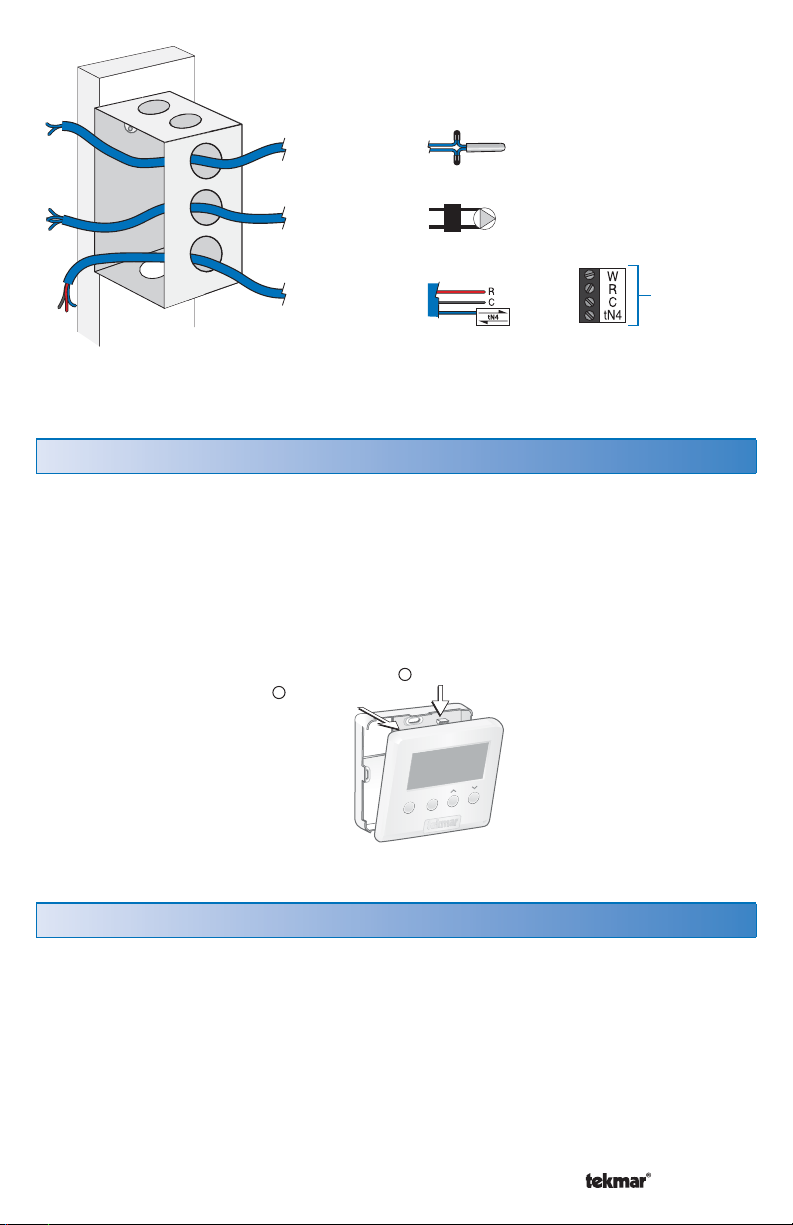
Use standard 18 AWG wire for the control power, relays, tN4 and sensor
connections.
Refer to the diagram below to determine the number of conductors to run from each
piece of equipment to the control location.

3 of 12 © 2008 W 161 - 12/08
Remove the Wiring Cover
Mounting the Setpoint Control
To remove the wiring cover:
•
Place a small slot screwdriver or similar tool into the slot located on the top of the
control.
•
While pushing against the plastic tab, pull the top of the front cover so that it pivots
around the bottom edge of the control’s base.
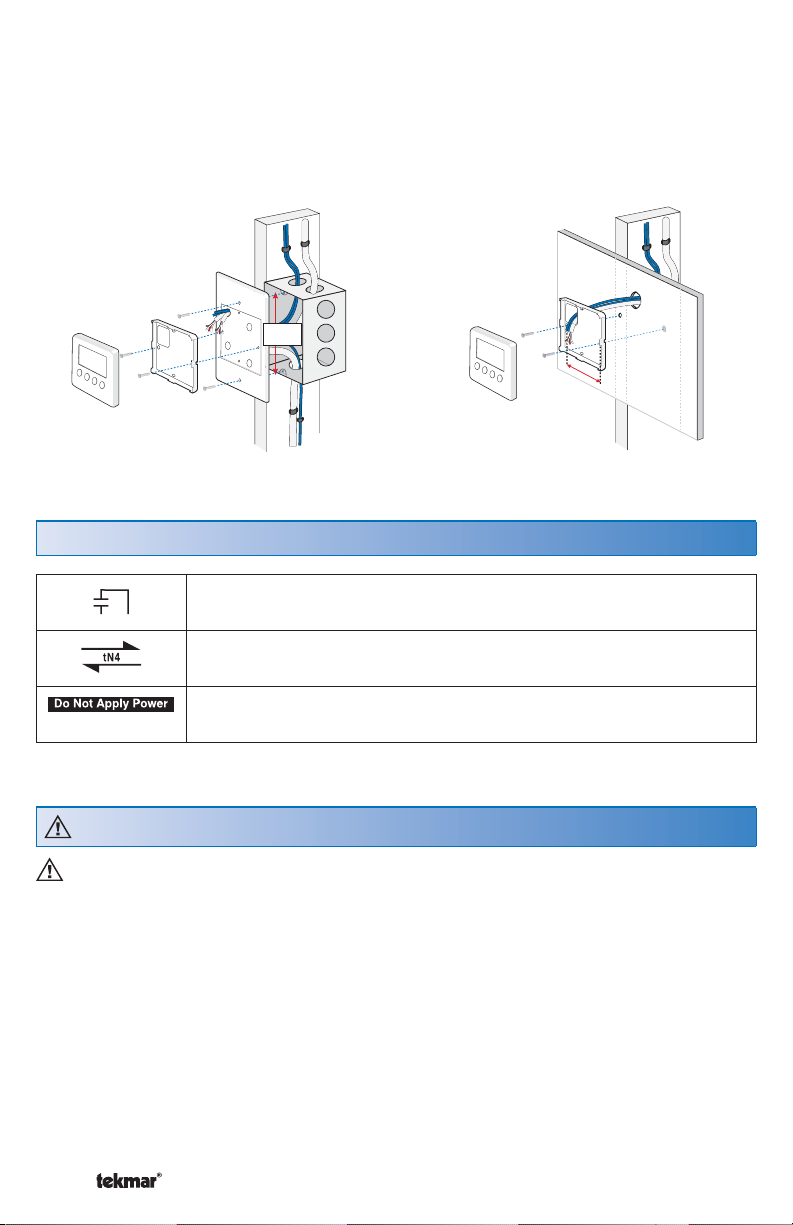
If a single gang switch box is used, an Adaptor Plate 007 is required to mount the
control to the box.
•
Fasten the base of the control to the adaptor plate.
•
Feed the wiring through the openings in the back of the adaptor plate and control.
•
Use the upper and lower screw holes to fasten the adaptor plate to the box.
Sensor
2 Cond. / 18 AWG
2 Cond. / 18 AWG
3 Cond. / 18 AWG
Note: When multiple wires
run to the same equipment
location, wiring conductors
can share one wire jacket.
R
C
tN4
Zone Manager
Pump
or
Valve
Menu
Item
Remove cover
Push tab
1
2

© 2008 W 161 - 12/08 4 of 12
Wiring Symbols
Electrical Drawings
Dry contact switch. Operates a device.
tekmarNet®4
Do not apply power to these terminals. Serious control damage
will result.
The electrical drawing examples on the following pages show the 161 in common
applications. Choose the drawing that most accurately depicts the components in
your system and use that drawing as a guide to aid in wiring your system.
These are only concept drawings, not engineered drawings. They are not intended
to describe a complete system nor any particular system. It is up to the system
designer to determine the necessary components for and configuration of the
particular system being designed including additional equipment isolation relays
(for loads greater than the controls specified output ratings) and any safety devices
which in the judgement of the designer are appropriate in order to properly size,
configure and design that system and to ensure compliance with building and safety
code requirements.
Stud
Switch
Box
Control
Base
007 Adaptor
Plate
Control 31/4”
(83 mm)
Stud
23/8”
(60 mm)
screwhole
23/8”
(60 mm)
screwhole
Control
Control
Base
Wall
Mounted on switch box Mounted on wallboard
If a switch box was not used, mount the control directly to the wall.
•
Feed the wiring through the openings in the back of the control.
•
Use screws in the screw holes to fasten the control to the wall. At least one of the
screws should enter a wall stud or similar rigid material.

5 of 12 © 2008 W 161 - 12/08
Description:
Setpoint Control used with tN4 System Zone Manager.
Electrical Application 161 E1
24 V ±10% 50/60 Hz 1.7 VA
24 V (ac) 2 A
Power:
Relays:
tN4 Setpoint Control 161
One Stage Heat
Feb 2006
Lot 1948
Meets Class B:
Canadian ICES
FCC Part 15
Cut jumper to
isolate relay
For product instructions see brochure
Use at least 194°F (90°C) conductors
/
161
161
Zone Manager
tN4 C RW
Heat Zone
Zone Pump
or
Valve
Sensor

© 2008 W 161 - 12/08 6 of 12
Electrical Application 161 E2
Description:
Setpoint Control used as a stand alone device. Relay 1 is used to cycle a pump to
provide heat.
Legend:
P1 = Pump cycled for heating
24 V ±10% 50/60 Hz 1.7 VA
24 V (ac) 2 A
Power:
Relays:
tN4 Setpoint Control 161
One Stage Heat
Feb 2006
Lot 1948
Meets Class B:
Canadian ICES
FCC Part 15
Cut jumper to
isolate relay
For product instructions see brochure
Use at least 194°F (90°C) conductors
/
161
RC
Relay 003
External Class 2
Transformer
24 V (ac)
P1
161
3
4
5
6
2
1
8
7
L
N
Sensor

7 of 12 © 2008 W 161 - 12/08
Wiring the Setpoint Control
Power 24 V (ac) Terminals 2, 3
Wire 24 V (ac) to terminals C and R.
If a Zone Manager is used:
•
Connect C on the setpoint control to C on the proper zone of the Zone Manager.
•
Connect R on the setpoint control to R on the proper zone of the Zone Manager.
If a 24 V (ac) transformer is used:
•
Connect C on the setpoint control to C on the transformer.
•
Connect R on the setpoint control to R on the transformer.
tN4 C R Com S1
12345
tN4 C RW
Zone Manager
Setpoint Control
tN4 Communication Terminals 1, 2
Wire the tN4 communication to terminals tN4 and C.
If a Zone Manager is used:
•
Connect tN4 on the setpoint control to the tN4 on the proper zone of the Zone
Manager. The C terminal is already connected.
If a Zone Manager is not used:
•
Connect tN4 on the setpoint control to the tN4 terminal on another tN4 device on
the same tN4 bus.
•
Connect C on the setpoint control to the C terminal on another tN4 device on the
same tN4 bus.
Setpoint Control
Zone Manager
tN4 C R Com S1
12345
tN4 C RW

© 2008 W 161 - 12/08 8 of 12
Relay 1 Terminals 6, 7
Relay 1 is used to switch the heat.
If a Zone Manager is used:
•
Connect Relay 1 to W on the proper zone on the Zone Manager.
If a Zone Manager is not used:
•
Determine if the jumper must be cut.
•
When the jumper is not cut, Relay 1 is internally powered through terminal 3.
•
When the jumper is cut, Rh and Relay 1 is an isolated switch.
Setpoint Control
RRhR1
367 Zone Manager
tN4 C RW
Sensor Input Terminals 4, 5
The sensor is connected to the setpoint control on terminals Com and S1.
•
• Connect sensor to terminals S1 and Com.
Do not apply power to terminals S1 and Com, permanent damage to the
sensors and / or setpoint control will result!
Universal
Sensor
Setpoint Control
tN4 C R Com S1
12345
Do Not Apply Power

9 of 12 © 2008 W 161 - 12/08
Troubleshooting the Wiring
General
The following tests are to be performed using standard testing practices and procedures
and should only be carried out by properly trained and experienced persons.
A good quality electrical test meter, capable of reading from at least 0- 300V (ac),
0 - 2,000,000 Ohms, and testing for continuity is essential to properly test the wiring
and sensors.
tN4 C R Com S1
12345
### 7R1
6Rh

© 2008 W 161 - 12/08 10 of 12
161 LCD Display
Relay 1
Testing the Wiring
Testing 24V (ac) Power Supply
1. Remove the front cover from the setpoint control.
2. Disconnect the wires from the relay.
3. Use an electrical test meter and check for continuity across the relay.
•
• When the relay symbol is displayed in the LCD, there should be continuity.
•
• When the relay symbol is not displayed in the LCD, there should be no continuity.
4. Reconnect the wires to the relay.
5. Install the front cover on the setpoint control.
Testing the Relay
1. Remove the front cover from the setpoint control.
2. Use an electrical test meter to measure (ac) voltage between the R and C
terminals. The reading should be 24 V(ac) +/– 10%.
3. Install the front cover.
Autres manuels pour tekmarNet 4 Setpoint Control 161
1
Table des matières
Autres manuels Tekmar Contrôleurs

Tekmar
Tekmar D 650 Manuel utilisateur

Tekmar
Tekmar Mixing Control 356 Manuel utilisateur

Tekmar
Tekmar 284 Manuel d'utilisation et d'entretien

Tekmar
Tekmar 284 Manuel utilisateur

Tekmar
Tekmar House Control 401 Manuel utilisateur

Tekmar
Tekmar tekmarNet 4 Setpoint Control 162 Manuel utilisateur

Tekmar
Tekmar Snow Melting Control 680 Manuel d'utilisation et d'entretien

Tekmar
Tekmar 153 Manuel utilisateur

Tekmar
Tekmar Mixing Control 354 Manuel utilisateur

Tekmar
Tekmar D 255 Manuel utilisateur