
TEEHO RZ09 Mode d’emploi

RZ09
Smart Lock
Thank you for purchasing our products. Please review this manual thoroughly before operating your device.
All pictures in this manual are for illustration purpose only. Actual product may vary due to product upgrade.
User Guide / Installation Instruction

User Guide
P 1
P2
P 3
At a Glance
How to Lock / Unlock
Definitions
Installation Instruction
STEP 1: Prepare the door and check dimensions
STEP 2: Install the latch and strike
STEP 3: Install exterior assembly
STEP 4: Install interior assembly
Factory default settings
Programming guide
P 6
P 7
P 9
P 10
P 12
P 13
The DDLock App is required to operate the lock. After the lock is properly installed,
the first one who register and pair the lock will be the administrator.
IMPORTANT:

USER GUIDE
At a Glance
Exterior Assembly Interior Assembly
Keypad
IC card Touch Area
Fingerprint
Keyhole
Indicator Lights Reset Button
Passage Switch
Battery Cover
1
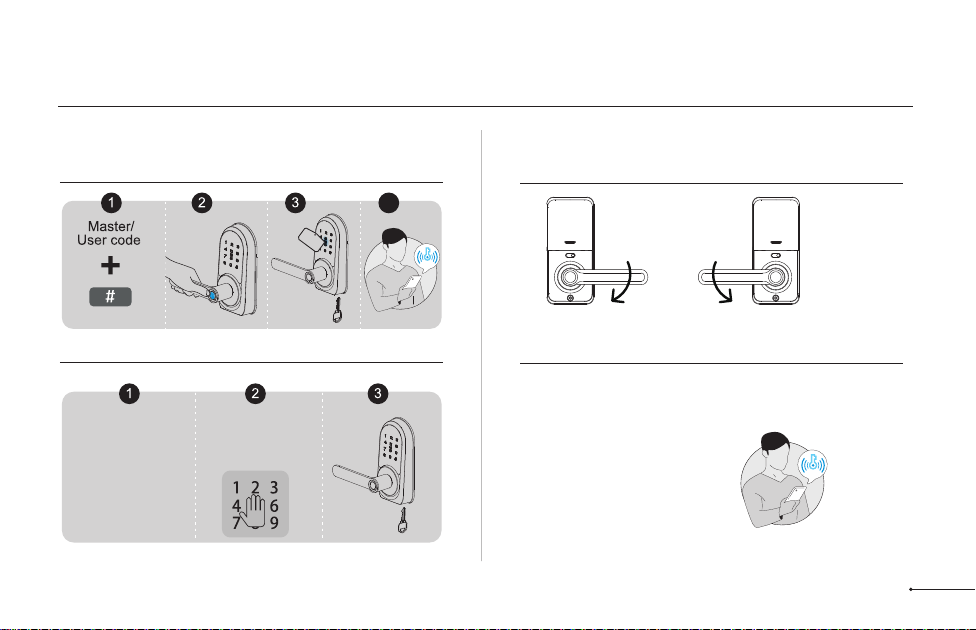
How to Lock / Unlock
UNLOCK the door from outside
LOCK the door from outside
UNLOCK the door from inside
LOCK the door from inside
Right Hand Left Hand
Auto Lock Mode
In Auto Lock Mode,
the lock will
automatically move to
locked position after 5
seconds, then the
lever can’t be turned.
Auto Lock Mode
In Auto Lock Mode,
the lock will
automatically move to
locked position after 5
seconds, then the
lever can’t be turned.
Tap and hold Lock icon in
App to lock.
Manual Mode
Press # on keypad
for 2 seconds.
4
Card or
Backup Key
2

• Master Code
The default master code is 123456.
Before pairing your lock in DDLock App, please do not change the
default master code.
After pairing successfully, the master code will be changed to a
random 7 digit number, and you can change it to your own master
code in the App(Settings>Basics>Admin password).
• Auto Lock & One-touch Lock
Automatically locks the latch after the door closed in 5 seconds. Auto
Lock is disabled by default. The Auto Lock time can be customized
between 1 and 900 seconds.
One-touch Lock is pressing and holding "#" on the touch keypad for 2
seconds to lock from outside.
• Wrong Entry Limit
After 5 times unsuccessful attempts at entering an invalid password,
the device will shut down for 2 minutes.
• Passage Mode
Move the Passage Switch to enable and disable the Passage Mode.
Enable Passage Mode, the lock will stay Unlocked until it’s locked
manually.
In Passage Mode, Auto-lock will be disabled.
• Anti-peeping password
Entering random numbers before or after correct password will also
unlock the door, which can prevent the password being exposed.The
length of anti-peeping password should be within 16 digits.
Definitions
3

INSTALLATION INSTRUCTION
Interior Assembly
Screws (L)
Strike (D)
Mounting
plate (E)
Backup key (A)
Exterior Assembly
(B)
Exterior Assembly
Screw (F)
Latch (C)
Interior
Assembly (G) Battery
Cover (H)
Strike Screws
(I)
Latch Screws
(J)
Mounting
plate Screws (K)
4

Latch x1 Strike x1
Exterior Assembly x1
Mounting Plate x1 Exterior Assembly
Screw (Optional) Strike Screws x2
Mounting Plate Screws x2
Latch Screws x2
A B C
E F I
J
K
D
Parts List
If any parts are missing or damaged, please contact Customer Support.
Interior Assembly x1
Battery Cover x1
G
H
Interior Assembly
Screws x3
L
MReset Tool x1
Drive-In Collar (Optional)
NIC Card x2
O
Backup Key x2
5

Measure to confirm
that the hole in the
door edge is 1"
(25mm).
Measure to confirm
that the backset is
either 2-3/8" or
2-3/4" (60 or 70mm)
2-3/8" or 2-3/4"
(60 or 70mm)
Make sure the hole in
the door frame is
drilled a minimum of
1’’ (25mm) deep, to
leave enough space
for the latch to extend
into the door frame
when the door is
locked.
Measure to confirm
that the door is 1-3/8"
to 2" (35mm to
50mm) thick.
A
Measure to
confirm that the
hole in the door is
2-1/8" (54mm)
B
CD
Prepare the door and check dimensions
1
STEP
1"
25mm
1-3/8" to 2"
(35mm to 50mm)
2-1/8"
(54mm) 1"
25mm
Make sure the door frame is aligned with the door.
There are no obstructions stuck in the door frame.
Notes: 6

2
4
3
chiseled
not chiseled
Install the latch and strike
2
STEP
Backset is the distance from the door
edge to the center of the hole in the door.
The latch is provided with adjustable
design which can fit either 2-3/8’’(60mm)
or 2-3/4’’(70mm) backset.
A
B
Latch backset adjustment
Install the latch
2-3/8"
(60mm)
2-3/4"
(70mm)
If the backset of your door is
2-3/8"(60mm), no need to adjust
the latch.
If the backset of your door is 2-3/4"(70mm), please adjust the latch.
2
Latch Screws (J)
C
1
1
Drive-In Collar (N)
Opening inwards
Opening outwards
7

CInstall strike on the door frame.
DChange Handle Direction (Optional)
Make sure the hole in door frame is
drilled a minimum of 1" (25mm) deep.
IMPORTANT: Strike Screws (I)
D
Change the Handle direction of exterior assembly. Change the Handle direction of interior assembly.
Loosen the screw completely and remove the screw by using a
screwdriver. Rotate the handle to the other side and keep the handle
horizontal. Tighten the screw in the Left-hand or Right-hand screw holes
according to the actual handle direction.
Loosen the reversing screw by using a screwdriver. Rotate
the lever to the other end and keep it horizontal. Tighten the
reversing screw.
1
2
The handle direction can be changed for compatible with both right handed and left handed doors.
Notes:
8
Table des matières
Autres manuels TEEHO Verrouillage


