HDMI
7
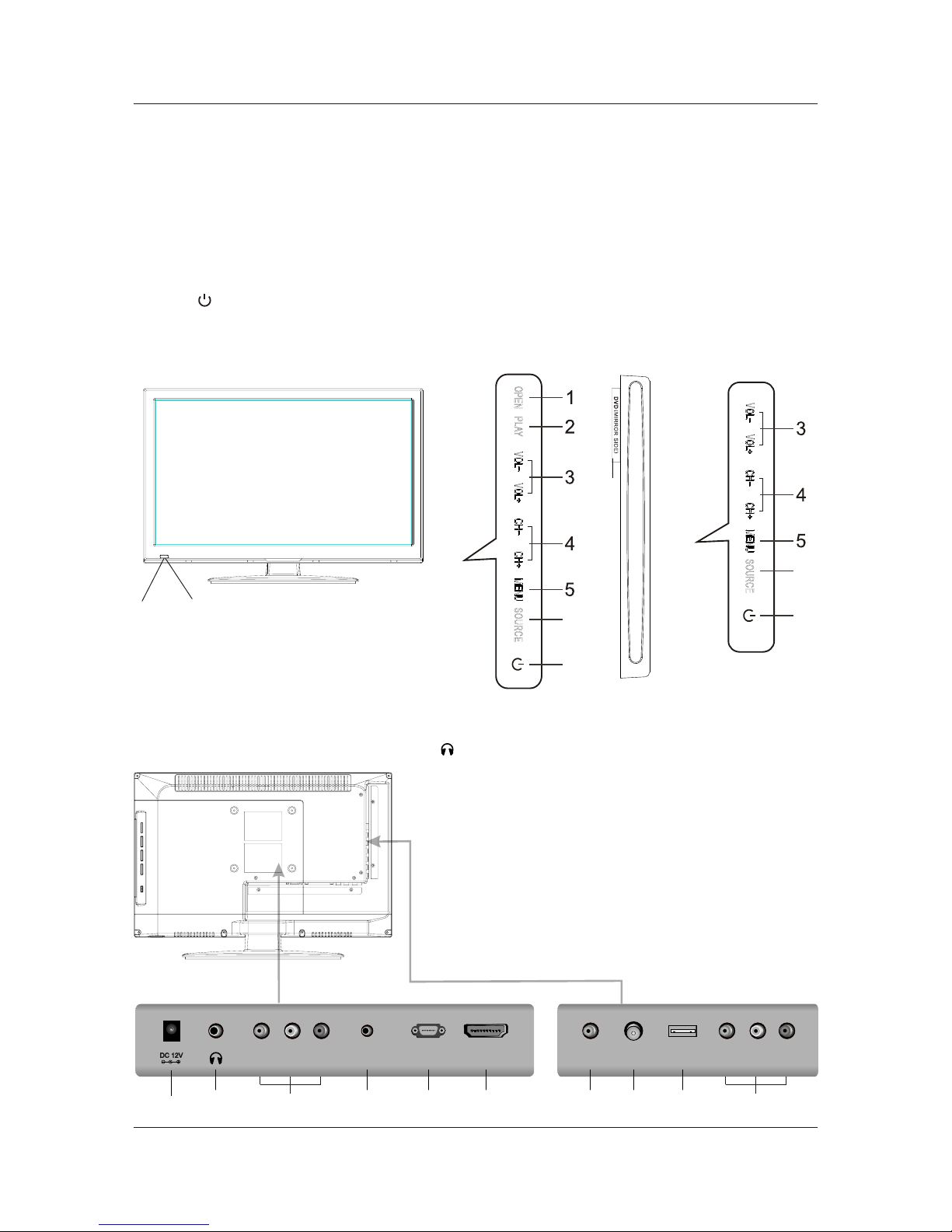
1. DC 12V: DC input socket.
/ ( ) /Audio
2. : Connect the headphone.
3. VIDEO Audio LR : Connect to the Video output
jack of DVD or VCR.
4. PC AUDIO: Connect the Audio output jack of PC.
5. VGA(PC): Connect the PC-RGB output jack of PC.
6. HDMI: Connect the HDMI output jack of DVD.
7. COAX: Connect the SPDIF receiver.
8. RF IN: Connect the antenna.
9. USB: Connect to portable usb device.
10. YPbPr: Connect the YPbPr output jack of DVD or VCR.
4. FRONT BACK CONNECTIONS OF TV
Front View
Back View and Control Connections
25
4
VGA(PC)VGA(PC)
PC AUDIO USB
RF IN RF IN
8
7
COAX
9
1. OPEN/CLOSE in DVD mode.
2. PLAY/PAUSE in DVD mode.
3. Press“VOL+”or “VOL-”to increase or decrease the sound level.
4. Press“CH+”or “CH-”to change channels.
5. Press “MENU”to bring up the main menu on the screen.
6. Press“SOURCE”to select the input source.
7. Press“ ” button to turn standby mode on or off.
8. POWER INDICATOR: show red in standby mode, show blue when your TV is switched on.
9. REMOTE SENSOR: infrared sensor for the remote control.
10.DVD: Insert a 12cm disc to the disc slot according to the label.
896
7
6
7
LED19DHRBJBD/LED22DFRBJBD
LED19DHRDBJBD/LED22DFRDBJBD
13
VIDEOVIDEO RRLL
10
YYPrPr
PbPb
6
10
(DVD MODELS ONLY)