
Tecnolec DUO EC 3 Manuel utilisateur

DUO EC 3
DOUBLE OVEN
ELECTRIC COOKER
Operating Instructions
Before operating this cooker,
please read these instructions carefully

°C
°C
9
8
7
DUO
2
Introduction Installation
CONTENTS
– Introduction page 2
– Installation ” 2-3-4-5
– Technical Data ” 3
– Features ” 6
– How to use the hotplates ” 7-8
– How to use the autotimer ” 9-10
– How to use the ovens ” 10
– How to use the Top
conventional oven ” 11
– How to use the Bottom
fan oven ” 12
– Temperature recipe guide ” 13
– Care and maintenance ” 14-15
– After sales service ” 15
INTRODUCTION
Congratulations on your purchase of this
TECNOLEC electric cooker which has
been carefully designed and produced to
give you many years of satisfactory use.
Before using this appliance it is essential
that the following instructions are care-
fully read and fully understood.
We would emphasize that the installation
section must be fully complied with for
your safety and to ensure that you obtain
the maximum benefits from your applian-
ce.
MOUNTING THE LID
Insert the bayonets B of the lid in the
holes H on the cooktop (see fig. 1).
Fig. 1
B
B
H
H

3
Installation
INSTALLATION
All electrical wiring must be in
compliance with the appropriate IEE
regulations and carried out by a qualified
electrician.
The cooker must be supplied via a
suitable double pole isolating switch
placed in a readily accessible position
adjacent to the oven.
Each cooker is equipped with a data
plate (see fig. 1) indicating the rated
input and voltage at which the oven
should operate.
Before installing the cooker the electricity
must be turned off.
The electrical connections must be
connected to the terminal block as
detailed opposite. A cable of the correct
rating of this appliance must be used
type H05 RR-F section 4 mm2.
Cable must be able to withstand a
temperature rise of 75°C above ambient
temperature.
TECHNICAL DATA
230 Volts AC - 50 Hz
Static top oven
– Top element 0.7 kW
– Bottom element 1.1 kW
– Grill element 2.1 kW
Fan Bottom Oven
– Fan element 2.5 kW
Maximum power rating
– Top oven 2.1 kW
– Bottom oven 2.5 kW
Hotplate
– Front left 2.0 kW
– Back left 1.0 kW
– Back right 1.5 kW
– Front right 1.0 kW
Oven lamp 15 W
300 °C, miniature edison screw
Maximum rated power 10,155 W

4
Installation
LN
Green &Yellow
(Earth)
Brown
(Live)
Blue
(Neutral)
Fig. 2 P
C
B
A
CONNECTING THE MAINS CABLE
– Remove the two screws securing the cover plate A behind the cooker.
– Remove the screw C from the cable clamp.
– Insert the mains cable (type H05 RR-F) of minimum 4 mm2section into the cable pro-
tector P.
– Connect the phase and earth cables to the mains terminal connection block B.
EARTH
N NEUTRAL
L LIVE
IMPORTANT: This appliance must be earthed.
– Refit the cable clamp so that it clamps the outer sleeving of the cable.
– Refit the cover plate A.

5
Installation
BEFORE USE
Please ensure that all packing has
been removed from the appliance
before switching on.
PREPARING THE OVEN
Clean the upper and lower ovens
thoroughly before using it for the
first time; use water and soap,
then rinse carefully.
Hook the lateral frames (fig. 4) to
the side walls and then insert the
rack shelves and grill pan into the
shelf guides provided in the side
frames. Once you have done this
heat the oven and the grill ele-
ment for about 30 minutes to eli-
minate any residual factory grease
that might impart unpleassant
smells to the meals being cooked.
IMPORTANT
As a safety measure, before you
start to clean the oven, switch off
the electrical supply.
Fig. 4
400 mm
15.7"
650 mm
25.5"
°C
°C
9
8
7
DUO
Fig. 3
LOCATION
This appliance is designed with type “X” protec-
tion with regard to overheating of surrounding
surfaces.
The adjacent cabinets must be able to withstand
a temperature rise of 75 °C.

6
Features
900 mm - 35.5"
600 mm
23.6"
600 mm
23.6"
°C
°C
9
8
7
DUO
CONTROL PANEL (Fig. 5)
Control knobs:
7. Front right plate (4)
8. Rear right plate (3)
9. Rear left plate (2)
10. Front left plate (1)
11. Bottom oven switch and
thermostat
12. Top oven function
selector
13. Top oven thermostat
Control lamps:
14. Bottom oven temperature
15. Top oven temperature
16. Hotplates
Oven timer:
17. Auto timer (bottom oven
only)
2134
Fig. 5
13 12 11 10 9 8 7
HOB ELEMENTS (Fig. 5)
1. 180 mm diameter (rapid)
2. 145 mm diameter (normal)
3. 180 mm diameter (normal)
4. 145 mm diameter (normal)
OVENS (Fig. 5)
5. Conventional top oven
6. Fan bottom oven
Fig. 5
17
15
5
6
1614

7
REMEMBER:
Solid plates retain their heat for a consi-
derable time after switching off.
Always allow the plate to cool before
cleaning or touching the plate for any
other reason.
BOILING AND SIMMERING:
Boiling and simmering can be carried out
on any of the four plates.
FRYING:
Generally frying is carried out on the
larger plates. It is important not to leave
frying unattended even for a short while.
Do not use a chip-pan more than one
third full of fat or oil.
The hob is made of steel coated with a
vitreous enamel to provide a durable and
attractive surface. There are four solid
plates clamped to the surface of the hob.
All have a fixed stainless steel ring which
may discolour slightly after the plate is
first used. This is normal.
ELECTRIC PLATES:
The higher the number set on the control
knob, the higher the temperature that will
be maintained on the plate.
Each plate has seven working positions
marked on the control knob (Fig. 6):
- Position 0Off
- Positions 1 - 6 Operating number
(indicator light on)
How to use the Hotplates
0
6
5
4
3
2
1
Fig. 6

8
Fig. 7
Right Wrong
Pan wrong shape
Wrong
Pan too small
Wrong
Do not dry cloths
on plates
Wrong
Pan too large
Wrong
Pan wrong shape
CHOICE OF PANS:
It is uneconomical to use pans smaller
than the plate that has been selected.
The plate is made of cast-iron and is
heated uniformly over the whole surface,
therefore any part of the plate not cove-
red by the pan is wasting energy.
Whilst almost any type of pan can be
used, those with curved or distorted
bases will waste energy.
We therefore recommend pans with flat
bases particularly those with machine
ground bases. Always dry the base of
the pan before placing on the plate.
How to use the Hotplates
DONT’S:
Pans with a ridged or recessed base
must not be used.
Likewise do not use an asbestos or wire
mat or anything else under the pan.
Never leave a plate switched on for long
periods when not covered with a pan.
Do not lower the lid until the hotplates
have cooled.
Do not use the cooker with the lid down
as a working surface.
9
How to use the Autotimer
Auto timer (bottom oven only).
DIGITAL CLOCK AND AUTOMATIC
TIMER
AThis knob adjusts the time of day on
the clock.
BThis knob controls the programming
- it sets the time to start cooking and
the length of cooking time.
CClock dial.
DDial indicating the length of cooking
time.
EDial indicating the start of cooking
time.
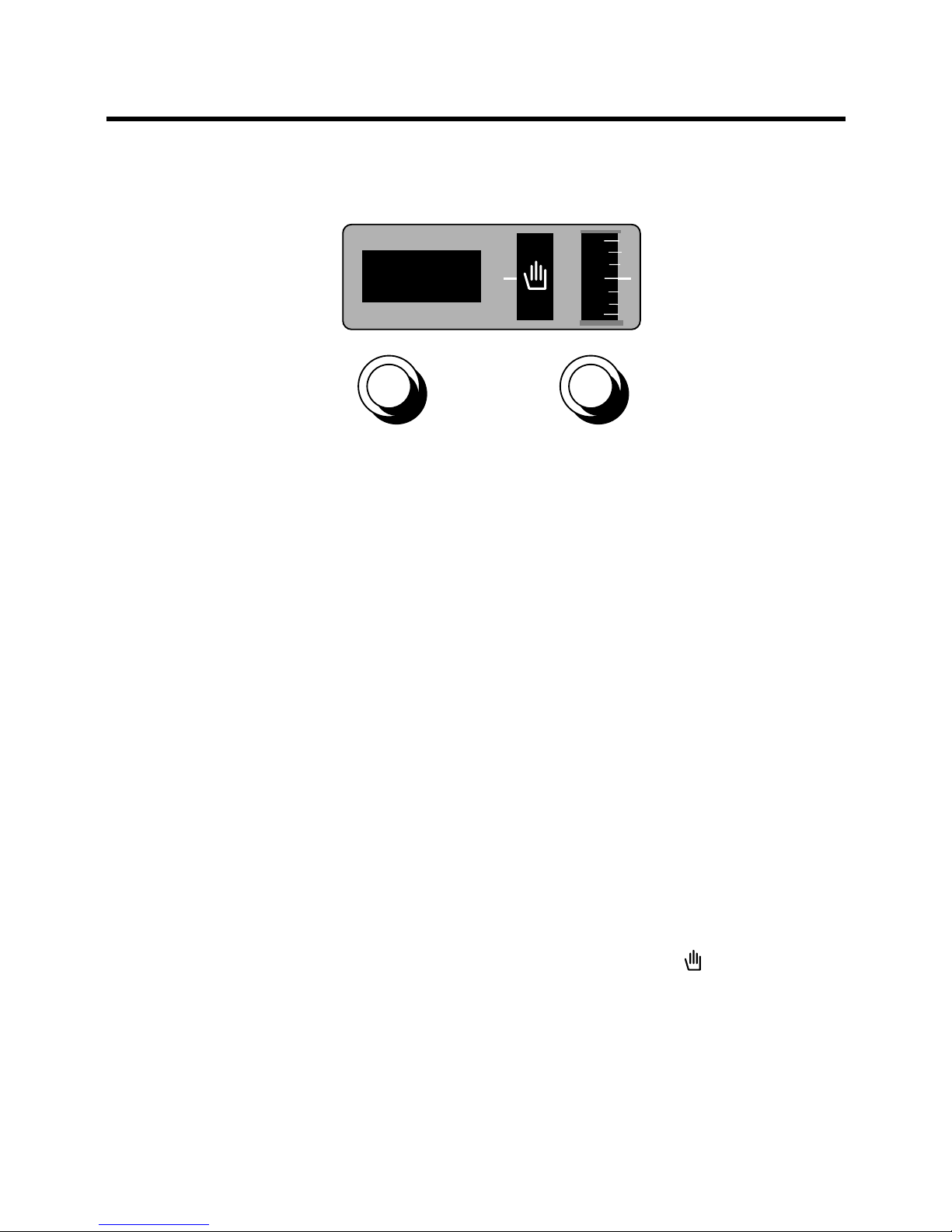
WHEN NOT IN USE THE TIMER
SHOULD BE SET TO MANUAL.
USING YOUR AUTOMATIC TIMER
SETTING THE TIME OF DAY
Gently turn the knob Auntil the correct
hours and minutes are displayed on dial
C. The clock is now set.
SETTING THE TIMER TO MANUAL
Ensure that the time on dial Eis the
same as the time of day displayed on
dial C. If not, proceed as follows:
- Turn the outer section of knob B
clockwise until the symbol is selec-
ted on dial D.
- Turn the inner section of the knob
clockwise until the correct time is
selected on dial E.
9
8
7
8.00
A
C D E
BFig. 8

10
ATTENTION:
Although the cooker conforms to
the E.C. Standard on oven door
temperature, the oven doors can
become hot during operation.
KEEP CHILDREN AWAY.
How to use the Autotimer
SETTING THE TIMER TO START AND
STOP COOKING (FULLY AUTOMATIC)
The cooking start time can be set along
with the length of cooking time for fully
automatic cooking. Proceed as follows:
- Turn the outer section of knob B
clockwise until the length of cooking
time is displayed on dial D(up to 3 1/2
hours).
- Push and turn the inner section of knob
Bclockwise until the time that you want
cooking to start is displayed on dial E.
The oven will begin cooking at the start
time set for the length of time set and
switch off when the cooking time is over.
An audible signal will be heard before
the oven switches off. This can be stop-
ped by turning the outer section Buntil
the symbol appears on dial D.
SETTING THE TIMER TO STOP
COOKING (SEMI-AUTOMATIC)
Using this mode the oven can be swit-
ched on normally but set to switch off
automatically at the required time.
Proceed as follows:
- Turn the outer section of knob B
clockwise until the length of cooking
time is displayed on dial D(up to 3 1/2
hours).
- Select the function and temperature
required.
The oven will operate immediately and
switch off when cooking time is over. An
audible signal will be heard before the
oven switches off. This can be stopped
by turning the outer section of knob B
until the symbol appears on dial D.
On completion of cooking, always
remember to set the oven controls back
to the “off” positions and turn the outer
section of knob Bto the symbol.
Ensure that the time on dial Ematches
the time on dial C.
Table des matières


