
TECHNO-AC AG-317G Manuel utilisateur


2
DEVELOPMENT, MANUFACTURING AND SUPPLY OF INSTRUMENTATION
Table of Contents
Introduction. ........................................... 3
1. Appearance of Receiver AP-019.3 ........ 4
2. OPERATING MODES .............................. 5
2.1.“Route” mode ....................................5
2.2. 2.2 “Graphic” mode. ......................... 6
2.3. “Graphic+” mode ..............................6
2.4 “Minimum maximum” .........................7
2.5 Modes with graphic representation of
“Relative distance to the Utility”(R.dist.) .....7
2.6 “2 frequencies” mode window ...........9
2.7 “Sonde” mode .................................10
3. Menu description ................................ 11
4. Start of work ........................................ 16
5. Search of cables in the mode “Route” . 17
5.1. Cable location in the passive mode ...17
5.2. Search of a communication and
measurement of its burial depth .......18
5.3. GPS ..............................................20
5.4. MapProgram .................................. 21
5.5. Cable route location in the active
mode..............................................22
6. Search of communications in the mode
“Graphic” ............................................. 25
6.1. Setting of the receiver for work in the
“Graphic” mode ...............................25
6.2. “Hot” keys for work in the “Graphic”
mode .............................................27
6.3. Search of communications in the mode
“Graphic” .......................................28
7. Search of the utilities in the mode
“Graphic+” ........................................... 29
7.1. Setting of the receiver for work in
the “Graphic+” mode .......................29
7.2. Search of communications in the
mode “Graphic+” ............................29
8. Perfoming the cable location in the
mode “MIN & MAX” .............................. 31
9. Performing cable route location in the
mode “ 2 frequencies” ......................... 3 2
10. The work mode «Cable selection
from a bunch» ......................................... 34
10.1. The work with the receiver in the mode
«Selection of the cable from a bunch» ..........34
10.2. «Hot» keys for the work in the mode
«Selection of the cable from the bunch» .......36
11. Mode «Search of defects»
using external sensors ........................ 37
11.1. The work with the receiver
in the mode «Search for defects»
..37
12. “ Sonde” mode ................................... 42
12.1. Sonde detection and location of the
communication .............................44
12.2. Declined sonde .............................45
12.3. Measuring the depth of the sonde ...45
Appendix 1 ........................................... 46
Appendix 2. .......................................... 47
Appendix 3. .......................................... 50
13. Transmitter AG-105 .......................... 51
13.1. Purpose of use and physical
configuration .................................51
13.2. Control and indication elements ......52
13.3. Ways of external commutation ........55
13.4. Accessories ..................................55
13.5. Design and function .......................56
13.6. Illustrative use information about
“Power supply monitoring”,
“Buttons functionality”, “Symbols” ....57
13.7. “Multimeter” of the output
parameters ...................................57
13.8. Sound signals ...............................57
14. Working with the device .................... 58
14.1. Preparatory activities ................... 58
14.2. Settings ....................................... 61
14.3. Clips ........................................... 61
14.4. Internal transmitting inductor “In” . ..62
14.5. External power sources .................62
14.6. Electromagnetic Compatibility
......62
15. Transmitter direct connection
to utility ............................................... 65
Appendix 4 ........................................... 66

3
DEVELOPMENT, MANUFACTURING AND SUPPLY OF INSTRUMENTATION
Introduction
This operation manual contains a description of the
cable and pipe locator Success AG-317G
,
its working modes and the information necessary for its proper use The basic set consists of the
receiver and a tracing transmitter. The receiver can be used individually or with the transmitter.
The receiver works at the network frequencies 50(60) Hz, 100(120) Hz, and with route locating
transmitters at frequencies of 512Hz, 1024 Hz, 8192 Hz, 32768 Hz (33 kHz) and “Sonde” mode.
Cable and pipe locator Success AG-317G
is used for:
• Area survey before excavation works;
• Utilities buried depth measurement;
• Detection of cable crosses and utility Y-junctions;
• Utility identification with the function of coordinates saving with track application on
Google maps;
• Location of non-metal pipelines by using a pipe transmitter;
• Selection of the cable from a bunch with an optional external sensor;
• Simultaneous area survey and cable fault location.
Intended use
- Power and Heat engineering
- Public utilities
- Oil and gas industry
- Geodesy
- Communication
- EMERCOM
- Construction
- Other industries
Operation conditions
- Ambient temperature from -20 °С to +60 °С
- Relative humidity up to 85% at t=35 °С
- Pressure of 84 to 106 kPa
- Device protection class - IP 54
Receiver working principle
The cable and pipe locator’s Success AG-317G
working principle is based on the analysis
of the electromagnetic field, created by the presence of alternating current flowing through
underground services. The electrical signals induced in the receiver sensors are amplified,
filtered, processed by the processor and then displayed on the graphical display in the form of
the utility’s position line, linear scale, digital value of the signal level amplification coefficient,
distance to the communication axis, the value of the current flowing through it, the graphic of the
signal level change and other parameters.
Due to constant improvement of produced instruments, «NPO TECHNO-AC» LLC
reserves the right to change schematics, software and user manuals, without degradation
of performance characteristics for its devices, without preliminary notification. Separate
changes in user manual content may be implemented after its reissue.
Up-to-date information about all produced instruments is published
on www.technoac.com

4
DEVELOPMENT, MANUFACTURING AND SUPPLY OF INSTRUMENTATION
1. Appearance, receiver AP-019.3 controls
The receiver is made in a single block, solid cast IP54 rated body. Up to the battery compartment,
the body provides an IP68 protection rating. Visually, the device can be split into three
components: the face panel with controls and displays, the battery compartment and bottom
which consists of the antenna block. On the rear side of the face panel, there are two slots for
external connections.
External sensor slot
graphical display with
backlight
Сonnection of external sensors.
Sensor DODK-117
Sensor DKI-117
NR-117
Superimposed
frame
CI-105/110
Inductive clamps Face panel, controls
«Power»/«Enter» button (6)
Switching on/off the receiver (to turn off the
receiver, press and hold this button for 2
seconds)
- open menu,
- enter into the editing mode of the selected
menu option,
- exit for the editing mode saving selected
parameters.
Buttons «Up» (3), «Down» (4), «Right» (5),
«Left» (2).
- selection of the menu option (icon),
- selection or changing the parameter inside
the menu,
- fast setting of the parameters
«GPS» button(1)
-Save coordinates and other available
parameters of the point
1 2
34
56
Module of omnidirected
antenna
Battery compartment for
four «type C» batteries
Built-in sound speaker
Six-button
keyboard
Mini-USB port
For PC and
external Power
connection

5
DEVELOPMENT, MANUFACTURING AND SUPPLY OF INSTRUMENTATION
2. OPERATING MODES
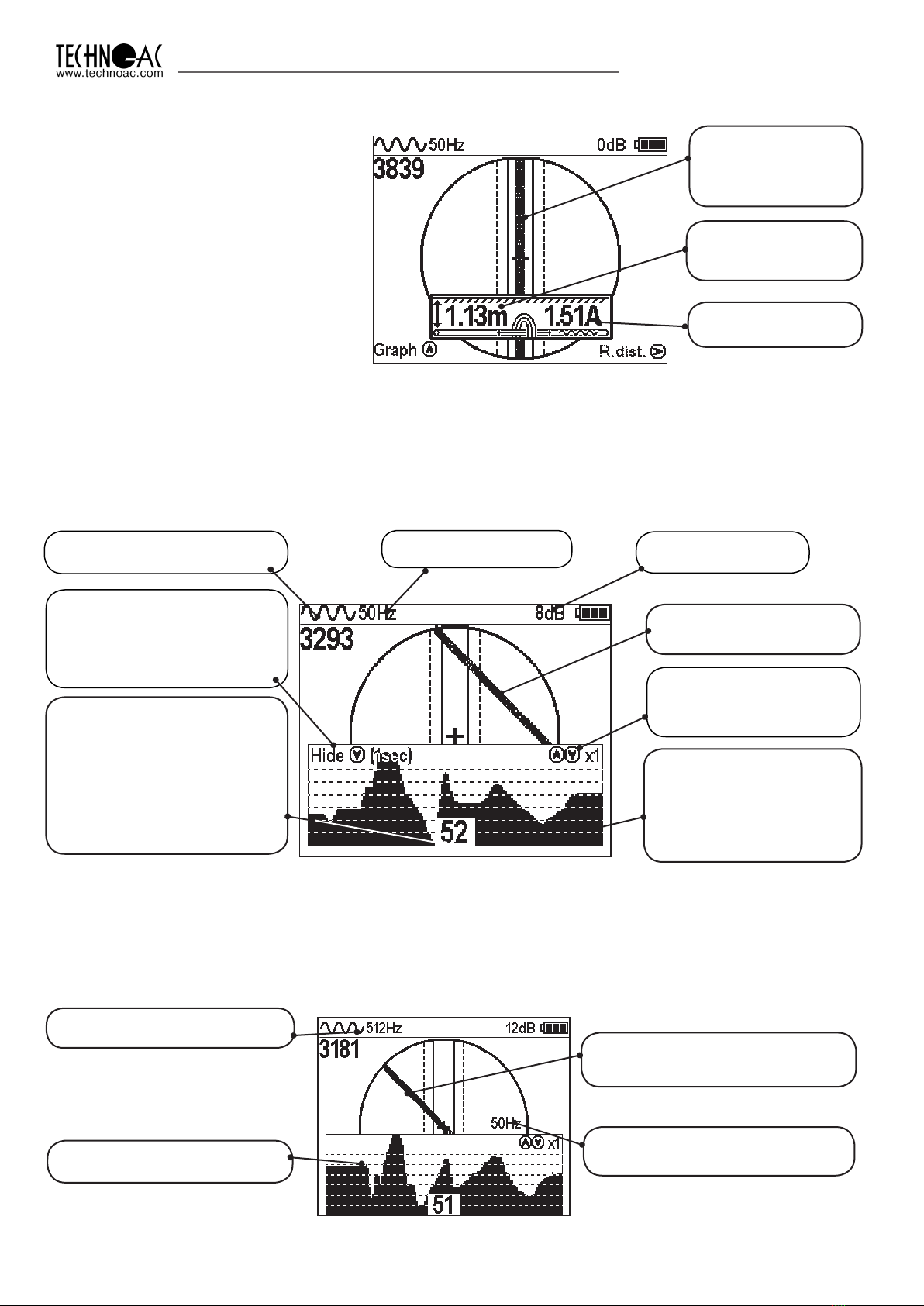
2.1 “Route” mode
The ball on the screen shows
the direction in which utility
is located.
When turning on the receiver for the first time, the device will begin in route mode and the service
information will appear. Route mode is the primary screen. Below, the indications are shown, which
are dependent on the operator position near the located utility.
The receiver can’t detect the utility. Position of utility axis shows,
where the utility is situated.
Depth and current measurement
enable automatically, If the utility
indicating line is aligned
with the axis of the receiver.
When above the utility, a solid line
will appear which is perpendicular
to the utility’s direction.
Battery charge level
Type of incoming signal
(continuous or pulse)
Frequency of
the enabled filter
Area where utility axis
visibility
Quick switch to
“graph” mode
Centre of receiver axis
Limits of utility position
where current and depth
measurements are available
Route Mode Description
Amplification coefficient
in dB
* The four-digit number “signal level” (0000 - 4100) represents the intensity of the electromagnetic
field, which is dependent on the filter frequency. The numeric value of the “signal level” becomes
greater when an operator approaches the source of electromagnetic signal of the chosen frequency.
The signal gains its maximum level when the receiver is placed strictly above the utility. The first number
of four-digit figure represents the order of the three-digit figure, generated by other figures: 0 –x1, 1- x10,
2 – x100, 3 – x1000, 4 - x10000. Dynamic range of changing signal levels is 1,000,000 times (120 dB).
Signal level
When approaching the utility,
a blurred line indicates its position.
Utility position indication line
6
DEVELOPMENT, MANUFACTURING AND SUPPLY OF INSTRUMENTATION
When the operator stands strictly
above the utility and the line indicating
the utility is positioned strictly in the
centre field between the two dotted
lines, an automatic depth and current
measurement is performed.
Route Mode and Depth Measurement
In graphic mode, the receiver screen is split into two segments. The upper segment indicates
utility position in 2D, and the lower segment is a moving graph of signal level change in time
according to a “maximum” method, where a maximum signal is reached when the receiver is
positioned strictly above the utility and signal decreases when the receiver is moved further away
from it. In this mode, current and depth measurement function is not available.
2.2 Graphic Mode
Signal level diagram. Every
time image is refreshed, the
graph moves 1 position left
and right position is filled
with new measurement
value
Digit representing current
(far right) value of the graph in
percentage terms. If there is
an incoming signal overload,
a special symbol will be visible
on the screen instead of the
digit “XX”. Indicated data is
incorrect in this case.
Utility position indication
line
2.3 Graphic+ Mode
This mode is different from the ordinary graphic mode. The main difference is that the utility
axis indication line represents only 50/60Hz utilities (power cables or utilities with induced signal)
which can be accidentally met during the operation on active frequencies.
Amplification
coefficient in dB
Graph scale setting
(buttons “up” and “down”
change scale of the graph)
Type of incoming signal
(continuous or pulse)
Frequency
of the enabled filter
Quick switch to route mode.
Press and hold “down” button
for 1 second in order to hide
the graph.
Indication of the frequency
of located energized cable
(can be 50 or 60 Hz)
Signal level moving
diagram
50/60 Hz Utility position
indication line
Frequency filter
(for diagram)
NOTE: When performing a depth
measurement, the receiver antenna
should be positioned perpendicularly
to the utility.
Buried depth
of the utility
Current
of the utility
Receiver and utility
axis are perfectly
aligned

7
DEVELOPMENT, MANUFACTURING AND SUPPLY OF INSTRUMENTATION
2.4 “Minimum maximum”
In “MIN & MAX” mode, the receiver screen is split into two segments. The upper segment is a
moving diagram which represents signal level changes according to the “minimum” method
– it means that the signal will be minimal when the receiver is positioned strictly over the utility. If
the receiver is moved aside, the signal level will increase.
The lower segment represents the “maximum” method diagram – the signal will be maximal
if the receiver is positioned strictly over the utility, and it will decrease if the device is moved further
away.
This mode does not allow depth and current measurements.
Every time image is refreshed,
the graph moves 1 position left
and far right position is filled with
new measurement value
Digit, representing
current (far right) value
of the graph in percentage
terms
Battery charge level
Amplification coefficient in dB
Quick change of diagram scale
Indication of lower
sensor operation (Filter,
Broadband, Radio)
Quick change of lower sensor
operation mode
Type of incoming
signal
(continuous or pulse)
Frequency filter
2.5 Modes with Graphic Representation of “Relative distance to the
Utility” (R.dist.)
In cases given above, both utilities lay beside each other. However, in this case “MIN & MAX” mode
does not allow the user to measure the depth of these cables. For this reason, it is better to use
graphic modes with indication of the “relative distance to the utility”.
While approaching the utility, the value of “relative distance to the utility” changes in the way
described on pictures, shown below:
Parameter value
«R.dist.», indicated
by «∞» symbol
Zones of utility presence
Utilites
Parameter value “R.dist.”
is equal to burial depth
of the utility

8
DEVELOPMENT, MANUFACTURING AND SUPPLY OF INSTRUMENTATION
Utility
This parameter can have values from “0.01” to “30.00”, “>30” and “∞”. Value “∞” are indicated
when the receiver is positioned aside from the utility or when the utility is positioned above the receiver
(an example being when there are overhead voltage lines around). The parameter “relative distance
to the utility” will have its minimum value when the receiver is positioned directly above the utility
axis. In this case, this value is equal to the real burial depth of the utility.
Minimum value of the
parameter - 2.40 is equal to
real burial depth of utility.
The receiver has two modes with indication of “relative distance to the utility”: “R.dis. Graph” is
used when the “relative distance to the utility” graph and utility route are indicated simultaneously,
whilst the “MIN&R.Dist mode“ is used when screen of the receiver indicates 2 graphs (minimal
signal and “relative distance to the utility”).
2.5.1 “R.dis. Graph” mode
This mode is the same as “Graph” mode. The screen is split in two parts, an upper display
and a lower display.
• Upper Part: Route axis indication
• Lower Part: “relative distance to the utility” graph
Indication of “R.dis. Graph”:
Hint: “Hide”– return to
“Route” mode by pressing
button “<” for 1 second
Hint: – change of graph
scale in 2\4 and 8 times by
pressing “up” and “down”
arrows
Graph of changing
“Relative distance to the
utility” in real time

9
DEVELOPMENT, MANUFACTURING AND SUPPLY OF INSTRUMENTATION
When two utilities are buried close to each other while moving the receiver straight across the
utility axis in “R dist” mode, an operator will be able to see the indication shown below:
Minimal values of “relative distance to the utility” indicate the presence of the utility with some
fault because in the case of multiple utilities laying nearby, minimum signal point may move
due to coinfluence of the signals.
You can enable the “R.dis.Graph” mode from “Route” mode by pressing the “>” button or
by switching it in the “Modes” section of the receiver’s main menu.
2.5.2 “MIN & R.Dist” Mode
In this mode the screen is split in two parts. Upper part: Minimal signal graph, lower part: “relative
distance to the utility” graph in real time.
Digit indicates the minimum
signal level of far right point of the
display
Digit indicates relative distance
value of far right part of the
display
“R.dist” value indicated by
“∞” icon
Hint – change of graph
scale in 2, 4 and 8 times
by pressing “up” and
“down” arrows
You can enable “MIN & R.Dist” mode only from “Modes” section of main menu.
2.6 “2 Frequencies” Mode Window
In the “2 frequencies” mode, the cable condition and pipeline protection diagnostic is performed
using the external transmitter. When conducting works on cable route location, it is possible
to select the communication located as “my own” and perform a route location on it.
Amplification coefficient in dB
The sum of frequency
components (A8+A1)
Frequency components
amplitude modulation
(A8/A1)
Frequency components change
of phase difference
Signal direction
(straight / reverse)
Signal level on 1024
and 8192 Hz
Quick reset of readings
and “reference” to the
utility
Battery charge level

10
DEVELOPMENT, MANUFACTURING AND SUPPLY OF INSTRUMENTATION
IMPORTANT NOTE:
Modes are split in two sets: basic and extended. In basic set, only 3 modes are available:
“Route”,“Graph” and“R.dis.graph”. All modes are available in extended set: “Route”,
“Graph”, “Graph+”, “MIN & MAX”, “2 Frequency”, “Sonde”, “R.dis.graph” and “MIN&R.
dist.”. You can switch between two sets in menu: Settings –> Modes select.
2.7 “Sonde” mode
“Sonde” mode is used for tracing of non-metal pipelines by using a special pipe transmitter
working on 512Hz frequency. (see paragraph 12)
Dynamic Overload Protection
There is protection in the receiver which prevents
the influence of dynamic overload. When the receiver is
operated in the area with tense electromagnetic fields,
this function automatically reduces the incoming signal
and prevents the electronics of the receiver from being
damaged and notifies the user with a special message on
the screen.
Table des matières
Autres manuels TECHNO-AC Équipement de test


Manuels Équipement de test populaires d'autres marques

SMART
SMART KANAAD SBT XTREME 3G Series Manuel utilisateur

Agilent Technologies
Agilent Technologies BERT Serial Manuel utilisateur

Agilent Technologies
Agilent Technologies N3280A Manuel utilisateur

Vernier
Vernier Go Direct Voltage Manuel utilisateur

Lifeloc
Lifeloc R.A.D.A.R. Manuel utilisateur

Fluke
Fluke T5-600 Instructions d'utilisation et d'installation


