
Techbikes ltd TBDZ02 Manuel utilisateur

TBDZ02 LCD CONTROLLER
OPERATING MANUAL
Techbikes ltd www.techbikes. z ph +6433317075

Specificatio s
Working voltage: DC 11V-60V
Max working current: 70mA(11V) 32mA(50V)
Display type: 21*4 segment LCD
Sampling:
•1-12 pulses each ci cle of the wheel (Data come the f om hall senso in cont olle )
•1 pulses each ci cle of the wheel(Data come f om eed senso on the f ont wheel)
Working temperature: -20°C to 50°C
Backlight: White LED
Brightness: 200cd/m2
Dimensions: 102.5mm×74.5mm×28mm
USB Charger Output: 5V, 700mA
Techbikes ltd www.techbikes. z ph +6433317075

I stallatio
The cont olle LCD is designed to be installed in the middle of the handleba s above the stem.
Remove the two secu ing bolts f om the clamps and st etch the clamps ove the handleba s.
Rubbe shims a e p ovided fo sec uing the display to smalle diamete handleba s. Once the
co ect shims a e in place e-fit the secu ing bolts and tighten them until the display is secu e (i.e.
until the display cannot be otated easily). Note that doing the secu ing bolts up too tight could
damage the clamps.
LCD Fu ctio s
Speed Display
Shows cu ent speed in eithe km/h o mil/h (use selectable)
Battery Indicator
Six ho izontal segments show the cu ent cha ge state of the batte y (each segment ep esents
17% of the capacity of the batte y). When the batte y eaches 15% capacity the batte y indicato
will appea empty and sta t to flash, indicating the the batte y needs to be cha ged.
NOTE: When a high assist setting is used and the moto is unde load the batte y indicato may
d op suddenly, then ecove when the moto is not unde load. This is no mal and is due to the
inte nal voltage d op in the batte y and wi ing at high cu ent.
rip Distance
T ip distance can be eset manually and is also eset when the cont olle is powe ed off.
Odometer
Shows the total distance t avelled (odomete can not be eset). This is useful fo se vicing.
Movement ime
This is the total time fo which the pedals have been tu ning. It can be eset manually and is also
eset when the cont olle is powe ed off.
Power Assist Level
The cu ent powe assist level is displayed on a ba g aph to the left of the sc een
Techbikes ltd www.techbikes. z ph +6433317075

Backlight
The LCD has a backlight fo use in low light levels. A lamp icon is displayed when the backlight is
on.
Wheel Diameter
The wheel diamete can be set f om 8” to 28”. The default setting is 26”
Speed Sensor
The speed senso type and numbe of pulses pe wheel evolution can be adjusted if equi ed. If
the speed senso p ovided with the kit is used this setting should be left at the default value.
Diagnostic Code
If a fault is detected a spanne will appea in the lowe left co ne of the display and the diagnostic
code will be displayed whe e the speed no mally appea s. The diagnostic codes a e explained at
the end of this manual.
USB Charging Output
A USB type-A outlet is p ovided on the LCD display. It can be used to cha ge devices such as mobile
phones. The output is 5V and a maximum cu ent of 700mA can be supplied.
3
Operatio a d Setti gs
Plus Minus Mode Powe
Powering the Controller On
P ess and hold the powe button fo 2 seconds to tu n the cont olle on. The cont olle can be powe ed off by
holding the powe button fo anothe 2 seconds. The cont olle will automatically powe off if no activity is
detected fo 5 minutes.
NOTE: The bike should always be at a standstill when the cont olle is powe ed on so that it can pe fo m it's self-
diagnostic. If you tu n the cont olle on while you a e iding the bike o if you have you feet on the pedals this
will p obably put the cont olle into a fault state as it expects the eading f om the to que senso to be ze o
du ing the self-diagnostic.
Techbikes ltd www.techbikes. z ph +6433317075

Setting the Assist Level
The e a e fou assist levels ( “ECO” “,TOUR” “,SPEED” and “TURBO”) and the powe assist can also be tu ned
off. P ess the plus button to inc ease the powe assist level and the minus button to dec ease the assist
level.
(no powe assist) ECO TOUR SPEED TURBO
Setting the Display Mode
P ess the info mation button to toggle th ough “ODO”, “TRIP”, “AVG” and “TIME” displays.
Advanced Settings
To ente the Advanced Menu, tu n the display off and then p ess and hold and fo th ee seconds. Now
p ess to toggle th ough the advanced options.
•“d1” - Set the wheel diamete of the bike. Default is 26”.
•“cc” - Inc ease “+”/dec ease “-” the numbe of signal outputs f om the speed senso pe
otation. Default is 1.
•“km/h” - Select the units of speed by p essing “+”. Default is km/h.
•“6km/h” - Set the walking speed function on/off by p essing “+”. Default is Off
•“Sd” - Inc ease “+”/dec ease “-” the maximum speed limit. Default is 25km/h.
•“A” - Default is 16.
•“m” - Select eithe Eu opean “EUR” o Japanese “JAP” mode by p essing “+”. Default is EUR.
•“25km/h” - Default is On.
4
Techbikes ltd www.techbikes. z ph +6433317075
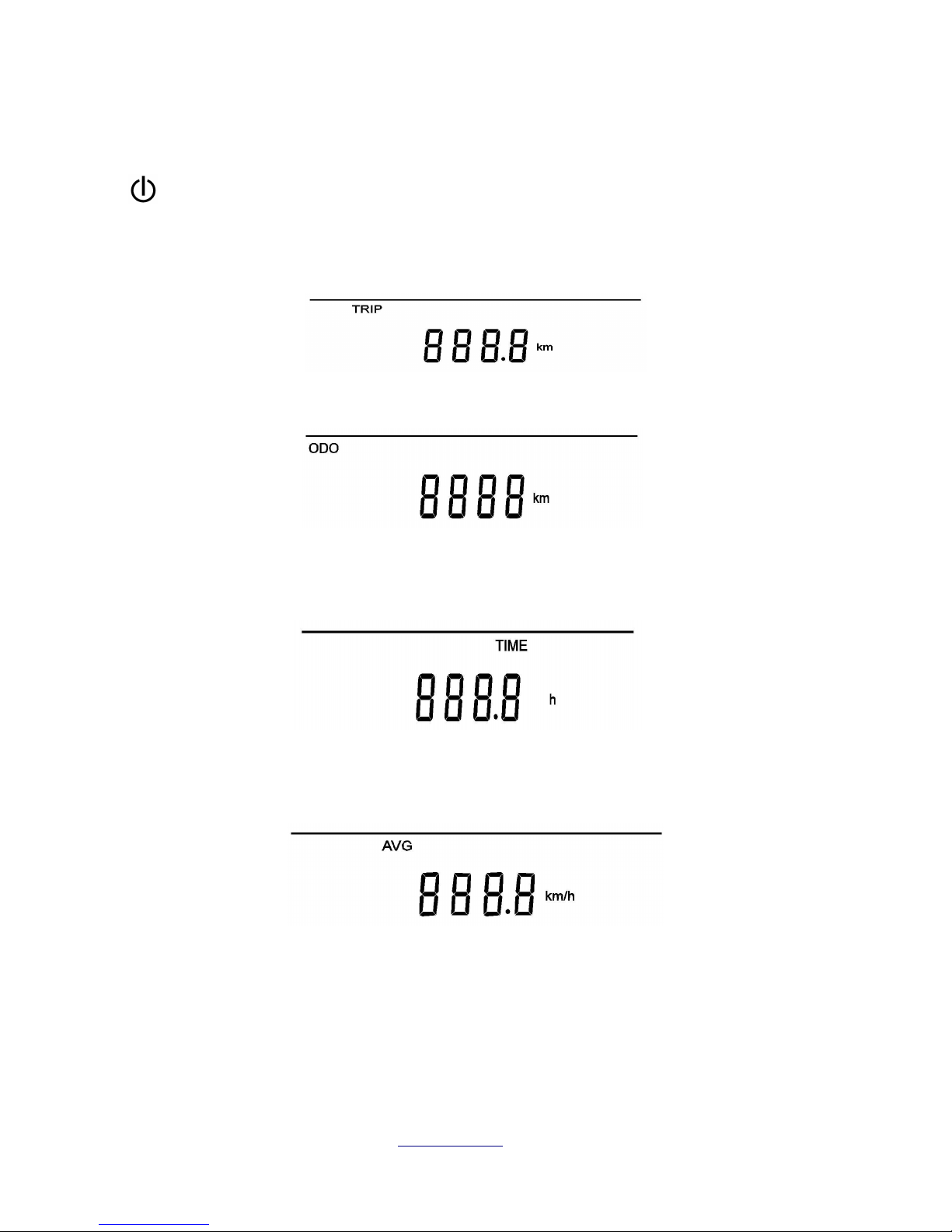
FUNCTIONS
Backlight kg ound lightv
With the system powe ed on push the powe button momenta ily to tu n the backlight on. Push the powe
button again to tu n the backlight off.
rip Distance (trip)
Shows the distance cove ed in the cu ent t ip.
Odometer
Shows the total distance cove ed. This is useful fo se vicing.
When on t ip distance, p ess the button fo 2 seconds to clea .
Movement ime ( IME)
Shows movement time.
P ess and hold the button fo 2 seconds to clea / eset.
Average Speed (AVG)
Shows the ave age speed (ave age speed=t ip distance / movement time), speed esolution is 1km/h (mil/h), full
ange is 99 km/h o 99mil/h.
Techbikes ltd www.techbikes. z ph +6433317075

Power
Ave age powe consumption in W*h.
Cons
Shows the ave age powe in watts
Wheel diameter selection
P ess button to select the wheel diamete using + and - buttons to adjust the wheel size f om 8 to 28 inch, the
default value is 26 inch.
Speed sensor selectionpeed senso selectio
P ess button to “Speed senso selection” using – and + buttons to select the numbe of pulses pe wheel
evolution. The default is 1.
Speed units selection (km/h-mil/h)
P ess button to ente the speed units. Use + button to switch between km/h and mil/h
default is km/h.
Techbikes ltd www.techbikes. z ph +6433317075

Diagnostic code
If a fault is detected a spanne will appea in the lowe ight con ne of the display and the e o code will be
displayed.
E02 = Motor hall sensor failure or Motor cable short circuit.
E03 = Controller failure.
E04 = Throttle failure.
E06 = Torque sensor fault. (NOTE: Often triggered if the controller is powered on
while the bicycle is being ridden)
E08 = nder voltage alarm.
Techbikes ltd www.techbikes. z ph +6433317075
Table des matières


