
TaoTronics TT-BH07 Manuel utilisateur

TT-BH07
TAOTRONICS TT-BH07 WIRELESS
STEREO HEADSET
User Guide
Hello
MADE IN CHINA
www.taotronics.com
NORTH AMERICA
E-mail: support@taotronics.com (US)
support.ca@taotronics.com(CA)
Tel: 1-888-456-8468 (Monday-Friday: 9:00 – 17:00 PST)
Address: 46724 Lakeview Blvd, Fremont, CA 94538
EUROPE
E-mail: support.uk@taotronics.com (UK)
support.de@taotronics.com (DE)
support.fr@taotronics.com (FR)
support.es@taotronics.com (ES)
support.it@taotronics.com (IT)
EU Importer: ZBT International Trading GmbH, Halstenbeker
Weg 98C, 25462 Rellingen, Deutschland
ASIA PACIFIC
E-mail: support.jp@taotronics.com (JP)
MANUFACTURER
Shenzhen NearbyExpress Technology Development Company Limited
Address: Block D, Minle Industrial Park, Meiban Road,
Longhua District, Shenzhen, China. 518131

Italiano
English
Deutsch
CONTENTS
01/10
11/20
21/31
Español
Français 32/41
42/52
取扱説明書 53/62

Thank you for choosing the TaoTronics TT-BH07
Wireless Stereo Headset. Please read the user
manual carefully, and keep it for future reference.
If in doubt, please contact our customer support
US UK CA
Package Content
1/2
1 x TaoTronics TT-BH07
Wireless Stereo Headset
1 x USB Charging Cable
6 x Ear Buds(two are
equipped on the headset)
6 x Ear Hooks(two are
equipped on the headset)

TAOTRONICS TT-BH07 WIRELESS
STEREO HEADSET
User Manual
Hello
Product Diagram
A2DP , AVRCP , HSP , HFP
APTX
33 feet (10 m)
5V/500mA
Approx. 6 hours
1.5 hours
590 x 25 x 32 mm
/ 23 x 0.98 x 1.26 in
15g /0.53 oz
Bluetooth®Prole
Audio Codec
Range
Charging Power
Working Time
Charging Time
Dimension (L*W*H)
Weight
Specications
① Volume + / Next
④ Volume - / Previous
② Multifunction Button
⑤ Microphone
③ LED Indicator
⑥ Micro USB Charging Port
3/4
1 x Travel Pouch 1 x User Guide

Status
Charging
Fully charged
In pairing mode
Paired with a Bluetooth®
device
Low battery
LED indicator
Solid red
Solid blue
Flashes in red and blue
alternately
Flashes blue once every 5
seconds
Flashes red
LED Indicators
▲Note: The unit will not automatically connect to a Bluetooth®
device when switched on; please read the next section on how
to connect to your Bluetooth®device.
How to Use
1.Charging
1)Connect the charging port with any USB charging adapter or
active computer USB port
2)Charging will start automatically with LED indicator turning red
3)The headset is fully charged when LED indicator turns blue
Note: Charge the headset at least once every 6 months when
not using for a long time.
2. Pairing
To pair with other Bluetooth®device, you must rst bring the
headset into pairing mode:
1)Make sure the headset and your Bluetooth®device are next
to each other (within 3 feet);
Operation
Press and hold the
Multifunction Button for 1
second
Press and hold the
Multifunction Button for 3
seconds
Press the Multifunction Button
once
Press the Volume +/- Button
Press and hold the Volume +/-
Button
Press the Multifunction Button
once
Press the Multifunction Button
once
Hold and press the
Multifunction Button for 1
second
Press the Multifunction Button
twice to re-dial the latest phone
number
Press both Volume +/- Button at
the same time to mute and
unmute phone call
Press and hold the Volume +/-
Button at the same time until
the LED Indicator ashes purple
3 times.
Function
Power ON
Power OFF
Play/Pause
Volume +/-
Play next/previous
Answer Phone Call
Hang up
Refuse phone call
Redial
Mute phone call
Reset
Button Control
5/6
2) The rst time you use the headset, press and hold the
Multifunction Button for approximately 5 seconds until the LED
indicator ashes red and blue alternately. Now the headset is
in pairing mode;
3) Activate Bluetooth®function on your phone and search for the
nearby Bluetooth®connection:
• For iPhone : Settings > Bluetooth® > On;
• For Android : Settings >Wireless & Networks > Bluetooth®:
On > Scan for devices;
• Find “TaoTronics TT-BH07” in the search results. Tap on the name
to connect. Once connected, only the blue LED will remain on.
Note:
• If a PIN code is required for pairing, please try “0000” or “8888”
(4 zero or 4 eight)
• The Bluetooth®headset can remember previous paired
devices. If you have previously paired the headset with a
device, simply turn on your device and the headset (by
pressing the multifunction button for 1 second), they will
connect automatically with no need to go into pairing mode.
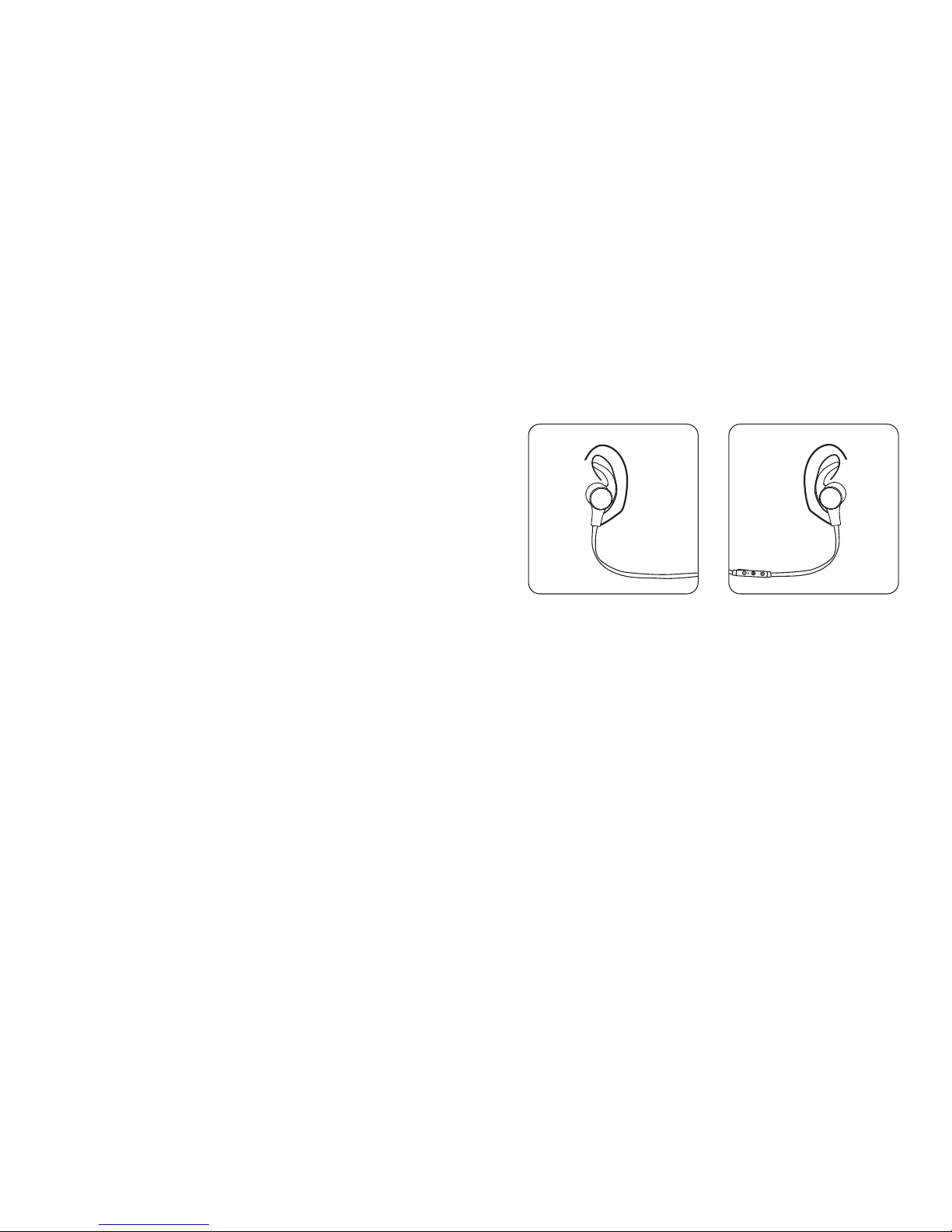
3.How to Wear
Please wear the headset as shown in the diagram:
1.Attach the ear hooks onto the earphones;
2.Wear the earphones and the hooks on your ears and adjust for
the best t.
▲Note:
• Please note the “L” and “R” markings on the headset, they
correspond to left side and right side respectively;
• In addition to the headset, two pairs of different size ear buds
are included in the package. Please try them out and nd the
most comfortable t for you.
Trouble shooting
Q: My headset will not switch on.
A: Please recharge it and make sure it has enough power.
Plug the unit to a charger and see if the power button
becomes solid red.
Q: Why can’t I pair this headset with other Bluetooth® devices?
A: Please check the following points:
• Make sure your Bluetooth®device support A2DP prole;
7/8

• Make sure the headset and your device are next to each other
or within 3 feet;
• You must get the headset into pairing mode with indicator
ashing red and blue alternately.
• Try to reboot your Bluetooth®device.
Q: After connecting and pairing with my Bluetooth®device, I
cannot hear any music from the headset.
A: Please check the following:
• Your sound system is connected to the headset (If LED indicator
ashes blue once every 5 seconds, then you are connected);
• Make sure the music volume is at audible level on both your
Bluetooth®device and headset;
• Make sure your Bluetooth®device is playing music.
Care and Maintenance
• Keep the headset away from heat and humidity;
• Do not put the product under direct sunlight or hot areas. High
temperatures will shorten lifespan of the headset, battery
and/or the internal circuit board;
• Do not try to take the product apart;
• Do not drop or knock your headset on hard surfaces;
• Do not use chemicals or detergents to clean the product;
• Do not scrape the surface with sharp objects.
Customer Support
For customer support and technical assistance, please email to:
For more information, please visit www.taotronics.com.
Warranty
This product is covered with TaoTronics parts and labor warranty
for 12 months from date of the original purchase from authorized
retailer and distributor. If the device becomes defective, please
contact TaoTronics Support to launch warranty claim.We will
instruct you on how to return the defective unit back to us for
repair and replacement.
The following are excluded from TaoTronics warranty cover:
• Device purchased as 2nd hand, used or from unauthorized sellers
• Damage resulted from misuse and abusive action
• Damage resulted from chemical, re, radioactive
substance, poison, liquid
• Damage resulted from natural disaster
• Damage caused to any 3rd party / person / object and beyond
No return will be accepted without seller authorization.
Statement
We can only provide after sale services for products that are sold
by TaoTronics or TaoTronics authorized retailer and distributor. If
you have purchased your unit from a different place, please
contact the seller for return and warranty issues.
9/10

Vielen Dank, dass Sie den TaoTronics TT-BH07 Kabellosen
Stereo Kopfhörer gekauft haben. Bitte lesen Sie die Anleitung
aufmerksam und bewahren Sie diese zum späteren Nachlesen
gut auf. Falls Sie Fragen haben sollten, senden Sie bitte eine
E-Mail mit einer detaillierten Problembeschreibung an
DE
Lieferumfang
11/12
1 x TaoTronics TT-BH07
Kabellose Stereo Kopfhörer
1 x USB Ladekabel
6 x Ohradapter (Zwei sind
bereits am Kopfhörer)
6 x Ohrhakenaufsätze (Zwei
sind bereits am Kopfhörer)

A2DP,AVRCP, HSP, HFP
APTX
10 m
5V/500mA
Ca. 6 Stunden
1.5 Stunden
590 x 25 x 32 mm
15g
Bluetooth®Prol
Audiocodierung
Reichweite
Ladeleistung
Laufzeit
Ladedauer
Maße (L*B*H)
Gewicht
Spezikationen
Produktabbildung
① Lautstärke + / vor
④ Lautstärke - / zurück
② Multifunktionsknopf
⑤ Mikrofon
③ LED Anzeige
⑥ Micro USB-Ladeanschluss
13/14
1 x Reisebeutel
TAOTRONICS TT-BH07 WIRELESS
STEREO HEADSET
User Manual
Hello
1 x Bedienungsanleitung

Status
Ladevorgang
Ladevorgang abgeschlossen
In Verbindungsmodus
Bluetooth®verbindung besteht
Akkustand niedrig
LED Anzeige
Leuchtet rot
Leuchtet blau
LED Anzeige blinkt
abwechselnd rot und blau
LED Anzeige blinkt alle 5
Sekunden blau
Blinkt rot
LED Anzeige
Beachten: Die Bluetooth®verbindung wird nicht automatisch mit
dem Einschalten des Gerätes aufgebaut. Lesen Sie dafür die
nächste Sektion, wie man die Bluetooh Geräte verbindet.
Handhabung
1. Gerät auaden
1)Verbinden Sie den Kopfhörer über den USB-Anschluss mit
einem Ladeadapter oder einen aktiven Computer
2)Der Ladevorgang startet automatisch und die
LED Anzeige leuchtet rot
3)Der Kopfhörer ist aufgeladen, wenn die LED
Anzeige blau leuchtet
Beachten: Bitte laden Sie die Kopfhörer bei Nichtbenutzung
mindestens einmal alle 6 Monate vollständig auf
2. Bluetooth®Verbindung
Um den Kopfhörer mit Ihrem Gerät zu verbinden muss sich der
Kopfhörer im Verbindungsmodus benden.
Bedienung
Halten Sie den Multifunktionsknopf
für 1 Sekunde gedrückt
Halten Sie den Multifunktionsknopf
für 3 Sekunden gedrückt
Drücken Sie den
Multifunktionsknopf 1x
Drücken Sie den +/- Knopf
Halten Sie den +/- Knopf
gedrückt
Drücken Sie den
Multifunktionsknopf 1x
Drücken Sie den
Multifunktionsknopf 1x
Halten Sie den Multifunktionsknopf
für 1 Sekunde gedrückt
Drücken Sie den
Multifunktionsknopf 2x um die
letzte Rufnummer zu wählen
Drücken Sie kurz und gleichzeitig
auf die Lautstärkeregler +/- um
stumm zu schalten. Wiederholen
Sie den Vorgang um das Mikro
wieder zu aktivieren.
" + " und " - " für 3-5 Sekunden bis
die LED Anzeige dreimal lila blinkt
Funktion
Einschalten
Ausschalten
Abspielen/Pause
Lautstärke +/-
Titel vor /Titel zurück
Anruf annehmen
Auegen
Anruf ablehnen
Wiederwahl
Telefongespräch stumm
schalten
Reset durchführen
Knopf Kontroll
15/16
Autres manuels pour TT-BH07
2
Table des matières
Autres manuels TaoTronics casque


