
T-COM T-Fax 2300 Manuel utilisateur

1
21.08.2003 KA_T-Fax 2300_ D.fm Gerätebezeichnung: Teledat 220 PCI
In Variablendefinition »Dateiname« zusätzlich noch Gerätebezeichnung eintragen.
Registerleiste
auf der Vorgabeseite anpassen!
T-Fax 2300
Kurzbedienungsanleitung
Beachten Sie unbedingt auch die Sicherheitshinweise für den Umgang mit diesem Pro-
dukt, wie sie in der Bedienungsanleitung aufgeführt sind. Eine Haftung von T-Com für
Schäden ausnicht bestimmungsgemäßem Gebrauch oder unsachgemäßer Handhabung
des T-Fax 2300 kann nicht übernommen werden.
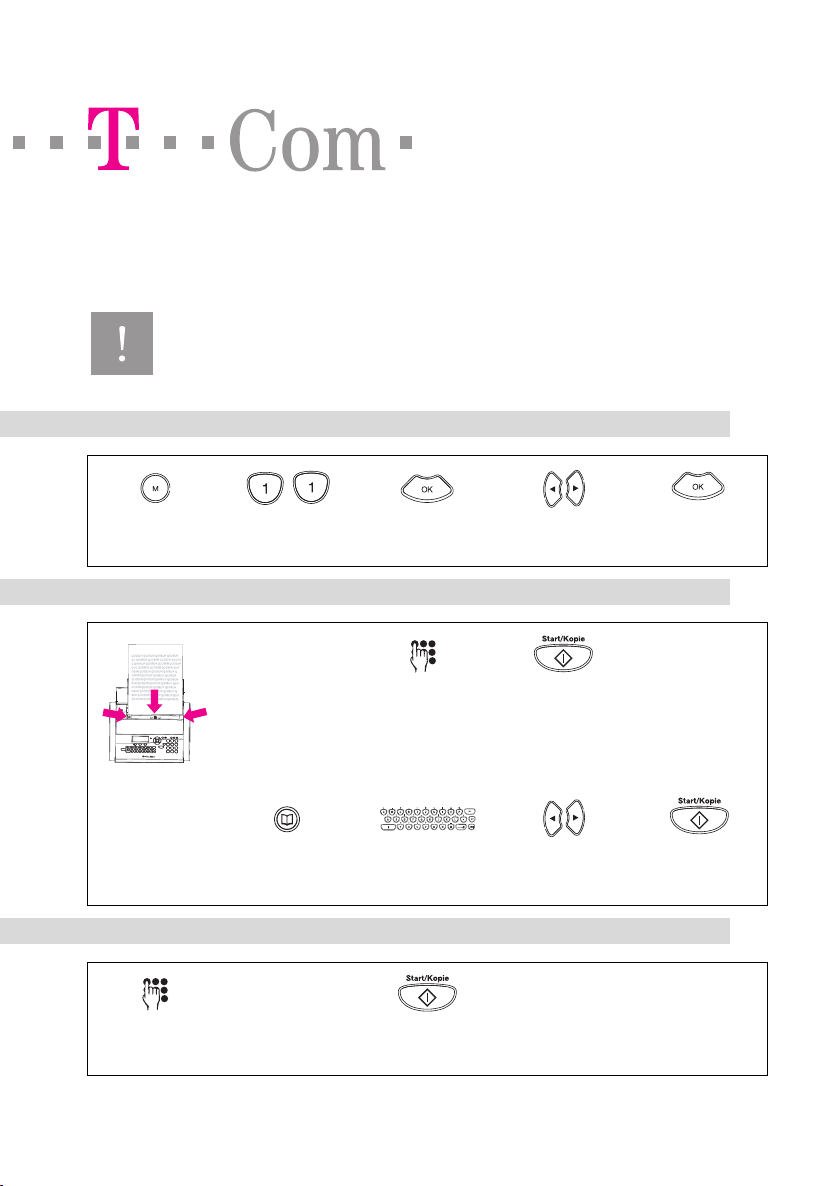
Sprache einstellen
1. MENÜ-Taste drü-
cken.
2. Zahl 11 eingeben. 3. OK Taste drücken. 4. Pfeiltasten: Sprache
wählen.
5. OK Taste drücken.
Fax senden
1. Legen Sie das Doku-
ment mit der Schrift-
seite nach vorn
(sichtbar) in den Do-
kumenteneinzug.
Richten Sie die Do-
kumentenführung
am Dokument aus.
2. Geben Sie die Ruf-
nummer über die
Wähltastatur ein.
3. Drücken Sie die Ta-
ste Start/Kopie.
Oder
wählen Sie über das
Telefonbuch:
1. Drücken Sie die Te-
lefonbuch Taste.
2. Geben Sie den An-
fangsbuchstaben
ein.
3. Wählen Sie mit den
Pfeiltasten den Na-
men.
4. Drücken Sie die Ta-
ste Start/Kopie.
Schneller Faxabruf
1. Geben Sie die Rufnummer der Abrufstelle
über die Wähltastatur ein.
2. Drücken Sie für ca. 2 Sekunden die Taste
Start/Kopie.
2
21.08.2003 KA_T-Fax 2300_ D.fm Gerätebezeichnung: Teledat 220 PCI
In Variablendefinition »Dateiname« zusätzlich noch Gerätebezeichnung eintragen.
Registerleiste
auf der Vorgabeseite anpassen!
Herausgeber: Deutsche Telekom AG
Stand 08/2003
5103 506 3442.1 EASY INSTALL T-FAX2300-DE
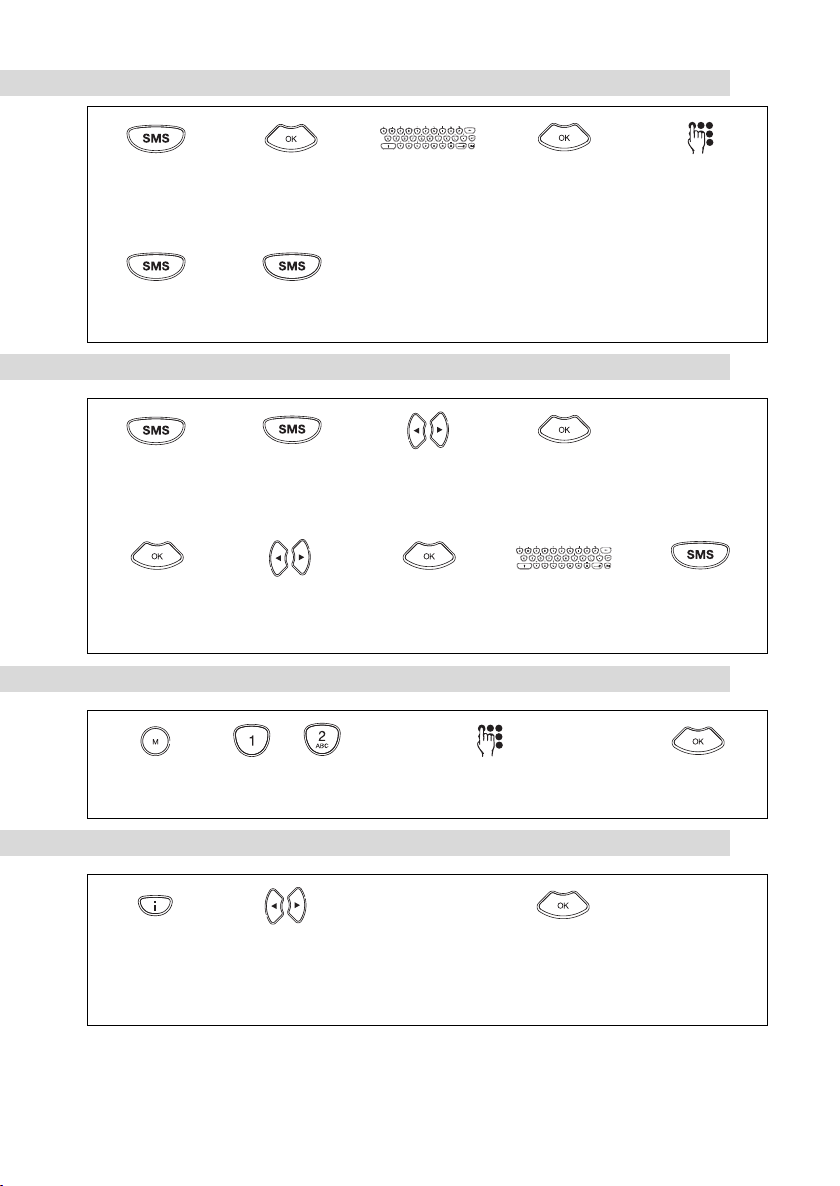
SMS senden
1. Drücken Sie die
SMS Taste.
2. Drücken Sie die OK
Taste.
3. Schreiben Sie den
Text der SMS (max.
160 Zeichen).
4. Drücken Sie die OK
Taste.
5. Geben Sie die Ruf-
nummer ein(mit Vor-
wahl).
6. Drücken Sie die
SMS Taste.
7. Drücken Sie die
SMS Taste.
SMS lesen und antworten
1. Die SMS Taste
blinkt.
2. Drücken Sie die
SMS Taste.
3. Wählen Sie mit den
Pfeiltasten eine SMS
aus.
4. Drücken Sie die OK
Taste.
5. Lesen Sie die SMS.
6. Drücken Sie die OK
Taste.
7. Wählen Sie mit den
Pfeiltasten ANT-
WORTEN.
8. Drücken Sie die OK
Taste.
9. Schreiben Sie die
SMS.
10.Drücken Sie die
SMS Taste.
Uhrzeit/Datum einstellen
3. Geben Sie nacheinader die einzelnen Stellen
von Uhrzeit und Datum ein.
1. Drücken Sie die
Menü Taste.
2. Drücken Sie die Zif-
fern 1 und 2.
3. Drücken Sie die OK
Taste.
Hilfeseiten drucken
1 Allgemeine Hilfe
2 Installationshilfe
3 Telefon
4 Fax/Faxweiche
5 Einlesevorrichtung
6 Liste Einstellungen
7 SMS
1. Drücken Sie die Info
Taste.
2. Wählen Sie mit den
Pfeiltasten die ge-
wünschte Hilfe:
3. Drücken Sie die OK
Taste oder warten
Sie ca. 10 Sek., bis
der Druck beginnt.
1
21.08.2003 KA_T-Fax 2300_ GB.fm Gerätebezeichnung: Teledat 220 PCI
In Variablendefinition »Dateiname« zusätzlich noch Gerätebezeichnung eintragen.
Registerleiste
auf der Vorgabeseite anpassen!
T-Fax 2300
Quick Reference Guide
Please also pay attention to the safety notices describing the correct way of using this pro-
duct which are to be found in the operating instructions. T-Com cannot accept any liability
for damage arising from the improper use of the T-Fax 2420 or if it is not employed as spe-
cified..
Setting the language
1. Press the MENU
key.
2. Enter the number
11.
3. Press the OK key. 4. Select the language
with the arrow keys.
5. Press the OK key.
Sending a fax
1. Insert the document
into the document
feed with the prin-
ted side facing you
(i.e. visible). Adjust
the document gui-
des to fit the paper.
2. Enter the telephone
number using the di-
alling keypad.
3. Press the Start/Ko-
pie (Start/Copy) key.
Or
Dial using the Direc-
tory:
1. Press the Directory
key.
2. Enter the first letter
of the name.
3. Select the name with
the arrow keys.
4. Press the Start/Ko-
pie (Start/Copy) key.
Fast polling
1. Enter the telephone number of the remote fax
using the dialling keypad..
2. Press the Start/Kopie (Start/Copy) key for ap-
prox. 2 seconds.

2
21.08.2003 KA_T-Fax 2300_ GB.fm Gerätebezeichnung: Teledat 220 PCI
In Variablendefinition »Dateiname« zusätzlich noch Gerätebezeichnung eintragen.
Registerleiste
auf der Vorgabeseite anpassen!
Issued by: Deutsche Telekom AG
Status 08/2003
5103 506 3444.1 EASY INSTALL T-FAX2300-UK
Sending an SMS
1. Press the SMS key. 2. Press the OK key. 3. Write your SMS mes-
sage (max. 160 cha-
racters).
4. Press the OK key. 5. Enter the telephone
number (with the
area code).
6. Press the SMS key. 7. Press the SMS key.
Reading an SMS and replying
1. The SMS key is
flashing.
2. Press the SMS key. 3. Select an SMS using
the arrow keys.
4. Press the OK key. 5. Read the SMS.
6. Press the OK key. 7. Select REPLY SMS
with the arrow keys.
8. Press the OK key. 9. Write your SMS. 10.Press the SMS key.
Setting the Time/Date
3. Enter the various digits of the time and date
one after the other.
1. Press the Menu key. 2. Enter the numbers 1
and 2.
3. Press the OK key.
Printing the help pages
1 General help
2 Installation help
3 Telphone & Answe-
ring device
4 Fax reception
5 Scanner/copier
6 Settings list
7 SMS
1. Press the Informati-
on key.
2. Select the kind of
help you require
with the arrow keys:
3. Press the OK key or
wait for approx. 10
seconds until the
printing begins.

1
09.09.2003 KA_T-Fax 2300_ TR.fm Gerätebezeichnung: Teledat 220 PCI
In Variablendefinition »Dateiname« zusätzlich noch Gerätebezeichnung eintragen.
Registerleiste
auf der Vorgabeseite anpassen!
T-Fax 2300
Özet Kullanım Rehberi
Cihazın kullanımına ilişkin kullanım rehberinde belirtilen güvenlik
uyarılarına mutlaka uyulmalıdır. T-Com, T-Fax 2300 cihazının kullanım
amacına ve usulüne aykırıkullanımından doğan hasarlar için sorumluluk
üstlenmez.
Dil Ayarı
1. MENÜ tuşuna
basın.
2. 11 rakamını
girin.
3. OK tuşuna
basın.
4. Yön tuşları: Dili
seçin.
5. OK tuşuna
basın.
Faks Gönderimi
1. Dokümanıyazılı
tarafıöne
bakacak
(görülür) şekilde
doküman girişine
yerleştirin.
Doküman
kavramasıkenar
ayarınıyapın.
2. Rakamtuşlarıyla
alıcının
numarasınıgirin.
3. Start/Kopie
tuşuna basın.
Veya
Telefon
rehberinden
seçim yapın:
1. Telefon rehberi
tuşuna basın.
2. İsmin ilk harfini
girin.
3. Yön tuşlarıyla
ismi seçin.
4. Start/Kopie
tuşuna basın.
HızlıFaks Çağrımı
1. Rakam tuşlarıyla faksıçağıracağınız
yerin numarasınıgirin.
2. Yakl. 2 saniye boyunca Start/Kopie
tuşuna basın.

2
09.09.2003 KA_T-Fax 2300_ TR.fm Gerätebezeichnung: Teledat 220 PCI
In Variablendefinition »Dateiname« zusätzlich noch Gerätebezeichnung eintragen.
Registerleiste
auf der Vorgabeseite anpassen!
Herausgeber: Deutsche Telekom AG
Stand 08/2003
5103 506 3443.1 EASY INSTALL T-FAX2300-TK
SMS Gönderimi
1. SMS tuşuna
basın.
2. OK tuşuna basın. 3. SMS metnini
girin (max. 160
karakter).
4. OK tuşuna basın. 5. Telefo n
numarasınıgirin
(alan kodu dahil).
6. SMS tuşuna
basın.
7. SMS tuşuna
basın.
SMS Okuma ve Cevaplama
1. SMS tuşu yanıp
söner.
2. SMS tuşuna
basın.
3. Yön tuşlarıyla
SMS seçimi
yapın.
4. OK tuşuna basın. 5. SMS mesajını
okuyun.
6. OK tuşuna basın. 7. Yön tuşlarıyla
CEVAPLA
seçimini yapın.
8. OK tuşuna basın. 9. SMS mesajını
yazın.
10.SMS tuşuna
basın.
Saat / Tarih Ayarı
3. Sırasıyla saat ve tarih hanelerini girin.
1. Menü tuşuna
basın.
2. 1 ve 2 tuşlarına
basın.
3. Sırasıyla saat ve
tarih hanelerini
girin.
Yardım SayfalarınıYazdır
1 Genel yardım
2 Enstallasyon
yardımı
3 Telefon
4 Faks / Faks ayırıcı
5 Okuma tertibatı
6 Ayarlar listesi
7 SMS
1. Info tuşuna
basın.
2. Yön tuşlarıyla
istediğiniz yardım
sayfasınıseçin:
3. OK tuşuna basın
ve yazdırma
işlemi başlayana
kadar yakl. 10
sn. bekleyin.
Table des matières
Langues :
Autres manuels T-COM Télécopieur


