
Symcode R50 Manuel utilisateur

Wireless Scanning and
Payment All-in-One Device
User 's manual


1
Precautions
1. Please read the user manual carefully before using this barcode scanner.
2. The working voltage of this barcode scanner is 3.3V, charging voltage 5V.
Please use our original USB cable and AC power adapter to ensure the
scanner is working properly.
3. Copyright and Patent Notice Our company reserves the copyright,software
copyright and sufficient patents of the barcode scanner and its accessories
(including firmware,MR Configurator,illustration documents,appearance
and so on. )
4. Our company reserves all rights -reserves the right to make any changes
to the product to improve its reliability, function or design.Our company
shall not be liable for applications or use of any product or circuit with our
scanner, or any liability arising therefrom or in connection with any other
applications described herein.
5. Our wireless barcode scanner accessories:
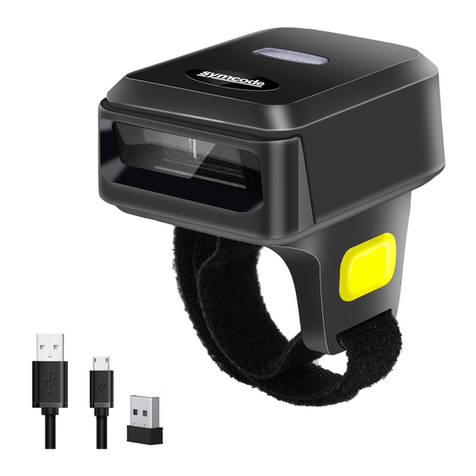
A: standard package: :barcode scanner (1 piece), Mini Receiver
(1 piece), Pedestal ,USB cable (1 piece), user manual (1 piece).
Option:vibration.
6. The contents of this manual are subject to change without prior
notice.
Wireless Scanning and Payment All-in-One Device

2
Contents
20.Appendix A
1.Notice.
2.Introduction & Features
3.Application & Execution Standards
4.Working Conditions& Related regulations.
5.Appearance
6.How to use the barcode scanner
7.Reset Configuration to Defaults&Version information
8.Pair with bluetooth
9.Pull up and Hide iOS Keyboard&Caps Lock
10.Pair with pedestal
11.Sound and Vibration Setting
12.Standby Time Setting
13.Language Settings
14. End Character Setting
15.Transmission Speed Setting and Bluetooth protocol
16.Operating Mode.
17.Bluetooth Name Change Setting
18.Hide front and back characters
19.Set Prefix and Suffix
1
..........................................................................
3
..............................................................
4
.......................................
5
..............................
6
.....................................................................
7-8
...........................................
9
...............
9
............................................................
10
..............................
11
.............................................................
12
................................................
13
........................................................
14
.............................................................
15
.......................................................
16
.................
17-18
................................................................
19
...........................................
20-21
............................................
22
...........................................................
23-33
..............................................................................................
21.FAQ(Frequently Asked Questions) 34
.........................................
22.Buzzer and Indicator Light State 35
...........................................
23.Electric Quantity Display
Wireless Scanning and Payment All-in-One Device

3
The series of barcode scanner produced by our company feature as strong
light source,enhanced long-distance scanning technology. It can read the
damaged,stained and poor printed barcode fast under different ambient light
conditions. It is durable in use, since it is protected by the industrial safty
technique.High volume buzzer is another hint of success scanning besides
LED light in the noisy industrial environment.
Introduction
Features
1.Support wired, 2.4G wireles and bluetooth transmission protocols.
2.Bluetooth 4.1 module: support HID,SPP and BLE multiple protocols.
And support customized development.Outdoor 20 meters visual
transmission distance.
3.Long-distance 2.4G module,Outdoor 100meters visual transmission distance.
4.Support online transmission, off-line storage and it can store 50000 barcodes.
5.Pedestal installed with 2.4G wireless receiver. When the scanner is charged on
the pedestals , the pedestals can be used for scanning and payment.
6.Support Windows xp、Win7、Win8、Win10 systems,Android devices
and IOS devices.
7.Adopting imported trigger button, long lifespan and fitting perfectly in your
hand for comfortable use.
Wireless Scanning and Payment All-in-One Device

4
Application
Execution Standands
* Applicable to Business (electrical, book, clothing, medicine,
cosmetics, etc.), retail industry, postal service, telecommunications
industry,warehousing, logistics industry, public security system,
customs systems,banking system, medical system.
* Compatible with Android、IOS、Linux、windows98 and above
operating systems and bluetooth protocol.
* Support multi-national keyboard language.
Wireless transmission protocol:Bluetooth Protocols and 2.4GHz wireless
protocols.
Storage: 16Mb.
Decoding chip: ARM Cortex 32 bits.
Bluetooth version: Bluetooth 4.1 Module.
Support bar code :
1D: Codabar,Code 11,Code93,MSI,Code 128,UCC/EAN-128,
Code 39,EAN-8,EAN-13,UPC-A,SBN,Industrial 25,Interleaved 25,
Standard 25,2/5 Matrix.
2D:QR,DataMatrix,PDF417,Aztec,Hanxin ,Micro PDF417(Optional)
Indicator: LED light、Buzzer、Vibration(Optional)
Battery Capacity:1100mA.
Charging voltage /current: 5V/1A.
Time of Endurance:1D≤20H 2D≤12H(5seconds/scan).
Charging Time:≤3hours
Standby time: >30days
Wireless Scanning and Payment All-in-One Device

5
Related regulations
Electrical safety:In accordance with UL1950、CSA C22.2 No.950、
EN60950/IEC950 EMI/RFI:FCC Part 15 Class B、
European Union EMC Directive、Taiwan EMC。
Environment Terms: In accordance with RoHS directive 2002/95/EEC.
Working Conditions
Working Temperature:32°F to 104°F/0°C to 40°C.
Storage Temperature:-40°F to 140°F/-40°C to 60°C.
Humidity:5% to 95% relative humidity (no condensation).
Ruggedness: Resist about several times drops from 1.5m to concrete ground.
Ambient Light Immunity:Under normal office and factory ambient
lighting conditions, or exposed to the sun
won’t take any effect to it.
Electrostatic discharge: In line with 15KV air discharge and 8KV contact
discharge requirements.
Wireless Scanning and Payment All-in-One Device

6
Appearance Introduction
Pedestal Scanning
Window
Charging thimble Charging Indicator
Bluetooth Indicator
Switch/Scanning
button
USB charge interface
Wireless Scanning and Payment All-in-One Device

7
How to use the barcode scanner
A.When use the scanner alone:
1.The barcode scanner only supports bluetooth protocols,which is
compatible with Android、IOS system and PC terminals with bluetooth.
(Please refer to page 9 ).
2.Connect USB Type-C end with scanner, and other side with PC. You can
charge the scanner and use for wired barcode scanner at the same time.
pair with smartphone
Wireless Scanning and Payment All-in-One Device

8
B.When used along with the pedestal:
The pedestals mode have desktop mode and handheld mode. When you use
the pedestals,please pair the scanner with mini-receiver installed in the pedestals.
1.Desktop mode:Put the barcode scanner with pedestals on the desk. When
you charge the scanner you can use the pedestals scanning window for scanning.
(Please refer to page 11)
2.Handheld mode :Hold the barcode scanner, and connect the pedestals with
PC terminals which is installed with the wireless 2.4G mini-receiver module.
Indoor transmission distance 30 meters. Outdoor transmission distance 100
meters.
Pair with Pedestals
Connect with PC
Wireless Scanning and Payment All-in-One Device
Table des matières
Autres manuels Symcode Lecteur de codes-barres


Manuels Lecteur de codes-barres populaires d'autres marques

POSMicro
POSMicro Datalogic PowerScan D7100 Manuel utilisateur

Marson
Marson MT780 Guide de configuration rapide

NCR
NCR RealPOS Manuel utilisateur

Motorola
Motorola SE3300 Guide de configuration rapide

Element
Element P130BT Manuel utilisateur

Motorola
Motorola Symbol LS3008 Manuel d'installation et d'exploitation


