
Sylvania SRT702A Manuel technique

LCD Color digital TV receiver
SRT702A
Operation Instruction
NOTE: THIS UNIT IS NOT MEANT TO BE USED IN A MOVING VEHICLE. ATSC DIGITAL
TUNERS DOES NOT RECEIVE SIGNAL WHEN IN MOTION.
This device complies with Part 15 of the FCC Rules.
Operation is subject to the following two conditions: (1) this device may not cause harmful
interference, and (2) this device must accept any interference received, including interference
that may cause undesired operation.

Contents
I Precautions
II Accessories
III Appearance
IV Description of Panel Buttons
V Remote Controller Operation Instruction
VI Basic Operation
VII TV Menu Operation
7.1. TV/AV Image Quality Adjustment
7.2. Sound Adjustment
7.3. Time Adjustment
7.4. Settings
7.5. Program search
VIII Operations in CARD mode
IX Before Repair
X Technical Parameter
XI Stand Assemble Instruction Manual
1
2
3
4
5
7
8
8
8
9
10
11
12
14
15
16

-1-
I Precautions
1. Keep this product away from extremely hot or cold places. The
storage temperature ranges from -40 to 60 and the working
temperature from -5 to 40 .
2. Do not use this product at damp environment like bathtubs, wash
basins, kitchens, washtubs, as well as basements, swimming pools
or similar places.
3. Do not expose your TV set to high humidity, dust or oil smoke.
4. Do not throw or drop this product.
5. Do not subject this device to the inside of a case or strong vibrations,
avoiding strong collision.
6. Do not push on or scrub this product with sharp objects.
Storage
Maintenance
1. Disconnect all cables of this device at first before cleaning.
2. Wipe the enclosure, screen and keys using soft cloth with a little
soft detergent on.
3. Do not use polishing cloth, abstergent, and all types of propellants or
chemical detergents like alcohol and benzene to clean your device.
Special Notice
1. Bright spots or dark spots may appear on the screen. This is a
normal phenomenon associated with the active matrix display
technology and is not a sign of malfunction. Do not attempt to
maintain. For any failures, please turn off your TV set immediately
and contact us or your dealer. This device integrates a great deal
of fine electronic components. Disassembly or alternation may
result in damages or breaks.
2. This Unit is controlled by microcomputer. If it runs abnormally,
please restart it.
1. Do not watch television programs or turn your TV set on for your
own and others' safety.
2. It is very dangerous to watch television programs or operate the
TV set while driving.
Warning!

II Accessories
-2-
1. Car adapter
2. AC adapter
3. Remote control
4. AAA type batteries
5. AV conversion cable
6. Telescopic antenna
7. User manual
* Open the package and make sure all the items are included.

III Appearance
-3-
21
20
22
23
24
25
10 10
1. Telescopic antenna
2. MUTE: Mute button
3. EXIT: Exit button
4
7. CHG: charging indicator,
twinkling when battery is
charging, keep light after full
of charging(Only available for
the machine of )
8. Power indicator
Red: Standby
Green: Power-on
9.
MENU: Menu button
15.
. OK: Confirm button
5. MODE: Mode shift button
6. : Standby button
internal battery
Remote-control receive
window
10. Speaker
11. TFT-LCD screen
12. CH+/ : Channel Select/
Upward button
13. CH-/ : Channel Select/
Downward button
14.
VOL+/ : Volume up/
Rightward button
16. SD/MMC/MS type CARD
input port
17. VOL-/ : Volume down/
Leftward button
18. USB connect Jack
19. Headphone jack
20. Antenna input Jack
21. AV Input
22. AV Output
23. Power on/off
24. DC Input
25. Battery Door

-4-
IV Description of Panel Buttons
1. MUTE: Mute button.
2. EXIT: Exit button.
3. OK: Confirm button.
4. MODE:
5. : Standby button.
6
TV/AV/External storage
switch.
. CH+/ : Upward selection/Channel
increasing.
7. CH-/ : Downward selection/Channel decreasing.
8. MENU: Menu button, press to show the main menu. When system
enters a multilevel submenu, press to return the previous menu step
by step.
9. VOL+/ : Rightward selection/For volume increasing.
10. VOL-/ : Leftward selection/For volume decreasing.

1. (Power Switching Key): When you press this key, the TV set will
be turned off, and press again it will be turned on.
2. Channel Key(Number key (0-9) and ): Press relevant key directly
when you want to change channel.
3. VOL+/VOL- (Volume control key, left and right direction key):
Press VOL+ to turn up the volume. Press this key to choose menu
rightward if it is in the system menu.
Press VOL- to turn down the volume. Press this key to choose
menu leftward if it is in the system menu.
4. MENU: Menu key. When you press this key, the main menu will
display. When the system enters a multilevel submenu, press this
key and return to previous menu step by step.
5. : Play/Pause.
6. : Stop.
7. CC: Close/Open Caption.
8. SLEEP: 240 minutes sleep shutdown settings.
V Remote Controller Operation Instruction
-5-
1
2
5
7
8
10
12
13
15
16
17
18
3
4
9
6
11
19 20
21 22
14
LR03 "AAA" SIZE
LR03 "AAA" SIZE

-6-
9. LIST: TV program menu key. When pressing this key, you will see
the entire program list in a program list box.
10. FAVOR: Press to activate/deactivate my favorite Program list.
11. SOURCE: When pressing this key, you switch state among TV, AV
and External storage.
12. EPG: When you press this key, the system will show the program
guide menu(ATSC mode).
13. (Mute Key): When you press this key, the sound will disappear,
and press again the sound will return to normal.
14. RETURN: Press this key to return to previous channel you were
watching and press again to return to current channel.
15. CH+/CH- (Program choosing key, up and down direction key):
Press CH+ key to increase the channel. Press this key and choose
menu upward if it is in the system menu.
Press CH- key to decrease the channel. Press this key and choose
menu downward if it is in the system menu.
16. OK: Confirm button.
17. EXIT: Press this key, exit operation and return to the program.
18. / : Previous track/Next track.
19. MTS: Audio language switch key
When pressing this key, you can adjust among different Audio.
20. ZOOM: When pressing this key, you can choose among Wide,
Zoom, Cinema, Panorama and Normal image display formats.
21. PICT: Image Mode Key. Press this key to choose among the four
image modes of Standard, Dynamic, Soft and Personal.
22. INFO: When you press this key, the system will show the message
/information of present program.

VI Basic Operation
-7-
1. Connection of Power Supply:
Align the power supply plug on
AC adapter with the jack on the
machine rear cover marked with
DC.
AV conversion cable
2. Connection of AV convert Cable:
Insert the external video cord into
the yellow port of the AV convert
cable, the left sound track into the
white port and the right sound track
into the red port. Then plug the AV
convert cord in AV IN or AV OUT
jack.
Sound Mode Personal
Treble/Bass
Prefer Language English
50
50
50
0
Picture Mode Personal
Brightness 50
Contrast
Color
Sharpness
Tint
Color Mode Normal
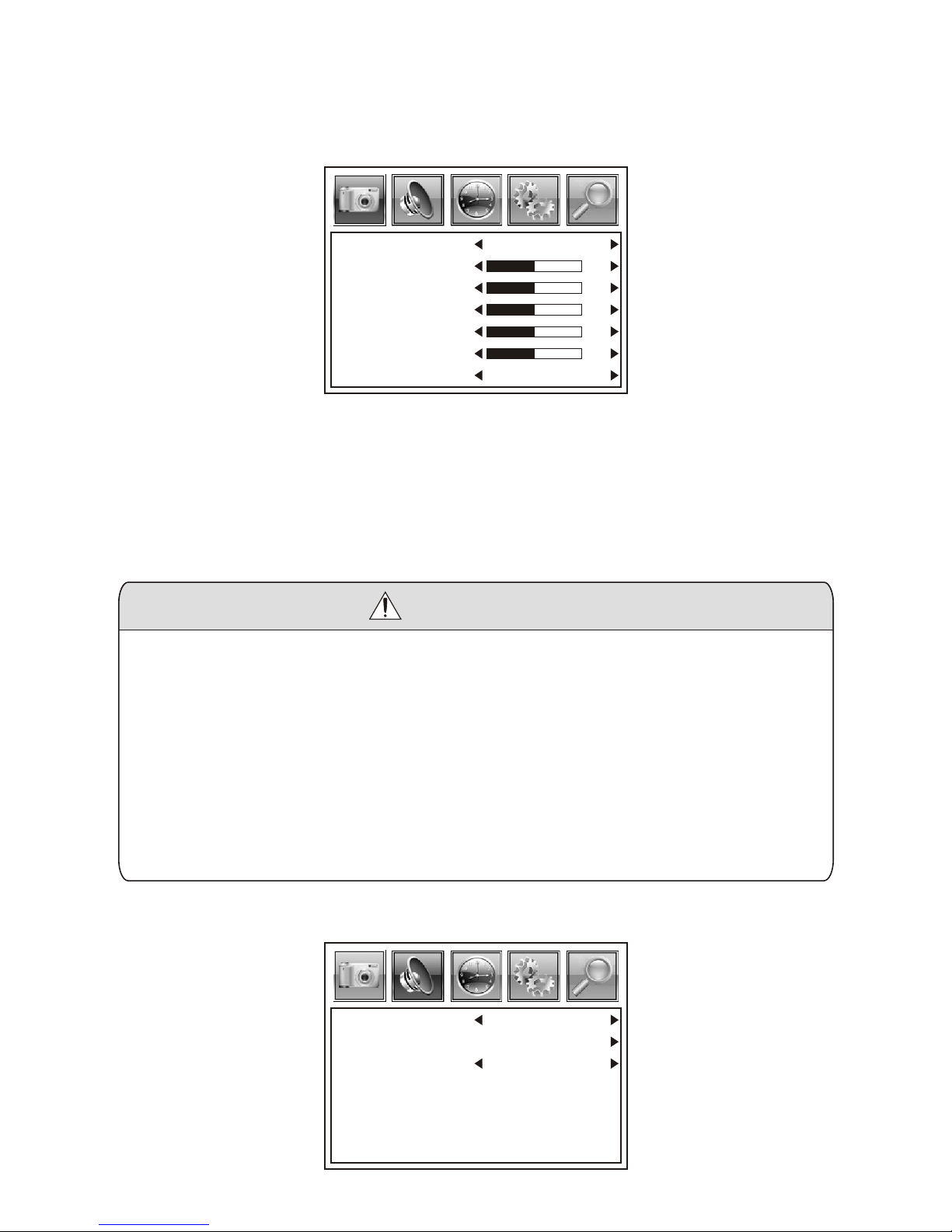
VII TV Menu Operation
Press MENU key to enter the menu list and then press left or right key
to enter the above list. Press up and down key to choose to enter the
sub-list, press left and right key to adjust the numerical value or setup
the contents, then press MENU to confirm and return to previous list.
Press MENU again or press EXIT key on the remote controller to quit
the sub menu list directly after the adjustment of image quality.
1. There are four options of Picture Mode, which are Personal
Standard, Dynamic and Soft.
2. Brightness: Adjust the brightness of the image.
3. Contrast: Adjust the black and white contrast of the image.
4. Color: Adjust the color of the image.
5. Sharpness: Adjust the definition of the image.
6. Tint: Adjust the tint of the image.
7. There are three options of Color Mode, which are Normal, Warm,
Cool.
Precautions
7.1. TV/AV Image Quality Adjustment
7.2. Sound Adjustment
-8-
Autres manuels pour SRT702A
1
Table des matières
Autres manuels Sylvania Récepteur TV


