
Switch Voice BR4 Manuel utilisateur

BR4 - Appliance User Manual v2.0
Page: 1/48
USER MANUAL

BR4 - Appliance User Manual v2.0
Page: 2/48
Version History
Version Description of change
1.2 Origin
1.3 Section 2.3.1. for interface cables added
1.4 Section 3.23.1. Firmware upgrade is elaborated
1.5 Section 3.23.1. Firmware upgrade is elaborated
1.6 1.1. Echo cancellation module chapter is expanded
1.7 Section 3.23.1. Firmware upgrade is elaborated
1.8 Links are updated to point SwitchVoice Ltd. web site
1.9 Added SSH/console access information
2.0 Section 1.1 and Section 2.3.1. are updated

BR4 - Appliance User Manual v2.0
Page: 3/48
Table of Contents
Table of Contents .................................................................................................................3
1. General overview.......................................................................................................... 4
1.1. Echo cancellation module ........................................................................................... 6
2. Technical information..................................................................................................7
2.1. System: uClinux, SwitchFin......................................................................................7
2.2. Hardware:....................................................................................................................8
2.3. Interfaces.....................................................................................................................8
2.3.1. Interface cables.........................................................................................................8
2.4. Applications ..............................................................................................................10
2.5. Additional information..............................................................................................10
3. Software and Configuration tips. Working with the GUI..........................................10
3.1. System Status Menu..................................................................................................10
3.2. mISDN Config Menu................................................................................................12
3.3. Trunks........................................................................................................................15
3.4. Outgoing Calling Rules.............................................................................................17
3.5. Dial plans...................................................................................................................18
3.6. Users.......................................................................................................................... 19
3.7. Ring Groups ..............................................................................................................21
3.8. Music on Hold........................................................................................................... 23
3.9. Call Queues ...............................................................................................................24
3.10. Voice Menus ........................................................................................................... 26
3.11. Time Intervals .........................................................................................................28
3.12. Incoming Calling Rules........................................................................................... 29
3.13. Voice mail...............................................................................................................30
3.14. Conferencing...........................................................................................................32
3.15. Follow me................................................................................................................34
3.16. Directory..................................................................................................................35
3.17. Call Features............................................................................................................36
3.18. VoiceMail Groups................................................................................................... 38
3.19. Voice Menu Prompts...............................................................................................39
3.20. System Info .............................................................................................................40
3.21. Back up....................................................................................................................40
3.22. Options ....................................................................................................................42
3.23. Advanced Options...................................................................................................43
3.23.1 Updating your BR4 firmware................................................................................46

BR4 - Appliance User Manual v2.0
Page: 4/48
1. General overview
What is BR4 - Appliance?
BR4 - Appliance is a Blackfin DSP based Asterisk driven, S/T interface
embedded appliance. It is an open source embedded platform based on
uClinux and SwitchFin.
Basic Rate Interface is Integrated Services Digital Network (ISDN)
configuration that consists of two B channels (64 kbits/s “bearer” channels) used
for voice and data. And one D channel (16 kbits/s “data” channel).
The physical interface is called S/T. It uses four wires with a separate pair of
wires for the uplink and another pair for the downlink.
The typical use of the BRI interface is in residential solutions.
The mISDN ports can be configured for PTP or PTMP mode. PTP (Point to
Point) is a type of connection restricted to two end points.
PTMP (Point to Multi Point) is a type of connection, providing multiple pats
from a single point to multiple points (locations).

BR4 - Appliance User Manual v2.0
Page: 5/48

BR4 - Appliance User Manual v2.0
Page: 6/48
1.1. Echo cancellation module
Echo cancellation module installed in BR4 - Appliance
To ensure carrier grade voice quality, BR4 - Appliance can accept an
optional line echo cancellation module based on G.168 standard.
Echo cancellation is a process of removing the echo from a voice
communication in order to improve voice quality on a telephone call. In general
there are two sources of echo in the telephony: Acoustic echo and echo from the
analog phone hybrids. Speech compression techniques and digital processing
delay often make these echoes more severe in telephone networks.
To achieve consistent quality we have selected hardware based solution from
Zarlink. There is a special connector inside the BR4 - Appliance, where user can
plug an optional LEC module. If you have LEC-64-BR4 installed in your BR4 –
Appliance it will be detected and configured automatically.

BR4 - Appliance User Manual v2.0
Page: 7/48
2. Technical information
*picture without LEC module
2.1. System: uClinux, SwitchFin
Our PBXs are driven by our own telephony oriented, Open Source uClinux
distribution called SwitchFin ( http://switchfin.org). Current version of
SwitchFin provides Asterisk 1.4.x and mISDN 1.2 together with custom kernel
modules to support our hardware. Additional applications such as PPPoE, SMTP
forwarder, NTPd and many more are also provided to extend usability of the
BR4-Appliance under different scenarios.

BR4 - Appliance User Manual v2.0
Page: 8/48
2.2. Hardware:
•ADSP - BF537 600MHz CPU. DSP core for the media processing.
•64MB of SDRAM
•256KB serial flash for the boot-loader
•256MB NAND flash for voicemail and prompts.
•SD card interface on a dedicated bus.
•Watchdog timer
•Optional, hardware based, G-168 Line Echo Cancellation.
2.3. Interfaces
•QUAD ISDN (2B + 1D) interface
•TE with PTP and PTMP
•EuroISDN (mISDN)
•10/100Mbps Ethernet port with high performance PHY
•RS232 for console connectivity (115k, 8-N-1)
2.3.1. Interface cables
•For the Ethernet connection you have to use:
-In case you connect to router, switch and etc. Ethernet patch cable
-In case you connect to other PBX device crossover cable
The default SSH credentials are username: root, password uClinux
•ISDN ports – the BR4 PBX has 4 ISDN ports:
•To connect the BR4-Appliance (TE mode) ISDN port to your
telecommunication equipment you should use standard Ethernet
“patch” cable. The configuration is:
Pin Description
3 TX+
6 TX-
4 RX+
5 RX-

BR4 - Appliance User Manual v2.0
Page: 9/48
Keep in mind that if you want to use BR4-Appliance in NT mode
you will need an ISDN crossover cable as shown below (pins
enumeration according standard RJ45 male connector, see above):
You will need to use 100Ωexternal resistive termination (between
both TX+,TX- and RX+,RX-) at the NT end of the ISDN cable. For
example assume BR4-Appliance1 is set to NT mode, BR4-
Appliance2 is TE mode. We will terminate at BR4-Appliance1
side (refer to the picture above). You need to put a resistor between
pins 3-6 and another one between pins 4-5. BR4-Appliance doesn’t
provide phantom power on its ISDN ports. If you are connecting
ISDN telephone which requires power from the ISDN line you
have to implement this externally
•Serial Port cable
You need serial patch cable for the console access to your PBX from a PC.
The schematic of the cable is:
The default console port credentials are username: root, password uClinux
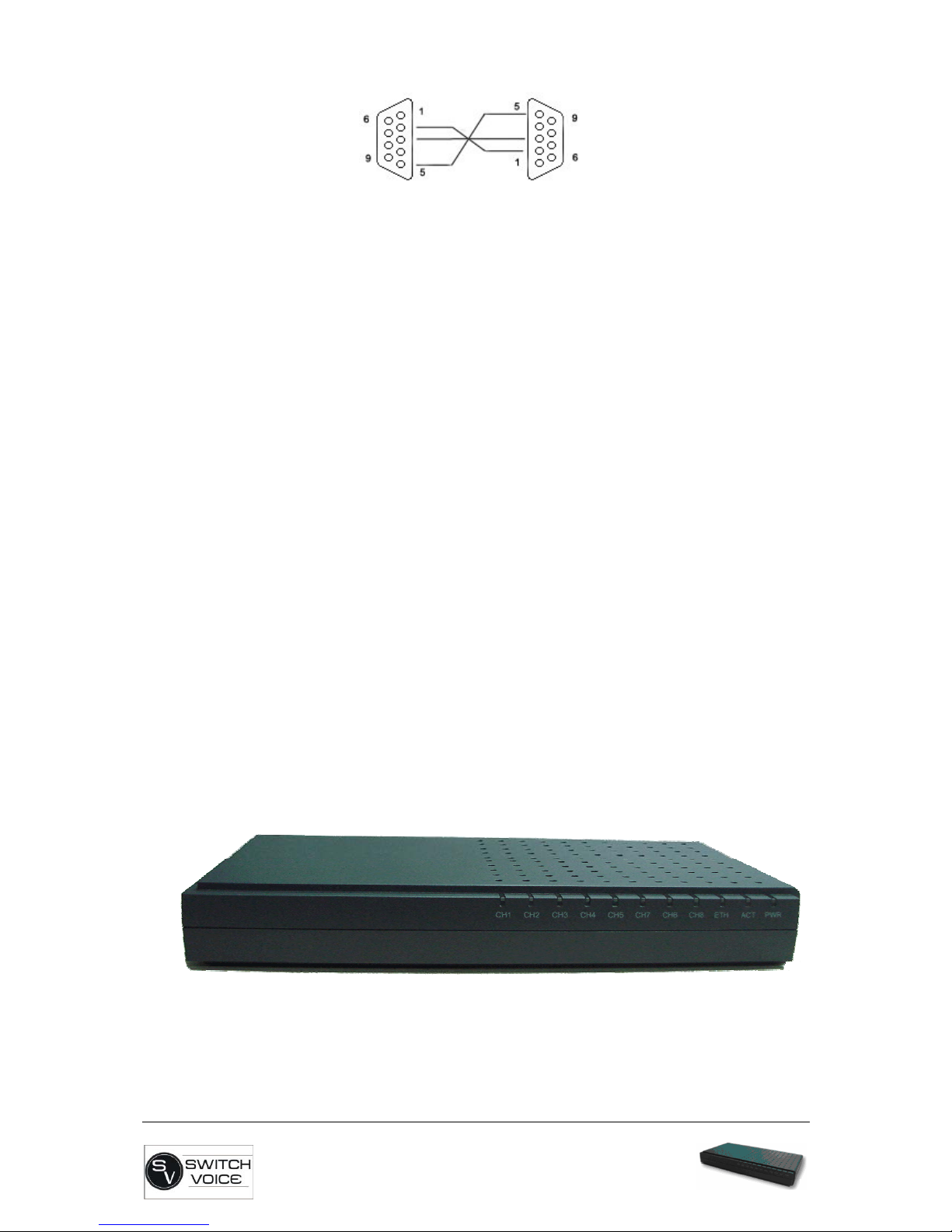
BR4 - Appliance User Manual v2.0
Page: 10/48
2.4. Applications
•VoIP / TDM Gateways
•PBX / IVR functionality
•VoIP Services
•Conferencing
•Custom platforms
•Voice Routing
•Custom Development
2.5. Additional information
•Power supply 6 - 12VDC
•Current consumption – 150 mA@12V
•Dumensions: 224 x 122 x 30 mm (8” 13/16 x 4” 13/16 x 1” 3/16)
•12V, 2A power adapter is included
3. Software and Configuration tips.
Working with the GUI
3.1. System Status Menu
After all the interfaces are connected and your BR4-Applinace is powered up
you can connect to the GUI through your preferred Web browser. By default all
BR4 - Appliances are preconfigured with 192.168.1.100/24 IP address/netmask.
Table des matières
Manuels PBX populaires d'autres marques

Allo.com
Allo.com Nano 2 Manuel utilisateur

ZYCOD
ZYCOD ZX50 Manuel utilisateur

Panasonic
Panasonic KX-TDA100BX Manuel utilisateur

LV switch
LV switch IPPBX800 Manuel d'instructions

Edge-Core
Edge-Core VST3305 Manuel utilisateur

Panasonic
Panasonic KX-T7625 - Digital Proprietary Speakerphone 24... Manuel utilisateur

Rauland-Borg
Rauland-Borg Telecenter IV Manuel utilisateur

Grandstream Networks
Grandstream Networks UCM6208 Manuel utilisateur

ATCOM
ATCOM IPPBX IP02 Manuel utilisateur

Panasonic
Panasonic KX-TVS50 - 2 Port Voicemail System Manuel utilisateur

bintec elmeg
bintec elmeg elmeg hybird 600 Manuel utilisateur

Panasonic
Panasonic KX-NS300 Manuel utilisateur


