
Swiss+go Zug Manuel utilisateur

User Manual
Zug

1. Quick sta guide
Overview
1. Touch screen
2. Thermal sensor
3. Hea sensor
4. Charging POGO PIN
• Make sure the POGO-pins on the charging cable t correctly
onto the charging terminals on the back of sma watch.
• Plug the big end of the USB cable to a power source and aer
successful charging, a charging icon will appear on the screen.

Install “Oplayer Sma Life” app on the phone
Connect the sma watch with the phone
Unbind sma watch with mobile phone
Search and install the “Oplayer Sma Life” app from Google Play or
App Store. Or scan the following QR code to install the app directly.
1. Enable Bluetooth on your sma phone.
2. Open the “Oplayer Sma Life” app on your sma phone, and then ll
in all the requested information in the “Seings” menu.
3. Tap “Connect device” in the “Seings” menu.
4. Select the sma watch icon to connect.
5. Choose your device name to connect it with your phone.
1. Open “Oplayer Sma Life” app on your sma phone.
2. Tap “Disconnect device” in the “Seings” menu and conrm “OK”.
3. To disconnect your sma watch with an iPhone, click “Disconnect
device” in the “Seings” menu of “Oplayer Sma Life” app, and go to
the Bluetooth seings on your iPhone, then access and select “Forget
This Device”.

Operation Introduction
2. How to use
• To switch on the watch, press and hold the center of the touch screen
until the display is on.
• To switch o the watch, slide the screen from right to le on main
inteace to enter in sub-menu, and then slide the screen up and down
to enter in seings, you will nd power o icon there.
• You can press the touch screen, or turn on gesture control in advanced
seings of Oplayer Sma Life and then raise your hand to light the
screen.
• Turn on: Press and hold the center of the touch screen for 3 seconds.
• Go to main menu: Slide from right to le on main inteace; slide up
and down to check more functions
• Select a function: Slide up and down; tap the icon.
• Conrm: Tap the icon.
• Exit menu: Slide from le to right on the screen.
• Check notications: Slide from le to right on main inteace.

3. Main menu
Aer turning on the sma watch, the main inteace will be displayed.
From the main inteace:
1. Go to the main menu
a. Slide from right to le to enter the main menu.
b. Slide up and down to check more functions.
c. Tap the icon to enter the sub menu. Slide from le to right to return to
the previous menu.
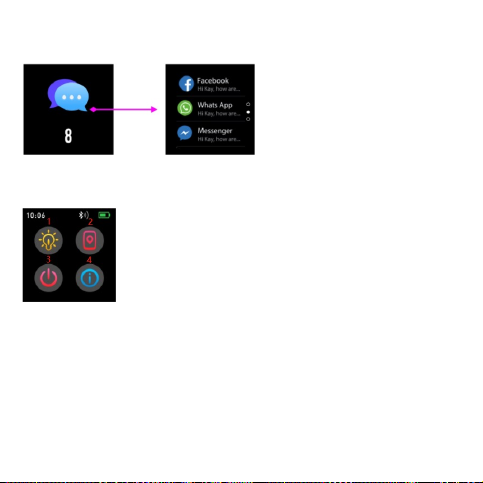
2. Go to the notication shocut inteace
Slide from le to right from the main inteace.
3. Go to other shocuts screen
Slide up and down from the main inteace.
No. 1 Brightness
You can adjust screen brightness by click this icon.
No. 2 Find phone
When your sma watch is connected with Oplayer Sma Life,
you phone will ring by click this icon.
No. 3 Shut down
You can shut down your sma watch by by click this icon.
No. 4 About
Yo u w i l l n d n a m e , ad d r e s s , a n d r m wa r e v e rs i o n b y c l i c k t h i s i c on .

There are 4 watch faces. In current watch face, press and hold
the center of the touch screen to choose the one you like.
The watch will record your daily activity automatically. Press
the step icon to check pedometer, distance and calories. Aer
synchronizing with Oplayer Sma Life, these spos data can
be also checked in Oplayer Sma Life.
Watch faces
Daily activities
4. Functions

Tap the spo icon to enter the multi-spo mode. The
sma watch has 4 spos modes: walking, running, cycling, and
hiking. Choose a spo mode you want, and then do spos. The
sma watch will record your exercise data.
If you want to end the spos, slide the screen to right and tap
the stop icon to nish your spos and save the data. The sma
watch displays your exercise data aer that. If you’ve connec-
ted your sma watch with Oplayer Sma Life via Bluetooth,
you can also check your exercise data in the app.
Note: if the exercise time is less than 5 minutes, the data
cannot be saved.
Multi-Spo

Slide up from main inteace repeatedly until temperature
icon shows on the display. Press the icon to monitor your skin
or body temperature. To exit the temperature monitor, please
slide to right.
If you’ve connected your sma watch with Oplayer Sma Life
via Bluetooth, you can also check your hea rate data in the
app.
You can set to monitor skin or body temperature, and tempera-
ture unit here.
Temperature monitor
Temperature seings
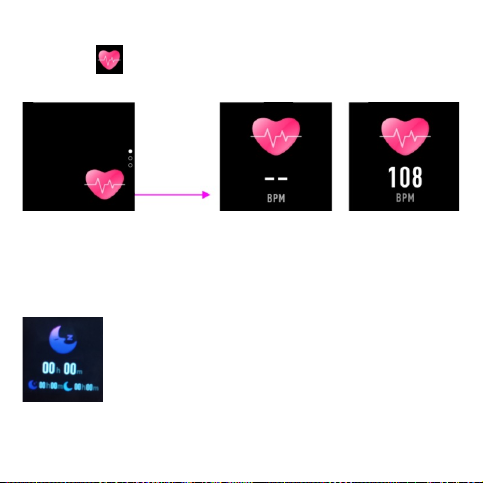
Select the hea rate icon to monitor your current hea
rate. To exit the hea rate monitor, please slide to right.
If you’ve connected your sma watch with Oplayer Sma Life
via Bluetooth, you can also check your hea rate data in the
app.
The sma watch automatically monitors your
sleep from 10p.m. to 9a.m.
When you get up the next day, the sma watch
displays your sleep repo about the time of total
sleep, light sleep and deep sleep. If you’ve connec-
ted your sma watch with Oplayer Sma Life via
Bluetooth, you can also check more detailed sleep
repo in the app.
Hea rate monitor
Sleep monitor
Table des matières
Langues :


