
SWAMI IZZO Golf Manuel utilisateur

Watch GPS Instruction Manual

1
TABLE OF CONTENTS
1. General Description of Hardware .................................................................................2
1.1 Basic Specications ........................................................................................2
1.2 Accessories List ..............................................................................................2
1.3 Screen Display Description .............................................................................3
2. Getting Started ................................................................................................................4
2.1 Power On/Off ....................................................................................................4
3. Time Mode ........................................................................................................................4
4. Using Swami on the Course ...........................................................................................5
4.1 Getting Started ............................................................................................5-6
4.2 Play Mode .......................................................................................................7
4.3 Shot Distance ..................................................................................................7
4.4 Electronic Score Card .....................................................................................8
4.5 Odometer ........................................................................................................9
4.6 End Round .....................................................................................................9
5. Swami Settings ..............................................................................................................10
5.1 Alarm ............................................................................................................10
5.2 Backlight ........................................................................................................11
5.3 Sound ............................................................................................................11
5.4 Date/Time ......................................................................................................12
5.5 Time Format ..................................................................................................13
5.6 Unit ................................................................................................................13
5.7 Daylight Savings Time ..................................................................................14
5.8 Language ......................................................................................................14

1.2 Accessories List
• USB Cable •Charging Station •User Manual
2
1. General Description of Hardware
1.1 Basic Specications
5.9 Device Info ......................................................................................................15
Caution ...............................................................................................................................15
Using Conditions ...............................................................................................................15
Charging Swami ................................................................................................................16
Warranty .............................................................................................................................17
Questions & Answers ........................................................................................................17
Registration Card ..............................................................................................................18
General Description of Hardware
Number of courses stored +35,000 Worldwide
Receiving chip SiRF Star III
Battery 300 mAh coin type rechargeable
Battery Life Golf Mode – 6.5 hours / Time Mode – 40 days
USB interface Supported
Display size 1” Transective
Water resistant Yes IPX7

3
1.3 Screen Display Description
Key Description:
• Power/Backlight: Press and hold (3 seconds) to turn the device on and off. Press
once to turn on backlight.
• OK/Menu: Press to select menu options and acknowledge messages. Press to switch
pages (Green View, Shot Distance, Scorecard, and Odometer) Press and hold to
open Main Menu.
• Up: Press to scroll up through menus, holes, and settings.
• Down: Press to scroll down through menus, holes, and settings.
Up
OK/Menu
Down
Power/Backlight
General Description of Hardware

2. Getting Started
2.1 Power On/Off
1. Press and hold Power key for 3 seconds until
the power screen appears.
2. The device will show the Start-Up logo rst
and into the Time Mode screen.
3. To turn off the device, press and hold the
Power key.
3. Time Mode
1. From Time Mode page
2. Press Up key to display Stopwatch .
• To start Stopwatch, press OK/Menu key
• To pause Stopwatch, press OK/Menu
key again.
• To reset the Stopwatch, press and hold
Down key.
3. Press Up key again to change 3rd row to
display Seconds .
4. Press Up key again to change 3rd row to display
Sunset time . Press Up key again to change 3rd
row to display Sunrise time .
Note: Date/Time must be set to AUTO for Sunrise/Sunset Feature
(See page 12). Satellite connection must be available.
4
A. Day of Week
B. Time of Day
C. Date
A
B
C
Getting Started Time Mode

5
4. Using Swami on the Course (directions on page 6)
Time Mode Page Main Menu Page
Using Swami on the Course
Searching for Signal Choose Course

6
1. From Time Mode page, press and hold OK/Menu key to access
Main Menu page.
2. Use Up or Down key to select Play Golf and press OK/Menu key.
3. Device will begin to search for satellite signal, you can press OK/Menu key to
cancel request. (Note: When Swami is used for the rst time or has not been used
for a while, it may take a few minutes to locate satellites. If it has not located them
within 5 minutes, please turn watch completely off and try again).
4. When device has found the satellite, it will begin auto searching the surrounding
courses that the device supports. You can press OK/Menu key to cancel request.
5. It will then list the nearest golf courses to choose from. Use Up or Down key to
select the golf course, then press OK/Menu key to continue.
6. Device will begin Play Mode and start at hole #1, user can press Up or Down key
to switch the hole number. (see page 7 for Play Mode screen)
4. Using Swami on the Course (Screen shots on page 5)
4.1 Getting Started
Using Swami on the Course

Using Swami on the Course
7
4.3 Shot Distance
1. From Green View page, press OK/Menu key to switch to
Shot Distance page.
2. Press & hold Down key to reset distance to 0.
3. Press & hold Up key to start marking.
4. Press & hold Down key to reset when nished.
5. Press OK/Menu key twice to return to Play Mode screen.
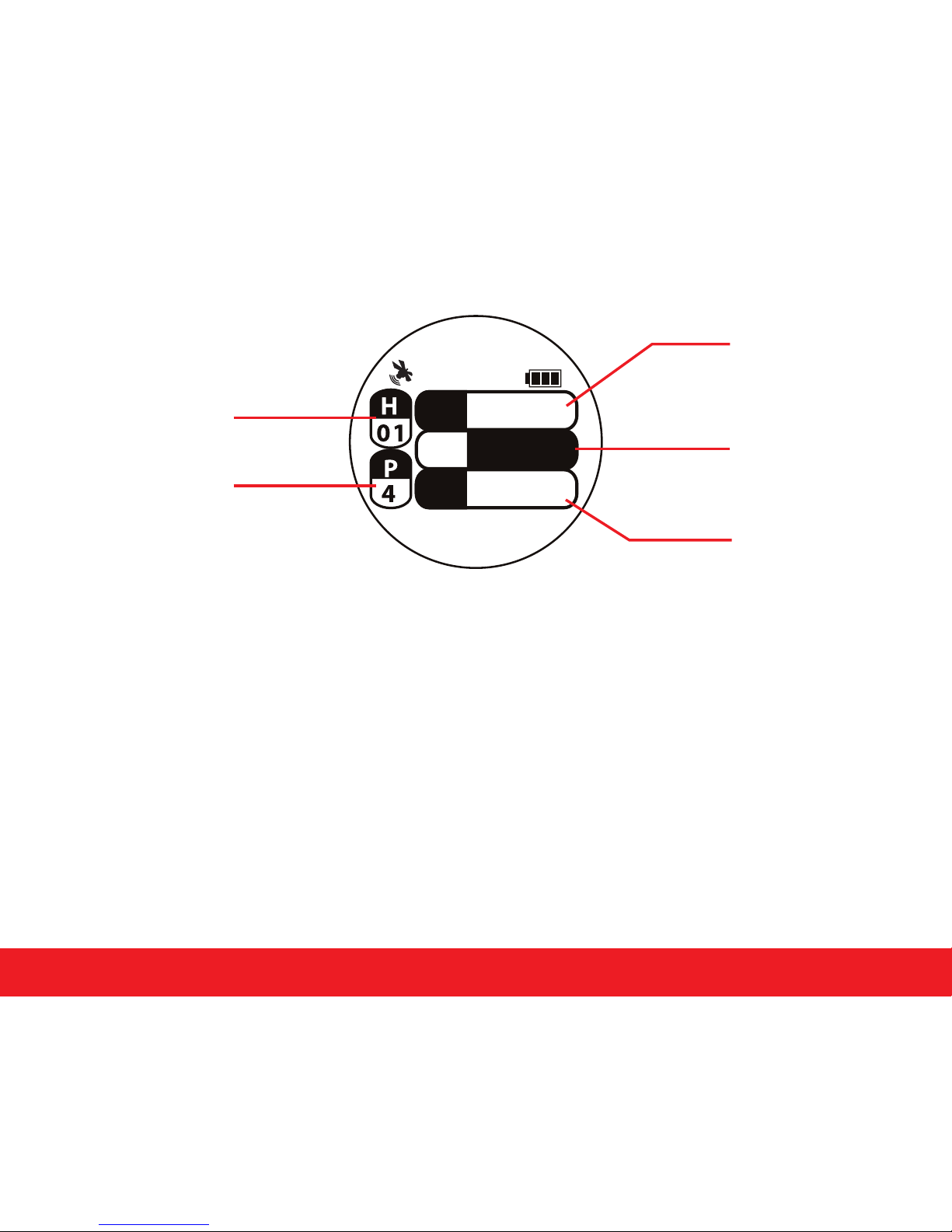
4.2 Play Mode
Current Hole Number
Indicates Par
for the Hole
Distance to the Back
of the Green
Distance to the Center
of the Green
Distance to the Front
of the Green
10:11
Using Swami on the Course 8
1. From Shot Distance screen, press OK/Menu key to switch to Scorecard screen.
2. Use Up or Down key to see scorecard for each hole.
3. To change the default Par press and hold Down key to access Edit mode. Use Up or
Down key to change the par then press OK/Menu key.
4. To change the Score press and hold Up key to access Edit mode. Use the Up or
Down key to change score for the hole then press OK/Menu key.
5. Press OK/Menu key to return to Play Mode screen.
4.4 Electronic Scorecard
Hole Number
User Score
Par
Total Score for
Round/ Total Par
for Course
10:11
S4
P
-3 5 4/72
4
Par Number

Using Swami on the Course
4.5 Odometer
1. From Time Mode or Play Mode, press and hold OK/Menu
key to access Main Menu.
2. Use Up or Down key to select Odometer and press
OK/Menu key (Figure A).
3. Press Up key to Enable Odometer (Figure B).
(Note: Will beep three times when ready)
4. Press Up key again to Disable Odometer.
5. Press Down key to reset Odometer.
6. To exit Odometer, press and hold OK/Menu key to return
back to Main Menu.
7. Press and hold OK/Menu key again will return back
to Time Mode page.
4.6 End Round
1. Press and hold OK/Menu key to return back to Main Menu will end the golf round.
2. Press and hold OK/Menu key again to return back to Time Mode page.
9
A
B
Autres manuels pour IZZO Golf
1
Table des matières


