Suunto SONIC Manuel utilisateur

SUUNTO SONIC
USER GUIDE
2024-01-16

1. Intended use...................................................................................................................................................3
2. Safety...............................................................................................................................................................4
3. Getting started.............................................................................................................................................. 6
3.1. Buttons.................................................................................................................................................6
3.2. Microphone........................................................................................................................................ 7
3.3. Bluetooth connectivity.....................................................................................................................7
3.4. Pairing..................................................................................................................................................8
3.5. Suunto app.........................................................................................................................................8
3.6. Wearing the headphones...............................................................................................................9
4. Features........................................................................................................................................................ 10
4.1. Sound mode......................................................................................................................................10
4.2. Voice feedback............................................................................................................................... 10
4.3. Dual device connection................................................................................................................. 11
4.4. Low latency mode...........................................................................................................................12
5. Settings..........................................................................................................................................................13
5.1. Device info.........................................................................................................................................13
5.2. Software updates............................................................................................................................13
5.3. Resetting the headphones........................................................................................................... 13
6. Care and support........................................................................................................................................ 14
6.1. Handling guidelines........................................................................................................................ 14
6.2. Battery and charging..................................................................................................................... 14
6.3. Disposal.............................................................................................................................................15
7. Reference...................................................................................................................................................... 16
7.1. Compliance........................................................................................................................................ 16
7.2. CE........................................................................................................................................................ 16
Suunto Sonic
2

1. Intended use
The Suunto Sonic headphones are wireless BluetoothⓇcompatible headphones designed
and made for outdoor sports. With Suunto Sonic, you can safely and comfortably listen to
music and make phone calls during exercises.
Do not use the product in situations that require special or full attention. The product is only
for recreational use.
Suunto Sonic
3

2. Safety
Types of safety precautions
WARNING: - is used in connection with a procedure or situation that may result in
serious injury or death.
CAUTION: - is used in connection with a procedure or situation that will result in
damage to the product.
NOTE: - is used to emphasize important information.
TIP: - is used for extra tips on how to utilize the features and functions of the device.
Safety precautions
WARNING: Keep the USB cable away from medical devices such as pacemakers, as well
as key cards, credit cards and similar items. The USB cable device connector includes a
strong magnet which may interfere with the operation of medical or other electronic devices
and items with magnetically stored data.
WARNING: Allergic reactions or skin irritations may occur when the product is in contact
with skin, even though our products comply with industry standards. In such event, stop use
immediately and consult a doctor.
WARNING: Always consult your doctor before beginning an exercise program.
Overexertion may cause serious injury.
WARNING: Suunto products and services are intended for recreational use only and are
not meant for medical purposes of any kind.
WARNING: Wearing headphones may impact your ability to hear your surroundings. Use
your headphones responsibly and prioritize safety.
WARNING: Before charging, ensure that the charging port of the headphones is free
from any residual liquid. Liquid on the charging port damages the headphones’circuit.
WARNING: Do not use the product during thunderstorms. Thunderstorms can cause
abnormal device operation and increase the risk of electric shock.
WARNING: Even if your headphones are waterproof, do not charge them while wet.
Charging wet headphones can lead to fire or electrical shock. Make sure that the charging
cable and the headphones are dry before charging the headphones.
CAUTION: Only use the provided charging cable when charging your Suunto Sonic.
CAUTION: Do not apply solvent of any kind to the product, as it may damage the
surface.
Suunto Sonic
4

CAUTION: Do not apply insect repellent on the product, as it may damage the surface.
CAUTION: Do not knock or drop the product, as it may get damaged.
NOTE: Do not throw the product away, but treat it as electronic waste to preserve the
environment.
NOTE: Always comply with the local laws and regulations when using the product
outdoors and when using it among people.
NOTE: Make sure you fully understand how to use your headphones and what their
limitations are by reading all the printed documentation and the online user manual. Always
remember that you are responsible for your own safety.
Suunto Sonic
5

3. Getting started
3.1. Buttons
Suunto Sonic has three buttons you can use to switch song, adjust volume and answer or end
phone calls.
1. multifunction button
2. [+] and power button
3. [–] button
Switching on/o the device
•keep the [+] button pressed for 3 seconds to switch the device on or o
Listening to audio
•press the multifunction button once to start or stop playing the audio
•press the multifunction button twice to skip to the next track
•press the multifunction button three times to return to the previous track
•press the [+] button to increase volume
•press the [–] button to decrease volume
•keep the multifunction button and the [+] button pressed simultaneously for 3 seconds to
switch sound mode
Making a phone call
•press the multifunction button once to answer or end a call
•press the [+] button to increase volume
•press the [–] button to decrease volume
Suunto Sonic
6

Adjusting settings when the device is on
•keep the [+] and [–] buttons pressed simultaneously for 3 seconds to enter pairing mode
•in pairing mode, keep the multifunction button and the [+] button pressed simultaneously
for 3 seconds to enable dual device connection
3.2. Microphone
Your Suunto Sonic comes with dual microphone and clear voice call (cVc) noise reduction
technology. These features guarantee good voice quality of your phone calls even in noisy
conditions.
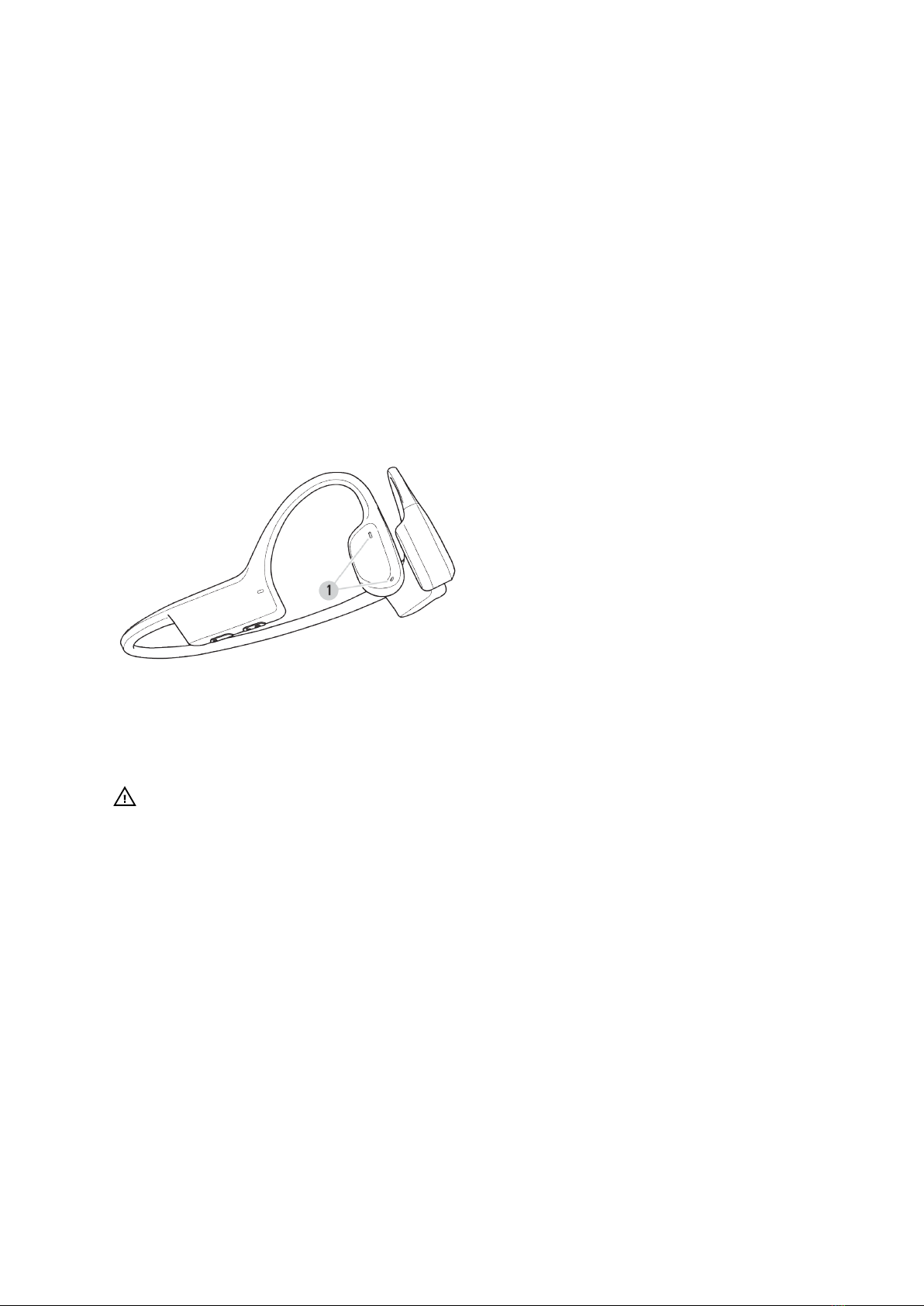
You find the microphones on the right side of the headphones:
1. dual microphone
CAUTION: Do not wash the microphone holes directly with water or volatile liquids, as
they may aect the performance of the microphone.
3.3. Bluetooth connectivity
Your Suunto Sonic headphones communicate with the compatible devices via Bluetooth. You
can pair the product with any Bluetooth devices capable of playing audio, such as mobile
phones, smart watches, tablets, etc. For information on how to pair the headphones with a
compatible device, see 3.4. Pairing.
You can connect your headphones to two Bluetooth devices at the same time. See 4.3. Dual
device connection.
If you want to disconnect the headphones and the compatible device, you can do so in the
Bluetooth settings of the paired device. You have two options. To keep the headphones on
the Bluetooth list of the paired device and ensure quick reconnection, simply disconnect the
devices. If you want to completely remove the headphones from the Bluetooth list of the
paired device, delete the headphones from the list of Bluetooth connections. In this case, if
you want to use the headphones and the Bluetooth device again, you have to start pairing
from the beginning.
Suunto Sonic
7

NOTE: If you move outside of the Bluetooth connection range for more than 3 minutes
while wearing Suunto Sonic, the headphones and the paired device disconnect.
When the Bluetooth connection between the headphones and the compatible device is lost,
Suunto Sonic automatically enters standby mode to save power. When the headphones are in
standby mode, press any button to quickly reconnect to the Bluetooth device.
3.4. Pairing
Before you use your Suunto Sonic for the first time, you need to pair it with a compatible
device.
If Suunto Sonic is not switched on:
1. Keep the [+] button pressed. After 3 seconds, Suunto Sonic switches on. Do not release
the button.
2. Keep the [+] button pressed for 2 more seconds to enter pairing mode. When the LED light
alternately flashes red and white, the product is ready for pairing.
3. Make sure Bluetooth is enabled on the device you want to pair your Suunto Sonic with.
4. Under the Bluetooth settings of the compatible device, open the list of nearby devices.
5. Find Suunto Sonic on the list and pair the headphones with the device.
When the pairing is successful, the headphones will play a sound and the white LED will light
for 1 second before it switches o.
If Suunto Sonic is already on:
1. Keep the [+] and [–] buttons pressed simultaneously for 3 seconds to enter pairing mode.
When the LED light alternately flashes red and white, the product is ready for pairing.
2. Make sure Bluetooth is enabled on the device you want to pair your Suunto Sonic with.
3. Under the Bluetooth settings of the compatible device, open the list of nearby devices.
4. Find Suunto Sonic on the list and pair the headphones with the device.
When the pairing is successful, the headphones will play a sound and the white LED will light
for 1 second before it switches o.
3.5. Suunto app
With the Suunto app on your phone, you can further enrich your Suunto Sonic experience.
Pair your headphones with the mobile app to adjust sound mode, connections and more.
To adjust headphones settings in Suunto app:
1. Pair Suunto Sonic with the compatible mobile device via Bluetooth. See 3.4. Pairing.
2. Download and install Suunto app on your compatible mobile device from the App Store,
Google Play or several popular app stores in China.
3. Start Suunto app on your phone.
4. The app automatically connects to your headphones.
5. Go to your profile in Suunto app and open the headphones menu to adjust product
settings.
Suunto Sonic
8


3.6. Wearing the headphones
Suunto Sonic headphones are bone conduction headphones with open-ear style, allowing
you to listen to audio and still hear your surroundings during exercises.
For the proper experience, put the headphones to the back of your head, with the hooks on
your ears so that the transducers rest in front of your ears. Keep the back of the headphones
parallel to the ground.
Whether you are training in the gym or you are out on rugged paths, the headphones stay
stable on your head. Thanks to their light weight and the open-ear style, the headphones are
comfortable to use for several hours. You can wear Suunto Sonic together with a bike helmet
or a hat and even under a beanie.
Suunto Sonic
9

4. Features
4.1. Sound mode
You can choose from dierent sound modes when wearing your headphones. Your Suunto
Sonic oers a normal sound mode for everyday use and light exercises and another sound
mode for outdoor trainings and noisy conditions. In the outdoor sound mode, the volume is
higher. Select the mode that provides the best experience in your given situation.
NOTE: Noise may occur at high volume levels.
While listening to audio, you can switch sound mode by keeping the multifunction button and
the [+] button pressed simultaneously for 3 seconds. If you have Suunto app installed on your
phone, you can also change sound mode in the app.
WARNING: Prolonged use of headphones at high volume levels can lead to hearing
damage and sound distortion.
WARNING: Wearing headphones may impact your ability to hear your surroundings. Use
your headphones responsibly and prioritize safety.
4.2. Voice feedback
If you have a voice feedback capable Suunto watch, you can get voice feedback with
valuable information during your exercise. The feedback can help you to keep track of your
progress and give you useful indicators, depending on what feedback options you have
selected. The voice feedback comes from your phone so your watch and your headphones
must be paired with Suunto app.
To activate voice feedback on your watch before an exercise:
1. Before starting an exercise, scroll down and select Voice feedback.
2. Toggle Voice feedback from app on.
3. Scroll down and select which voice feedback you want activated by turning the toggles
on/o.
4. Make sure your headphones are on and paired with Suunto app.
5. Go back and start your exercise as you normally do.
Your phone will now bring you various voice feedback during your exercise, depending on
which voice feedback you have activated.
To activate voice feedback on your watch during an exercise:
1. Press the upper button to pause the exercise.
2. Select Options.
3. Scroll down and select Voice feedback.
4. Toggle Voice feedback from app on.
5. Scroll down and select which voice feedback you want activated by turning the toggles
on/o.
6. Make sure your headphones are on and paired with Suunto app.
7. Go back and resume your exercise.
Suunto Sonic
10
Table des matières