Sunstech DTB-3500 Manuel utilisateur

User Manual
Of DigitalSet Top Box
DTB-3500
Please read this UserManual carefully to ensureproper use of this
product and keep thismanual for future reference.

Tableof Contents
11
Safety Information------------------------------------------------------------------------ 3
Introduction------------------------------------------------------------------------------- 2
Remote Control--------------------------------------------------------------------------- 4
Front and Rear panel illustration------------------------------------------------------- 6
Connecting to a Television and Video-------------------------------------------------- 8
Connecting to a Television ----------- --------------------------------------------------- 7
Connecting to a Surround Sound System------------------------------------------- 9
The setup menu system----------------------------------------------------------------- 10
USB----------------------------------------------------------------------------------------- 21
Troubleshooting-------------------------------------------------------------------------- 22
Specifications---------------------------------------------------------------------------- 23
Table of Contents ------------------------------------------------------------------------- 1

Introduction
Thank you for purchasing this product which has been designed and
manufactured to give you many years of trouble-free service.
About This User Guide
This user guide contains all the information you need to know about how to
setup and watch available free view Channels using your set top box.
What is DVB-T?
It works like traditional TV, but because the signals are Digital you need a
set top box to convert them. This means more channels can be transmitted
with extra features such as interactivity and wide screen pictures.
22
Look out for this symbol. It indicates useful and important tips.
Trade Mark of the DVB Digital Video Broadcasting
Project(1991 to 1996)
Digital Video
Broadcasting
Accessories In the Box
Remove your Digital set top box carefully from the box ,and remove the
packaging from each part.
You will find the following items:
Digital set top box with fitted mains plug
Remote Control with 2XAAAbatteries
User Manual

Safety Information
Position the cablesso that theycannot be walkedon or pinchedby items
placed on oragainst them.
Do not usethe set topbox in humidor damp conditions.
Do not allowthe set topbox to getwet.
Do not placewater filled objectssuch as vaseson top ofthe set topbox.
Do not exposethe set topbox to drippingor splashing.
Do not placenaked flame sources,such as candles,on the topof the set
top box.
Cleaning
ALWAYS unplug theset top boxbefore you cleanit.
Do not useliquid or aerosolcleaners.
Clean the settop box witha soft, damp(not wet) cloth.
Ventilation
The slots andopenings on the set top boxare for ventilation. Do not cover
or block themas it may cause overheating.
NEVER let childrenpush anything intothe holes orslots on thecase.
Servicing
There are nouser serviceable partsin this settop box.
When servicing, referto qualified servicepersonnel.
Consult your dealerif you areever in doubtabout the installation,operation
or safety ofthis unit.
33
Battery Disposal
Please ensure batteriesare disposed ofsafely.
Never dispose ofbatteries in thefire or withhousehold waste.
Check with yourlocal authority fordisposal regulations.
Safety is Important
Toensure your safety and the safetyof others, pleaseensure you read
the Safety Instructionsbefore you operate this product.
Keep this informationin a safeplace for futurereference. Please readall
the safety informationbefore using theproduct.
Safety Considerations.

Remote Control
44
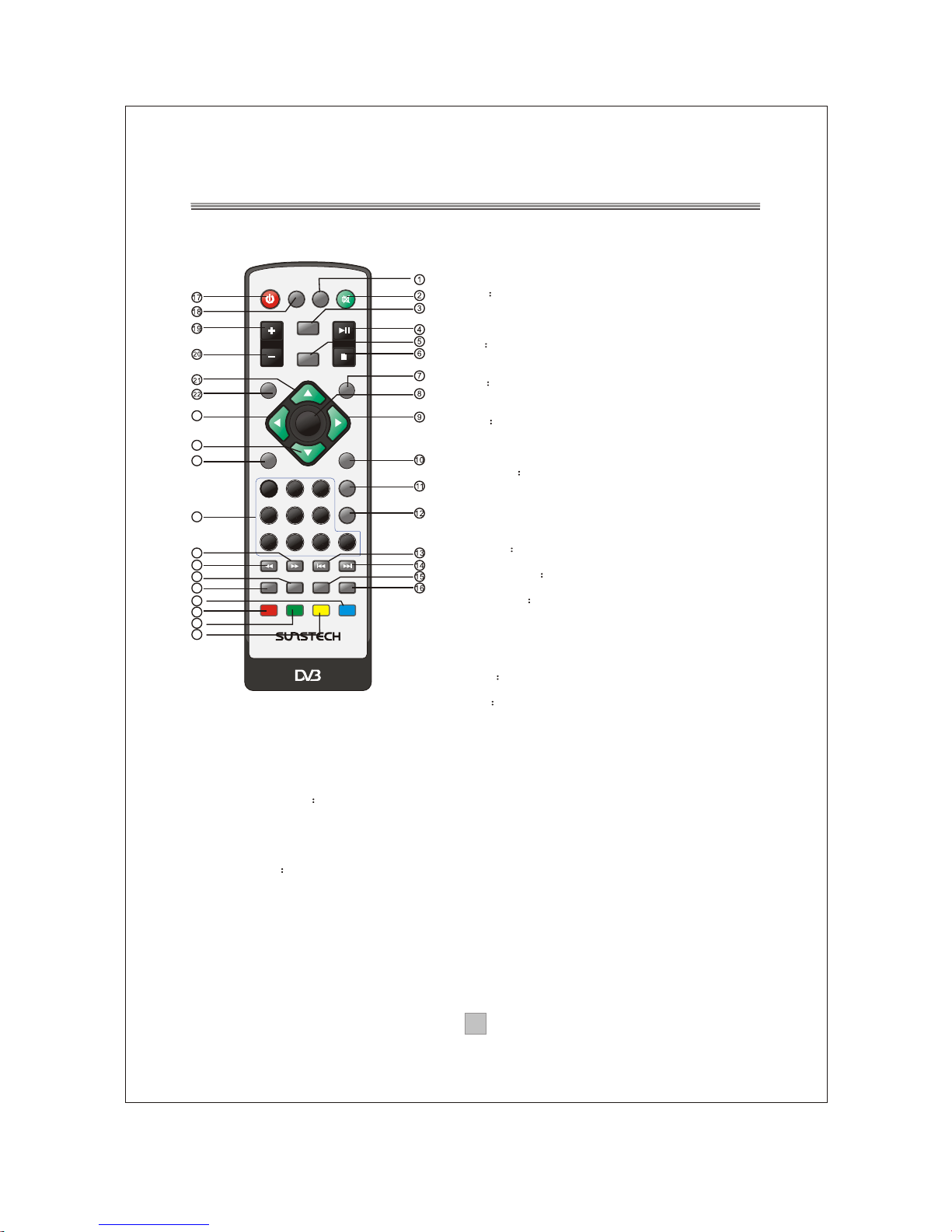
Remote Key Function:
1. TEXT: Used to openteletext osd displayif
teletext available in thebroadcasted stream.
2. MUTE: Usedto turn thesound on oroff.
3. INFO Used to displayinformation about the
channel being viewed
4. PLAY/PAUSE: Used to playbackor pause the
program being viewed.
5. EPG Used to displayinformation about the
program being viewed andwhat's next.
6. STOP:Used to stopthe program beingviewed.
7. EXIT Used to returnto the previousscreen or
menu.
8. ENTER:Used to confirma selection ina menu.
9. FAV+ Used to movearound the menuscreens or
select the favouritechannels in non-menustate.
10. TV/RADIO:Used to switchbetween TV channels
and Radio channels.
11. RECALL Used to switchbetween the last two
viewed channels.
12. GOTO:During playback, pressGOTO show the
current time counterposition.
13. PREV:Used to skip toprevious chapter or track.
14. NEXT:Used to skip tonext chapter or track.
15. AUDIO Used to setthe sound output,the
available settings areSTEREO, LEFT, RIGHT.
16. LANGUAGE Used to switchbetween different
audio languages thatare broadcasted.
17. STANDBY Used to switchthe set topbox to on
and off.
18. DTV/VCR:Used to switchbetween the VCR
SCART input and the DTV mode.
19. VOL+: Used toincrease the volumein non-menu
state..
20. VOL- Used to decreasethe volume innon-menu
state.
21. CH+ Used to movearound the menuscreens or
select the channelsin non-menu state.
22. SETUP: Used to openor close themain menu.
23. FAV-: Used to movearound the menuscreens or select the favourite channelsin non-
menu state.
24. CH-:Used to movearound the menuscreens or select the channels innon-menu state.
25. SOURCE: Used to switch betweenDTV and USB.
26. NUMBER KEYS Used to select channelnumbers or input numbersin menus.
27. FWD: Used to scanforward. The unitwill review thedisc at 2,4,8and 20 timesnormal
speed during USB mode.Press PLAYbutton to resume normalplayback.
28. REV: Used to scanin reverse. Theunit will reviewthe disc at 2,4,8 and 20times normal
speed during USB mode.Press PLAYbutton to resume normalplayback.
29. MODE:Used to change thevideo format output.
30. FAVORITE Used to access yourfavourite channelslist.
31. SUBTITLE:Used to repeatedlyto select subtitlelanguage.
32. REPEAT: Used to select repeatsingle, repeat all orrepeat off.
33. A-B:During playback, pressA-B button to selectpoint A, againpress A-B buttonto select
point B. Theunit will repeat thesection from Ato B automatically. Press A-B button third
time to cancelA-B repeat and clearpoints Aand B.
34: ZOOM:Used to magnifythe image.
COLOR KEYS(RED/GREEN/YELLOW/BLUE):Used to operate different functions inTEXT
screen or other menus.
Note: SUBTITLE/TEXT/LANGUAGE may not be available for allchannels
ENTER
MUTE
STOP
PLAY/PAUSE
123
456
7890
INFO
FWD
EPG
FAV+
CH+
CH-
FAVORITE
GOTO
REV
STANDBY
RECALL
PREV NEXT
TV/RADIO
DTV/VCR
TEXT
SETUP EXIT
SOURCE
MODE LANGUAGEAUDIO
REPEAT A-B ZOOM SUBTITLE
VOL-
VOL+
FAV-
DTB-3500
23
24
25
26
27
28
29
30
31
32
33
34

55
Installing the Batteries
Remove the batterycover from theremote control andput 2XAAAsize batteries
inside the compartment.
The diagram insidethe battery compartmentshows the correctway to installthe
batteries.
OPEN
OPEN
1.Open the cover 2.Install batteries 3.Close the cover
Using the RemoteControl
Touse the remotecontrol, point ittowards the frontof the digitalset top box
The remote controlhas a rangeof up to7 metres fromthe set topbox at anangle
of up to60 degrees.
The remote controlwill not operateif its pathis blocked.
Sunlight or verybright light willdecrease the sensitivityof the remote
control.

1
2 USB: USB Jack, Support USB1.1.
3 REMOTE CONTROL SENSOR: Used to receive thesignal from the remotecontrol.
4 STANDBYINDICATOR: Used to visually showpower state of theset top box, thegreen
LED will be lightif turned on theset top box andthe red LED willbe light if theset top box
entered standby mode.
5 CHANNEL UP/DOWN: Used to change channelswithout using the remotecontrol.
POWER BUTTON: Used to turn on/offthe main power supply.
66
Front Panel andRear Panel Illustration
1. Front panel
1 RF IN : This socket connects to your external aerial.
2 RF LOOPTHROUGH: This socket willbypass the RF signalto either yourTV or another
video system.
3 COAXIAL: This socket connectsto a coaxial socketon your surround soundsystem.
4 VCR SCART: This socket connectsto either a VCRor other video system.
5 TV SCART: This socket connectsto TV.
6 MAINS CABLE: This is usedto connect to mainpower supply.
CHANNEL
AC100-240V~
50/60Hz
Serial No.:Serial No.:
DIGITAL TERRESTRIAL RECEIVER
POWER SUPPLY: AC100-240V~ 50/60Hz
MAX POWER CONSUMPTION: 10WATTS
MODEL:DTB-3500
Made in China
CoaxialCoaxial
Digital
Audio
Digital
Audio
VCR O OVCR O O TVTV
ININRRFFLOOPLOOPRRFF
THROUGHTHROUGH

77
Connecting to aTelevision
TV
Set top box
(Option)
AC100-240V~
50/60Hz

88
Connecting to aTelevisionand Video
VCR or Video system
TV
Set top box
(Option) (Option)
AC100-240V~
50/60Hz

Connecting to aSurround Sound System
99
Audio system
Set top box
TV
(Option)
AC100-240V~
50/60Hz
Table des matières