
STM CANNA REVOLUTION 2.0 Manuel utilisateur

REVOLUTION 2.0
USER MANUAL
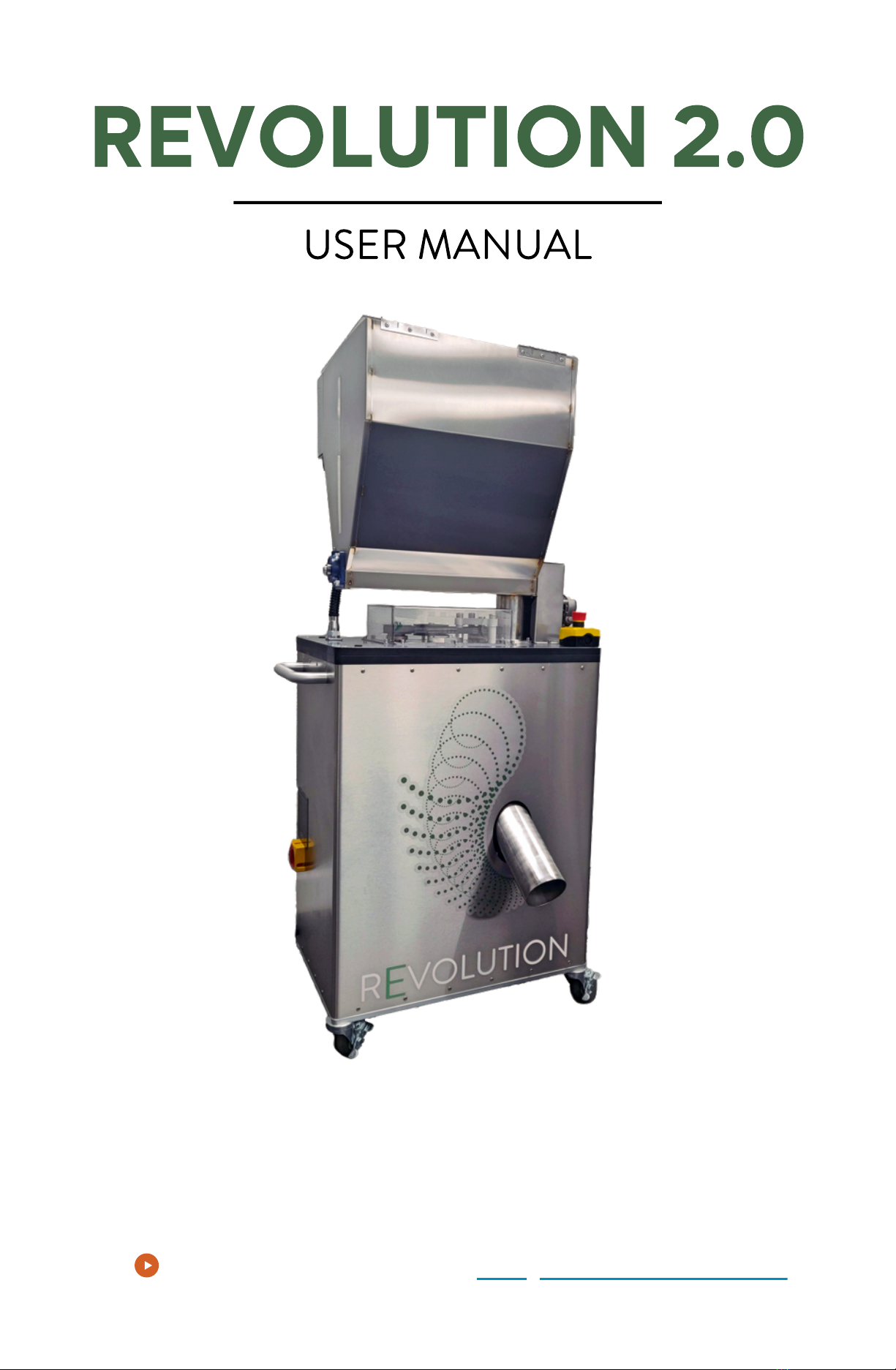
TABLE OF CONTENTS
Components
Technical Specifications
Getting Started
Best Practices & Tips
Powering the Revolution
Emergency Procedures
Touch Screen Operation
Auger Speeds
Chute/Particle Screen Maintenance
Changing Particle Screen
Changing Blades
Hopper Cleaning Procedure
Troubleshooting
Terms of Business
PAGE 2
PAGE 3
PAGE 5
PAGE 6
PAGE 7
PAGE 7
PAGE 8
PAGE 8
PAGE 9
PAGE 9
PAGE 10
PAGE 11
PAGE 12
PAGE 13
PAGE 1
©
NOVEMBER 2020 STM CANNA
™
PAGE 2
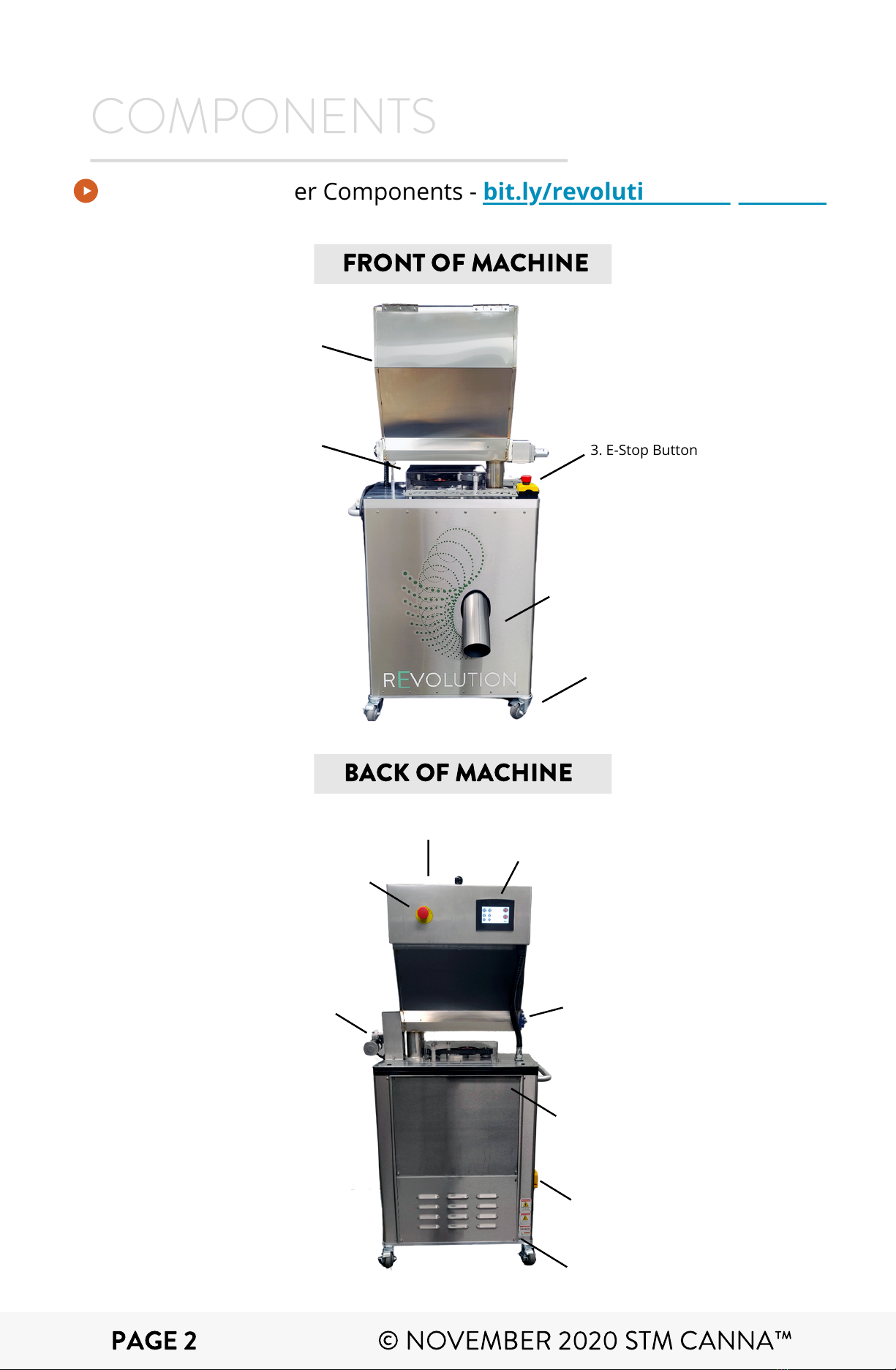
COMPONENTS
3. E-Stop Button
4. Chute
5. Casters
2. Belt Drive
Hopper1.
6. Lid
10. Auger Motor
8. Touch Screen Control
7. E-Stop Button
11. Power/Lockout Button
12. Lower Back Door Panel
10. Top of Back Door Panel
9. Auger Bearings
FRONT OF MACHINE
BACK OF MACHINE
Revolution Grinder Components - bit.ly/revolution-components
©
NOVEMBER 2020 STM CANNA
™
PAGE 3
MATERIALS
ASSEMBLY
POWER
MOTOR
WEIGHT &
DIMENSIONS
HOPPER
THROUGHPUT
DUAL-BLADE
SYSTEM
Encased in 100% Food-Grade Material
SAE 304/316, Dent-Resistant Stainless Steel
Handle & Heavy Duty Castor Wheels for Easy Mobility
Designed, Manufactured, & Assembled in the USA
Standard 220V | 16 Load Amps
Single Phase | 5-1/2 ft. Cord Length
Requires L6-30 Plug
Seek Certified Electrician for Installation Needs
3HP |UL Listed | Long Life Cycle
Small Footprint
Approx. 220 lbs
30" L x 65" H x 22-1/4" W
Holds 21 Liquid Gallons
(Four 5-Gallon Buckets of Material)
Up to 50 lbs +/- Hourly
Up to 400 lbs +/- Daily
Varies with Different Material Types
Custom-made Stainless Steel Serrated Blades
Proprietary Angle for Optimized Cutting of Material
REVOLUTION 2.0
TECHNICAL SPECIFICATIONS
©
NOVEMBER 2020 STM CANNA
™
PARTICLE
SCREENS
Fine Particle Screen (food grade, stainless material)
Coarse Particle Screen (food grade, stainless material)

PAGE 4
CHUTE &
CHAMBER
SOFTWARE &
UPGRADES
TOUCH
SCREEN
COMPLIANCE
CLEANING
LIFE CYCLE &
WARRANTY
SAFETY
FEATURES
Chute with Vibrating Agitator (non-stick, food-grade)
Blade Area Chamber (food-grade)
Revolution OS V1.1
Upgradable System Software Included for
Lifetime of the Machine
Manual and Automatic Operation
Ergonomic 4" Resistive Touch Control Panel
Low, Med, High Speed | Start/Stop
Auger On/Off Time Delay
Pop-Up Error Messages
Standard Service Data for Clogs or E-Stop Conditions
OSHA Compliant
Sliding Back Door for Easy Access
Quick Release Bolts | Dishwasher Friendly
1-Year Parts and Labor Warranty
Motor 10-Year LIfe Cycle
Machine is Fully Enclosed
2 Quick Access Emergency Stop Buttons
Lock-Out Tag-Out Power Switch
Multiple Automatic Internal Safety Limit Switches
©
NOVEMBER 2020 STM CANNA
™
REVOLUTION 2.0
TECHNICAL SPECIFICATIONS
Revolution Grinder Machine
Includes 1 - Screen for 3/16" (4.76mm) particles (pre-installed)
Includes 1 - Screen for 5/32" (3.96mm) particles
Includes 1 - Set of Dual Stainless Steel Blades (pre-installed)
Optional at Additional Cost – extra screens and blade sets
UNPACKING YOUR MACHINE
Carefully unpack your machine and inspect it to ensure it
has not been damaged during shipping. Make sure all the
correct parts are included and match your invoice. Please
contact us if you have missing or damaged items.
PAGE 5
GETTING STARTED
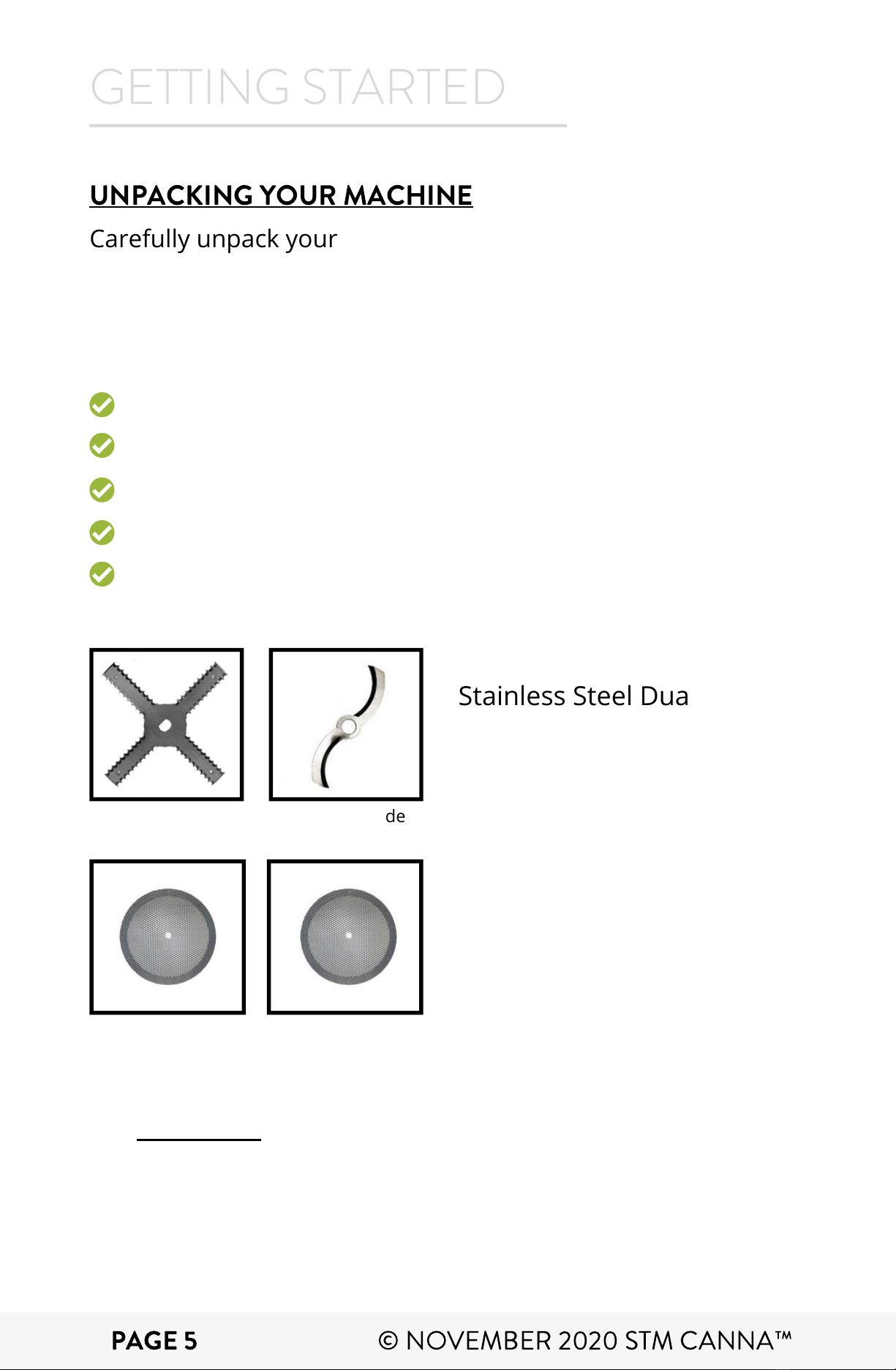
4 Arm Blade Floater Blade
Stainless Steel Dual Blade
(both blades are pre-
installed in your machine)
Particle Screens (the pre-roll
screen is pre-installed on
your machine)
Additionalparticle screens and blade sets are available in
the STM Store.
Particle screens available:
- 3/16" (4.76 mm)
- 5/32" (3.96 mm)
©
NOVEMBER 2020 STM CANNA
™

The Revolution grinder can handle up to
10% moisture.
BEST PRACTICES & TIPS
Having material inspected prior to grind is a must.
Optimal moisture is between 7-10%
Always start motor on highest speed setting speed
Auger on 3-seconds run time and 3-seconds off time to
prevent clogging. If material is too dry, auger can run for
longer, but can remain at 3-seconds of run time.
ALWAYS TURN OFF AND UNPLUG MACHINE
BEFORE CLEANING OR SERVICING.
PAGE 6
Video: Pre-Grind Preparation -bit.ly/pre-grind-prep
If product bends without a snap - TOO MOIST!
If product snaps and kief is seen falling after the snap - TOO DRY!
Optimal product will bend, then snap.
©
NOVEMBER 2020 STM CANNA
™

EMERGENCY PROCEDURES
If there is a sudden emergency or need to shut off the
machine quickly, press either of the two E-STOP buttons.
One is located on top of plate on the rear side of the
machine. The other is located just to the left of the touch
screen.
"Emergency Stop" will display on the touch screen.
NOTE: the machine will not operate in this mode.
To clear the "Emergency Stop", pull the red E-STOP near
the touch screen ensuring the yellow ring under the
bottom is exposed.
PAGE 7
If "Emergency Stop" message is still displayed and both E-
STOP buttons are not pressed, it is most likely a trigger of
the limit safety switch. (refer to page 12)
There are four safety switches located in the machine that
will display the emergency stop as well. The screen will tell
you which e-stop or limit switch is tripped.
DO NOT ALTER LIMIT SWITCHES IN ANY WAY
POWERING ON THE
REVOLUTION
Insert three-prong L6-30 plug into a standard 220v/30
amp single-phase wall outlet.
Turn the red lock out power switch to the vertical position
on the right side of machine for ON. Turn horizontal for
OFF.
If it does not turn on, check power connection. If
"Emergency Stop" is displayed on the screen, check
emergency procedures step #3 and #4 below.
STEP 1:
STEP 2:
STEP 3:
STEP 1:
STEP 2:
STEP 3:
STEP 4:
©
NOVEMBER 2020 STM CANNA
™
The Revolution has one auger speed that comes pre-set into the
machine. The auger comes pre-set with ON times and OFF times.
This prevents the clogging of materials and overfeeding the blade.
These times may be changed, but we do not recommend going
below 3 seconds off or more than 15 seconds on.
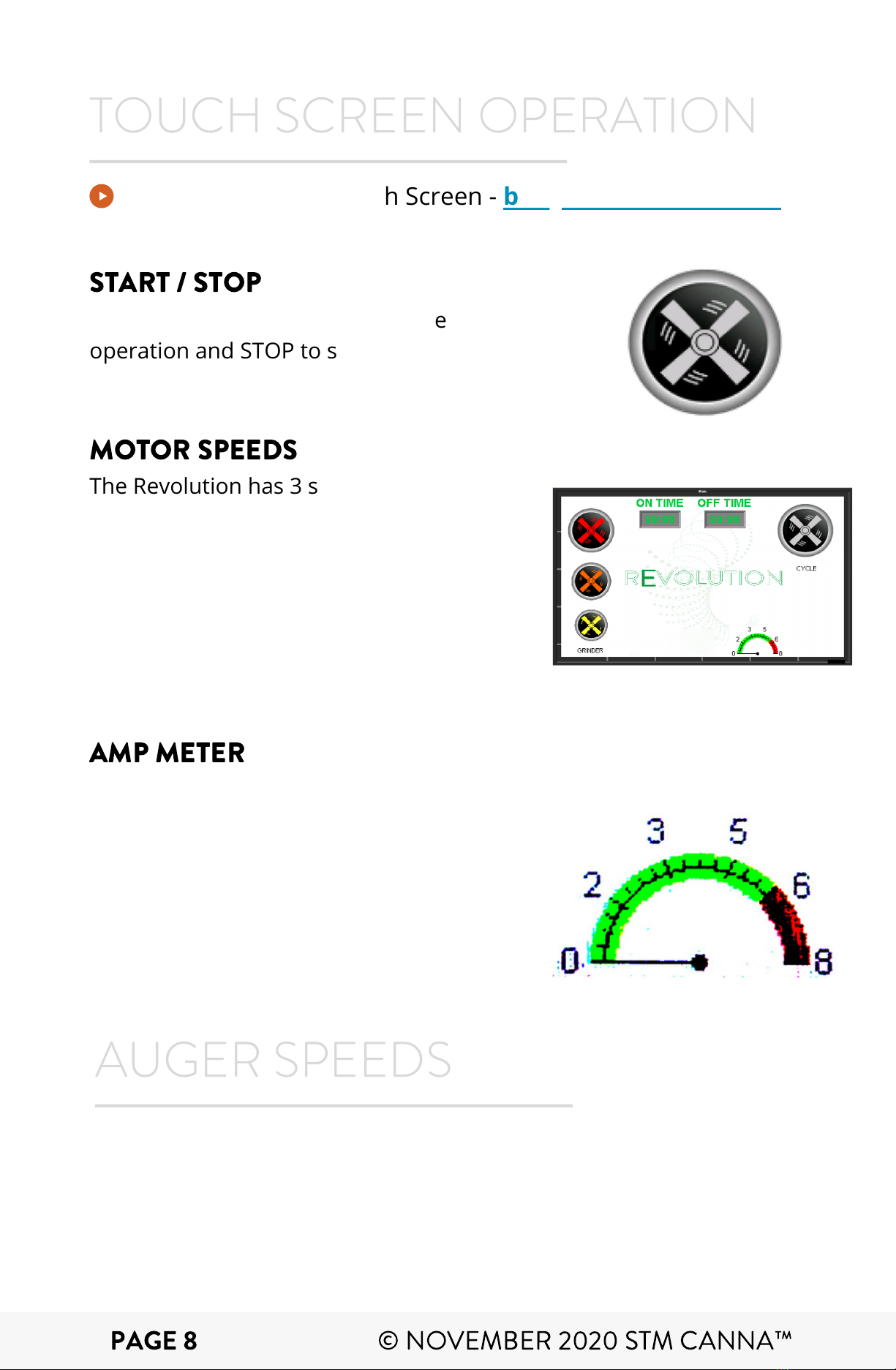
The amp meter is located in the lower
right corner. When in higher amperage,
the machine will read that and delay the
auger. This allows for the blade chamber
to clear before intoducing more material.
If the meter remains high, you may have
a clog that needs clearing.
TOUCH SCREEN OPERATION
The Revolution has 3 speeds for
operation. High, Medium, and Low,
indicated by the largest to smallest
icons on the touch screen:
HIGH: 100% of motor speed
MEDIUM: 50% of full power
LOW: 10% of full power
AUGER SPEEDS
Video: Revolution Touch Screen - bit.ly/rev-touch-screen
START / STOP
MOTOR SPEEDS
Pressthe START button to start the
operation and STOP to stop the
operation of the grinder.
AMP METER
PAGE 8
©
NOVEMBER 2020 STM CANNA
™
Ce manuel convient aux modèles suivants
1


