
Standard Horizon PC-35 Manuel utilisateur


OPERATORS MANUAL
Standard Horizon PC-45 Cutter
Read this manual, and thoroughly
familiarize yourself with its
contents before operating or
servicing this equipment.
PC45/OM


I
UM204005-08
040308/PC45/08E/DV
Important Information
- This manual is designed to help you to install, operate and maintain Paper Cutter, PC-45.
Read, understand and keep this manual in a safe and convenient place.
- Do not operate PC-45 until you read and understand the instructions in this manual.
- Horizon International Inc. shall not be liable for incidental consequential damages result-
ing from : improper or inadequate maintenance by customer; unauthorized modification or
misuse; operation outside of the environmental specifications for the product.
- Horizon International Inc. pursues a policy of continuing improvement in design and
performance of the product. Therefore, the product design and specifications are subject to
change without prior notice and without our legal obligation.
- All rights are reserved. No part of the manual may be photocopied, reproduced or trans-
lated to another language without the prior written consent of Horizon International Inc.
PC-45
PAPER CUTTER

II
Safety Precautions
- The signal word WARNING indicates a potentially hazardous situation which, if not
avoided, could result in death or serious injury.
- The signal word CAUTION indicates a potentially hazardous situation which, if not
avoided, may result in damage on machines. It may also be used to alert against unsafe
practices.
- Read and understand all safety instructions with signal word such as WARNING and
CAUTION. If safety instructions are ignored, personal injury may result.
- Horizon International Inc. cannot anticipate every possible situation that might involve
a potential hazard. The instructions in this manual and warning labels on the machine are
therefore not all inclusive.
- All equipment shall be locked out or tagged out to protect against accidental or inad-
vertent operation when such operation could cause injury to personnel. Do not attempt to
operate any switch, valve, or other energy isolating device where it is locked or tagged out.
- Do not operate the machines when any covers are removed.
- Some of the drawings in this manual show the machine uncovered for explaining the
detail or inside of machine.

III
CONTENTS
Important Information ............................................................................................I
Safety Precautions....................................................................................................II
1. Before You Begin
1-1 Purpose of PC-45 ...............................................................................................2
1-2 Specifications......................................................................................................2
1-3 Machine Descriptions ........................................................................................3
1-3-1 Safety Functions.............................................................................................3
1-3-2 Main Parts Descriptions .................................................................................4
1-4 Accessories..........................................................................................................5
1-5 Consumables ......................................................................................................6
2. Safety Function Check
2-1 Check on Table ..................................................................................................8
2-2 Check on Power .................................................................................................8
2-3 Check on Safe Functions ...................................................................................9
2-3-1 Check on Front Cover ....................................................................................9
2-3-2 Check on Automatic Return of Knife.............................................................9
2-3-3 Check on One Cycle.......................................................................................9
2-3-4 Check on Unworkable Knife with One Hand ................................................10
2-3-5 Check on Stop during Working......................................................................10
3. Operation Procedure
3-1 Operation Procedure .........................................................................................12
4. After Cutting
4-1 Original Condition.............................................................................................16
4-2 Power off.............................................................................................................16
4-3 Cleaning Table ...................................................................................................17

IV
5. Troubleshooting
5-1 Cut Sheets Are Not Square ...............................................................................20
5-2 Cut Surface Has Diagonal Lines ......................................................................21
5-3 Sheets Are Not Cut Equally ..............................................................................21
6. Maintenance
6-1 Cutting Stick Replacement ...............................................................................24
6-2 Knife Replacement.............................................................................................26
6-2-1 Knife Removal ...............................................................................................26
6-2-2 Knife Installation............................................................................................29
6-3 Knife Height Adjustment ..................................................................................32
6-3-1 Cutting Depth Adjustment..............................................................................32
6-4 Cutting Depth Balance Adjustment .................................................................33
6-5 Test Cutting........................................................................................................34
6-6 Lubrication (Monthly).......................................................................................35
7. Installation
7-1 Installation..........................................................................................................38

1
1. Before You Begin
1-1 Purpose of PC-45 ..................................................................................... 2
1-2 Specifications ........................................................................................... 2
1-3 Machine Descriptions.............................................................................. 3
1-4 Accessories ............................................................................................... 5
1-5 Consumables ............................................................................................ 6

2
1. Before You Begin
1-1 Purpose of PC-45
Horizon PC-45 is a machine for cutting printed sheets, wrapping paper, writing paper, or
booklets.
1-2 Specifications
Model PC-45
Maximum Cutting Width 450 mm (17.7")
Maximum Lift Height (Clamp Opening) 70 mm (2.7")
Maximum Cutting Depth 450 mm (17.7")
Minimum Cutting Depth 20 mm (0.8")
Cutting Speed 2.5 sec./cut
Power 120 V 60 Hz 13 A,
220 V 50/60 Hz 4.0 A,
240 V 50 Hz 2.3 A
Power Consumption 1.1 kW
Machine Dimensions (L) x (W) x (H) 790 x 805 x 1,170 mm (31.1" x 31.7" x 46")
Height from the floor level to table top 880 mm (34.6")
Machine Weight 158 kg (348 lb)
The machine design and specifications are subject to change without any notice.
3
1. Before You Begin
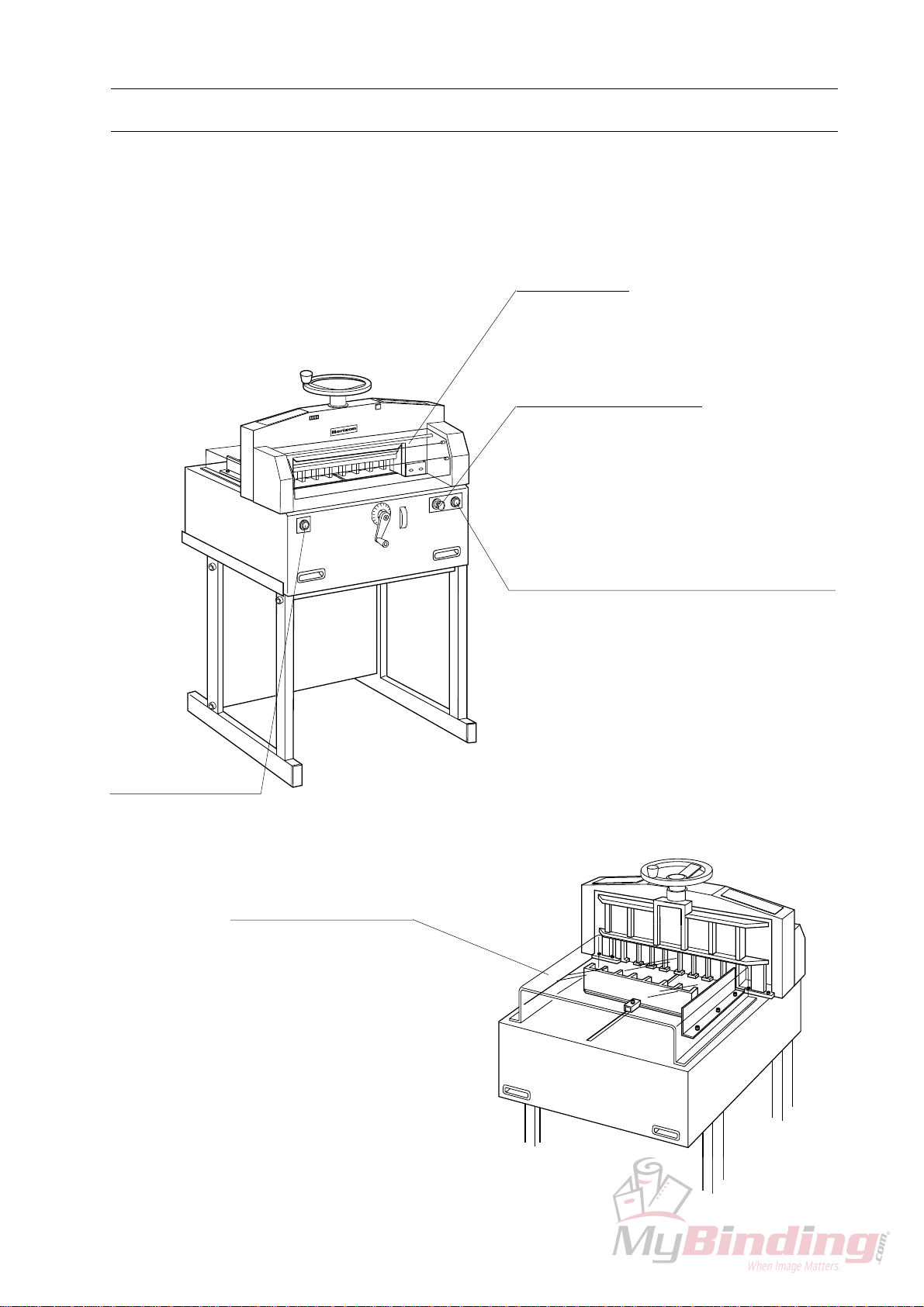
1-3 Machine Descriptions
1-3-1 Safety Functions
0
1
9
8
7
Key Switch
Cut Button B
Knife works when cut buttons A and B
are pressed at the same time. Knife stops
immediately when either cut button A or
B is released.
Cut Button A
Back Gauge Cover
Front Cover
Table des matières


