Stahl-Tek Vekian-CDT Manuel utilisateur

Stahl~Tek
Vekian - CDT
Operations Manual


3
Safety Instructions
The lightning flash with the arrowhead symbol within an equilateral triangle is intended to alert the user
to the presence of “dangerous voltage” inside the product that may constitute a risk of electric shock.
The exclamation point within an equilateral triangle is intended to alert the user to the presence of impor-
tant operating and maintenance instructions in the literature accompanying the product.
TO REDUCE THE RISK OF ELECTRIC SHOCK, AND/OR DAMAGE TO THE UNIT DO NOT REMOVE COVER.
NO USER-SERVICEABLE PARTS INSIDE. REFER SERVICING TO QUALIFIED SERVICE PERSONNEL
1. Read Instructions — Read all the safety and operating instructions before operating this
2. Retain Instructions — Retain safety and operating instructions for future reference.
3. Heed Warnings — Adhere to all warnings on the product and in the operating instructions.
4. Follow Instructions — Follow all operating and use instructions.
5. Cleaning — Unplug this product from the wall outlet before cleaning. Use a damp cloth for cleaning. Clean the
outside of the product only.
6. Attachments — Do not use attachments that are not recommended by the product manufacturer; they may be
hazardous.
7. Water and Moisture — Do not use this product near water.
8. Accessories — Do not place this product on an unstable cart or stand. The product may fall, causing bodily
injury and damage to the product. A product and cart combination should be moved with care. Quick stops,
excessive force, and uneven surfaces may cause the product and cart to overturn.
9. Ventilation — Slots and openings in the cabinet are provided for ventilation to ensure reliable operation of the
product and to protect it from overheating. These openings must not be blocked or covered. This product
should not be placed in a built-in installation such as a bookcase or rack unless proper ventilation is provided.
10. Power Sources — Operate this product only from the type of power source indicated on the label. If you are
not sure of the type of power supply to your home, consult your dealer or local power company. This product is
equipped with a three-prong grounding plug. This plug will only fit into a grounding power outlet. If you are un-
able to insert the plug into the outlet, contact your electrician to replace your obsolete outlet. Do not defeat the
safety purpose of the grounding plug.
11. Power Cord Protection — Power supply cords should be routed so that they are not likely to be walked on or
pinched by items placed upon or against them.
12. Lightning — Unplug the unit from the wall outlet for added protection during a lightning storm and when it is left
unattended and unused for long periods of time. This will prevent damage to the product due to lightning and
power line surges.
13. Overloading — Do not overload wall outlets or extension cords. This can result in a fire or electric shock.
14. Inserting Objects into Unit — Never push objects of any kind into this product through any openings; they
may touch dangerous voltage points or short out parts that could result in fire or electric shock.
15. Servicing — Do not attempt to repair or service this product yourself. Opening or removing covers may expose
you to dangerous voltage and other hazards. Refer all servicing to qualified service personnel.
16. Damage Requiring Service — Unplug this product from the wall outlet and refer servicing to qualified service
personnel under the following conditions: a) If the power-supply cord or plug is damaged. b) If liquid has been
spilled into the product. c) If the product has been exposed to rain or water. d) If the product does not operate
normally by following the operating instructions. e) If the product has been dropped or damaged in any way. f) If
the product exhibits a distinct change in performance.
17. Replacement Parts — When replacement parts are required, be sure the service technician has used replace-
ment parts specified by the manufacturer. Unauthorized substitutions may result in fire, electric shock, and
other hazards.
Continued on reverse...

4
Safety Instructions
18. Safety Check — Upon completion of any service or repairs to this product, ask the service technician to per-
form safety checks to determine that the product is in proper operating condition.
19. Wall or Ceiling Mounting — Mount the product to a wall or ceiling only as recommended.
20. Heat — The product should be situated away from heat sources such as radiators, heat registers, stoves, and
other products (including amplifiers) that produce heat.
CLASS 1 Laser Product
The Vekian-CDT is a CD player which has been designed and manufactured according to FDA regulations "title 21,
CFR, chapter 1, sub-chapter J, based on the Radiation Control for Health and Safety Act of 1968", and is classified as a
Class 1 laser product. There is no hazardous radiation during normal use because invisible radiation emitted inside this
product is completely confined within the protective housing. However you must observe the following important
warnings:
CAUTION!
THIS CD PLAYER USES INVISIBLE LASER LIGHT. WHEN THE PLAYER OPERATES, LASER LIGHT
IS RADIATED INTERNALLY. DO NOT REMOVE THE PROTECTIVE HOUSINGS. USE OF CONTROLS
OR ADJUSTMENTS OR PERFORMANCE OF PROCEDURES OTHER THAN THOSE SPECIFIED
HEREIN MAY RESULT IN HAZARDOUS RADIATION EXPOSURE CAUSING EYE INJURY. IF THIS
PRODUCT DEVELOPS A FAULT, PLEASE CONTACT YOUR AUTHORISED MUSICAL FIDELITY SER-
VICE AGENT. DO NOT ATTEMPT TO SERVICE IT YOUR-SELF AND DO NOT CONTINUE TO USE
THIS PRODUCT IN A FAULTY STATE.
BACK OF UNIT

5
Safety Instructions
CLASS 1 LASER PRODUCT:
The Vekian‐CDT is a CD player which has been
designed and manufactured according to FDA
regulations "title 21, CFR, chapter 1, sub‐chapter J,
based on the Radiation Control for Health and Safety
Act of 1968", and is classified as a Class 1 laser
product.
This device complies with part 15 of the FCC rules.
Operation is subject to the following two conditions;
1. This device may not cause harmful interference, and
2. This device must accept any interference received,
including interference that may cause undesired
operation.
BOTTOM OF UNIT:
Warning Label:
“CLASS 1 LASER PRODUCT:
The Vekian-CDT is a CD player which has been designed and manufactured according to FDA regulations
"title 21, CFR, chapter 1, sub-chapter J, based on the Radiation Control for Health and Safety Act of
1968", and is classified as a Class 1 laser product.
This device complies with part 15 of the FCC rules. Operation is subject to the following two conditions;
1. This device may not cause harmful interference, and
2. This device must accept any interference received, including interference that may cause undesired
operation. “

6
Introduction
T
hank you for purchasing the Stahl~Tek Vekian - CDT! Your new Vekian - CDT is a
truly superior CD Transport! It is precision –machined and hand assembled of materials that
provide excellent structural integrity, superb mechanical dampening, and isolates the internal cir-
cuitry from outside electrical interferences; while giving a stunningly sophisticated, elegant, and
clean presentation. The Vekian - CDT is sonically breath-taking,! The Vekian - CDT is designed to
function beautifully with the Vekian - D/A through the I2S interface (via HDMI).
We recommend taking the time to read through this manual prior to using the unit. The manual
will guide you through the setup, operation, proper care, and maintenance of the Vekian - CDT.
We are positive the Vekian - CDT will provide you many years of musical bliss. Please enjoy! If
you have any questions, comments, concerns please do not hesitate to contact us.
- The Stahl~Tek Staff
Ownership Information:
Vekian - CDT S/N:
Stahl~Tek Dealer:
Date of Purchase: / / Dealer Phone: ( ) -
Please fill in the information below for your records (The serial number is located on the back
bottom right of the unit.):
Stahl~Tek
P.O. Box 125
Clute, TX 77531
Phone: (979) 265-5114
Fax: (979) 265-1211
Website: www.stahltek.com

7
Table of Contents
Safety Instruction 03
Introduction 06
Table of Contents 07
Unpacking 09
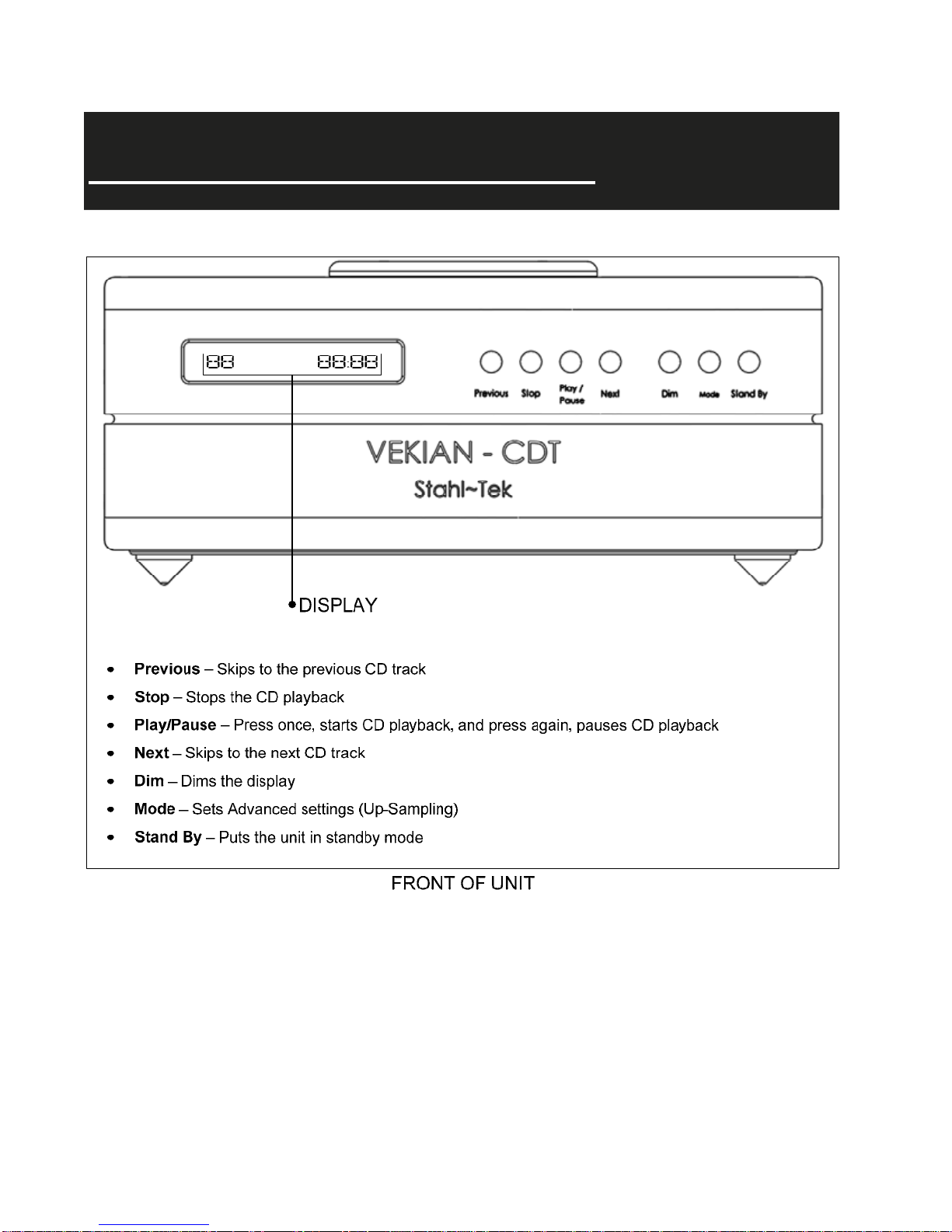
Getting To Know Your Unit 10
Front Of Unit 10
Rear Of Unit 11
Top Of Unit 12
Remote 13
Placement 14
Connecting 15
Power 15
Digital Outputs 15
Disconnecting 15
Operations 16
Powering Up 16
Inserting CD 16
Playing CD 18
System Stand By 18
Scan 19
Programming Tracks 19
CD Time Display 20
A/B Feature 20
Shuffle 20
Track/Disc Repeat 21
Display Dimming 21
Mode: Advanced Settings 22

8
Table of Contents
Maintenance 24
Cleaning 24
Fuse 24
Remote Batteries 24
Repairs 24
Trouble Shooting 23
Warranty 25
Notes 26

9
Unpacking
UN-BOXING THE UNIT:
1. Please Note: (1) Remove all jewelry to keep from scratching the unit. (2) The unit is
double boxed.
2. Make sure the box is positioned with the “This Side Up” label.
3. Carefully open the outer box.
4. Remove the top foam piece.
5. Remove the cable box. The unit’s HDMI and power cord is inside this packing box.
6. Remove the Operations Manual.
7. Remove the two foam pieces protecting the inner box.
8. Gently remove the inner box, and set it on a flat solid surface.
9. Carefully open the inner box.
10. Remove the top foam piece.
11. Remove the pieces of foam on each side of the unit. (The back of the unit is indicated by
the slotted piece of foam to protect the connectors).
12. Gently lift the unit out of the box by reaching down and lifting up from the bottom of the
unit.
13. Save all boxes and pieces of foam for transport.
14. Handle the unit with care.
15. Remember to note the Serial Number (located on the back bottom right of the unit) in the
front of this manual.
CONTENTS:
• One Vekian - CDT unit
• One Vekian - CDT Puck
• One Vekian - CDT Remote
• One Purist Audio Design HDMI Cable
• One Purist Audio Design Aqueous Aureus Power Cord
• Operations Manual

10
Getting To Know Your Unit
Table des matières