
Squarp Instruments Hermod+ Manuel utilisateur
quickstart
your eurorack system.
16 tracks x 16 patterns —
8 effects per track —
grid--free polyphonic step sequencer —
live recorder & modulation editing —
back to back projects for endless performances —
4 CV inputs (assignable) —
8 CV/Gate outputs (with polymorphic layouts) —
extensive MIDI/USB connectivity.
16–track sequencer & interface for
BASICS
Sequencer workflow
Each of the 8 voices of Hermod+ (CV/Gate outputs) is controlled by a track.
A track can be configured to control more than 1 voice, for polyphonic use or
for velocity and aftertouch playback. A track can also be used as a "modulation"
track, to allow recording and playback of CV and CC messages.
A project includes up to 16 tracks. Each of these tracks contains :
•
16 patterns, which are arrangements of notes, gates or modulations
•
an effect rack, with up to 8 effects
•
a modMatrix, to control effect parameters using CV or CC
An unlimited number of Hermod+ projects can be stored on the SD card. They can
be saved and loaded without stopping the playback, for seamless project transitions.
The user interface of Hermod+ is designed around 4 main modes :
Inspect and edit
patterns : add or
edit notes, gates
and modulation.
Set the length of
the current
pattern.
Add effects,
configure their
parameters,
mute/unmute
effects, use the
modMatrix
to set up effect
modulations.
Mute/unmute
tracks, set up
voices layout,
enter global
settings.
Set the currently
playing sequence
on the fly, change
playback style
between
sequences,
program a chain
of sequence,
access the
save/load menu.
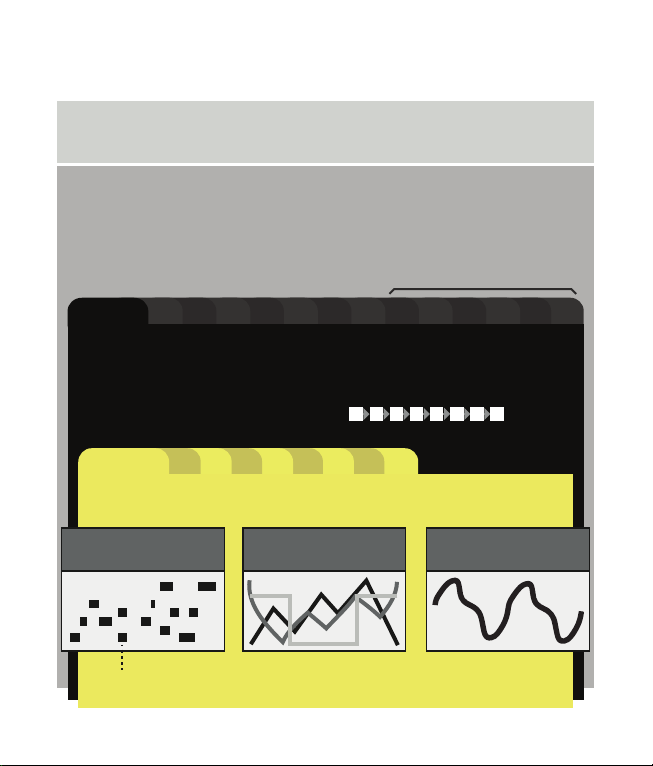
Hermod+ architecture
Project
• Tempo (1 BPM to 540 BPM)
• track mutes
• sequences run modes and loop sync
• song (chain of sequences)
• set of 16 tracks :
Global settings
• sync in/out, MIDI in/thru, CV/Gate in, misc, info
16...12111098765432track 1
• voices layout (NOTE, MODULATION, POLYPHONIC VOICES, ...)
• input config (MIDI, USB DEVICE, USB HOST, CV/GATE)
• output config (MIDI, USB DEVICE, USB HOST, CV/GATE)
• player options : quantize, gate retrig, allocator, transpose
• fx rack : modMatrix + up to 8 effects
• set of 16 patterns :
1 2 3 4 5 6 7 8
...765432
pattern 1
• pattern length (1 step ... 16 bars)
• MIDI events :
16
a note = MIDI pitch, velocity and length
recorded pitchbend,
aftertouch and sustain
a modulation
(waveform automation)
step notes
(mono/polyphonic notes)
TR9 ... TR16 = MIDI tracks
Wire up
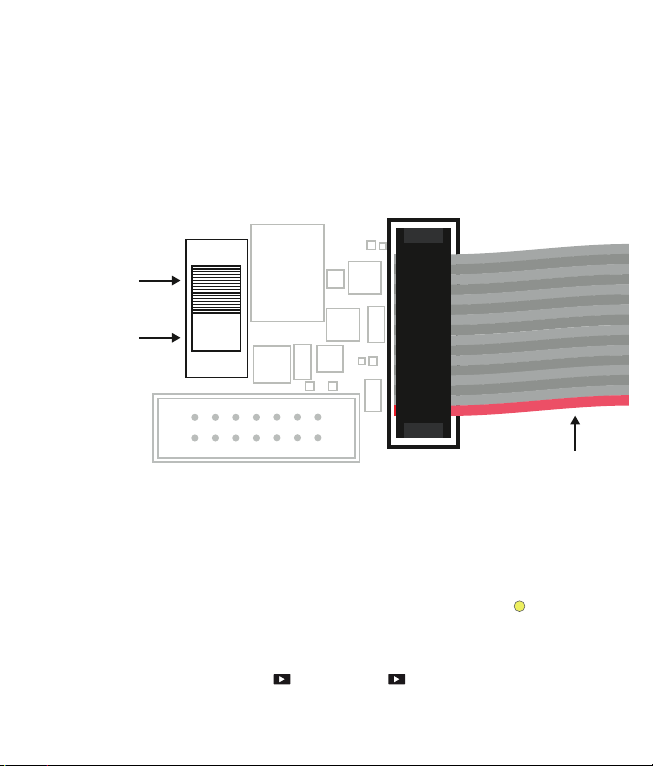
Connect Hermod+ to your eurorack system power with the supplied ribbon cable.
Most eurorack power supplies have a dedicated +5V rail (in addition to the +12V
and –12V rails). If your power supply delivers +5V, we recommend to place the «
5V switch» in the top position, in order to use the +5V rail for the digital circuitry of
Hermod+. If your power supply does not deliver +5V, you may place the switch in
the lower position. This switch is located on the back of Hermod+ :
Selecting a track
In
track
mode,
scroll to choose the selected track.
Access t
racks 1to 8(the CV/Gate tracks) on the first page.
Access t
racks 9to 16 (the MIDI tracks) on the second page.
For faster track selection, press the corresponding track selection switch .
Play/stop
To start the sequencer, press play . Pressing play again will stop the sequencer
and return to the beginning of the sequence.
eurorack power ribbon cable
use the +12V rail
and use the
onboard +12V to
+5V converter
use the +5V
eurorack rail
(recommended)
Live recording
Press rec while playing to capture a live performance (notes, pitchbend,
aftertouch, sustain, modulation) coming either from an external MIDI instrument or
controller, a computer or a modular system sending CV/Gate. Recording inputs is
possible at any time, in every mode.
TIP
By default, events will be recorded on the currently selected track.
Pressing rec while holding
step
will enable multitrack recording (all your
MIDI/CV routed tracks will be recorded at the same time).
TIP
Holding and pressing rec enables hard recording : previously recorded
notes will be overwritten (= no overdub).
Project tempo
Hold rec and press play to enter the BPM menu. Scroll the encoder to change
the BPM, or press rec repeatedly to tap the tempo.
NOTE Go to the SYNC INPUT settings to synchronize Hermod+ with a MIDI or analog
clock.
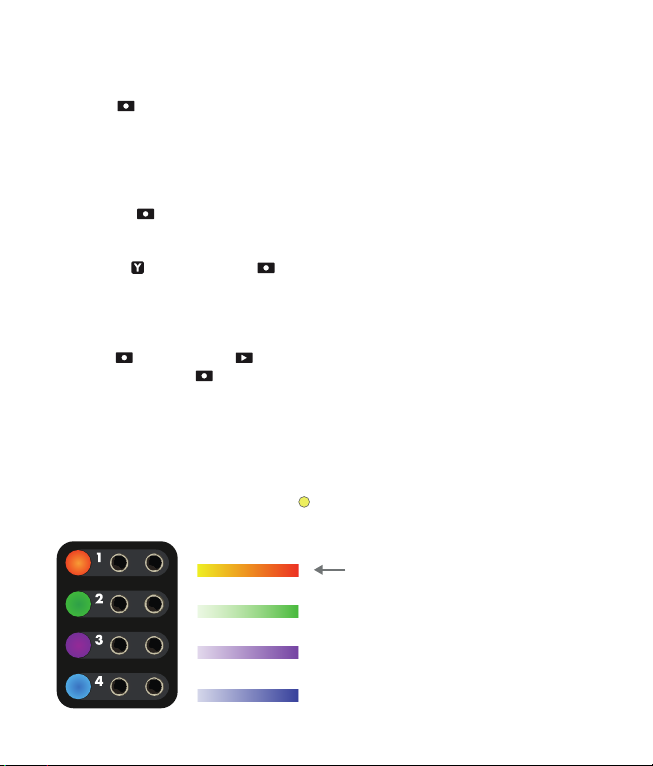
CV/Gate voices
The color of the backlit track switches help visualize the voices layouts, and the
CV/Gateoutput values:
= NOTES
= VELOCITY
= AFTERTOUCH
= MODULATION
By default, each track is set to 1 voice
= notes = CV pitch + gate output.
Please refer to the track chapter to
change track layouts (assign voices to
output mono or poly notes, velocities,
aftertouch, modulations and/or
gates).

Reset and Clock outputs
In addition to the 8 pairs of CV/Gate, Hermod+ adds two dedicated gate outputs
for transport :
•
Reset : outputs a trig when Hermod+ starts (RESET ON PLAY).
•
Clock : outputs a BPM--synchronized clock.
TIP
The behavior of these outputs can be configured in the SYNC OUTPUT settings.
Calibration
Calibrating Hermod+ can improve the factory accuracy of the analog inputs/out-
puts. For this operation, a voltmeter is required.
First, power on Hermod+ while pressing to start calibrating the CV outputs. Follow
the steps on screen and use a voltmeter (and a patch cable) to measure and finetune
each of the 8 CV outputs. At the end, press to save the calibration settings on the
SD card.
The CV inputs can now be calibrated, using the previously calibrated CV outputs of
voice 1. Power on Hermod+ while pressing , and follow the steps on screen. At the
end, the calibration is done and saved automatically.
Usb device and host
Both ports are plug-and-play (USB Class Compliant) and act as MIDI inputs/outputs :
USB device
USB host
link a computer (or any MIDI equipment fitted
with an USB host port)
link a MIDI controller or synthesizer (or any MIDI
equipement fitted with an USB device port) -- if
necessary, this port will supply 5V power to the
attached device
STEP MODE
Press
step
to enter step mode. This mode allows the editing of notes, modulations,
gate events or live recordings.
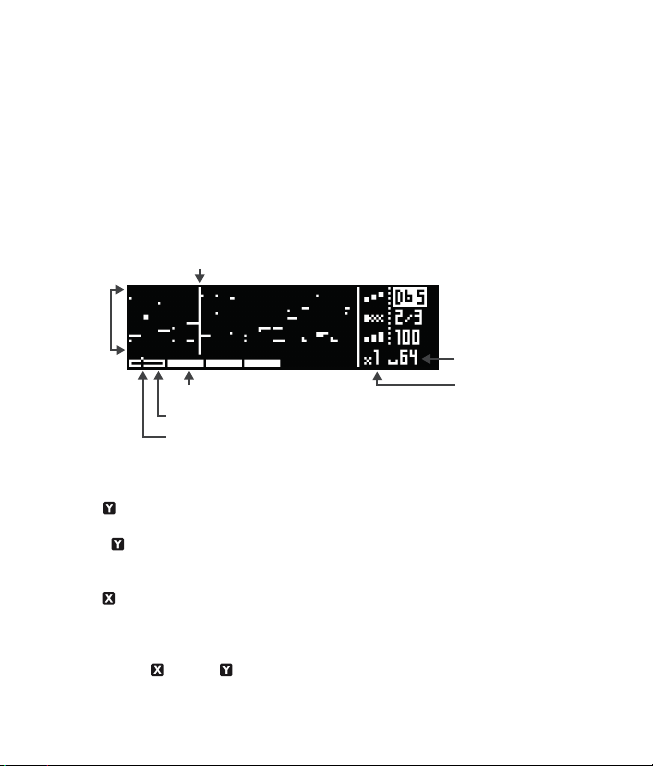
Notes (or modulation events) of the current page are shown both on the screen and
the 16 pads.
Under the piano roll, the bottom bar shows the number of bars in the current pattern,
the currently viewed page, and the track playhead :
Pattern length, zoom and navigation
•
Hold and turn the encoder to set the pattern length, from 16 (1 bar) to 256
steps (16 bars). When increasing the length, new pages will be available to display.
TIP
Hold and press the encoder while scrolling for finer resolution (17 = 1 bar +
1/16 note, 18 = 1 bar + 2/16, …)
•
Hold and turn the encoder to set the zoom value. Zoom in for precise editing,
zoom out to get a global view. This will affect the number of pages.
TIP
Itʼs possible to set a zoom of 2/3 to easily create triplets.
•
Briefly press (left) or (right) to select the page to display.
The number of pages depends on the pattern length and the zoom value.
playhead
track length
(64 steps = 4 bars)
zoom
(x1 = no zoom)
page viewed (highlighted)
pages needle
pattern pages (4 pages = 4 bars)
notes
as MIDI
events
C0
C10
Edit a note pattern
On a note track, patterns are polyphonic and grid--free. It is therefore possible to
add chords, superpose notes, record off--grid events, program complex grooves and
compose intricate harmonies.
Each note event has 3 parameters : pitch, length and velocity. Pitch goes from
note C0 to C10 (CV out –5V to 5V). Length is the duration of the note. Velocity is
used when the track outputs MIDI, or when the layout has VELOCITY voices, which
will output note velocities as control voltages.
ADD/DELETE A NOTE
To add or delete a note, simply press the corresponding step (pad 1 to 16).
A note will be added with the parameter values displayed on screen.
To set the pitch parameter before adding a note, rotate the encoder.
To add a note with a new length or velocity : hold the corresponding step, click
the encoder to select the parameter (pitch, length, velocity) and scroll.
EDIT A NOTE
Editing a note works exactly in the same way, just press and hold the step where
the note lies, and edit its parameters. The note will be updated in real time. If several
notes are in the same step, all of them will be edited simultaneously.
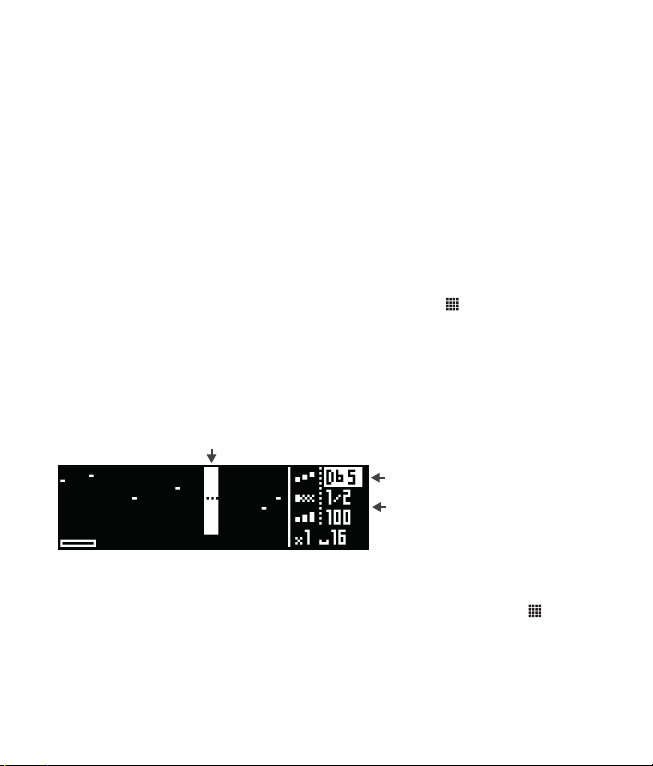
TIP
Hold multiple pads (instead of a single step) to select a range to be edited.
TIP
Hold a pad to quickly copy its content. Then, press any other pad to paste it.
this step range is selected (by holding a pad)
note pitch highlighted :
rotate the encoder to set the pitch
click the encoder to switch to
length or velocity editing
ROW EDITING
By default, the 16 pads show all notes in their corresponding step. For example, if a
chord is present on the first step (pad 1), editing this step will edit the entire chord.
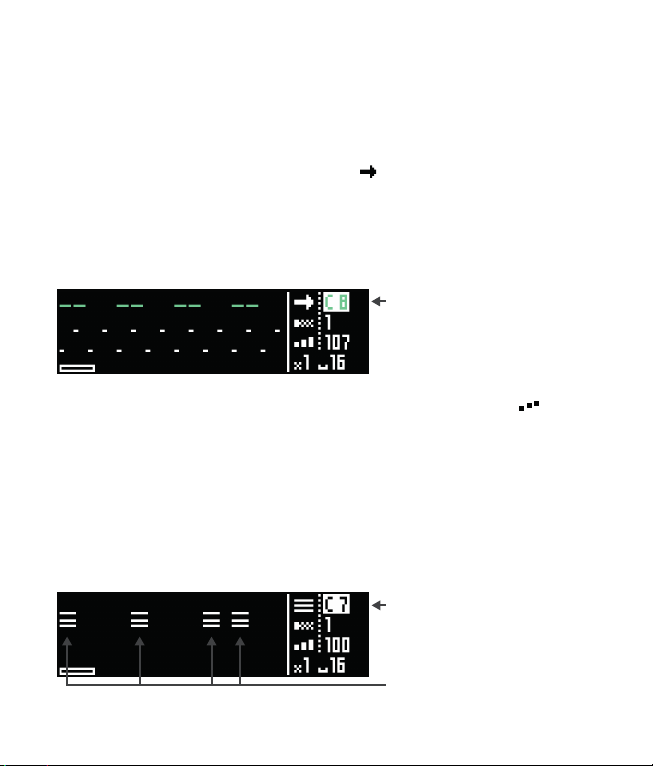
It is also possible to only display notes of a given pitch on the 16 pads. Hold
step
and scroll right to enter row editing. An arrow ( ) will appear next to the selected
note.
Notes can be added, edited and removed in the same way as in the regular step
editing. Itʼs a great way to fine--tune a pattern note per note, and program chords or
drums.
To exit row editing, hold
step
and scroll left. Next to the selected note, will
reappear.
TIP
Press
step
to cycle through the notes already used in the pattern.
NOTE LEARN
Step mode greatly benefits from the use of an external MIDI controller. A keyboard
can be used to set the current pitch (and velocity) before adding a note, and even
learn a chord :
note C8 selected :
only these notes will be available
for editing on the 16-pads
a chord of 3 notes is learned,
its first pitch is C7
this chord has been added on
4 steps
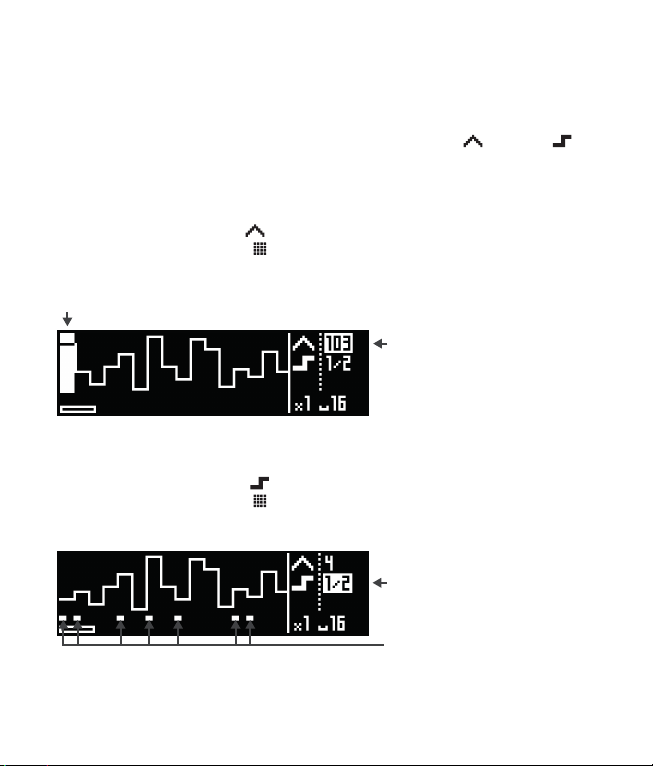
Edit a modulation pattern
NOTE
To create a modulation layout (mod track), please refer to the
track
chapter.
In a mod track pattern, two kind of events can be edited : mod and gate .
Press
step
to cycle through the event type to be edited.
CREATE AND EDIT MODULATIONS
•
Scroll to set the mod value .
•
Press the corresponding step to add or delete a mod event.
•H
old a step and scroll to offset the mod value of this step.
CREATE AND EDIT GATES
•
Scroll to set the gate length .
•
Press the corresponding step to add or delete a gate event.
•H
old a step and scroll to edit the gate length of this step.
this step range is selected by holding a pad
mod highlighted :
turning the encoder sets the value
gate is highlighted :
pressing pads adds/removes gates
gates events
Table des matières
Autres manuels Squarp Instruments Équipement d'enregistrement
Manuels Équipement d'enregistrement populaires d'autres marques


Strymon
Strymon NIGHTSKY Manuel utilisateur

Mitsubishi Electric
Mitsubishi Electric 16CH DIGITAL RECORDER DX-TL5000U Manuel utilisateur

Tews Technologies
Tews Technologies TPMC465 Manuel utilisateur

Honeywell
Honeywell Excel 50 Manuel utilisateur

SeaLevel
SeaLevel COMM+8.LPCI Manuel utilisateur

Arturia
Arturia AUDIOFUSE STUDIO Manuel utilisateur


