
Spy-Shop SS-IP11 Manuel utilisateur

HD1080P Wi-Fi AC ADAPTER
HIDDEN CAMERA
Users’ Guide
Version: July 2015


Quick guide:
1.
Download Free App Pro iCam from App Store or Google Play.
2.Plug in power, wait for 3 minutes;
3. Enter smartphone setting —> Search and connect camera’s Wi-Fi
named: CM…..., wait till phone status bar appear Wi-Fi connected
icon;
4. Enter APP ,press top right corner plus icon + and select Add new
online camera —> Search(LAN), click the camera and OK;
5. Click gear icon after camera, select Advance Cong – WIFI Cong,
select your Wi-Fi and input the password , press OK;
6. Quit APP , and enter again after 3 minutes, camera is online for
live/ remote video.
1

Overview:
The Wi-Fi AC Adapter Hidden Camera is a 1080p high denition
covert DVR that supports up to a 32GB micro SD card.
The camera can be easily connected to Wi-Fi and watch live video,
and remotely take photo and video by APP into inserted TF card
anywhere in the world; Also, it supports Point to Point (P2P) function,
connected by APP to smartphone for local live video without Wi-Fi.
Also, it records continuous and/ or motion-activated video or capture
photos. This hidden camera is powered by a standard, un- switched
AC power outlet.
In the box:
1 x Wi-Fi AC Adapter Hidden Camera
1 x Micro SD Card Reader
1 x this User’s Guide
1 x CD
2

Product structure:
1. Camera lens 2. Micro SD card slot
3. Reset Button 4. Indicator Light
3

Getting Started of Camera part:
Step1: Download APP
Search and download APP named【P2PLiveCam】from IOS or
Android app store.
Step2: Insert micro SD card and Connect power
Open backs cover and insert micro SD card; Plug camera into socket,
it will start automatically and send out its Wi-Fi signal in around 3
minutes.
Step 3: Wi-Fi setting (Remote view setting)
1.Open smartphone setting, search and connect mobile Wi-Fi to
camera’s wireless signal named “CM……”,wait for Wi-Fi connected,
and phone status bar appear Wi-Fi connected icon ①.
4

2.Enter app, click top right corner the plus icon , then click Add new
online camera and Search(LAN), select the camera showed press
OK②. You will nd the camera online now.
TIPS: This is the P2P mode, which you can check live video when
not any Wi-Fi.
①
②
5
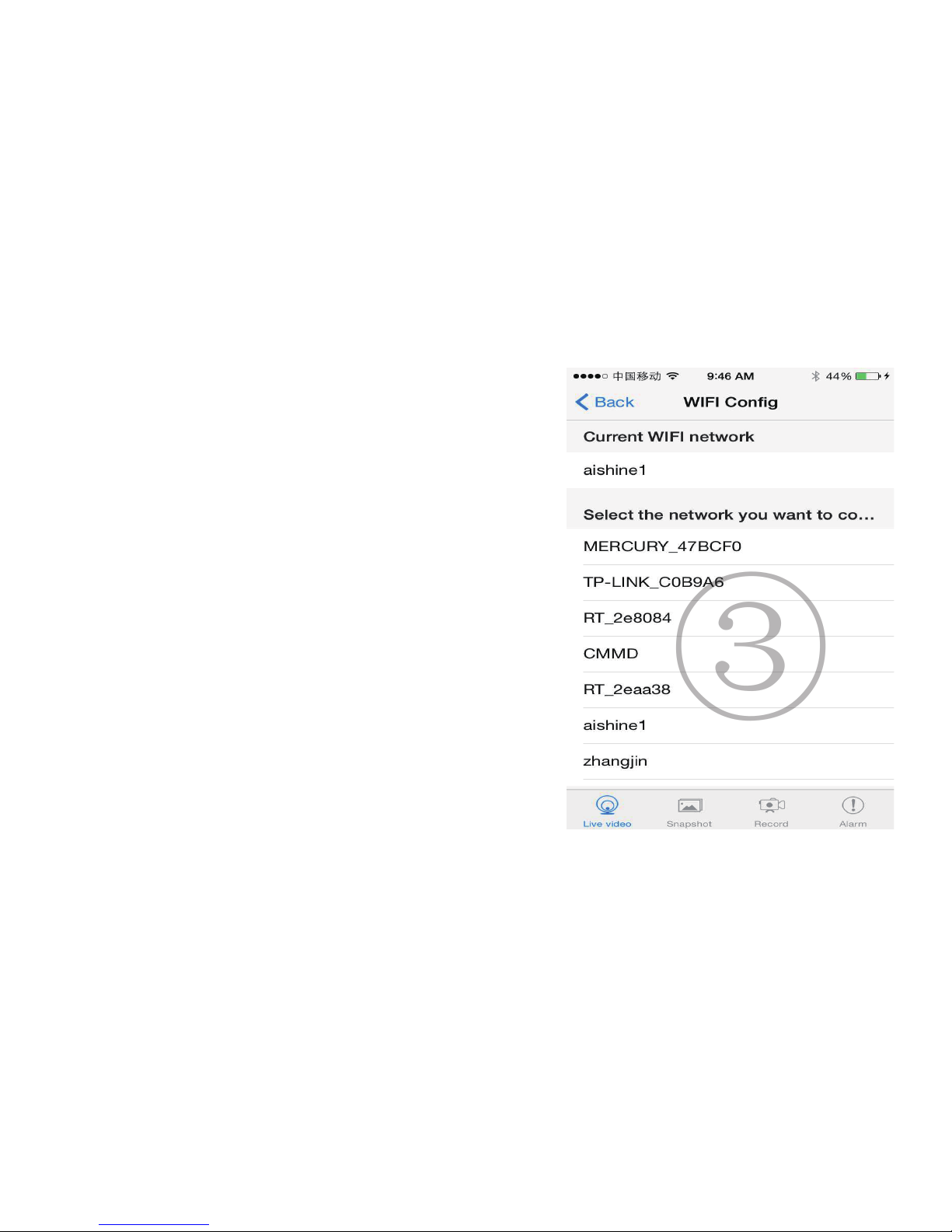
3. Press the gear icon after camera, click
Advanced cong, WIFI Cong, select your
wi and input the wi password(case
sensitive )③.
Quit app, camera will restart and ready in
another 3mins.
4.Enter app to check live video and do
other setting.
③
6

Set camera name and private code
Set name:Press the after the camera or long press the
camera,select Modify camera④, select Name and insert name
like Ofce⑤, Room…...
④
⑤
7

Set code: Long press the camera and select Advance
Cong ,select Change P2P password⑥. Current one is 8888.
⑥
8
Autres manuels pour SS-IP11
1
Table des matières


