
SpotterRF M600 Manuel utilisateur

Copyright 2011 SpotterRF
Proprietary
www.spotterrf.com
User Manual - SpotterRF M600
Introduction
M600 Required Components
Physical Setup
Direct Wire Connection
Setting Up the PC
Wi-Fi Connection
Setting up the PC
Connection Troubleshooting
Setting up Google Earth
Configuring the Radar Unit
Adjusting the Sensitivity of the Radar Unit
Calibrating the Offset Angle
Displaying Trackers
Setting up Multiple M600’s
Introduction
The M600 is a light-weight (about 3 ½ lb), medium range (1 km) Micro Surveillance Radar (MSR). A single
M600 can provide surveillance in all visibility conditions for up to 148 acres. This manual will guide you
through the setup process of an M600 radar unit.

Copyright 2011 SpotterRF
Proprietary
www.spotterrf.com
M600 Required Components
1. M600 Radar
2. Mount
3. Passive Power over Ethernet Injector
4. Cigarette Lighter Adapter Power Cable
5. 2 Cat5 Cables
6. Laptop with Google Earth and Firefox or Chrome browsers
Physical Setup
Placement of the radar unit will directly affect its performance. Avoid pointing the radar at buildings
within 100 m or vehicles within 50 m (direct reflection from large and flat surfaces can reduce the
tracking performance of the radar).
Mounting the radar high will reduce reflections coming from the ground, and thereby improve its
performance. Mounting the radar unit high can also improve its line of sight. Mounting at 10 ft or more
is recommended for tracking a target on foot out to 1 km. Mounting on a vehicle will shorten the range
to roughly 800 m, depending on the terrain.
After mounting the M600, you can set up either a direct-wired connection or a wireless connection.

Copyright 2011 SpotterRF
Proprietary
www.spotterrf.com
Setting Up the PC
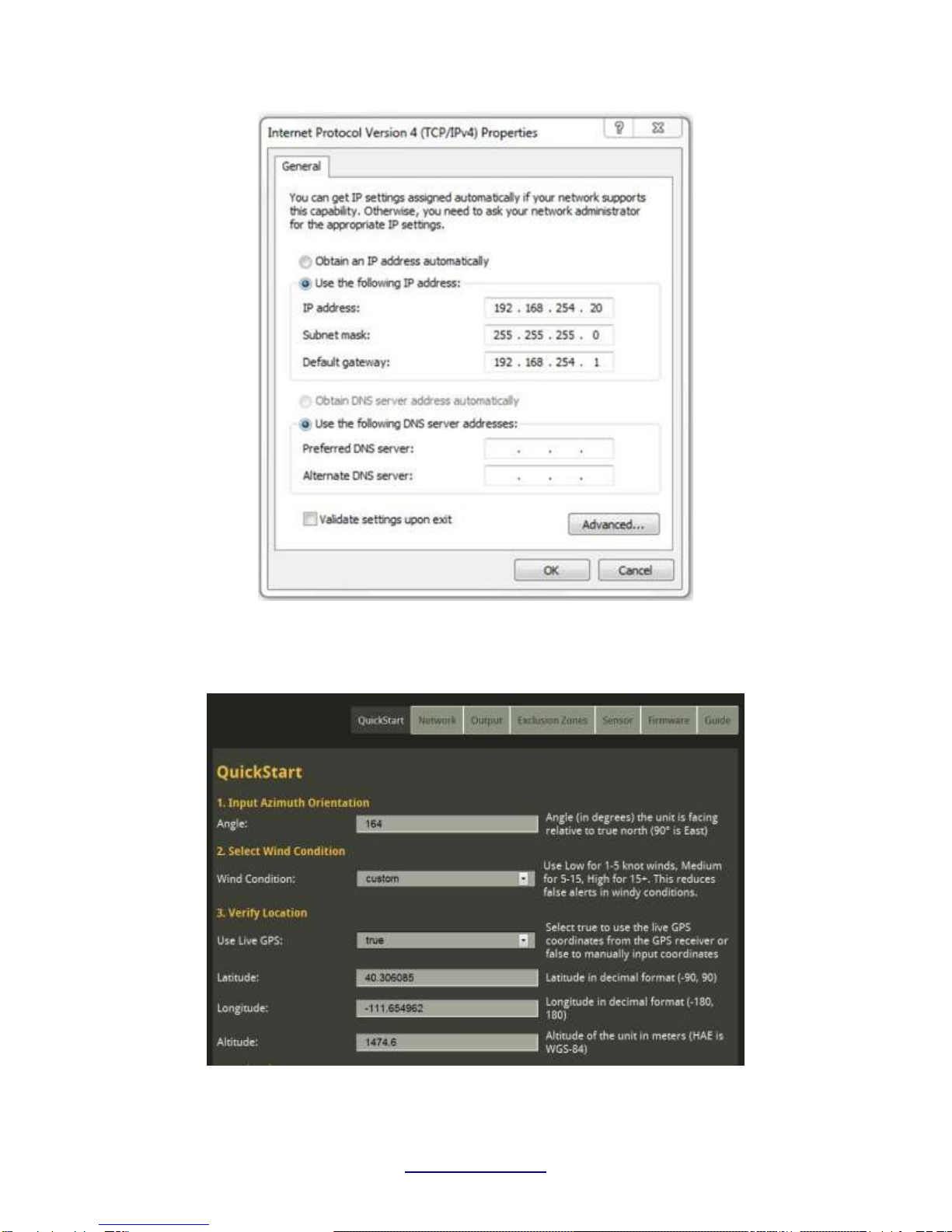
To establish a connection to the radar unit, the static IP address of your computer must be in the same
sub-network as the radar unit. For example, to connect to the radar unit at its default address
(192.168.254.254), your computer will use the following TCP/IPv4 settings (see fig. 2.):
IP address: 192.168.254.(any number 2-249)
Subnet mask: 255.255.255.0
For Windows XP, these settings can be adjusted by choosing Start > Control Panel > Network and Internet Connections >
Network Connections > Local Area Connection > Properties > Internet Protocol (TCP/IP) > Properties <<
For Windows 7, these settings can be adjusted by choosing Start > Control Panel > Network and Internet > Network and Sharing
Center > Change Adapter Settings > Local Area Connection > Properties > Internet Protocol Version 4(TCP/IPv4) > Properties <<
Copyright 2011 SpotterRF
Proprietary
www.spotterrf.com
Fig. 2: Screenshot of proper network settings
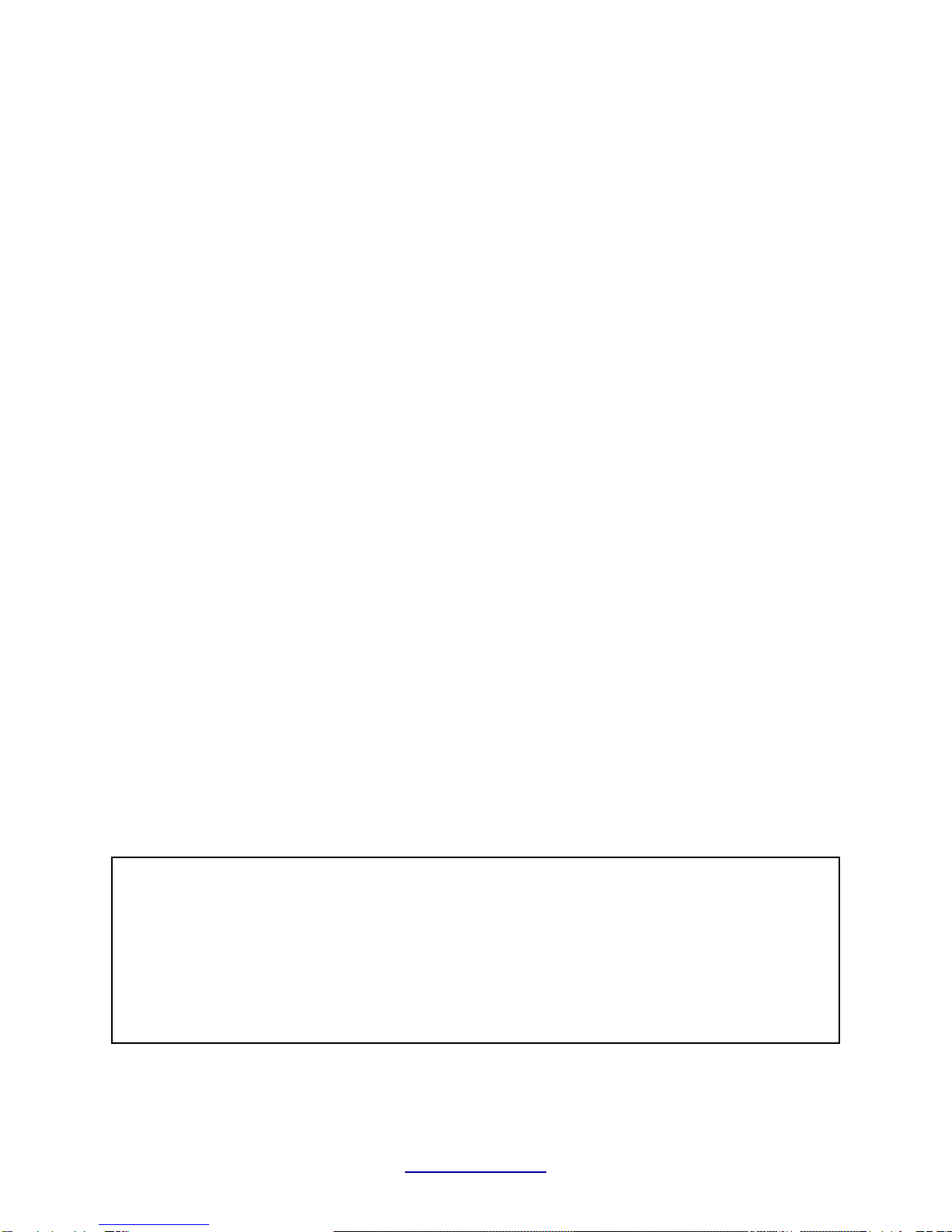
After setting the IP address, open a web browser and type 192.168.254.254 into the URL. You should get
the following page (see fig. 3):
Fig. 3: Screenshot of SpotterRF QuickStart web page
Copyright 2011 SpotterRF
Proprietary
www.spotterrf.com
Wi-Fi Connection
1) Assure the spotter is NOT lying flat down against any surface.
2) Connect the spotter to the M12 Ethernet cable then connect the cable to the case (See Figure 1).
3) Connect the case to either AC power or DC power using the appropriate cable.
4) Turn on the Wireless switch inside the pelican case.
Setting up the PC
From the Network Sharing Center on your Laptop click on Connect to a network. Find the Network
Called BA and click Connect. You will be prompted to enter a security key. The security key is:
PREMIUM93. To establish a connection to the radar unit, the wireless static IP address of your computer
must be in the same sub-network as the radar unit. For example, to connect to the radar unit at its
default address (192.168.254.254), your computer will use the following TCP/IPv4 settings:
WLAN IP address: 192.168.254.(any number 2-249)
Subnet mask: 255.255.255.0
For Windows XP, these settings can be adjusted by choosing Start > Control Panel > Network and Internet Connections >
Network Connections > Wireless Network Connection > Properties > Internet Protocol 4 (TCP/IP) > Properties
For Windows 7, these settings can be adjusted by choosing Start> Control Panel> Network and Internet> Network and Sharing
Center> Change Adapter Settings> Wireless network Connection > Internet Protocol 4 (TCP/IP)> Properties
After establishing a connection with the network, open a web browser that supports HTML 5 (i.e. Google
Chrome or FireFox 4) and type 192.168.254.254 into the URL. A web page similar to that of figure 3
should appear.
Connection Troubleshooting
Common mistakes while setting up the radar unit include:
1. The battery is dead and needs to be recharged
2. The IP address has not been set up correctly.
3. The cable from the radar unit to the case is too long. The case has a built in 19 Volt power
supply, however a 24 volt power supply is required when using cable runs longer than 100
ft. DO NOT USE AN ACTIVE POE (POWER OVER ETHERNET) SUPPLY -- A STANDARD POE
SUPPLIES OUTPUT 48V DC, WHICH WILL DAMAGE THE RADAR UNIT.
Copyright 2011 SpotterRF
Proprietary
www.spotterrf.com
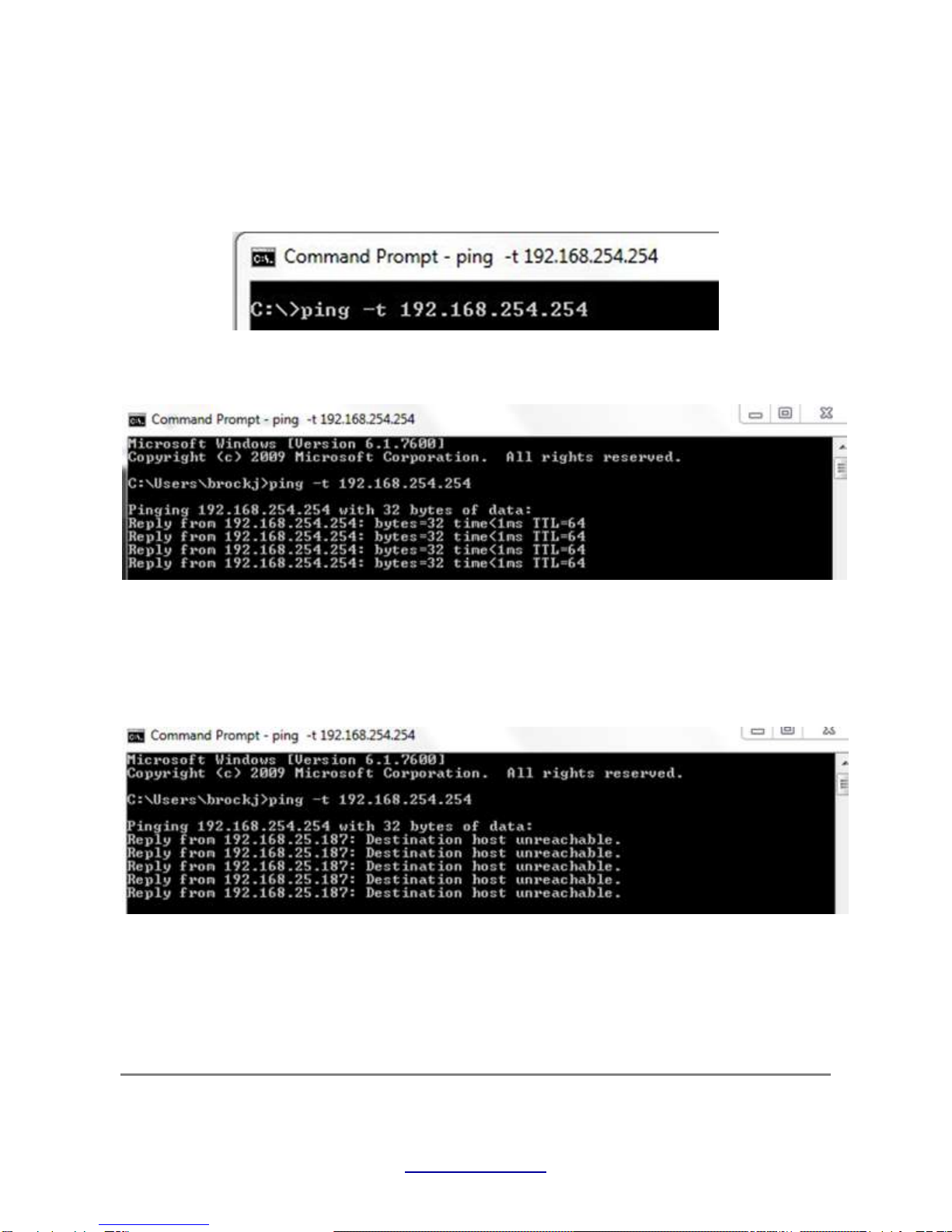
If you are unable to connect to the QuickStart page, you should verify that the computer and the radar
unit have established a connection. To do this, first open up the Windows Start menu, type cmd into
the search bar at the bottom, and press Enter. Ping the radar unit's IP address from the computer's
command prompt by typing ping -t 192.168.254.254 and pressing Enter, as seen below.
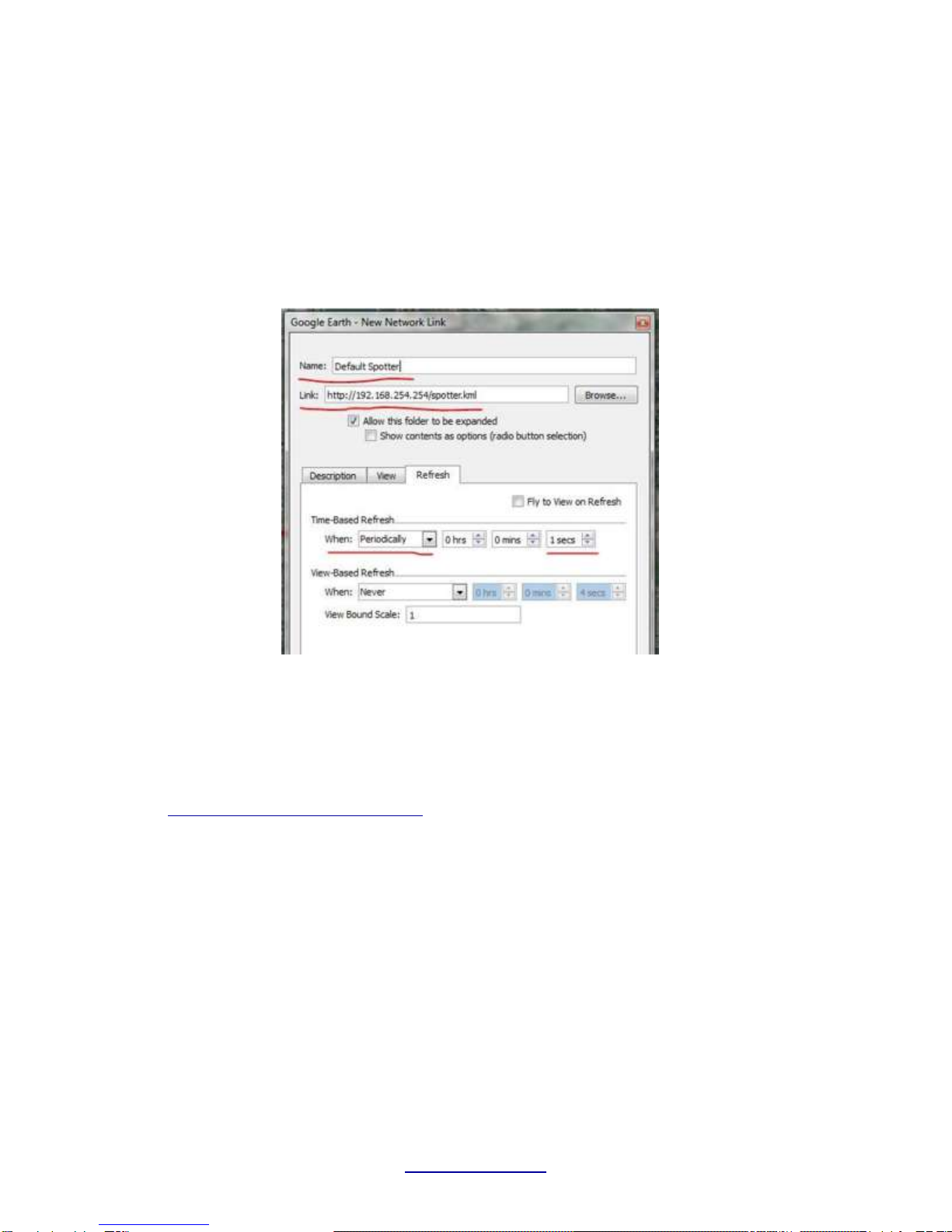
If the radar unit is connected correctly you will see the following response in the command prompt:
If this is the case but you still cannot connect to the QuickStart page, you may have entered the wrong
IP address into the URL. Be sure to enter the address 192.168.254.254 exactly.
If you are not connected correctly your screen will look like this:
If this is the case there could be a number of problems associated with the physical setup and/or
network setup. Please verify that you followed the setup instructions exactly.
Remember: The default IP address of the radar unit is 192.168.254.254 -- You should be able to establish a connection
with the radar unit at this IP address (when it is directly connected to the radar unit as shown in figure 1). The static IP
address of your computer should never be the same as the IP address of the radar unit.
Copyright 2011 SpotterRF
Proprietary
www.spotterrf.com
Setting up Google Earth
To view trackers using Google Earth, you must tell Google Earth where to find the radar unit's output
file. In Google Earth, choose Add > Network Link. A window similar to figure 4 below should be visible.
Fig. 4: New Network Link in Google Earth
Edit the fields above marked in red according to the following specifications:
●Name: Choose a descriptive name. This name will appear under My Places > Places in the right
hand column (Figure 7) after adding the link.
●Link: http://(The IP address of the radar unit)/spotter.kml (e.g.
http://192.168.254.254/spotter.kml)
●Time Based Refresh: When set to Periodically, choose 1 secs.
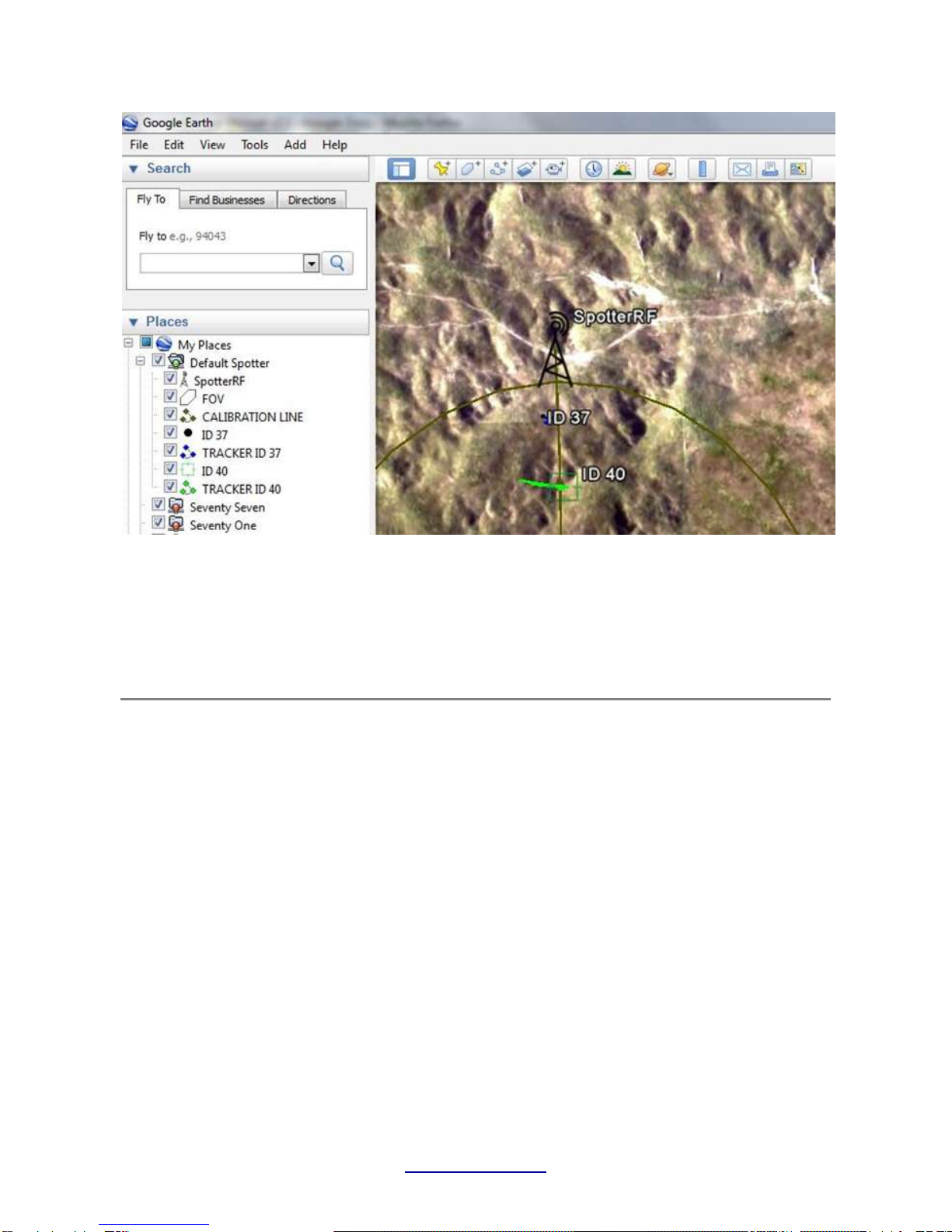
Click OK. The network link just created should now be visible on the left hand side of Google Earth,
as seen in figure 5 below.
Copyright 2011 SpotterRF
Proprietary
www.spotterrf.com
Fig. 5: Active Spotter Link in Google Earth
The icon labeled FOV corresponds to the area that is being monitored by the radar unit. The icon
labled CALIBRATION LINE corresponds to the Azimuth Angle setting on the QuickStart page of the
web interface. The items labeled TRACKER ID XX correspond to trackers. If a tracker is alive, it will
have cross-hairs at the current position of the tracker. If the radar is unable to sense the target being
tracked for a given period of time, the tracker dies and displays a black dot.
Configuring the Radar Unit
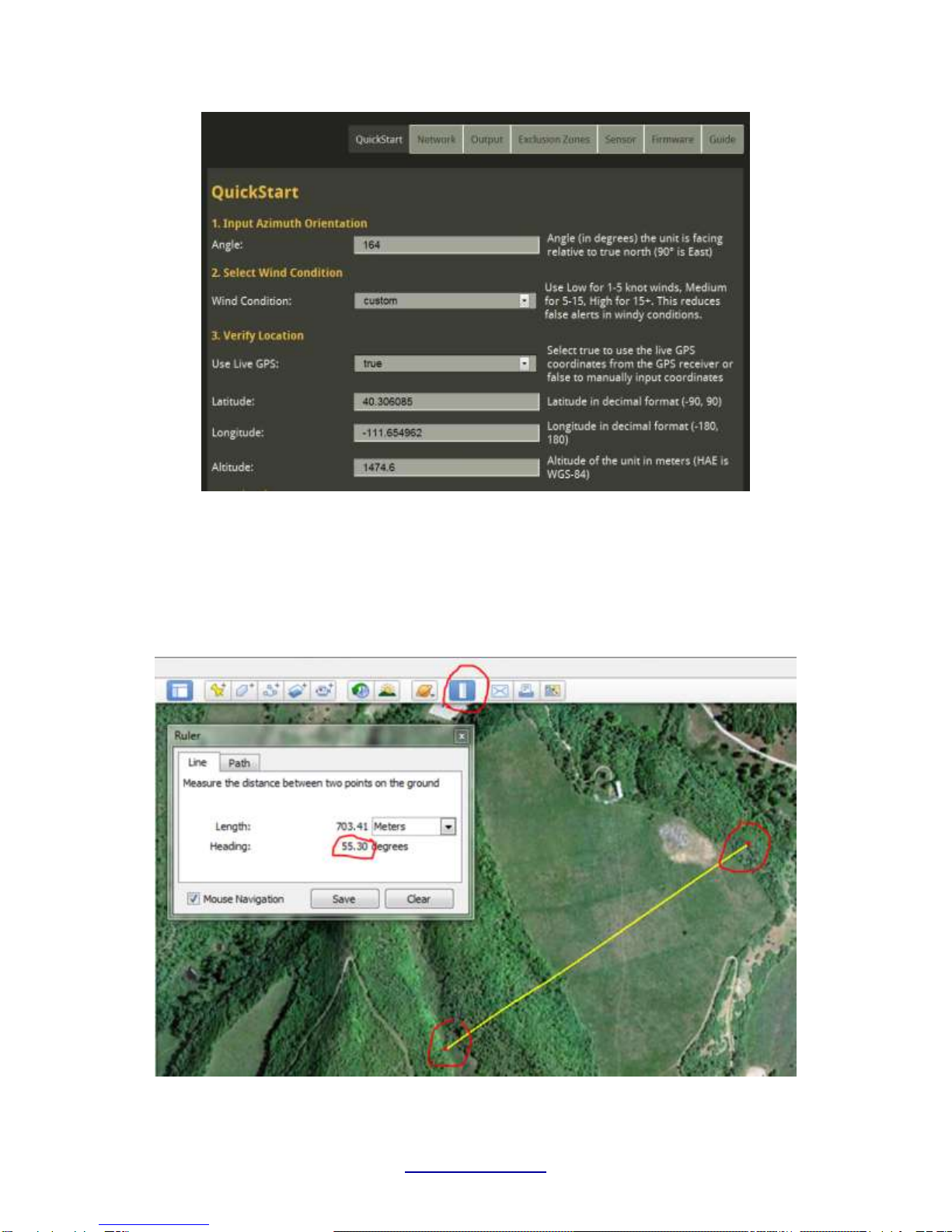
The configuration of settings is done through the unit's web interface. To connect to the web
interface, launch Google Chrome or other HTML5 compatible web browser and type the IP address of
the radar unit (http://192.168.254.254) into the address bar of the web browser. You should see the
following:
Copyright 2011 SpotterRF
Proprietary
www.spotterrf.com
Fig. 6: Screen shot of QuickStart Page
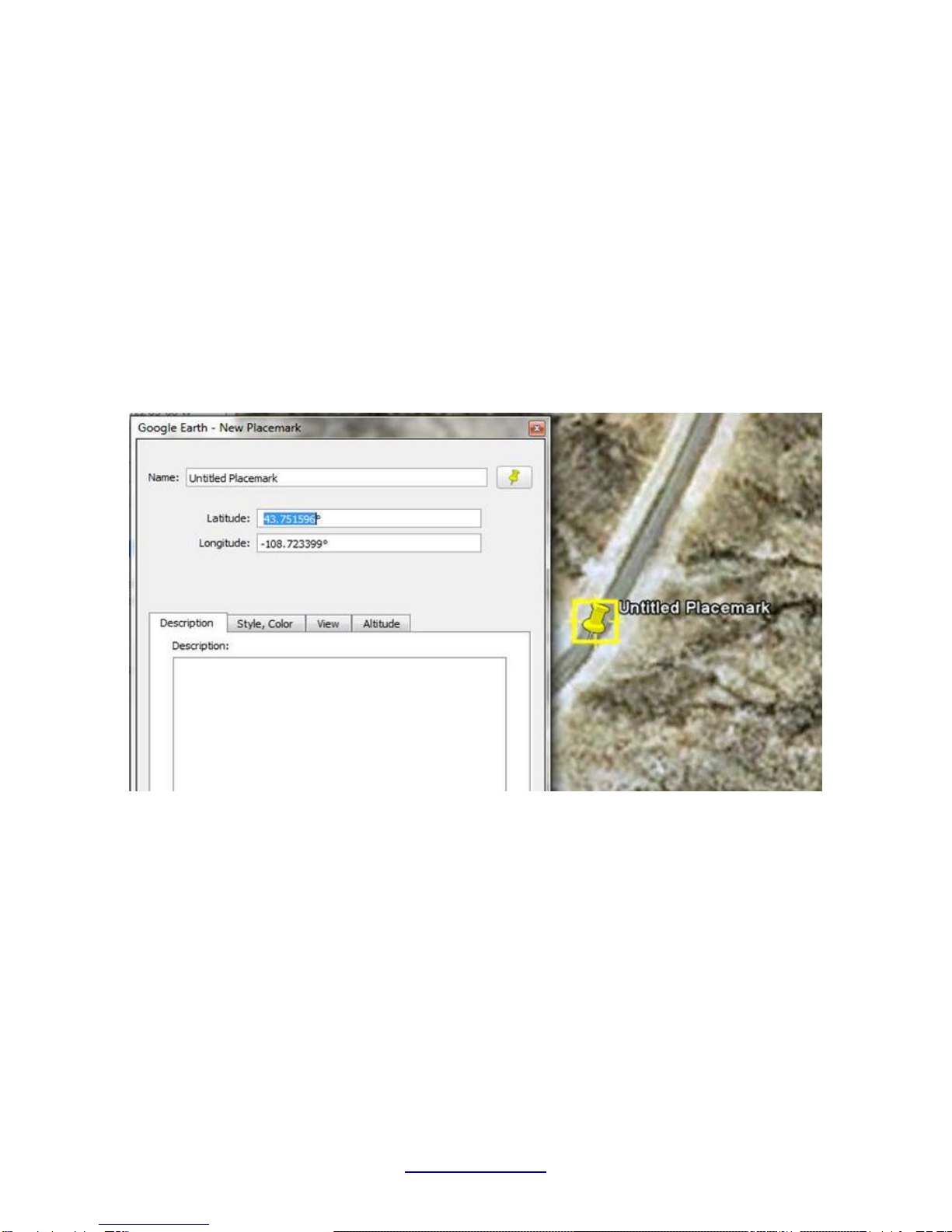
1. First you must input the azimuth angle the radar is pointing. You can use either a compass or the
ruler function in Google Earth to determine the azimuth (in degrees) the Spotter is pointing. To do
this open the ruler function in Google Earth. Drop one point at the base of the radar and another
point out at the direction the radar is facing.
Fig. 7: Using Ruler to measure heading and range in Google Earth
Copyright 2011 SpotterRF
Proprietary
www.spotterrf.com
2. If the radar unit has the Garmin GPS receiver attached, it should be detecting satellites within a
few minutes (typically less than a minute after initial boot-up in a new location). If the GPS receiver
does not lock on to any satellites, manually input the time, latitude, and longitude of the radar unit in
decimal format. A simple way to get accurate latitude and longitude, is by opening Google Earth,
placing a new placemark at the location of the radar unit, and then copying and pasting the
coordinates from Google Earth into their corresponding fields on the “GPS/Time” tab of the web
interface.
If Google Earth is not displaying your Lat/Long coordinates in the decimal degree format, choose
Tools > Options > 3D View > Show Lat/Long > Decimal Degrees
Fig. 8: Using Placemarks to read GPS coordinates in Google Earth
Table des matières
Autres manuels SpotterRF Radar


Manuels Radar populaires d'autres marques

SAW D2L
SAW D2L Valentine One Gen2 Manuel utilisateur

Raymarine
Raymarine Raytheon R20X Manuel utilisateur

Simrad
Simrad CA34 Manuel utilisateur

Endress+Hauser
Endress+Hauser Micropilot FMR67B Caractéristiques techniques

Endress+Hauser
Endress+Hauser Levelflex M FMP45 Manuel utilisateur

ECHOMAX
ECHOMAX Active-X-Band Manuel utilisateur


