Spartan PROvision Touch Manuel utilisateur

SPARTAN TOOL L.L.C.
8 0 0 . 4 3 5 . 3 8 6 6
WWW.SPARTANTOOL.COM
PROvision Touch
V i d e o I n s p e c t i o n S y s t e m
Owner’s Manual
63039900 4-1-11 © 2011 Spartan Tool LLC
SPSP
SPSP
SPARTART
ARTART
ARTANAN
ANAN
AN

Page 2
Warning
SPARTAN TOOL L.L.C.
1506 W. Division Street
Mendota, IL 61342
800.435.3866 Fax 888.876.2371
www.spartantool.com
— Read the safety and operating instructions before using any Spartan Tool products.
Drain and sewer cleaning can be dangerous if proper procedures are not followed and appropri-
ate safety gear is not utilized.
— Before starting unit, be sure to wear personal protective equipment such as safety
goggles or face shield and protective clothing such as gloves, coveralls or raincoat, rubber boots
with metatarsal guards, and hearing protection.
— Drains and sewer can carry bacteria and other infectious micro-organisms or
materials which can cause death or severe illness. Avoid exposing eyes, nose, mouth, ears,
hands and cuts and abrasions to waste water or other potentially infectious materials during drain
and sewer cleaning operations. To further help protect against exposure to infectious materials,
wash hands, arms and other areas of the body, as needed, with hot, soapy water and, if neces-
sary, flush mucous membranes with water. Also, disinfect potentially contaminated equipment by
washing such surfaces with a hot soapy wash using a strong detergent.
— For any questions contact the company at the address shown below.
“California Prop. 65: This product may contain an extremely small amount of lead in the coating.
Lead is a material known to the State of California to cause cancer or reproductive toxicity.”

Page 3
Contents
Operating Section
PROvision Touch Features ......................................................................................................... 4-5
Unpacking ..................................................................................................................................... 6
Description ................................................................................................................................... 6
Safety Instructions ...................................................................................................................... 6-8
Familiarization ......................................................................................................................... 9-10
PROvision Touch Interface ............................................................................................................11
Interface - Main Screen ............................................................................................................... 12
Interface - Camera Lights ............................................................................................................ 13
Interface - Record ........................................................................................................................ 14
Interface - Features while Recording ........................................................................................... 15
Interface - Playback ................................................................................................................ 16-17
Interface - Snapshot .................................................................................................................... 18
System Options...................................................................................................................... 19-21
Accessing the Thumbdrive with Computer ................................................................................... 22
Video Files - Windows Compatibility ........................................................................................... 22
Video Sharing and Utilities .......................................................................................................... 23
Battery Operation and Charging ..................................................................................................24
External Video Reel (optional) ................................................................................................ 25-26
Operating Instructions & Tips ..................................................................................................... 27
Maintenance ............................................................................................................................... 28
PROvision 2.0 Troubleshooting ................................................................................................... 29
Parts Section
PROvision Touch Components ............................................................................................... 30-34
Flex Link Components ................................................................................................................ 35
Product Information ..................................................................................................................... 36
Note Space ................................................................................................................................. 37
Warranty Information .................................................................................................................... 38

Page 4
PROvision Touch Features
MONITOR SCREEN
15” (38.1cm) Color LCD (Liquid Crystal Display) screen
8wire Glass-Film-Glass touch panel
Auto-sensing brightness control
Increasing Brightness of LCD to 1000nits for sunlight readability
Anti Reflection Treatment
Single Board Atom Processor Computer
Screen is hinged for optimal viewing angle
CASE FEATURES
Rugged molded design
Protective Lid design with easy access quick-release latches
Quick Guide Instructions
Pivoting display using counterbalanced constant torque hinges
Telescoping handle
Built-in wheels
Totally enclosed, self contained circuitry
Integrated power cord storage
Easy access fuse protection
Easy access push rod
System dimensions: 21” x 21” x 11”
BATTERY
PUSH CABLE
Batteries can be charged at any time or power level
Batteries can be charged from 110 / 220 Volt AC
Fully Charged batteries offer 4 hours of operation
Kevlar reinforced cable jacket
Abrasion resistant jacket 100 foot length
Mounted in reel for ease of feed and retrieval
Optional external reel system available for 200 foot lengths

Page 5
INCLUDED ACCESSORIES
One 4 GB memory thumbdrive
Centering Guide
Flex-link with 512 Hz beacon
SELF-LEVELING COLOR CAMERA HEAD
1.375” diameter
2.28” length
0.5 LUX sensitivity (without lights)
3.7 mm wide angle lens
768 Effective Pixel (horizontal)
494 Effective Pixel (vertical)
Optical grade, scratch resistant, clear sapphire lens
12 fully adjustable super bright white LEDs
Even light placement eliminates “hot spots”
Heavy duty, machined stainless steel housing
Automatic self-leveling picture
Remarkable picture clarity and focus in lines up to 6” diameter
Operates in 1-1/2 “ straight runs, 3” sweeps and 90 degree bends
PROvision Touch Features
TOUCHSCREEN INTERFACE
Full screen touchscreen
Simple one-press control buttons
Movable/hideable on-screen distance counter
Movable/hideable on-screen date/time box
Reset option for distance counter
Hideable control overlay for full screen viewing
LED camera light control
Full keyboard for file naming
Live onscreen text typing plus drawing telestrator
Automatic file organizing by date
Quick snapshot feature for taking still images
Easy access system options
System upgradeable through website
Built in product manual

Page 6
Unpacking
Before signing the shipping receipt, check and inspect unit for visible damage. If there is visible damage,
note so on the shipping receipt.
Description
The system is composed of a miniature closed circuit television camera and color LCD touchscreen
monitor connected through flexible push type cable.
This unit operates on internal battery power and 110/220 Volt AC electrical current.
WARNING: READ THE “OPERATOR’S MANUAL” THOROUGHLY BEFORE USING ANY SPARTAN
TOOL PRODUCT. DRAIN/SEWER CLEANING CAN BE DANGEROUS IF PROPER PROCEDURES
ARE NOT FOLLOWED. KNOW THE PROPER OPERATION, CORRECT APPLICATIONS AND THE
LIMITATIONS OF ALL SPARTAN TOOL PRODUCTS BEFORE USE.
CAUTION #1
Use of any electrical equipment in a wet environment can cause fatal shock if equipment is
not properly grounded, adequately maintained, and if care is not used by the operator.
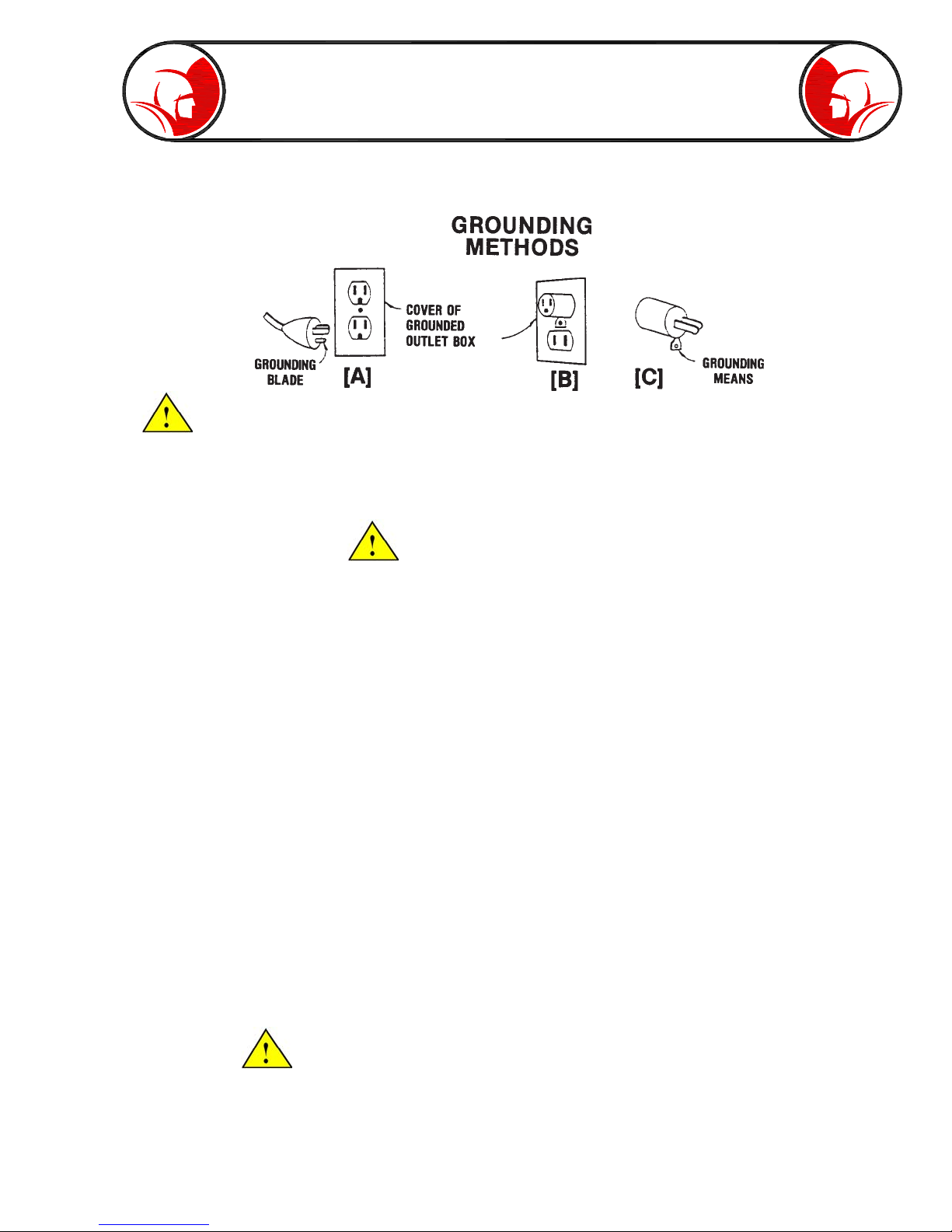
A. GROUNDING INSTRUCTIONS —
Before charging your Spartan PROvision Touch, make sure a properly grounded, three hole electrical
outlet is available. If not, as in some older homes, use a three-prong adapter and connect the
green pigtail (or grounding lug) to a known ground such as a cold water pipe. Never cut off the
grounding prong for use in a two hole outlet receptacle. By doing so, you have cut off your protection
from shock.
The Spartan PROvision Touch must be grounded while charging or operating using the 110V
power cord to protect the operator from electrical shock. The Spartan PROvision Touch comes
with a three-conductor cord and three-prong grounding type plug to fit the properly grounded
receptacle. An adapter, see sketches (B) and (C), is available for connecting, sketch (A) type
plugs, to a two-prong receptacle, except in Canada.
Safety Instructions

Page 7
The green-colored rigid ear (or lug), extending from the adapter must be connected to a permanent
ground such as a properly grounded outlet box.
Don’t assume that all three-hole outlets are properly installed. Check the outlet and
also the adapter, if used, with an outlet testing device which quickly indicates if a ground is connected.
Correct a faulty test indication before proceeding. The use of a Ground Fault Interrupter is the
safest means to check for proper grounding.
B. EXTENSION CORDS —
Plug the power cord attached to the PROvision Touch directly into an inspected outlet. If an extension
cord must be used, it must be of an approved three-wire type in good condition, equipped with a
three-prong plug. Never cut off the grounding prong for use in a two hole outlet receptacle. By doing
so you have cut off your protection from shock.
C. OUTDOOR EXTENSION CORDS —
When Spartan Tool equipment is used outdoors, use an extension cord intended for use outdoors
and so marked.
D. AVOID ELECTRICAL CORD ABUSE —
Never move or lift Spartan Tool equipment by the cord. Do not yank cord at one end to disconnect
it from the receptacle. Keep cord away from heat, oil and sharp edges to avoid damage. Always
replace or repair damaged cords.
E. ALWAYS WEAR RUBBER BOOTS IN WET AREAS FOR ADDED PROTECTION
WARNING: SPARTAN TOOL PRODUCTS ARE NEVER TO BE OPERATED IN AN EXPLOSIVE
ENVIRONMENT.
CAUTION #2
Avoid eye or skin contact with acids or caustic substances while inspecting drains/sewers.
A. Always wear safety goggles when inspecting drain/sewers to avoid injury to eyes.
Safety Instructions (cont)

Page 8
B. Before beginning work, ask the customer if either acids or caustic substances are present in the
pipe. If in doubt, litmus paper used at the opening of the pipe may give an indication of the type of
substance in the line. Litmus paper (acids/caustics) can be purchased at most pharmacies.
C. Exposure to acids or caustic substances can cause the push cable to break or to become brittle.
Depending upon the concentration of acids or caustic substances in the drain/sewer, push cables
may break or become brittle in the drum, in the pipe, or when placing the cable back into the drum.
If the push cable remains exposed to acids or caustic substances for any length of time, the cable
can continue to be damaged.
CAUTION #3
Drains/sewers carry bacteria and the possibility of infectious disease exists, if exposed.
A. Always wear safety goggles and Spartan Tool riveted gloves with rubber gloves inside the riveted
gloves to minimize exposure to infection from bacteria in pipes.
B. Avoid contact with ears, eyes, or mouth with contents of pipe to lower the risk of infection. DO NOT
SMOKE!
C. Avoid exposing any cuts to drains/sewers and sewer inspecting equipment
CAUTION #4
Follow all rules of safety and good housekeeping.
A. Keep work area clean.
B. Stay alert.
C. Place the unit and controls in a stable and accessible position for safe operation.
D. Properly store the tools.
E. Keep children away from all equipment.
F. Use only recommended equipment and accessories. Maintain tools in original working condition.
G. Do not exceed limitation of equipment or accessories.
H. Always wear recommended safety gear
I. Always lift with legs and not your back.
Safety Instructions (cont)

Page 9
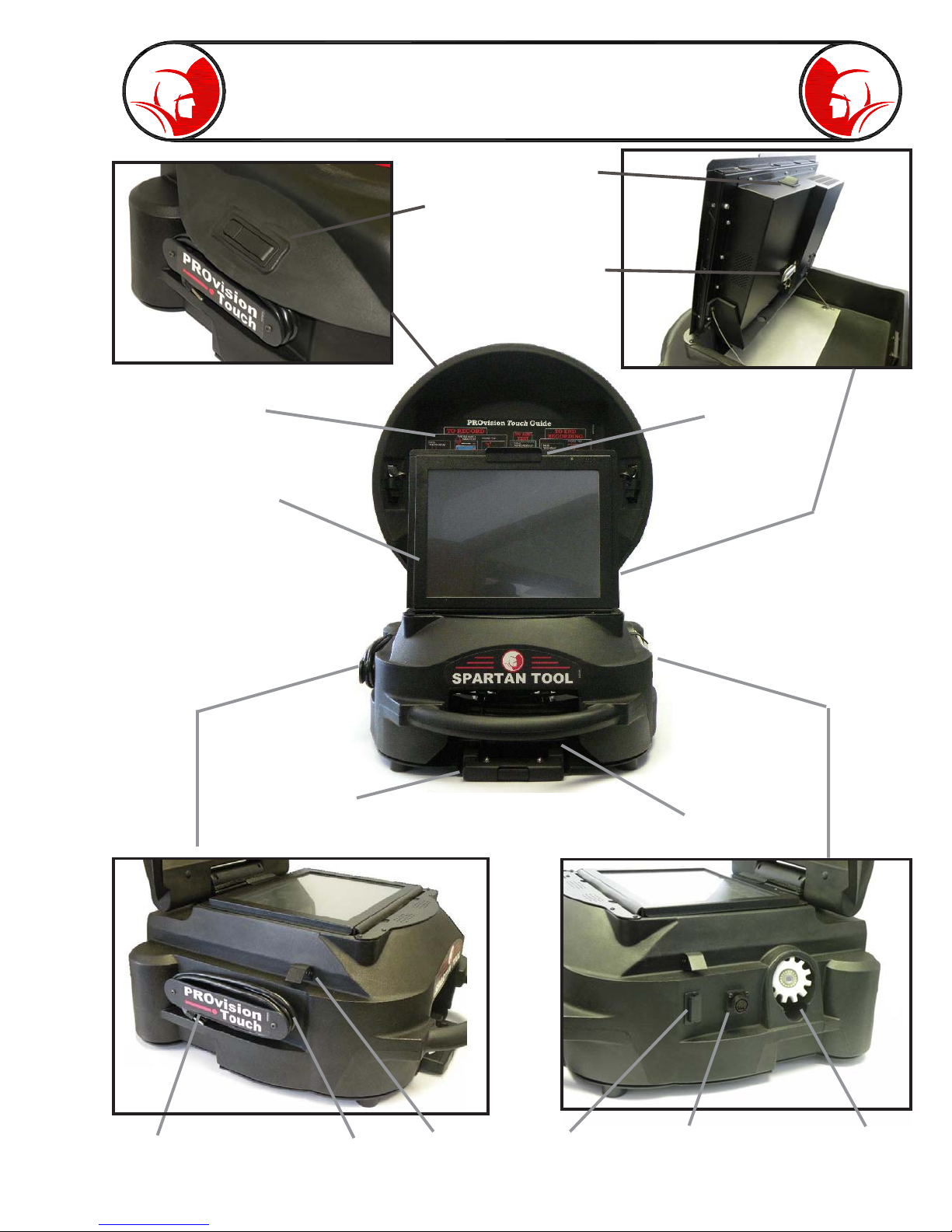
Familiarization
Fig. 9-3
Fig. 9-2
Fig. 9-1
Telescoping Handle
Touchscreen
Monitor
Lid Latch
Quick Guide
Instructions Lift Handle
Push Rod
Camera
Home
External Reel
Connector
Battery Fuse
Lid Catch
AC Cord
AC Fuse
Block
Thumbdrive
Memory
System Power
Toggle Switch
Fig. 9-4 Fig. 9-5

Page 10
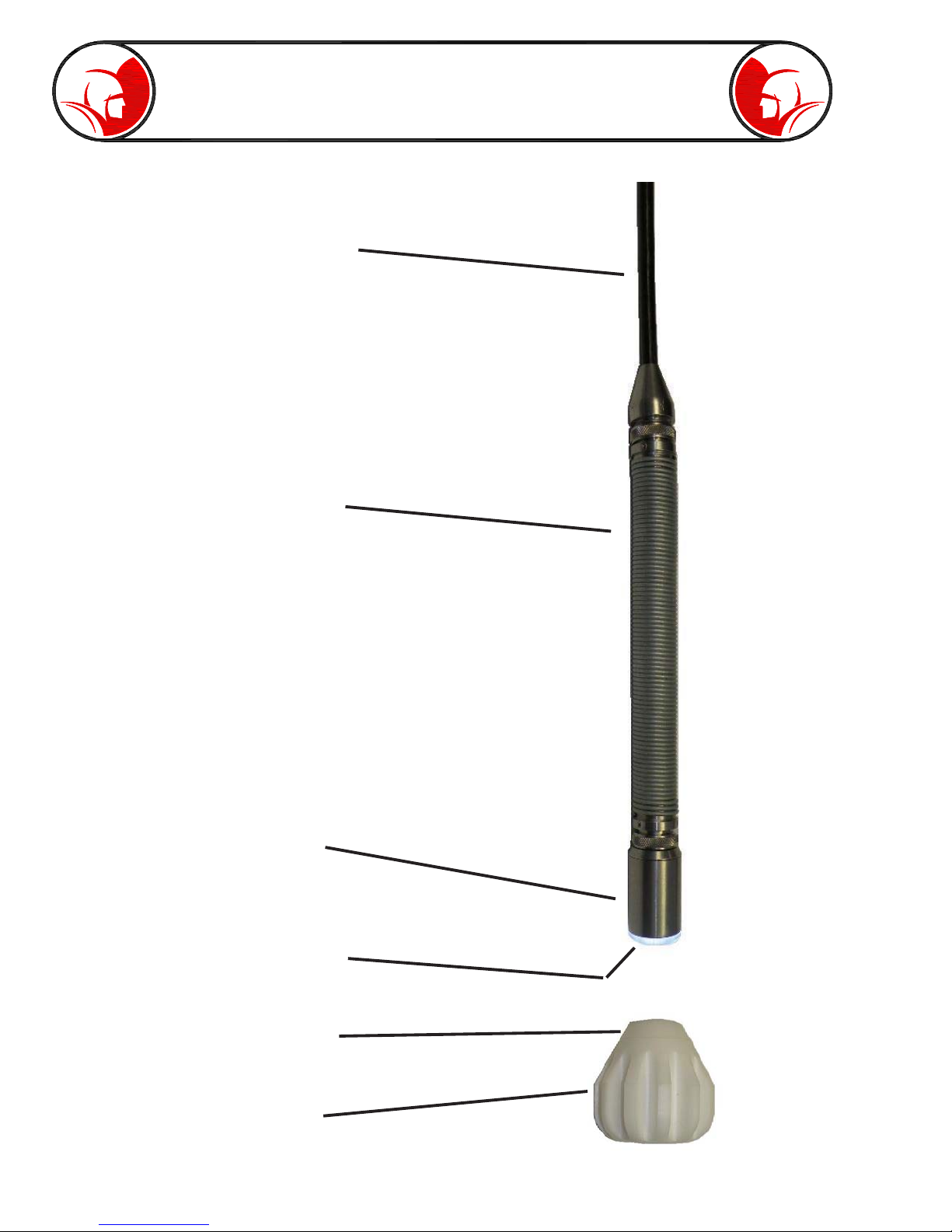
Familiarization (cont)
100 Feet Push Rod
Flex Link with 512 Hz
Beacon Assembly
Self Leveling
Camera Head
12 High Intensity
LED’s
Centering Guide
Fig. 10-2
Fig. 10-1
Centering Guide
Locking Ring
Table des matières
Autres manuels Spartan Instrument analytique
Manuels Instrument analytique populaires d'autres marques

EXTOL PREMIUM
EXTOL PREMIUM 8820043 Instructions d'installation et d'utilisation

RIDGID
RIDGID SeeSnake Compact Manuel utilisateur

Teledyne
Teledyne 3000PA Manuel utilisateur

YDLIDAR
YDLIDAR TIA Manuel utilisateur

Olympus
Olympus IPLEX FX Series Manuel utilisateur

Bosch
Bosch GLM 50 C Professional Manuel utilisateur