
Southwing NeoCar Manuel utilisateur

English
Español
Deutsch
Français
Italiano
Bluetooth Hands-free Car Kit
User Guide
1
19
35
51
67
English.qxd 19/05/2004 17:18 PÆgina 1

English
Index
Introduction.............................................3
Overview.................................................5
First steps...............................................5
Setting up..............................5
Pairing...................................5
Connect..................................................6
Calls........................................................7
Troubleshooting......................................9
Additional Information...........................10
Declaration of Conformity.....................13
Commands Summary Table.................16
Note: Please read the "Safe Usage Guidelines" on page
10 and "Warranty" on page 11 before using the Car Kit
English.qxd 19/05/2004 17:18 PÆgina 2

Introduction
Thank you for choosing to buy this SouthWing
Car Kit. We hope you enjoy using it.
This User Guide provides all the information
you will need on how to use and look after your
product.
The NeoCar Bluetooth* Car Kit brings a true
hands-free quality driving experience. It requi-
res no installation and provides a fast and relia-
ble hands-free voice transmission in the car.
NeoCar works with the Bluetooth wireless tech-
nology and is compatible with all Bluetooth pho-
nes which support the headset or hands-free
profiles.
* Bluetooth is a registered trademark owned by Bluetooth
SIG, Inc. U.S.A. and licensed to SouthWing.
SouthWing
SouthWing is headquartered in Barcelona,
Spain. Our experienced team is focused on
developing the future generation of innovative
wireless communication devices.
Should you wish to learn more about the com-
pany, please visit our web site at:
www.south-wing.com
If you have any comments or suggestions on
this or any other SouthWing product, we would
love to hear from you.
What is Bluetooth?
Bluetooth is a short-range cord replacement
technology that allows the seamless intercon-
nection of many different devices such as mobi-
En
3
Introduction
English.qxd 19/05/2004 17:18 PÆgina 3

le phones, portable computing devices, car kits
and headsets without the complication of cables.
Industry collaboration has meant that Bluetooth
has become a highly interoperable, affordable,
and widely deployed wireless connectivity stan-
dard.
What do I need?
As this Car Kit is a qualified Bluetooth product
supporting the Bluetooth Headset and
Bluetooth Hands-free profiles, it can connect to
any other qualified Bluetooth product suppor-
ting at least one of these profiles. Today, nearly
every mobile phone with integrated Bluetooth
supports one or both of these profiles.
As a mobile phone will most commonly be used
with your Bluetooth Car Kit, references to a
mobile phone are used throughout this user
guide.
4
En
Introduction
English.qxd 19/05/2004 17:18 PÆgina 4
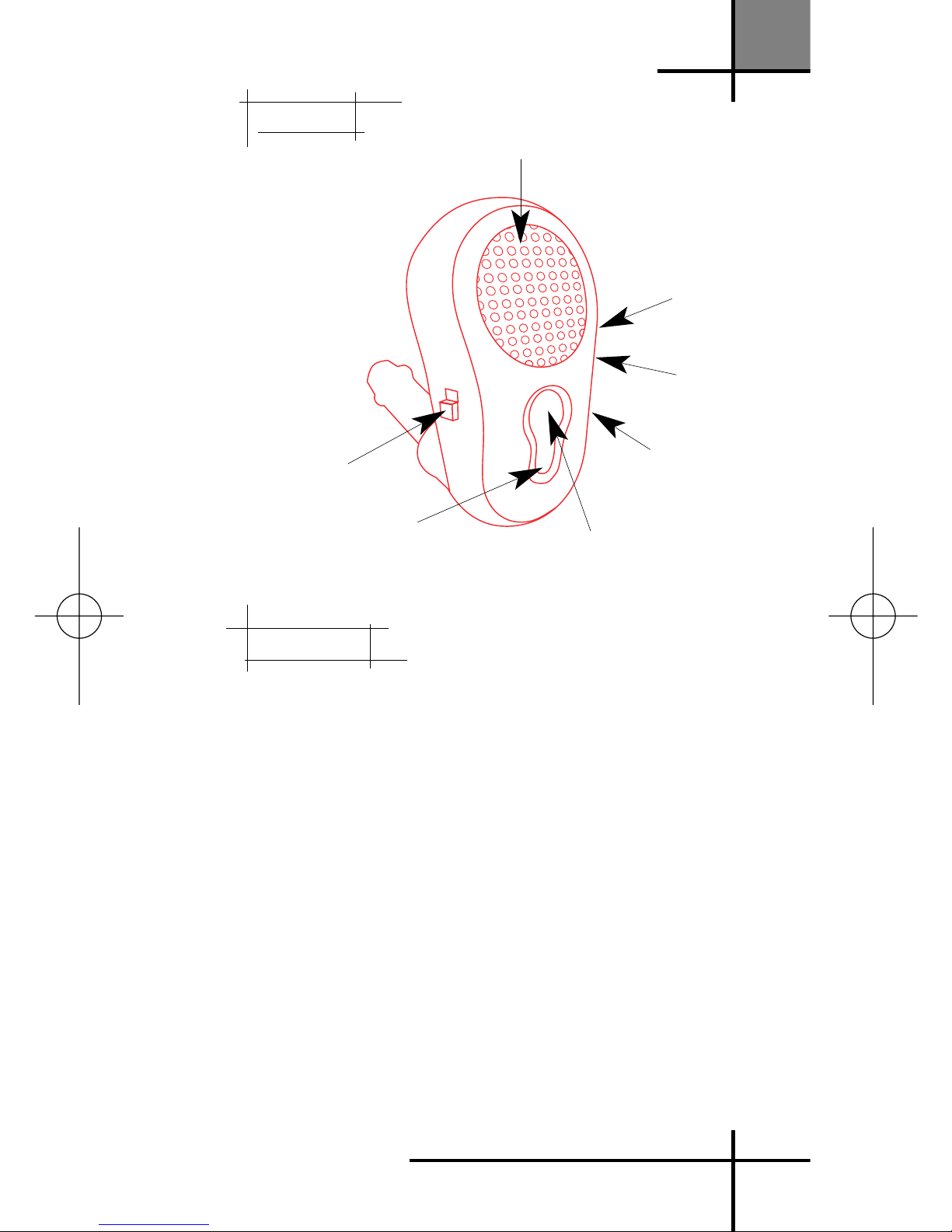
First Steps
Setting up
1. Plug the Car Kit into the cigarette lighter
2. Plug the microphone into the car kit and turn
it towards you for optimum audio quality
3. Switch on the unit. You should also see a
blue light.
Pairing
Before using your Car Kit for the first time you
will need to pair it to your Bluetooth mobile
phone. You will need to repeat this process if
you want to use your Car Kit with another mobile
phone. Pairing is a feature of your Bluetooth Car
Kit that, even in your car, prevents anyone else
eavesdropping on your phone conversations.
En
5
Speaker
Volume down
Volume up
Plug for
microphone
Multi-function dial
Bluetooth button
On-off switch
Overview
Overview
First steps
English.qxd 19/05/2004 17:18 PÆgina 5

1. Make sure the power is on. Press the
Bluetooth button (you will hear two beeps, low
and high) and hold it until the red LED flashes
repeatedly 4 times per second.
2. Put the mobile phone into pairing mode (see
the instructions which came with your phone)
3. From your phone, search for the Car Kit in
the "discover" or "search for devices" Bluetooth
menu. The name of this menu varies depen-
ding on your phone.
4. "NeoCar" will then appear in the pairing list
on your phone. Select it and key in the pin
number 1111.
5. Both devices are now connected and ready
to be used.
Connect
Switching on
Switch on the Car Kit using the on-off switch.
Connect
Every time the Car Kit has been switched off,
you will need to turn it on again and connect it
with your phone to be able to make and receive
calls again. The pairing process is not neces-
sary here. To connect, press and hold the
Bluetooth button until you hear two beeps (low
and high) to make the connection between your
phone and Car Kit. The red LED flashes 3 times
every 3 seconds. If you wish to disconnect the
Car Kit, press and hold the Bluetooth button until
you hear two beeps, (high and low). The red LED
switches off. With certain phones, you will need to
press the multifunction dial to complete the con-
nection.
6
En
Connect
English.qxd 19/05/2004 17:18 PÆgina 6

Turning off
We suggest that you switch off the Car Kit
every time you leave your car.
Calls
Answering an incoming call
1. When you receive an incoming call, the Car
Kit rings, and the red LED flashes three times
every three seconds
2. Press the multi-function dial to answer the call
Please note: For privacy, you can always answer the inco-
ming call directly from your phone.
Making a call
When the Car Kit is connected to your phone,
dial the number from your phone which will
transfer it directly to the Car Kit.
Voice dialling
If your phone supports voice dialling, you can
speak the name of the person you wish to call
through the Car Kit. Refer to the phone user
guide to enable the voice commands on your
phone.
1. Briefly press the multi-function dial; you will
hear one high beep. Then wait for a lower beep
after which you can say the voice tag, which
has to be previously recorded on your phone.
2. If the voice tag is recognised, the Car Kit will
repeat* it and dial out.
* Depending on phone mode
En
7
Calls
English.qxd 19/05/2004 17:18 PÆgina 7

Ending a call
During a call, press briefly the multi-function
dial to end this call.
Redialling
You can make your Car Kit redial the last num-
ber called. To do so, press the multi-function
dial three to four seconds (you will hear a
beep). After a short delay the Car Kit will dial
out the last number called.
Please note: Not all Bluetooth phones support the featu-
res of Redialling and Rejecting a call.
Transfer to phone
For privacy, you can transfer a current call
directly to your phone. Press for 3 to 4 seconds
the multi-function dial during the call.
Please note: Not all Bluetooth phones support this feature.
If it is the case with your phone, pressing the multi-func-
tion dial may end the call and not transfer it to the phone.
Adjusting the Volume
To increase the volume, press the volume up
button (+).
To decrease the volume, press the volume
down button (-).
8
En
Calls
English.qxd 19/05/2004 17:18 PÆgina 8
En
9
Suggestions
• Make sure that not only the pairing process was completed but also
that the Car Kit is connected to the phone (for example after the Car
Kit has been turned off) To connect, press and hold the Bluetooth but-
ton until you hear two beeps (low and high)
• Check that the Bluetooth mode of your phone is on.
• Make sure that the mobile phone is in the correct Bluetooth mode
and that Bluetooth is on.·
• Make sure that the Car Kit is ready for pairing by pressing the
Bluetooth button until the red LED flashes 4 times per second
• Make sure first that the voice tag used works with the phone only
• If it does, make sure the Car Kit is connected to the phone.
• Make sure that you press the multi-function dial for 3 to 4 seconds
• Some Bluetooth phones do not support this feature
Problem
Incoming call rings only in the
phone - Outgoing calls from
the phone are not transferred
to the Car Kit
Pairing is unsuccessful
Voice dialling does not work
Last number redialling does
not work
Troubleshooting
Troubleshooting
English.qxd 19/05/2004 17:18 PÆgina 9
Additional Information
Contacts
Please contact SouthWing should you have
any questions or suggestions, indicating your
product's serial number.
Email: [email protected]
Please note: For all warranty related issues, please return
the product to the shop from which you purchased it.
Safe Usage Guidelines
Only use the product according to the direc-
tions within this User Guide. Usage of this pro-
duct contrary to these directions could cause
injury. In addition, any usage of this product
contrary to this User Guide will void any
warranty.
- Do not place the product in a fire as it may
explode causing injury or death.
- Do not attempt to service this product your-
self. If the product requires servicing, this must
be performed by an approved service person.
- If the product becomes dirty, it should be clea-
ned with a soft cloth. Do not use any cleaning
agents as these may damage the plastics,or
electronics.
- As this product contains parts which may
cause injury if consumed, keep it out of reach
of children.
10
En
Additional Information
English.qxd 19/05/2004 17:18 PÆgina 10
Ce manuel convient aux modèles suivants
1
Table des matières
Autres manuels Southwing Accessoires automobiles

Southwing
Southwing SC-310 Manuel utilisateur

Southwing
Southwing SC-705 Manuel utilisateur

Southwing
Southwing SC-705 Manuel utilisateur

Southwing
Southwing SC310 Manuel utilisateur

Southwing
Southwing SF-505 Manuel utilisateur

Southwing
Southwing SF-505 Manuel utilisateur

Southwing
Southwing SF-505 Manuel utilisateur

Southwing
Southwing SH-650 Manuel utilisateur


